
1. Úvod
Thank you for choosing the Wendry 9601G Car Stereo. This multimedia player is designed to enhance your in-car entertainment and connectivity. It features a 7-inch high-definition touchscreen, Bluetooth for hands-free calls and music streaming, and support for various media formats via USB and TF card. This manual provides essential information for installation, operation, maintenance, and troubleshooting to ensure optimal performance and user satisfaction.
2. Bezpečnostní informace
- Před instalací a provozem si pečlivě přečtěte všechny pokyny.
- Installation should be performed by a qualified technician to prevent damage to the unit or vehicle.
- Neobsluhujte jednotku způsobem, který by vás rozptyloval od řízení. Vždy upřednostňujte bezpečnost silničního provozu.
- Nevystavujte jednotku extrémním teplotám, delšímu přímému slunečnímu záření nebo vlhkosti.
- Use only specified power supply (DC12V). For 24V systems, a transformer is required.
- Nepokoušejte se jednotku rozebírat ani upravovat. Mohlo by dojít ke zrušení záruky a poškození.
3. Obsah balení
Ověřte, zda jsou v balení přítomny všechny položky:
- 1 x Main Unit (Wendry 9601G Car Stereo)
- 1 x infračervené dálkové ovládání
- 1 x Návod k obsluze (tento dokument)
- 1 x napájecí kabel
- 1 x Disassembly Tool
- 1 x Reversing Camera Kit
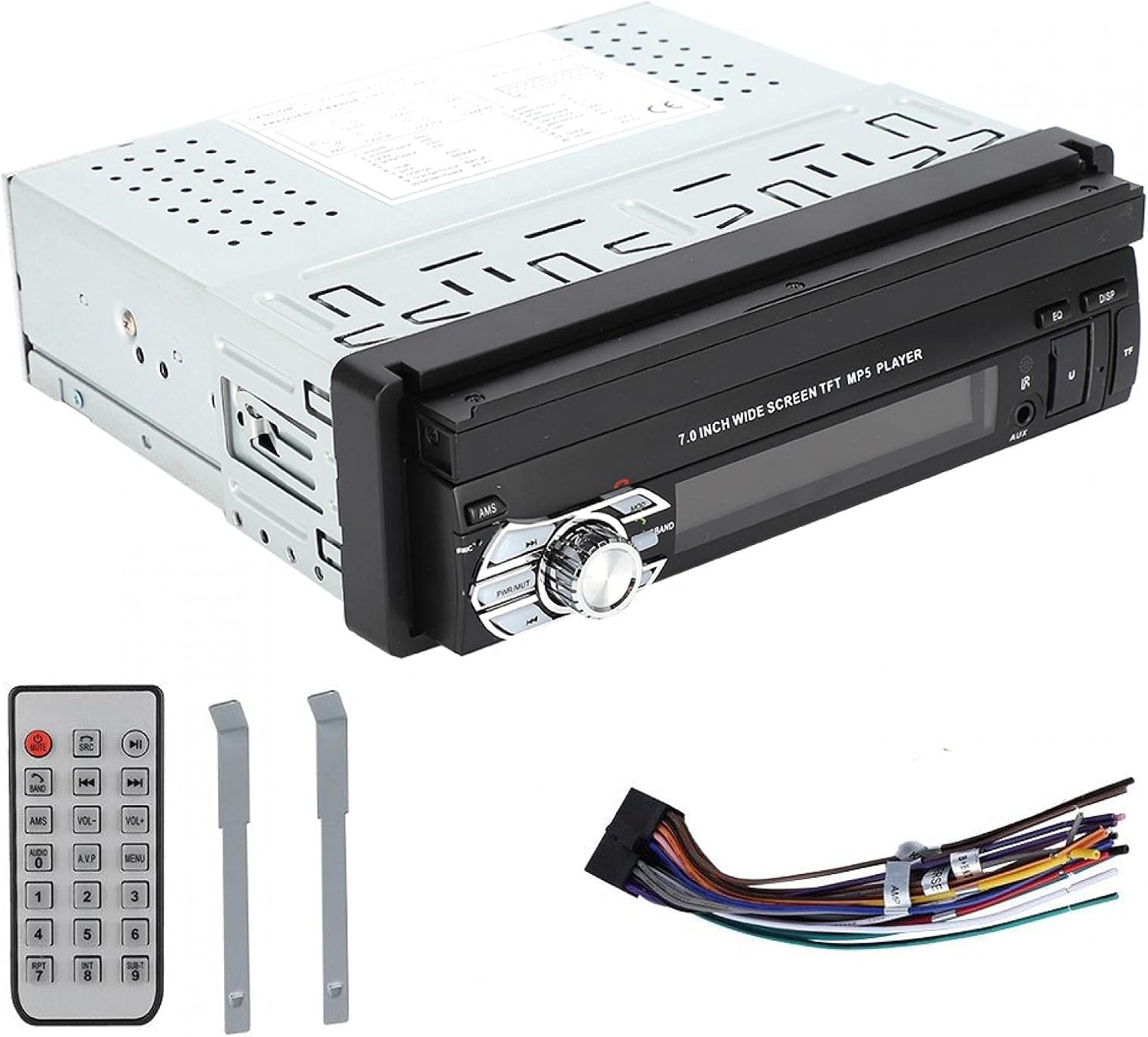
Image: Included accessories: remote control, wiring harness, and disassembly tools.
4. Konec produktuview
The Wendry 9601G is a single DIN car multimedia player featuring a retractable 7-inch touchscreen. It supports various audio and video formats, Bluetooth connectivity, and includes inputs for USB, TF card, and a reverse camera.
Klíčové vlastnosti:
- 7-inch High-Definition Retractable Touchscreen
- Bluetooth pro handsfree volání a streamování hudby
- Supports 24-bit 96kHz WAV audio format for high-fidelity sound
- USB 2.0 Interface for U disks and mobile hard drives
- TF Card Slot for media playback
- Reverse Video Input with reversing priority (requires compatible camera)
- Dynamic Menu Interface

Image: The Wendry 9601G car stereo with its 7-inch screen extended, showing multimedia playback.

Obrázek: Přední strana view of the car stereo with the screen retracted, showing the 'BT AUDIO' display.
5. Nastavení a instalace
5.1 Schéma zapojení
Refer to the wiring diagram provided on the unit's casing or in the separate wiring guide for correct connections. Incorrect wiring can cause damage to the unit or your vehicle's electrical system.

Obrázek: Zadní view of the car stereo, illustrating the connection ports for power, audio, video, and reverse camera input.
5.2 Obecné kroky instalace
- Odpojit baterii: Před nastartováním odpojte záporný pól baterie vozidla, abyste předešli elektrickému zkratu.
- Odstraňte starou jednotku: Carefully remove your existing car stereo using appropriate tools.
- Připojení kabeláže: Connect the power cable, speaker wires, antenna, and any other necessary cables (e.g., reverse camera, external amplifier) to the new unit according to the wiring diagram. Ensure all connections are secure.
- Test funkčnosti: Before fully mounting, reconnect the battery and briefly test the unit's basic functions (power on/off, audio, screen operation).
- Montážní jednotka: Slide the stereo into the single DIN slot and secure it using the provided mounting brackets or screws.
- Znovu připojte baterii: Znovu připojte záporný pól baterie.
6. Návod k obsluze
6.1 Zapnutí/vypnutí a ovládání obrazovky
- Moc: Press the power button (usually labeled PWR/MUTE) to turn the unit on or off.
- Zatažení obrazovky: The 7-inch screen is retractable. Use the dedicated button or menu option to extend or retract the screen.
- Dotyková obrazovka: Navigate through menus and control functions by touching the icons on the screen.

Image: The car stereo's screen extended, showing video playback.
6.2 Připojení Bluetooth
- Povolit Bluetooth: On the stereo, navigate to the Bluetooth menu. Ensure Bluetooth is enabled on your mobile device.
- Párování: Hledat available devices on your mobile phone. Select "9601G" (or similar device name) from the list. Enter the default PIN (usually "0000" or "1234") if prompted.
- Hands-free hovory: Po spárování můžete volat a přijímat hovory přímo přes stereo.
- Streamování hudby: Play music from your paired device, and control playback (play/pause, skip) via the stereo's touchscreen or remote control.
6.3 Přehrávání médií (USB/TF karta)
- Vložit médium: Vložte USB disk do portu USB 2.0 nebo TF kartu do slotu pro TF kartu.
- Vyberte zdroj: On the stereo, select the USB or TF card source from the main menu.
- Prohlížet Files: Use the touchscreen to browse and select audio or video files pro přehrávání.
- USB nabíjení: The USB port supports high current output, allowing you to charge most mobile phones.

Image: The car stereo's USB port can charge mobile phones.
6.4 Reverse Camera Input
If a compatible reverse camera is connected, the stereo will automatically switch to the camera view when the vehicle is put into reverse gear. This feature provides reversing priority for enhanced safety.
7. Údržba
- Čištění obrazovky: Dotykovou obrazovku jemně otřete měkkým hadříkem, který nepouští vlákna. Nepoužívejte abrazivní čisticí prostředky ani rozpouštědla.
- Generální úklid: Keep the unit free from dust and debris. Use a soft, dry cloth for cleaning the main body.
- Vyhněte se tekutinám: Nevylévejte tekutiny na jednotku.
- Teplota: Nenechávejte jednotku po delší dobu v extrémně horkých nebo chladných podmínkách.
8. Řešení problémů
| Problém | Možná příčina | Řešení |
|---|---|---|
| Jednotka se nezapne. | Nesprávné zapojení; Spálená pojistka; Problém s baterií vozidla. | Check power connections; Inspect vehicle fuse box; Verify battery charge. |
| Žádný zvuk. | Příliš nízká hlasitost; Aktivováno ztlumení; Nesprávné zapojení reproduktorů. | Zvyšte hlasitost; Deaktivujte ztlumení; Zkontrolujte připojení reproduktorů. |
| Bluetooth se nepřipojuje. | Bluetooth not enabled; Device out of range; Pairing issue. | Ensure Bluetooth is on for both devices; Bring devices closer; Re-attempt pairing. |
| USB/TF karta nebyla rozpoznána. | Unsupported format; Corrupted files; Loose connection. | Kontrola file formats; Try a different USB/TF card; Ensure secure connection. |
| Nezobrazuje se couvací kamera. | Camera not connected; Incorrect wiring; Faulty camera. | Verify camera connection; Check reverse trigger wire; Test camera functionality. |
Pokud problémy přetrvávají i po vyzkoušení těchto řešení, kontaktujte zákaznickou podporu.
9. Specifikace
| Značka | Wendry |
| Model | 9601G |
| Napájecí zdroj Voltage | DC12V (24V requires transformer) |
| Velikost obrazovky | 7 palce |
| Technologie připojení | Bluetooth, USB |
| Kompatibilní zařízení | Chytrý telefon, tablet, osobní počítač |
| Speciální funkce | Dotyková obrazovka |
| Režim zvukového výstupu | Stereo |
| Rozměry produktu | 18.4 x 17.8 x 6.2 cm (7.2 x 7.0 x 2.4 palce) |
| Hmotnost produktu | 1.42 kg (59.3 oz) |

Image: Dimensions of the Wendry 9601G car stereo.
10. Záruka a podpora
For warranty information, please refer to the documentation provided at the time of purchase or contact your retailer. If you encounter any issues or require technical assistance, please reach out to Wendry customer support through the official channels provided by your seller.