
Zavedení
Thank you for choosing the Zelotes F-35 2.4GHz Vertical Wireless Rechargeable Gaming Mouse. This ergonomic mouse is designed to provide a comfortable and efficient user experience, reducing wrist strain during extended use. Featuring multiple connectivity options and customizable buttons, it is ideal for both productivity and gaming on various devices.
Vlastnosti produktu
- Ergonomický vertikální design: Positions the hand in a natural handshake posture to minimize wrist and forearm strain.
- Vícerežimové připojení: Supports 2.4GHz wireless via USB dongle, Bluetooth 1, and Bluetooth 2 for versatile device pairing.
- Dobíjecí baterie: Built-in rechargeable battery for convenience.
- Nastavitelné DPI: Up to 2400 DPI for precise cursor control, suitable for various tasks and gaming.
- 6 programovatelných tlačítek: Includes left/right click, scroll wheel, DPI button, and forward/backward buttons for enhanced functionality.
- Optický senzor: Reliable and accurate tracking on most surfaces.
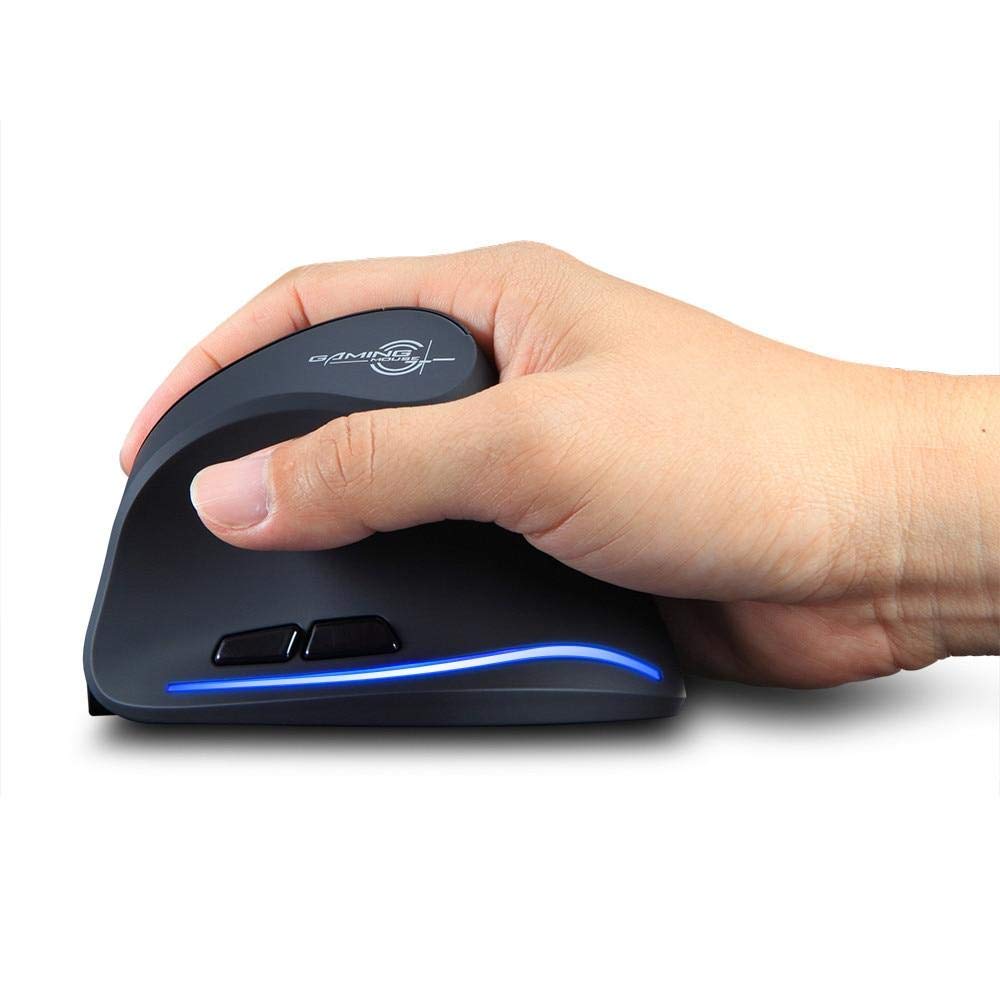
Image: The Zelotes F-35 Vertical Wireless Gaming Mouse, showcasing its unique ergonomic shape and illuminated accents.

Image: A visual comparison illustrating the natural hand position with a vertical mouse versus the twisted wrist position with a traditional horizontal mouse, highlighting the ergonomic benefits.
Pokyny pro nastavení
- Zapnutí: Najděte vypínač na spodní straně myši a posuňte jej do polohy „ON“.
- Vyberte režim připojení: The mouse supports three connection modes: 2.4GHz wireless (via USB dongle), Bluetooth 1, and Bluetooth 2. Use the 'Mode Switch' button on the bottom of the mouse to cycle through these options. The corresponding indicator light will illuminate.
- Bezdrátové připojení 2.4 GHz:
- Remove the USB receiver dongle from its storage slot on the bottom of the mouse.
- Zapojte USB přijímač do volného USB portu na vašem počítači nebo notebooku.
- Myš by se měla připojit automaticky.
- Připojení Bluetooth (BT1/BT2):
- Switch the mouse to either Bluetooth 1 or Bluetooth 2 mode using the 'Mode Switch'.
- On your computer or laptop, go to Bluetooth settings and search for new devices.
- Select 'Zelotes F-35' from the list of available devices to pair.

Image: The underside of the Zelotes F-35 mouse, highlighting the ON/OFF switch, mode switch, and the integrated storage slot for the 2.4GHz USB receiver dongle.
Návod k obsluze
The Zelotes F-35 mouse features 6 buttons designed for intuitive control and enhanced productivity:
- Levé tlačítko myši: Standardní funkce primárního kliknutí.
- Kliknutí pravým tlačítkem: Standardní funkce sekundárního kliknutí.
- Rolovací kolečko: Scroll up or down for navigation. Can also be pressed for a middle-click function.
- Tlačítko pro nastavení DPI: Located near the scroll wheel, press to cycle through different DPI settings (e.g., 800/1200/1600/2400) to adjust cursor sensitivity.
- Tlačítko vpřed: Located on the thumb rest, typically navigates forward in web prohlížeče popř file průzkumníci.
- Tlačítko zpět: Located on the thumb rest, typically navigates backward in web prohlížeče popř file průzkumníci.
Nabíjení a baterie
The Zelotes F-35 mouse is equipped with a rechargeable battery for continuous use.
- Nabíjecí port: The mouse features a USB-C charging port, typically located at the front base of the mouse.
- Nabíjení: Connect the provided USB-C cable to the mouse and the other end to a USB power source (e.g., computer USB port, wall adapter).
- Indikátor baterie: The mouse may have an indicator light to show charging status or low battery. Refer to the product packaging for specific indicator behavior.
- Životnost baterie: The average battery life is approximately 12 months, depending on usage.
Údržba
- Čištění: K čištění povrchu myši použijte měkký, suchý hadřík. V případě odolných nečistot použijte lehceamp Lze použít hadřík, který zajistí, aby se do vnitřních součástí nedostala vlhkost.
- Péče o senzor: Udržujte optický senzor na spodní straně myši čistý a bez prachu nebo nečistot, abyste zajistili přesné sledování.
- Skladování: When not in use for extended periods, turn off the mouse to conserve battery life. Store the USB receiver in its designated slot to prevent loss.
Odstraňování problémů
- Myš nereaguje:
- Ujistěte se, že je myš zapnutá.
- Zkontrolujte úroveň nabití baterie a v případě potřeby ji dobijte.
- For 2.4GHz connection, ensure the USB receiver is securely plugged into the computer.
- For Bluetooth connection, ensure Bluetooth is enabled on your device and the mouse is correctly paired. Try re-pairing if issues persist.
- Nepřesné sledování:
- Vyčistěte optický senzor na spodní straně myši.
- Ujistěte se, že myš používáte na vhodném povrchu (nereflexním, neskleněném).
- Upravte nastavení DPI na pohodlnou úroveň.
- Connectivity Drops:
- Ensure the mouse is within the effective range of your device (typically up to 10 meters for wireless).
- Minimalizujte rušení od jiných bezdrátových zařízení.
Specifikace
| Funkce | Detail |
|---|---|
| Značka | Zelotes |
| Model | F-35 |
| Typ | Bezdrátové 2.4 GHz, Bluetooth |
| Provozní režim | Optoelektronické |
| Počet tlačítek | 6 |
| Počet válečků | 1 |
| Orientace rukou | Právo |
| Typ rozhraní | USB |
| DPI | 2400 |
| Speciální funkce | Dobíjecí, Bezdrátový |
| Detekce pohybu | Optický |
| Kompatibilní zařízení | Přenosný počítač, osobní počítač |
| Operační systém | Linux, Windows 7 (and newer) |
| Průměrná životnost baterie | 12 měsíců |
| Zdroj napájení | Napájení z baterie |
| Barva | Černý |
| Země původu | Čína |
Záruka a podpora
For warranty information and technical support, please refer to the documentation included with your product or visit the official Zelotes website. You may also contact the retailer where you purchased the product for assistance.