
Zavedení
Welcome to the user manual for your CHACON 54671 Mini Remote Control Smart Plugs. This manual provides essential information for the safe and efficient operation of your device. Please read it thoroughly before use and retain it for future reference.
Obsah balení
- 4 x CHACON Mini Remote Control Plugs
- 1 x dálkové ovládání (s 1 baterií CR2032 součástí balení)
- 1 x Uživatelská příručka (tento dokument)
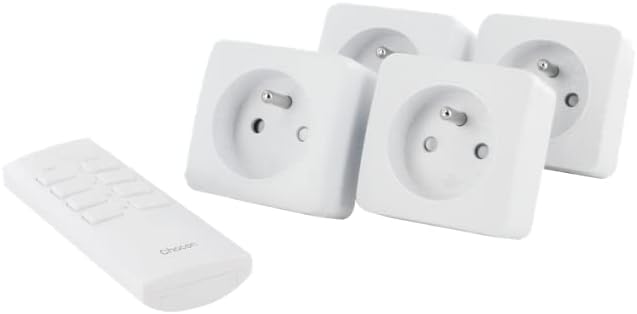
Image: The CHACON set includes four mini remote control plugs and one remote control unit.
Důležité bezpečnostní informace
- Pouze pro vnitřní použití.
- Do not exceed the maximum load of 2300W.
- Ensure the plugs are fully inserted into the wall socket.
- Neponořujte do vody ani nevystavujte nadměrné vlhkosti.
- Uchovávejte mimo dosah dětí.
- Nepokoušejte se zařízení rozebírat nebo opravovat.
Nastavení a párování
Your CHACON Mini Remote Control Plugs are pre-paired from the factory. If re-pairing is necessary or if you wish to change the assigned channel, follow these steps:
- Plug the mini remote control plug into a wall socket. The LED indicator on the plug will flash.
- Within 6 seconds of plugging in, press the desired "ON" button (1, 2, 3, or 4) on the remote control.
- The LED indicator on the plug will stop flashing and remain lit for a moment, then turn off, indicating successful pairing.
- Repeat for each plug and desired remote control channel.

Image: A single CHACON mini plug shown next to the remote control, illustrating the components involved in the pairing process.
Operace
The remote control allows you to switch connected devices ON and OFF wirelessly.
Pomocí dálkového ovládání
- Each pair of "ON" and "OFF" buttons (1-4) corresponds to a specific plug.
- To turn a device ON: Press the corresponding "ON" button (e.g., "1 ON").
- To turn a device OFF: Press the corresponding "OFF" button (e.g., "1 OFF").
Ruční ovládání
Each plug has a manual button on its side. Pressing this button will toggle the power state (ON/OFF) of the connected device.

Image: Close-up of the CHACON remote control, showing the numbered ON/OFF buttons.
Údržba
Čištění
Wipe the plugs and remote control with a dry, soft cloth. Do not use abrasive cleaners or solvents.
Výměna baterie dálkového ovládání
Dálkový ovladač používá jednu baterii CR2032.
- Najděte přihrádku na baterie na zadní straně dálkového ovladače.
- Otevřete přihrádku pomocí malého šroubováku nebo mince.
- Remove the old battery and insert a new CR2032 battery, ensuring correct polarity (+/-).
- Bezpečně uzavřete přihrádku na baterie.
Odstraňování problémů
| Problém | Možná příčina | Řešení |
|---|---|---|
| Plug does not respond to remote. | Není správně spárováno. | Re-pair the plug with the remote control (see Setup section). |
| Plug does not respond to remote. | Baterie v dálkovém ovladači je slabá nebo vybitá. | Vyměňte baterii CR2032 v dálkovém ovladači. |
| Plug does not respond to remote. | Obstruction or distance. | Ensure the remote is within the 30m range and there are no major obstructions. |
| Device connected to plug does not turn on. | Device is faulty or switched off manually. | Check the device's power switch and ensure it is functioning correctly. |
| Plug LED does not light up. | Žádné napájení do zásuvky. | Check the wall socket with another device. |

Image: A CHACON mini plug inserted into a wall socket, demonstrating typical installation.
Technické specifikace
- Značka: CHACON
- Číslo modelu: 54671
- Barva: Bílý
- Rozměry (D x Š x V): 7 x 6 x 6 cm
- Hmotnost: 470 g (celkem za sadu)
- Materiál: Plast
- Rádiová frekvence: 433.92 MHz
- Přenosová vzdálenost: Až 30 metrů (otevřené pole)
- Maximální výkon: 2300W
- Zdroj napájení: Cable Electric (for plugs), 1 x CR2032 battery (for remote)
- Speciální funkce: Dálkově ovládané zásuvky
Záruka a podpora
For warranty information or technical support, please refer to the contact details provided by your retailer or visit the official CHACON webUschovejte si doklad o koupi pro případ reklamace.