
1. Úvod a konecview
Thank you for choosing the Bewinner 12-inch LED Digital Photo Frame. This device allows you to display your favorite photos, play music and videos, and utilize clock and calendar functions. It features a high-resolution 12-inch LED screen (1280x800) and supports various media formats.

Image: The digital photo frame showcasing its 12-inch LED screen with a high-resolution image.
The frame is constructed from high-quality ABS material and comes with an infrared remote control for convenient operation. It includes built-in speakers and a 3.5mm headphone jack for audio output.
Obsah balení:
- 1 x Bewinner Digital Photo Frame
- 1 x Dálkové ovládání
- 1 x napájecí adaptér/nabíječka
- 1 x Stojan na rám
- 1 x Uživatelská příručka (tento dokument)
2. Nastavení
2.1 Vybalení
Opatrně vyjměte všechny součásti z obalu. Ujistěte se, že všechny položky uvedené v obsahu balení jsou přítomny a nepoškozené.
2.2 Připevnění stojanu
Locate the detachable frame stand. Insert the stand into the designated slot on the back of the digital photo frame. Ensure it is securely attached to provide stable support on any flat surface.

Obrázek: Zadní view of the digital photo frame with the stand in place, highlighting the port layout.
2.3 Připojení napájení
Connect the provided power adapter to the DC IN port on the digital photo frame. Plug the other end of the adapter into a standard electrical outlet. The frame will typically power on automatically or enter standby mode.
2.4 Inserting a Memory Card or USB Drive
The digital photo frame supports external storage via SD cards (up to 32GB, not included) and USB 2.0 host devices. Insert your SD card into the memory card slot or connect a USB flash drive to the USB host port. Ensure the media is inserted correctly.
Poznámka: This device does not have significant internal storage for media files. An external SD card or USB drive is required to display photos, videos, or music.

Obrázek: Side profile of the digital photo frame, illustrating the various input ports including USB and SD card slots.
3. Návod k obsluze
The digital photo frame can be operated using the buttons on the back of the frame or the included infrared remote control.
3.1 Základní navigace
- Vypínač: Turns the frame on or off.
- Menu/Setup Button: Accesses the main menu and settings.
- Šipky (nahoru/dolů/doleva/doprava): Procházejte nabídky a vyberte možnosti.
- Tlačítko Enter: Potvrzuje výběr.
- Tlačítko Konec: Returns to the previous screen or main display.
- Tlačítka hlasitosti: Adjust audio volume (VOL+, VOL-).
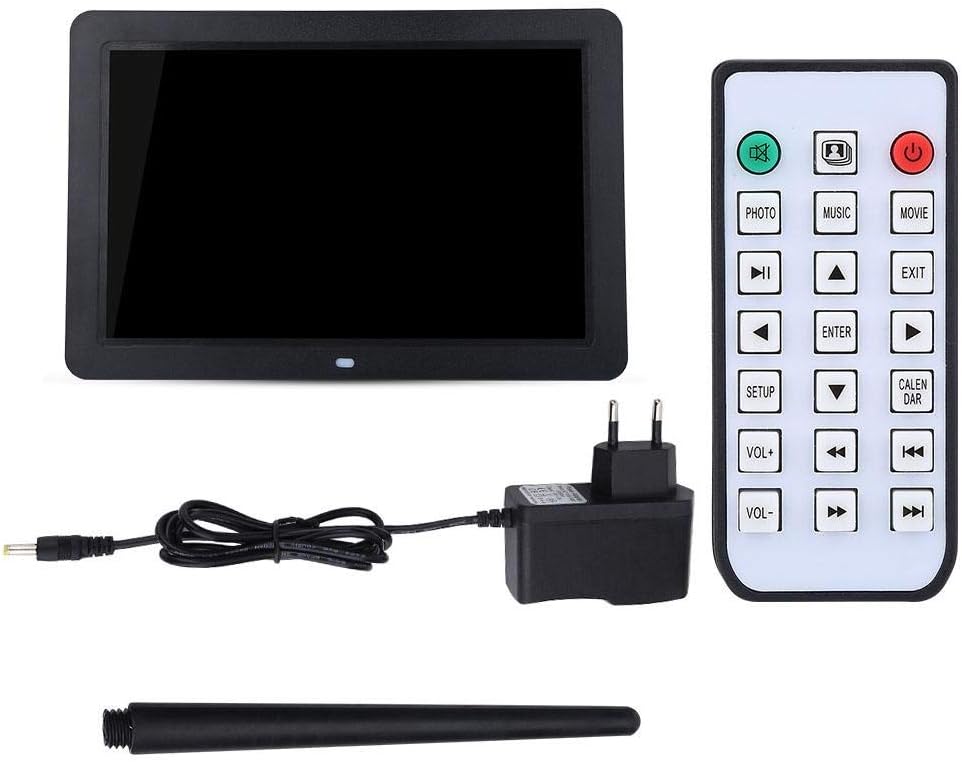
Image: The included remote control, showing buttons for various functions like Photo, Music, Movie, Setup, Calendar, and volume control.
3.2 Photo Playback
The frame supports JPEG and JPG image formats. To view fotky:
- Ensure your photos are stored on a compatible SD card or USB drive.
- From the main menu, select "Photo" or press the FOTOGRAFIE tlačítko na dálkovém ovladači.
- Navigate to your desired folder or select "All Photos" to start a slideshow.
- You can configure slideshow duration, transition effects, and brightness settings in the "Setup" menu.

Image: The digital photo frame displaying a high-resolution image, demonstrating its photo playback capability.
3.3 Přehrávání hudby
The frame supports MP3 audio format. To play music:
- Store your MP3 files on a compatible SD card or USB drive.
- From the main menu, select "Music" or press the HUDBA tlačítko na dálkovém ovladači.
- Procházejte svou hudbu filea vyberte skladbu, kterou chcete přehrát.
- Adjust the volume using the VOL+ and VOL- buttons. You can also connect headphones to the 3.5mm jack.

Image: The digital photo frame displaying a visual while playing music, with an overlay indicating MP3 support.
3.4 Přehrávání videa
The frame supports various video formats including RM, RMVB, MKV, MOV, M4V, MPG, FLV, PMP, AVI, VOB, DAT, MP4, and 3PG. To play videos:
- Store your video files on a compatible SD card or USB drive.
- From the main menu, select "Movie" or press the FILM tlačítko na dálkovém ovladači.
- Procházejte své video files and select a video to play.
- Upravte hlasitost pomocí tlačítek VOL+ a VOL-.
3.5 Clock and Calendar Functions
The digital photo frame includes built-in clock and calendar functions. To access these:
- From the main menu, select "Calendar" or press the KALENDÁŘ tlačítko na dálkovém ovladači.
- You can set the time and date in the "Setup" menu.
3.6 Nastavení a přizpůsobení
Access the "Setup" menu to customize various settings:
- Jazyk: Vyberte preferovaný jazyk.
- Nastavení obrazovky: Upravte jas, kontrast a poměr stran.
- Nastavení prezentace: Configure interval, transition effects, and playback mode (e.g., sequential, random).
- Čas a datum: Nastavte aktuální čas a datum.
- Automatické přehrávání: Set the frame to automatically play music, images, videos, or a mixed sequence upon startup.
4. Údržba
4.1 Čištění obrazovky
To clean the LED screen, gently wipe it with a soft, lint-free cloth. For stubborn smudges, slightly dampOtřete hadřík vodou nebo čisticím roztokem vhodným pro obrazovky. Nepoužívejte agresivní chemikálie ani abrazivní materiály.
4.2 Obecná péče
- Keep the digital photo frame away from direct sunlight, excessive heat, and moisture.
- Zabraňte pádu zařízení nebo jeho vystavení silným nárazům.
- Do not attempt to disassemble the frame, as this will void any potential warranty and may cause damage.
- Pokud se přístroj delší dobu nepoužívá, odpojte napájecí adaptér.
5. Řešení problémů
If you encounter issues with your Bewinner Digital Photo Frame, please refer to the following common problems and solutions:
| Problém | Možná příčina / řešení |
|---|---|
| Rám se nezapne. |
|
| No photos/videos/music displayed. |
|
| Dálkové ovládání nefunguje. |
|
| Images appear washed out or too bright/dark. |
|
| Audio is distorted or no sound. |
|
6. Specifikace
| Funkce | Detail |
|---|---|
| Značka | Bewinner |
| Číslo modelu | Bewinner1moich0rzq-03 |
| Velikost obrazovky | 12 palců |
| Typ zobrazení | LED |
| Rezoluce | 1280 x 800 (WXGA) |
| Poměr stran | 16:9 |
| Jas | 250 cd/m² |
| Materiál pláště | ABS (akrylonitrilbutadienstyren) |
| Barva | Černý |
| Podpora externího úložiště | SD Card (up to 32GB), USB 2.0 Host |
| Podporované formáty obrázků | JPEG, JPG (Base Encoding) |
| Podporované hudební formáty | MP3 |
| Podporované video formáty | RM, RMVB, MKV, MOV, M4V, MPG, FLV, PMP, AVI, VOB, DAT, MP4, 3PG |
| Podporovaný formát elektronických knih | TXT |
| Vestavěný reproduktor | 8Ω2W * 2 |
| Operační metoda | Infrared Remote Control, On-frame Buttons |
| Rozhraní | 3.5mm Headphone Jack, Memory Card Slot, USB 2.0 Host, Mini USB Adapter, Charging Port |
| Rozměry (D x Š x V) | Přibližně 30.5 x 20.2 x 2.5 cm (12.0 x 7.9 x 1.0 palce) |
| Hmotnost | Přibl. 895 g |
| Zdroj napájení | Elektrický kabel |

Image: Dimensional diagram of the digital photo frame, indicating its width and height.
7. Záruka a podpora
Information regarding specific warranty terms and conditions for the Bewinner Digital Photo Frame is not provided in the product details. For warranty claims or technical support, please refer to the retailer or manufacturer's official webstránky, kde jste produkt zakoupili.
Please note that information on spare parts availability and guaranteed software updates is also not available.