
1. Konec produktuview
The Prolink PRO700SFCU is a single-phase input/single-phase output Line-Interactive Uninterruptible Power Supply (UPS) system designed to provide stable backup power. It features Prolink's Super-Fast Charging technology, enabling the battery to recharge to 90% capacity within 2-4 hours. This UPS is suitable for home and small office applications, protecting devices such as computers, modems, wireless routers, and network equipment from power disruptions.
Klíčové vlastnosti:
- Super rychlé nabíjení: Battery recharges to 90% capacity within 2-4 hours.
- Přepěťová ochrana: Protects connected equipment from spikes and surges.
- Advanced Early Warning: Alerts users to output overload, high temperature, or low battery conditions, allowing time to save data or shut down systems.
- Ochrana proti přetížení: Initiates an alarm and automatic shutdown to prevent damage and prolong UPS lifespan.
- Ochrana proti přehřátí: Shuts down the power supply if internal temperatures become unacceptably high.
- Inteligentní správa baterií: Protects the battery from overcharging and deep discharging.
- Automatický svtage Regulace (AVR): Boosts and bucks voltage for stable output.
- Universal Sockets: Kompatibilní se širokou škálou zařízení.
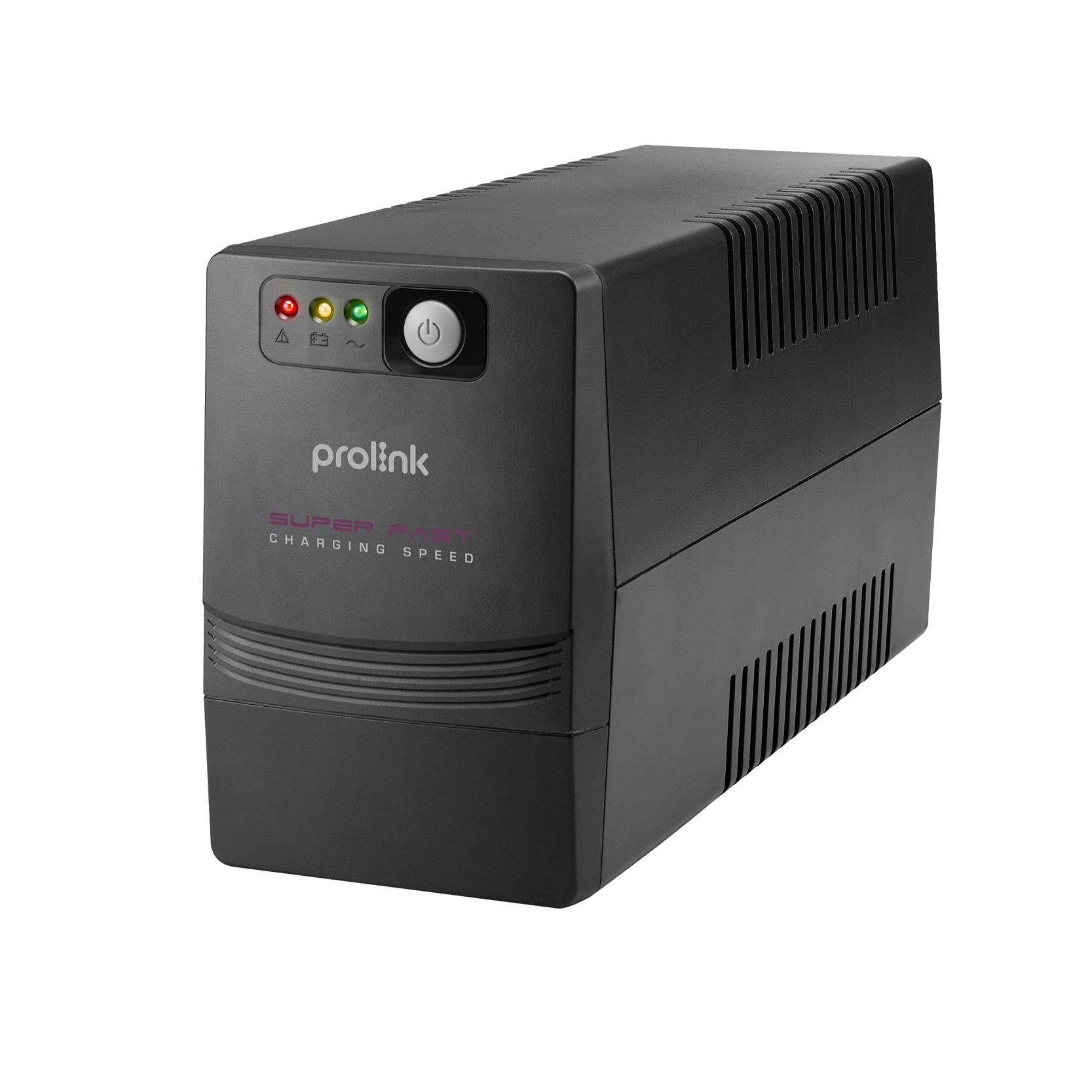
Obrázek 1: Přední strana view of the Prolink PRO700SFCU UPS, showing its compact design.

Figure 2: Prolink PRO700SFCU UPS highlighting key features such as Super Fast Charging, True AVR, and Universal Sockets.
2. Bezpečnostní informace
Please read and follow all safety instructions carefully before installing, operating, or servicing the UPS. Keep this manual for future reference.
Obecná opatření:
- Neotevírejte UPS casing. Uvnitř nejsou žádné součásti, které by mohl uživatel opravit. Servis svěřte kvalifikovanému servisnímu personálu.
- Neinstalujte UPS na přímém slunečním světle, v blízkosti zdrojů tepla ani v prostředí s nadměrnou prašností, vlhkostí nebo korozivními látkami.
- Zajistěte dostatečné větrání kolem UPS. Neblokujte větrací otvory.
- Connect the UPS to a grounded power outlet.
- Do not connect non-computer related loads such as medical equipment, life support systems, or other critical devices to the UPS.
- V případě nouze stiskněte tlačítko VYP a odpojte napájecí kabel od zdroje střídavého proudu, abyste UPS deaktivovali.
Bezpečnost baterie:
- Baterie mohou představovat riziko úrazu elektrickým proudem a vysokého zkratového proudu. Dodržujte následující bezpečnostní opatření:
- Nevhazujte baterie do ohně; mohou explodovat.
- Baterie neotevírejte ani nepoškozujte. Uvolněný elektrolyt je škodlivý pro kůži a oči.
- Battery servicing should be performed or supervised by personnel knowledgeable about batteries and the required precautions.
- Replace batteries only with the same type and number of batteries as originally installed.
3. Obsah balení
Ověřte, zda jsou všechny níže uvedené položky součástí balení. Pokud některé položky chybí nebo jsou poškozené, obraťte se na svého prodejce.
- Prolink PRO700SFCU UPS Unit
- Uživatelská příručka
- AC napájecí kabel
- USB komunikační kabel
4. Nastavení
Follow these steps to properly set up your Prolink PRO700SFCU UPS.
4.1 Vybalení a umístění:
- Opatrně vyjměte UPS z obalu.
- Place the UPS in a clean, dry, and well-ventilated area, away from direct sunlight, heat, and moisture.
- Ensure there is sufficient space around the UPS for proper airflow.
4.2 Připojení k napájení:
- Connect the supplied AC power cord to the UPS input socket (labeled "INPUT 10A max") on the rear panel.
- Zapojte druhý konec napájecího kabelu do uzemněné zásuvky ve zdi.
4.3 Connecting Devices:
- Plug your computer, monitor, modem, or other critical equipment into the UPS output sockets (labeled "OUTPUT") on the rear panel.
- For USB communication and monitoring, connect the USB cable from the UPS USB port to your computer's USB port.
4.4 Počáteční nabití:
For optimal performance, charge the UPS for at least 4-6 hours before initial use. The UPS will charge automatically when connected to AC power, even if the unit is turned off.
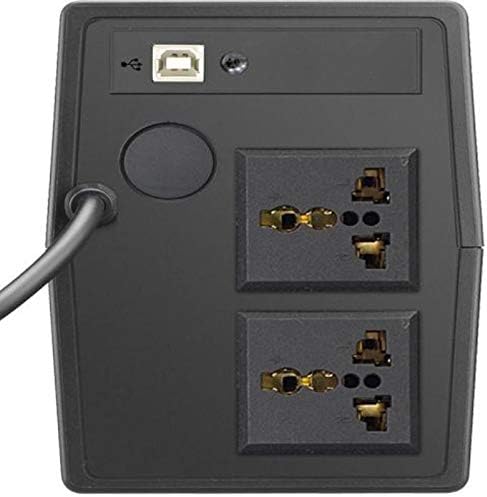
Figure 3: Rear panel of the UPS, illustrating the input power connection, output sockets, and USB port.
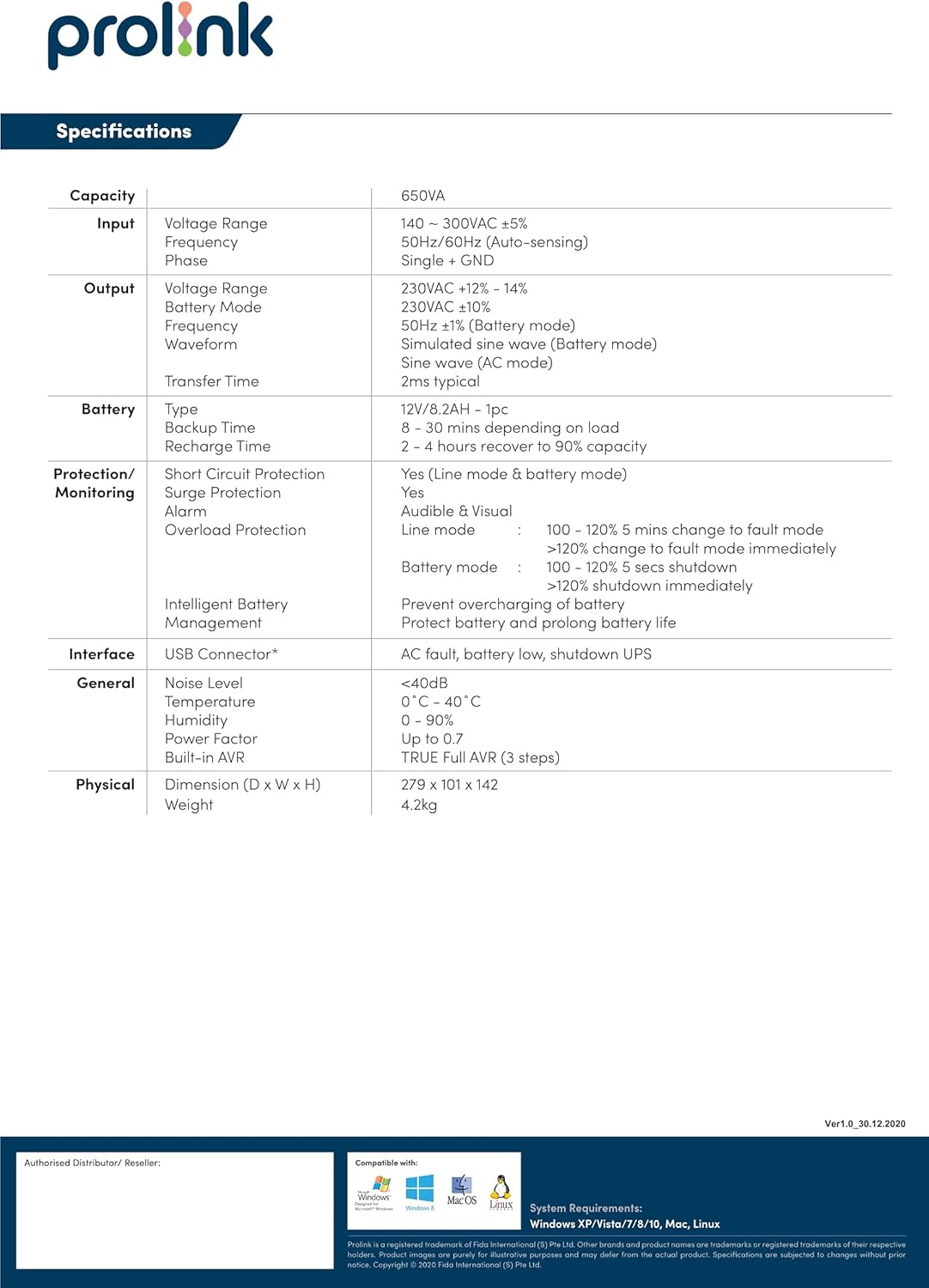
Figure 4: Detailed diagram of the UPS rear panel, indicating Power AC Input, Backup Outlets, and USB Port.
5. Provoz
5.1 Zapnutí/vypnutí:
- Zapnutí: Press and hold the 'ON/MUTE' button for approximately 3 seconds until you hear a beep and the LCD display illuminates.
- Vypnutí: Press and hold the 'OFF/ENTER' button for approximately 3 seconds until the LCD display turns off.
5.2 Understanding the LCD Display:
The comprehensive LCD display panel provides real-time status information about the UPS, including input/output voltage, battery level, load capacity, and operational mode. Refer to the display for current operating conditions.
5.3 EKO režim:
The UPS may feature an ECO mode for energy saving. When active, the UPS operates with higher efficiency by bypassing the inverter during stable power conditions. Consult the LCD display or specific model features for activation and status of ECO mode.
5.4 USB Communication:
The USB port allows for software monitoring and control of the UPS. Install the provided monitoring software on your computer to view UPS status, configure settings, and enable automatic shutdown during extended power outages.
6. Údržba
Pravidelná údržba zajišťuje dlouhou životnost a optimální výkon vaší UPS.
6.1 Péče o baterii:
- Keep the UPS connected to AC power to ensure the battery remains fully charged. This prolongs battery life.
- If the UPS is stored for an extended period, recharge the battery every three months for at least 4-6 hours.
- Výměnu baterie by měl provádět pouze kvalifikovaný servisní personál.
6.2 Čištění:
- Use a soft, dry cloth to clean the exterior of the UPS.
- Nepoužívejte tekuté nebo aerosolové čisticí prostředky.
- Ujistěte se, že větrací otvory jsou bez prachu a nečistot.
6.3 Úložiště:
- Uložte UPS na chladném a suchém místě.
- Ensure the battery is fully charged before storing.
7. Řešení problémů
This section addresses common issues you might encounter with your UPS. If the problem persists, contact customer support.
| Problém | Možná příčina | Řešení |
|---|---|---|
| UPS se nezapne | Žádné střídavé napájení; Vybitá baterie; Porucha UPS | Check AC power connection; Charge battery for 4-6 hours; Contact support if fault persists. |
| UPS nepřetržitě pípá | Overload; Low battery; UPS fault | Reduce connected load; Allow battery to charge; Contact support if fault persists. |
| Krátká doba zálohování | Baterie není plně nabitá; Konec životnosti baterie | Charge battery for 4-6 hours; Consider battery replacement by qualified personnel. |
| Varování před přetížením | Connected load exceeds UPS capacity | Disconnect non-essential equipment to reduce load. |
8. Specifikace
Technical specifications for the Prolink PRO700SFCU 650VA UPS.
| Funkce | Specifikace |
|---|---|
| Kapacita | 650 VA |
| Vstupní objemtage Dosah | 140 - 300VAC ±5% |
| Vstupní frekvence | 50Hz/60Hz (automatické snímání) |
| Výstupní objemtage Dosah | 230VAC ±12% - 14% (Battery Mode: 230VAC ±10%) |
| Výstupní frekvence | 50Hz ±1Hz (Battery Mode: 50Hz ±1Hz) |
| Výstupní průběh | Simulated Sine Wave (AC Mode: Sine Wave) |
| Doba přenosu | Typicky 2 ms |
| Typ baterie | 12V/7.2AH x 1pc |
| Doba zálohování | 8 - 30 minutes (depending on load) |
| Doba nabíjení | 2 - 4 hours to 90% capacity |
| Ochrana proti přepětí | Ano |
| Zvukový alarm | Battery Mode, Low Battery, Overload, UPS Fault |
| Rozhraní | Konektor USB |
| Úroveň hluku | <40dB |
| Provozní teplota | 0°C - 40°C |
| Vlhkost | 0 - 90% (non-condensing) |
| Účiník | Až do 0.7 |
| Vestavěný AVR | TRUE Full AVR (3 kroky) |
| Rozměry (D x Š x V) | 279 x 101 x 142 mm |
| Hmotnost | 4.2 kg |
| Celkové elektrické zásuvky | 2 |
| Typ konektoru | IEC 320 C13/C14 |
| Typ napájecí zástrčky | Typ G |
9. Záruka a podpora
Informace o záruce:
This Prolink PRO700SFCU UPS is covered by a manufacturer's warranty. Please refer to the warranty card included in your package or visit the official Prolink webPodrobné záruční podmínky platné pro váš region naleznete na webových stránkách.
Zákaznická podpora:
For technical assistance, troubleshooting, or service inquiries, please contact Prolink customer support. You can find contact information on the official Prolink webna webu nebo prostřednictvím místního prodejce.
Webmísto: www.prolink2u.com