
1. Úvod a konecview
The Samson CB288 Beltpack Transmitter is a key component of the Samson Concert 288 Wireless System, designed to provide reliable and high-quality audio transmission for various applications. This compact and durable transmitter offers exceptional performance and ease of use, making it ideal for musicians, presenters, and performers.
This manual provides detailed instructions on the setup, operation, maintenance, and troubleshooting of your CB288 Beltpack Transmitter to ensure optimal performance and longevity.
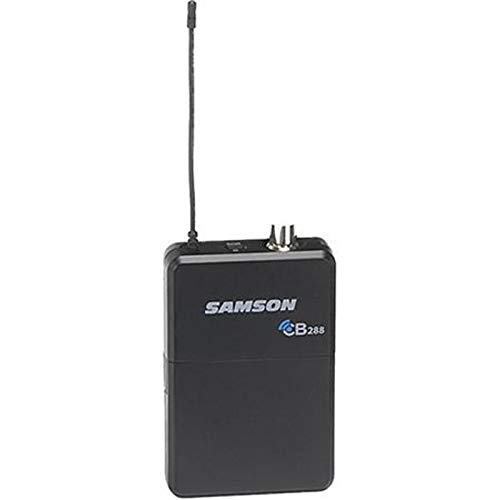
Obrázek 1: Přední strana view of the Samson CB288 Beltpack Transmitter. The device is black with the "SAMSON CB288" logo visible on the front. An antenna extends from the top left, and two small connectors are visible on the top right.
2. Klíčové vlastnosti
- Prodloužená životnost baterie: Operates for up to eight hours on two standard AA batteries.
- Široký provozní rozsah: Provides a reliable operating range of up to 300 feet (line of sight).
- Specific Frequency Band: Operates within Band I, Channel A: 518-542MHz, ensuring clear and interference-free transmission.
- Všestranný vstup: Features a Mini-XLR (P3) input connector for various microphone and instrument connections.
- Optimized Input Impedance: Designed with a 1MOhm input impedance for broad compatibility.
- Adjustable Input Gain: Offers a 38dB input gain range, allowing precise level matching for different audio sources.
- Odolná konstrukce: Built to withstand the rigors of live performance and regular use.
3. Průvodce nastavením
3.1. Instalace baterie
- Locate the battery compartment on the rear of the CB288 Beltpack Transmitter.
- Vysuňte kryt přihrádky na baterie.
- Vložte dvě nové baterie typu AA a dbejte na správnou polaritu (+/-) vyznačenou uvnitř přihrádky.
- Bezpečně zavřete kryt bateriového prostoru.
Poznámka: Always use fresh alkaline or rechargeable AA batteries for optimal performance and battery life. Remove batteries if the unit will not be used for an extended period.
3.2. Connecting a Microphone or Instrument
- Identify the Mini-XLR (P3) input connector on the top of the transmitter.
- Connect your compatible Samson microphone (e.g., LM10, HS5) or instrument cable to this input. Ensure the connector clicks firmly into place.
3.3. Zapnutí/vypnutí
- To power on, press and hold the power button located on the top of the transmitter until the indicator light illuminates.
- Chcete-li zařízení vypnout, znovu stiskněte a podržte tlačítko napájení, dokud kontrolka nezhasne.
3.4. Frequency Selection and Pairing
The CB288 transmitter is pre-set to Band I, Channel A (518-542MHz). For proper operation, ensure your Concert 288 receiver is also set to the corresponding frequency band and channel.
- Refer to your Concert 288 receiver's manual for specific instructions on channel selection and pairing procedures.
- Typically, the receiver will have a scan function to find an available channel, and then a sync function (often via infrared) to pair with the transmitter.
- Once paired, the receiver will indicate a stable RF connection.
4. Návod k obsluze
4.1. Adjusting Input Gain
The CB288 features an adjustable input gain to optimize the audio level from your microphone or instrument before transmission. This helps prevent distortion and ensures a strong, clear signal.
- With the transmitter powered on and connected to your audio source, speak into the microphone or play your instrument at your typical performance level.
- Locate the gain adjustment control (usually a small trim pot) on the transmitter. You may need a small screwdriver or a similar tool to adjust it.
- Monitor the audio level on your Concert 288 receiver. Adjust the gain control on the transmitter until the receiver's audio level indicator shows a strong signal without clipping (peaking into the red).
- A good starting point is to set the gain so that the peak audio levels on the receiver are consistently in the green or amber range, only occasionally touching the red.
4.2 Optimální umístění
For best wireless performance, ensure the transmitter's antenna is not obstructed. Wear the beltpack on your hip or in a position where the antenna has a clear line of sight to the receiver whenever possible. Avoid placing the transmitter directly against metal objects or large body masses that could block the signal.
4.3. Indikátor stavu baterie
The CB288 Beltpack Transmitter includes an LED indicator that displays battery status. A solid green light typically indicates sufficient battery power. A flashing or red light indicates low battery, and batteries should be replaced soon.
5. Údržba
- Čištění: Use a soft, dry cloth to clean the exterior of the transmitter. Do not use abrasive cleaners, solvents, or harsh chemicals.
- Péče o baterie: Always remove batteries from the transmitter if it will not be used for an extended period (e.g., more than a few weeks) to prevent leakage and damage.
- Skladování: Store the transmitter in a cool, dry place away from direct sunlight, extreme temperatures, and high humidity.
- Péče o anténu: Handle the antenna with care. Avoid bending or stressing it excessively, as this can affect performance.
6. Řešení problémů
| Problém | Možná příčina | Řešení |
|---|---|---|
| Žádný zvuk nebo slabý signál |
|
|
| Zkreslený zvuk |
|
|
| Krátká výdrž baterie |
|
|
7. Specifikace
| Model | CB288 Transmitter |
| Frekvenční rozsah | Band I, Channel A: 518-542MHz |
| Vstupní konektor | Mini-XLR (P3) |
| Vstupní impedance | 1MOhm |
| Rozsah vstupního zisku | 38 dB |
| Životnost baterie | Up to 8 hours (with 2x AA batteries) |
| Provozní rozsah | 300 stop (v přímé viditelnosti) |
| Rozměry produktu | 4.6 x 3.2 x 1.6 palce |
| Hmotnost položky | 4 unce |
| Výrobce | Samson |
| Datum první dostupnosti | 28. srpna 2019 |
8. Záruka a podpora
The Samson CB288 Beltpack Transmitter is covered by a Samson 2 Year Limited Warranty. Tato záruka se vztahuje na vady materiálu a zpracování při běžném používání.
For detailed warranty information, technical support, or service inquiries, please visit the official Samson website or contact their customer support. You can often find FAQs, driver downloads, and service center locations on their support pages.
Samson Official Webmísto: www.samsontech.com
Další zdroje a informace o produktech můžete také navštívit Samson Store on Amazon.