
1. Úvod
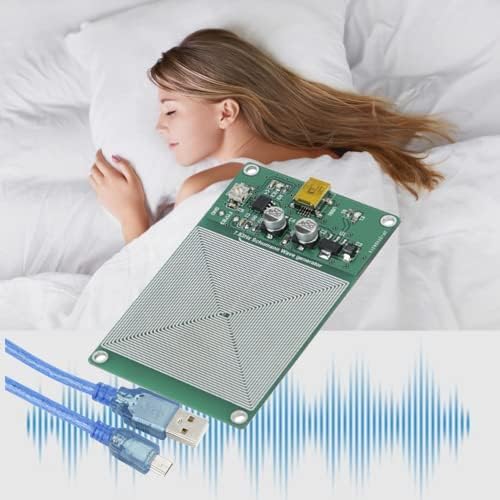
This manual provides detailed instructions for the Walfront 7.83HZ Schumann Ultra-low Frequency Audio Resonator Pulse Generator. This device is designed to generate a precise 7.83Hz Schumann wave, offering high accuracy and stability. It is powered via a Mini USB port and features an ultra-low static power consumption main control IC for stable waveform output.

2. Vlastnosti produktu
- Mini USB Port Power Supply: The device is powered via a Mini USB port, typically requiring +5V 0.1A. A compatible USB cable is included.
- Ultra-low Schumann Frequency: Generates a 7.83HZ ultra-low frequency Schumann wave with high accuracy and stability.
- Low Static Consumption: Incorporates an imported ultra-low static power consumption main control IC, ensuring a stable waveform output.
- 7.83HZ Pulse Square Wave Output: Produces a 7.83HZ pulse square wave with a 50% duty cycle. The frequency can be fine-tuned for correction.

3. Pokyny k nastavení
Follow these steps to set up your Schumann Resonance Pulse Generator:
- Rozbalte zařízení: Carefully remove the Schumann Resonance Pulse Generator and the included USB cable from its packaging.
- Připojte napájení: Insert the Mini USB end of the provided cable into the Mini USB port on the generator board. Connect the standard USB-A end of the cable to a compatible +5V 0.1A USB power source (e.g., a computer USB port, a USB wall adapter, or a power bank).
- Umístění: Place the generator in your desired location. Ensure it is on a stable, non-conductive surface.
- Zapnutí: Once connected to a power source, the device will automatically power on and begin generating the Schumann wave. A blinking green light on the board indicates operation.

4. Návod k obsluze
The Walfront Schumann Resonance Pulse Generator operates continuously once powered. No user interaction is typically required for its primary function.
- Automatický provoz: Upon connecting to a power source, the device automatically begins emitting the 7.83Hz pulse square wave.
- Frequency Fine-tuning: The device includes a mechanism for fine-tuning the output frequency. This adjustment is typically performed using a small potentiometer on the board and requires specialized equipment (e.g., a frequency counter or multimeter with frequency measurement capabilities) for accurate calibration. Adjustments should only be made if precise frequency correction is necessary and you have the appropriate tools and expertise.
5. Údržba
The Walfront Schumann Resonance Pulse Generator requires minimal maintenance.
- Čištění: Keep the device clean and free from dust. Use a soft, dry cloth to gently wipe the surface. Avoid using liquids or abrasive cleaners.
- Prostředí: Ensure the device is used in a dry environment, away from excessive moisture, extreme temperatures, and direct sunlight.
- Zacházení: Handle the circuit board with care to avoid damage to components.
6. Řešení problémů
If you encounter issues with your device, refer to the following troubleshooting guide:
| Problém | Možná příčina | Řešení |
|---|---|---|
| Device not powering on (no blinking green light). | No power supply, faulty USB cable, or power source issue. | Ensure the USB cable is securely connected to both the device and a working +5V 0.1A power source. Try a different USB cable or power source. |
| Measured frequency is not 7.83Hz. | Device requires fine-tuning or measurement error. | If you have appropriate calibration equipment, use the fine-tuning potentiometer on the board to adjust the frequency. Ensure your measurement device is accurate and properly calibrated for low frequencies. |
| Perceived EMF field is weak. | The device generates an ultra-low frequency field, which may be subtle. | The device is designed to produce a specific low-frequency wave. Its output is not intended to be a strong electromagnetic field detectable by standard consumer devices. Functionality is indicated by the blinking green light. |
7. Specifikace
| Specifikace | Hodnota |
|---|---|
| Rozměry produktu | 6.3 x 5.51 x 0.79 palce |
| Hmotnost položky | 2.11 unce |
| Číslo modelu | Walfront6sknmq2oi3 |
| Napájení | +5V 0.1A (via Mini USB) |
| Výstupní frekvence | 7.83HZ (Schumann Resonance) |
| Průběh | Pulse Square Wave |
| Pracovní cyklus | 50 % |
| Výrobce | Walfront |
8. Záruka a podpora
Specific warranty information for the Walfront 7.83HZ Schumann Ultra-low Frequency Audio Resonator Pulse Generator is not available in the provided product data. For details regarding warranty coverage, technical support, or service, please contact Walfront directly through their official channels or the retailer from whom the product was purchased.