
1. Úvod
Děkuji za nákupasing the Wendry Smart Projector. This portable LED projector is designed to provide a versatile viewing experience for both indoor and outdoor entertainment. This manual will guide you through the setup, operation, and maintenance of your new projector to ensure optimal performance.
2. Obsah balení
Ověřte prosím, zda jsou ve vašem balení obsaženy všechny níže uvedené položky:
- Wendry Smart Projector Unit
- Dálkové ovládání
- Napájecí adaptér
- AV Cable (3-in-1 RCA)
- HDMI kabel
- Uživatelská příručka
- Čisticí hadřík
- 100-inch Projection Screen
- Wall Mount Hooks for Screen

Figure 2.1: Wendry Smart Projector and included accessories.
3. Vlastnosti produktu
- Displej s vysokým rozlišením: Supports 720P and 1080P resolution for clear and natural images.
- Přenosnost: Small and lightweight design for easy transport and setup.
- Jas: 3000 lumens for vibrant presentations.
- Více možností připojení: Includes HDMI, AV, VGA, USB, and Micro SD card slots.
- Integrovaný zvuk: Features a built-in speaker and a headphone jack for external audio.
- Nastavitelná projekce: Manual focus adjustment, aspect ratio selection (16:9 to 4:3), and a projection distance of 1.0-2.8 meters.
- Long-Life Lamp: Equipped with RGB lamps offering up to 30,000 hours of operational life.

Figure 3.1: High-definition display capabilities.

Figure 3.2: Multiple input interfaces for diverse media devices.
4. Nastavení
4.1. Počáteční umístění
Place the projector on a stable, flat surface. Ensure there is adequate ventilation around the unit.
4.2. Připojení napájení
- Připojte napájecí adaptér k portu DC IN na projektoru.
- Zapojte napájecí adaptér do vhodné elektrické zásuvky.
4.3. Připojení vstupních zdrojů
Connect your desired media device (e.g., laptop, TV box, game console, USB drive) to the projector using the appropriate port:
- HDMI: Pro video a audio ve vysokém rozlišení.
- USB: Pro přehrávání médií filepřímo z USB flash disku.
- AV: For standard definition video and audio using the included AV cable.
- VGA: Pro připojení starších počítačů nebo zařízení.
- Micro SD: Pro přehrávání médií filepřímo z karty Micro SD.
4.4. Setting Up the Projection Screen
The included 100-inch projection screen can be mounted using the provided hooks and adhesive stickers. Follow the instructions on the screen packaging for proper installation.
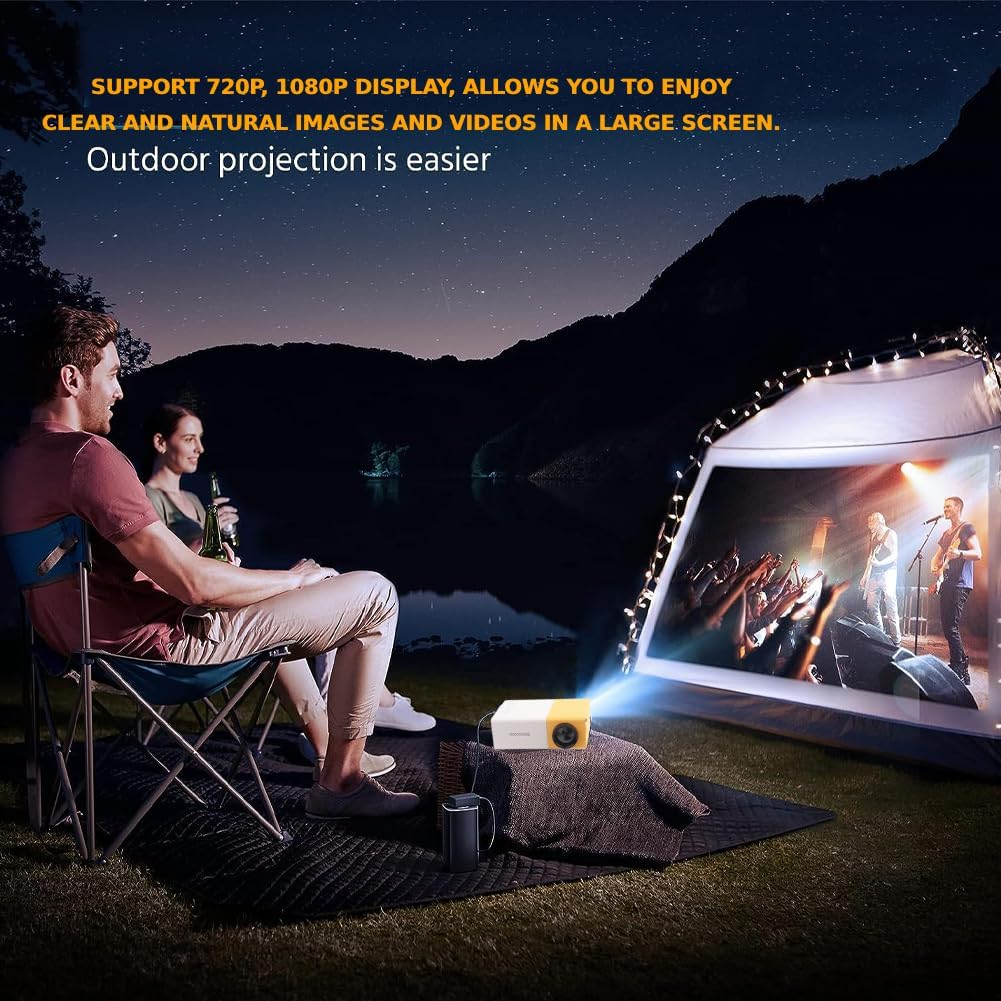
Obrázek 4.1: Přample of outdoor projection setup.
5. Návod k obsluze
5.1. Zapnutí/vypnutí
Stisknutím tlačítka napájení na projektoru nebo na dálkovém ovladači zapnete nebo vypnete zařízení.
5.2. Úprava zaostření
Rotate the focus ring located on the projector lens until the image on the screen appears clear and sharp.

Figure 5.1: Adjusting projection for optimal viewIng.
5.3. Výběr vstupního zdroje
Use the 'Source' button on the remote control or the projector's control panel to cycle through available input sources (USB, TF, HDMI, AV, VGA).
5.4. Menu Navigation and Volume Control
Use the arrow keys and 'OK' button on the remote control or projector to navigate through menus and make selections. Adjust the volume using the dedicated volume buttons on the remote.
5.5. Aspect Ratio Adjustment
The projector supports aspect ratio adjustments from 16:9 to 4:3. Refer to the on-screen menu for specific settings.
6. Údržba
6.1. Čištění čočky
Gently wipe the projector lens with the provided cleaning cloth or a soft, lint-free cloth. Avoid using abrasive materials or harsh chemicals that could damage the lens.
6.2. Generální úklid
Wipe the exterior of the projector with a soft, dry cloth. Ensure ventilation vents are clear of dust and debris to prevent overheating.
7. Řešení problémů
Pokud se s projektorem setkáte s problémy, podívejte se na následující běžná řešení:
- Bez napájení: Ensure the power adapter is securely connected to both the projector and the electrical outlet.
- Bez obrázku: Verify that the correct input source is selected. Check all cable connections (HDMI, AV, VGA, USB).
- Rozmazaný obrázek: Adjust the focus ring on the projector lens. Ensure the projection surface is flat and the projector is at an appropriate distance.
- Žádný zvuk: Check the volume settings on both the projector and the connected media device. If using external speakers, ensure they are properly connected.
- Dálkové ovládání nefunguje: Ensure batteries are correctly inserted and functional. Point the remote directly at the projector's IR receiver.
For further assistance, please consult the full user guide or contact customer support.
8. Specifikace
| Funkce | Specifikace |
|---|---|
| Rozměry produktu | 5 x 3.21 x 1.91 palce |
| Hmotnost položky | 1.01 libry |
| Číslo modelu | Wendry0fw4c39u5i-01 |
| Rozlišení displeje | 320 x 240 (Native), Supports 720P/1080P |
| Technologie připojení | HDMI, USB, VGA, AV, Micro SD |
| Speciální funkce | Lehký, přenosný |
| Doporučená použití | Gaming, Home Cinema, Outdoor Recreation |
| Lamp Život | 30,000 hours (RGB LED) |
| Jas | 3000 XNUMX lumenů |