
1. Úvod
The Protmex PT625A is a handheld digital anemometer designed for measuring air velocity and airflow. This device is suitable for various applications, including environmental monitoring, HVAC system analysis, outdoor sports, and industrial use. It provides accurate and fast readings with multiple measurement units and data handling capabilities.
2. Konec produktuview
2.1 Komponenty
- Air Velocity Flow Sensor: The fan blade assembly at the top of the device.
- Zobrazit: LCD screen for showing measurement readings and indicators.
- Ovládací tlačítka: Power, Function, Unit, Max/Min/Avg, Data Hold, Record.
- Přihrádka na baterie: Umístěno na zadní straně pro instalaci baterie.
- Micro USB port: For data connection (on some models, not explicitly stated for PT625A but mentioned in video).
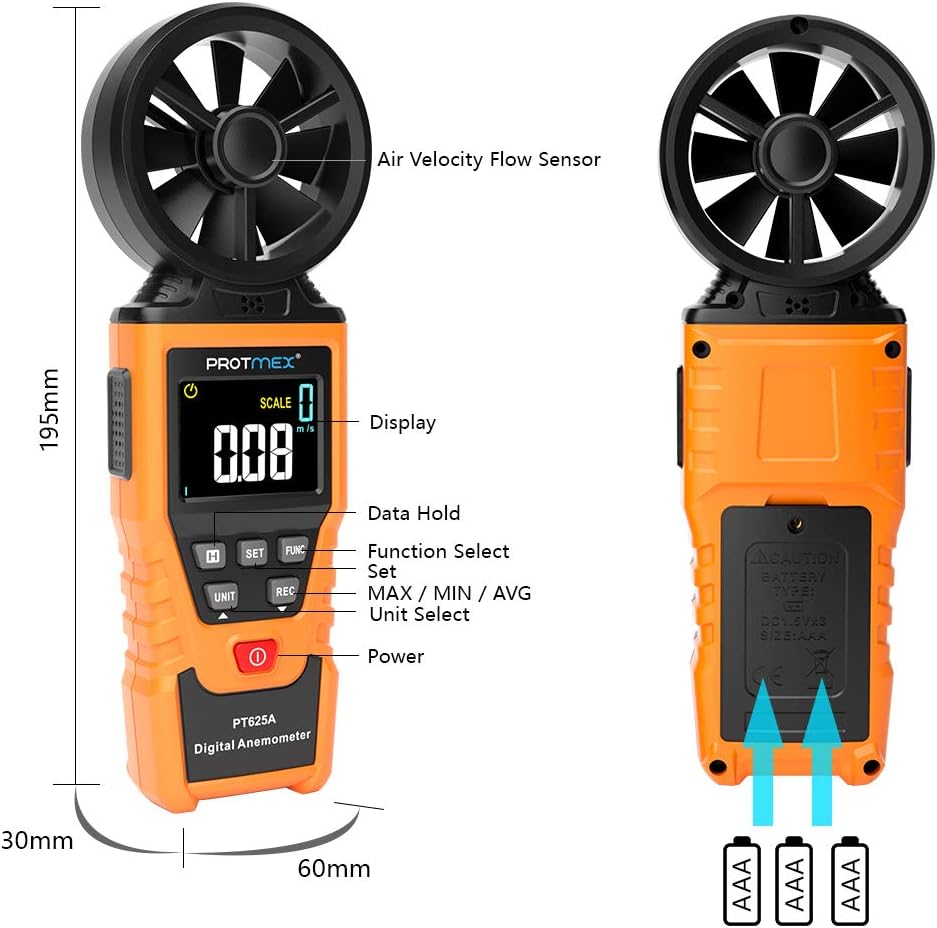
Obrázek 1: Přední strana view of the Protmex PT625A Anemometer with key components labeled, including the air velocity flow sensor, display, and control buttons.
2.2 Vlastnosti
- High accuracy for wind speed measurement (0.4~40 m/s).
- Multiple units for wind speed: m/s, km/h, ft/s, knots, mil/h, fp/m.
- Air volume measurement in CFM, CMM, CMS.
- 8-blade aviation wing fan for sensitive and accurate readings.
- MAX/MIN/AVG data display.
- Funkce uchování dat.
- Automatické vypnutí.
- Indikátor slabé baterie.
- Air duct area setting for airflow calculation.
3. Nastavení
3.1 Instalace baterie
- Najděte přihrádku na baterie na zadní straně zařízení.
- Pomocí šroubováku otevřete kryt prostoru pro baterie.
- Insert the provided 9V battery, ensuring correct polarity (+/-).
- Nasaďte kryt prostoru pro baterie a zajistěte jej šroubem.

Obrázek 2: Zpět view of the anemometer, indicating the battery compartment where a 9V battery is inserted. A screwdriver is required to open the compartment.
4. Návod k obsluze
4.1 Zapnutí/vypnutí
Stiskněte tlačítko Moc tlačítko ( ) to turn the device on or off. The device features an auto power-off function to conserve battery life.
4.2 Measuring Air Velocity
- Turn on the anemometer.
- Point the air velocity flow sensor (fan) directly into the airflow you wish to measure. Ensure the airflow passes through the fan blades.
- The current air velocity reading will be displayed on the LCD screen.
- Stiskněte tlačítko JEDNOTKA button to cycle through different measurement units (m/s, km/h, ft/s, knots, mil/h, fp/m).

Figure 3: The anemometer being used to measure wind speed in an outdoor environment, demonstrating how to position the sensor into the airflow.
4.3 Airflow Measurement (CFM/CMM/CMS)
- Turn on the anemometer.
- Stiskněte tlačítko ZAMĚSTNANEC button to enter airflow measurement mode.
- Použijte SOUBOR button to input the cross-sectional area of the air duct or channel. This is crucial for accurate airflow calculation.
- Once the area is set, point the sensor into the airflow. The device will display the airflow volume in CFM, CMM, or CMS.
- Stiskněte tlačítko JEDNOTKA button to select the desired airflow unit.

Figure 4: Illustration of the anemometer displaying airflow measurement after setting the air duct area. The screen shows both area input and calculated flow.
4.4 Data Hold, Max/Min/Avg, and Record Functions
- Pozastavení dat: Stiskněte tlačítko DRŽET tlačítko pro zmrazení aktuální hodnoty na displeji. Dalším stisknutím tlačítko uvolníte.
- MAX/MIN/AVG: Stiskněte tlačítko MAX / MIN / PRŮM button to cycle through maximum, minimum, and average readings during a measurement session.
- Záznam: Stiskněte tlačítko REC button to initiate data recording. (Note: Specific details on data storage and retrieval may be in the full manual or software).
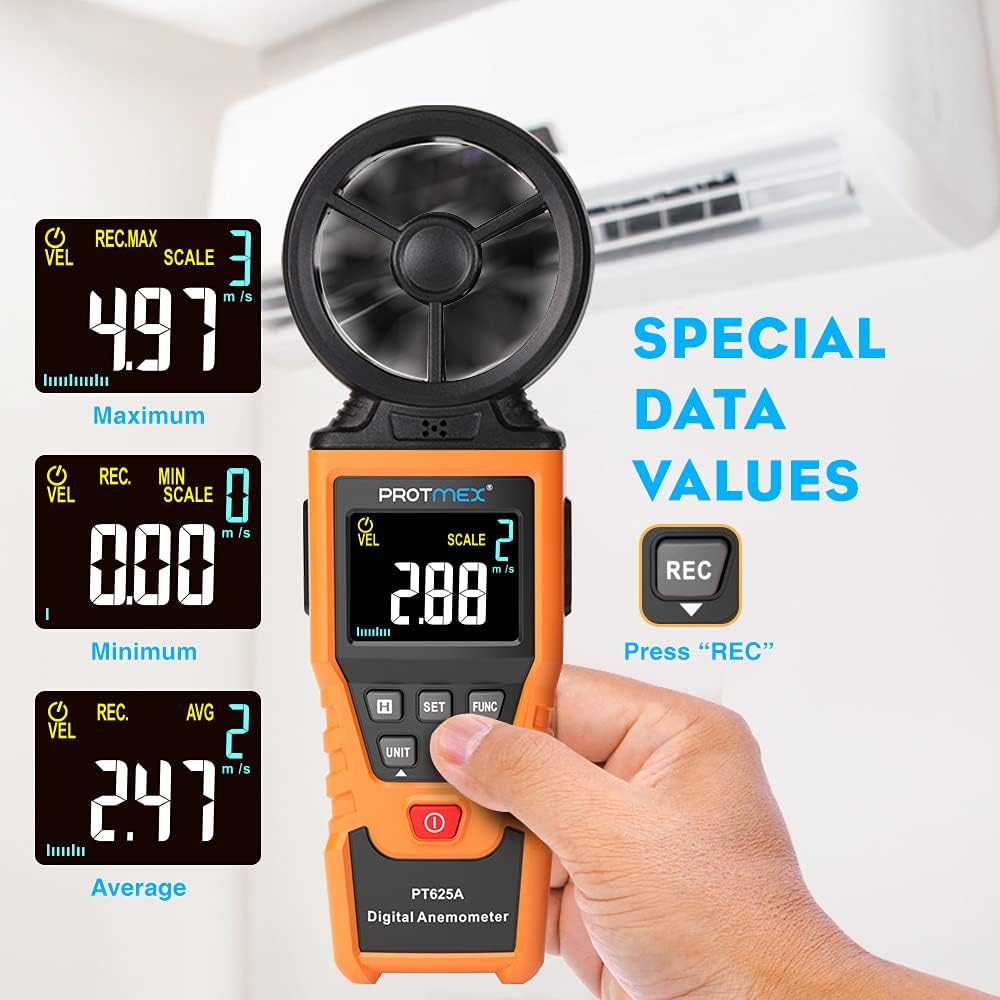
Figure 5: The anemometer's display showing maximum, minimum, and average wind velocity readings, accessible via the dedicated buttons.
5. Údržba
- Udržujte zařízení čisté a suché. Otírejte měkkým,amp tkanina. Nepoužívejte abrazivní čisticí prostředky nebo rozpouštědla.
- Ensure the fan blades are free from dust and debris to maintain measurement accuracy.
- Pokud se přístroj delší dobu nepoužívá, vyjměte baterii, abyste zabránili jejímu vytečení.
- Store the anemometer in its protective case in a cool, dry place.
6. Řešení problémů
- Žádný displej/zařízení se nezapíná:
- Zkontrolujte, zda je baterie správně vložena se správnou polaritou.
- Vyměňte baterii, pokud je slabá nebo vybitá.
- Nepřesná čtení:
- Ensure the fan blades are clean and spinning freely.
- Verify that the sensor is pointed directly into the airflow.
- Check if the correct measurement unit is selected.
- For airflow measurements, confirm the air duct area setting is accurate.
- Tlačítka nereagují:
- Turn the device off and then on again.
- Vyměňte baterii.
7. Specifikace
| Parametr | Hodnota |
|---|---|
| Rozsah rychlosti větru | 0.4~40 m/s |
| Jednotky rychlosti větru | m/s, km/h, ft/s, knots, mil/h, fp/m |
| Air Volume Units | CFM, CMM, CMS |
| Sampčas ling | Approx. 0.5s/time |
| Maximální zobrazovaná hodnota | 9999 |
| Napájení | 9V baterie |
| Rozměry (D x Š x V) | 8.85 x 4.52 x 1.77 palce |
| Hmotnost položky | 10 unce |
| Materiál | Pryž |

Figure 6: A detailed screen introduction showing various symbols and their descriptions, including MAX, MIN, AVG, VEL, FLOW, AREA, and different units of measurement.
8. Záruka a podpora
Protmex products are designed for quality and reliability. For any issues or support, please refer to the contact information provided with your purchase or visit the official Protmex website. The product is CE (LVE, EMC), RoHS approved.
Protmex offers 24/7 online friendly support. Your satisfaction is our priority.