
Zavedení
This manual provides comprehensive instructions for the Zerone RM-YD038 Universal Remote Control. This remote is designed as a replacement for various models, including RM-YD033, RM-ED040, RM-YD034, and RM-YD035, and is compatible with specific TV models such as KDL32EX500, KDL55HX729, and KDL40EX723. Please read this manual carefully to ensure proper setup and operation of your new remote control.
1. Nastavení
1.1 Instalace baterie
The Zerone RM-YD038 remote control requires two (2) AAA batteries (sold separately) for operation. Follow these steps to install the batteries:
- Najděte přihrádku na baterie na zadní straně dálkového ovladače.
- Stiskněte jazýček a posuňte kryt baterie dolů, abyste jej otevřeli.
- Vložte dvě baterie typu AAA a ujistěte se, že kladný (+) a záporný (-) pól správně shodují s označením uvnitř přihrádky.
- Zasuňte kryt baterie zpět na místo, dokud bezpečně nezapadne.

Obrázek 1: Přihrádka na baterie s odstraněným krytem, připravená pro vložení baterií AAA.
1.2 První použití
No programming or setup is required for this universal remote control. Once the batteries are correctly installed, the remote is ready for immediate use with compatible devices.
2. Návod k obsluze
The Zerone RM-YD038 remote control features a standard layout for easy navigation and control of your television. Below is an overview of key functions:
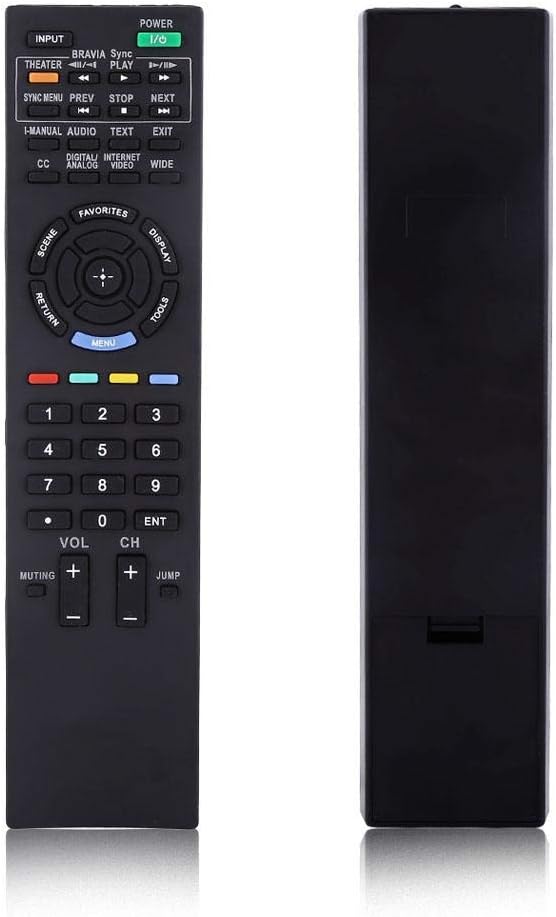
Obrázek 2: Přední strana view of the Zerone RM-YD038 Remote Control.
- Tlačítko napájení (Green, top right): Turns the television on or off.
- Vstupní tlačítko (Top left): Cycles through available input sources (HDMI, AV, etc.).
- Navigační klíč (Circular pad in the middle): Used for menu navigation. The central button typically acts as "Enter" or "OK". This dedicated menu navigation key allows direct access to digital TV functions.
- Zvýšení/snížení hlasitosti (VOL +/-): Adjusts the audio volume.
- Kanál nahoru/dolů (CH +/-): Changes television channels.
- Tlačítko ztlumení (Muting): Mutes or unmutes the television audio.
- Číselná podložka (0-9): Directly enters channel numbers.
- Tlačítko Menu (Blue, below navigation pad): Accesses the television's main menu.
- Tlačítko Návrat (Left of navigation pad): Returns to the previous screen or menu.
- Ovládací prvky přehrávání (Play, Stop, Pause, Rewind, Fast Forward): Controls media playback if your TV supports it.

Figure 3: The remote control held in hand, showing button layout.

Obrázek 4: Detailní view of the remote's buttons.
3. Údržba
3.1 Čištění
To maintain the remote control's functionality and appearance, clean it regularly:
- K otření povrchu dálkového ovladače použijte měkký, suchý hadřík.
- Pro odolnou špínu lehceampOmyjte hadřík vodou nebo jemným, neabrazivním čisticím prostředkem. Zabraňte nadměrné vlhkosti.
- Nepoužívejte agresivní chemikálie, rozpouštědla ani abrazivní čisticí houbičky, protože by mohly poškodit povrchovou úpravu dálkového ovladače nebo jeho vnitřní součásti.
3.2 Výměna baterie
Replace batteries when the remote's response becomes sluggish or it stops functioning. Refer to Section 1.1 for battery installation instructions. Always replace both batteries at the same time with new AAA batteries.
3.3 Skladování
Pokud se dálkový ovladač delší dobu nepoužívá, doporučuje se baterie vyjmout, aby nedošlo k jejich vytečení a možnému poškození.
4. Řešení problémů
If you experience issues with your Zerone RM-YD038 remote control, please refer to the following common troubleshooting steps:
- Dálkové ovládání nereaguje:
- Ensure batteries are correctly installed with proper polarity (+/-).
- Replace old batteries with new ones. Weak batteries are a common cause of unresponsiveness.
- Zkontrolujte, zda se mezi dálkovým ovladačem a infračerveným přijímačem televizoru nenacházejí nějaké překážky.
- Ujistěte se, že jste v efektivním dosahu a míříte dálkovým ovladačem přímo na televizor.
- Buttons Require Excessive Pressure:
- This can sometimes occur with new remotes or after extended use. Ensure you are pressing the buttons firmly and directly.
- If the issue persists, ensure the remote is clean and free of debris around the buttons.
- Limited Range or Poor Signal:
- Replace batteries, as low battery power can reduce signal strength.
- Ensure there are no strong light sources (like direct sunlight or certain types of lighting) interfering with the IR signal.
- Remote Makes Unusual Sounds:
- If the remote produces unusual sounds, particularly after a fall, it may indicate internal damage. Consider replacing the unit.
Pokud tyto kroky problém nevyřeší, obraťte se na zákaznickou podporu s žádostí o další pomoc.
5. Specifikace
| Funkce | Detail |
|---|---|
| Značka | nula |
| Číslo modelu | RM-YD038 (Internal Model: Zer oneuhiskbndp2) |
| Kompatibilní modely dálkových ovladačů | RM-YD033, RM-ED040, RM-YD034, RM-YD035 |
| Kompatibilní modely televizorů | KDL32EX500, KDL55HX729, KDL40EX723 |
| Zdroj napájení | 2 x AAA baterie (nejsou součástí balení) |
| Hmotnost položky | 2.39 unce (přibližně 67.7 gramů) |
| Speciální funkce | Univerzální náhrada |
| Maximální počet podporovaných zařízení | 1 (Televize) |
| ASIN | B07WCN3S2V |
| Datum první dostupnosti | 12. srpna 2019 |

Figure 5: Dimensions of the Zerone RM-YD038 Remote Control.
6. Záruka a podpora
6.1 Informace o záruce
Specific warranty details for the Zerone RM-YD038 remote control are not provided in this manual. Please refer to the product packaging or the retailer's webna webu, kde naleznete veškeré platné záruční podmínky.
6.2 Zákaznická podpora
For further assistance, technical support, or inquiries regarding your Zerone RM-YD038 remote control, please contact the retailer or manufacturer directly. Contact information can typically be found on the product packaging or the official Zerone webmísto.