
1. Úvod
This manual provides essential information for the setup, operation, maintenance, and troubleshooting of your Blackmagic Design Pocket Cinema Camera 6K. Designed for professional filmmaking, this camera features a 6144 x 3456 Super 35 sensor and a Canon EF lens mount, offering exceptional image quality and flexibility.

Obrázek 1: Přední strana view of the Blackmagic Design Pocket Cinema Camera 6K, highlighting the EF lens mount.
2. Nastavení
2.1 Nasazení objektivu
The camera is equipped with a Canon EF lens mount. Align the red dot on your EF lens with the red dot on the camera's lens mount and twist clockwise until it clicks into place. Ensure the lens is securely fastened before operation.
2.2 Vkládání paměťových médií
The camera supports SD UHS-II and CFast card recorders. Locate the card slots on the side of the camera. Insert your chosen media card with the contacts facing inwards until it locks into place.
2.3 Napájení kamery
The camera operates on a compatible battery (not included with this variant) or external power. Connect an external power source to the 12V DC input port. For extended shooting, external battery packs are recommended due to the camera's power consumption.

Obrázek 2: Strana view of the camera, illustrating the HDMI, USB-C, and audio input ports.
3. Návod k obsluze
3.1 User Interface and Controls
The camera features a built-in 5-inch touchscreen for intuitive menu navigation and settings adjustment. Physical buttons for common functions are located on the top and back of the camera for quick access.
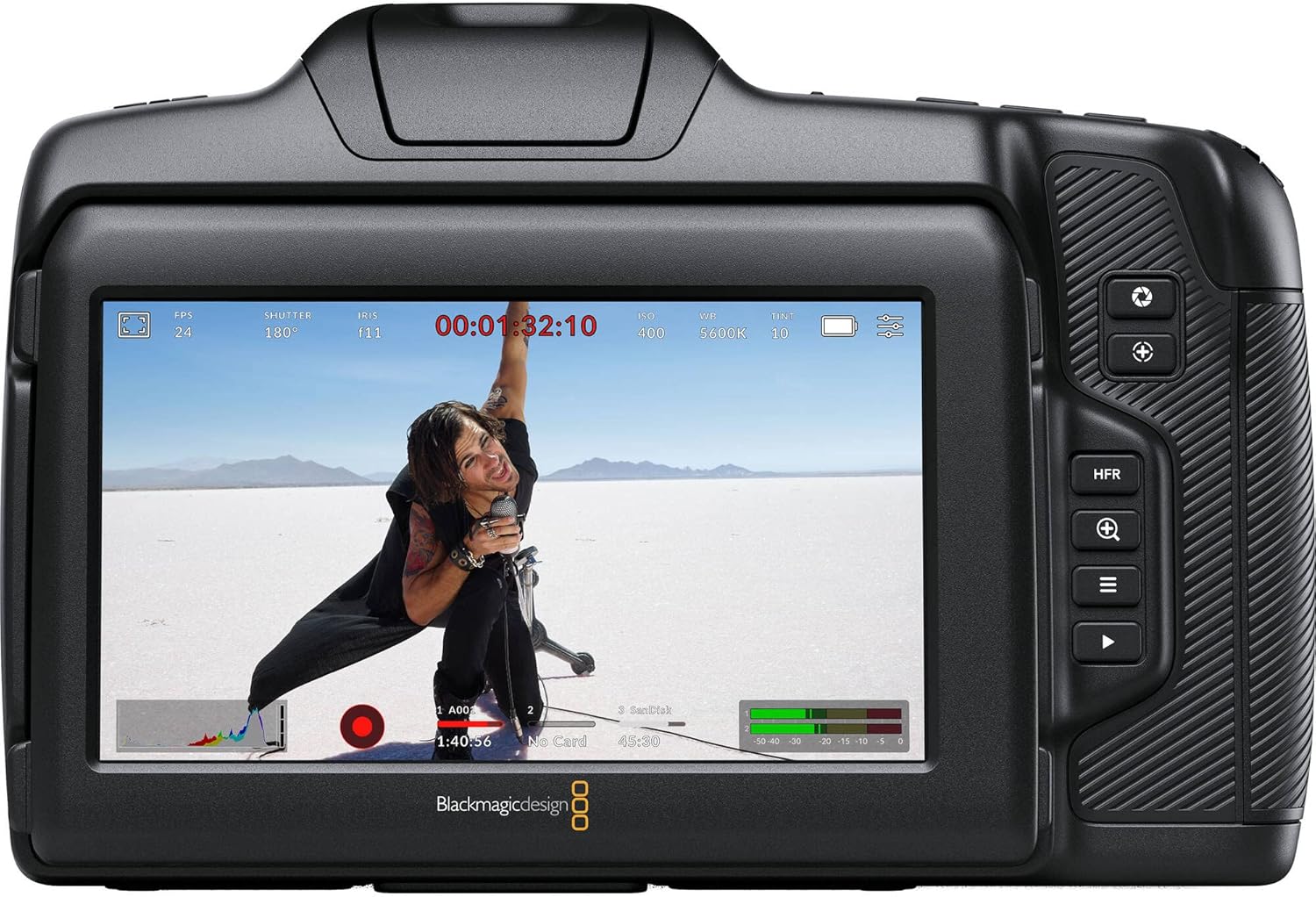
Obrázek 3: Zadní view of the camera, displaying the 5-inch touchscreen and dedicated control buttons.
3.2 Nastavení nahrávání
The camera supports various shooting resolutions and frame rates:
- 6144 x 3456 (6K): Až 50 fps
- 6144 x 2560 (6K 2.4:1): Až 60 fps
- 5744 x 3024 (5.7K 17:9): Až 60 fps
- 4096 x 2160 (4K DCI): Až 60 fps
- 3840 x 2160 (Ultra HD): Až 60 fps
- 3728 x 3104 (3.7K 6:5 anamorphic): Až 60 fps
- 2868 x 1512 (2.8K 17:9): Až 120 fps
- 1920 x 1080 (HD): Až 120 fps
The camera records in high-quality Blackmagic RAW and ProRes formats, offering extensive flexibility in post-production. The intuitive menu allows for easy selection of codecs and sensor usage.
3.3 Exposure and Color Control
The Pocket Cinema Camera 6K offers a wide 13 stops of dynamic range for film-like looks and excellent low-light performance with an expanded ISO range up to 25600. White balance settings are customizable. Exposure control can be set to automatic or manual.
3.4 Zaměření
The camera utilizes Contrast Detection Autofocus. For precise control, manual focus is often preferred, especially in professional filmmaking environments. The camera's large screen aids in accurate focusing.
3.5 Zvuk a připojení
Built-in microphones are available, but for professional audio, external audio sources are recommended via the mini XLR audio inputs. Video output is available via HDMI Type A, and data transfer/control is possible through the USB-C port.
Video 1: Stručný přehledview of the Blackmagic Design Pocket Cinema Camera 6K's user interface and key features, demonstrating menu navigation and settings adjustments.
4. Údržba
4.1 Péče o senzor
To maintain optimal image quality, regularly check the sensor for dust or debris. If dead pixels appear, the camera features a Pixel Remapping function. To perform this, ensure the lens cap is on to fully eliminate light, then activate the function through the camera's menu. Refer to the on-screen prompts for detailed steps.
4.2 Chladicí systém
The camera includes an internal fan for cooling during operation. While the fan may produce some noise, it is essential for maintaining optimal operating temperatures, especially during prolonged recording sessions or in warm environments.
5. Řešení problémů
5.1 Krátká výdrž baterie
The Blackmagic Design Pocket Cinema Camera 6K is known for its high power consumption, resulting in relatively short battery life with standard camera batteries. It is highly recommended to use external battery packs (e.g., V-mount or Gold-mount batteries with a D-Tap to DC cable) or mains power for extended shoots.
5.2 Přehřátí
In rare cases, the camera may overheat and shut down, particularly during long recording sessions in high ambient temperatures. Ensure the camera's fan vents are unobstructed and consider using external cooling solutions if operating in extreme conditions.
5.3 Autofocus Limitations
The camera's Contrast Detection Autofocus is not designed for fast-paced, continuous autofocus tracking. For critical focus, especially in dynamic scenes, manual focus or external follow-focus systems are recommended.
6. Specifikace
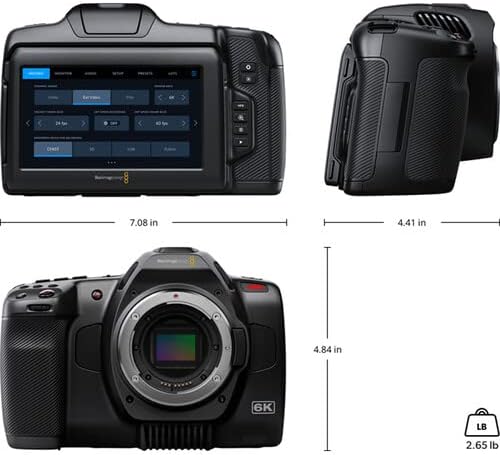
Figure 4: Physical dimensions of the Blackmagic Design Pocket Cinema Camera 6K.
| Funkce | Detail |
|---|---|
| Název modelu | CINECAMPOCHDEF6K |
| Effective Sensor Size | 23.10 x 12.99 mm (Super 35) |
| Držák objektivu | Active EF Mount |
| Dynamický rozsah | 13 Zastávky |
| Duální nativní ISO | 400 a 3200 |
| Shooting Resolutions | Up to 6144 x 3456 (6K) at 50 fps |
| Paměťová média | SD UHS-II, CFast 2.0 |
| Video výstupy | 1x HDMI typu A |
| Audio vstupy | 2x Mini XLR, 1x 3.5mm Stereo |
| Rozhraní USB | 1x USB-C for external drive recording |
| Velikost obrazovky | 5-inch LCD with touchscreen |
| Bezdrátové ovládání | Bluetooth |
| Hmotnost | 900 gramů |
7. Záruka a podpora
This product is covered by a manufacturer's warranty. For specific details regarding warranty duration, coverage, and claims, please refer to the documentation provided with your purchase or visit the official Blackmagic Design support website. Technical support and service information can also be found on the manufacturer's webmísto.