
Insize 9501-1200
Insize Coating Thickness Gauge 9501-1200
Uživatelská příručka
1. Konec produktuview
The Insize Coating Thickness Gauge 9501-1200 is a precision instrument designed for non-destructive measurement of coating thickness. It is capable of measuring both non-magnetic coatings on magnetic substrates (ferrous, Fe) and non-conductive coatings on non-magnetic substrates (non-ferrous, NFe). This gauge is widely used in manufacturing, quality control, and inspection processes to ensure proper coating application.
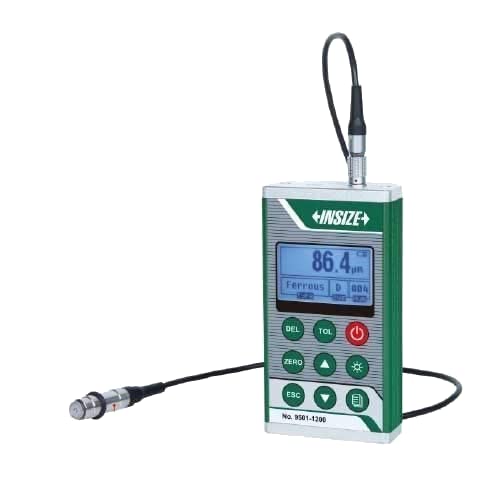
Figure 1: Insize Coating Thickness Gauge 9501-1200. The image shows the compact, handheld device with a digital display, control buttons, and a connected measurement probe.
2. Bezpečnostní informace
- Always handle the gauge and probes with care to prevent damage.
- Nevystavujte zařízení extrémním teplotám, vlhkosti ani korozivnímu prostředí.
- Zabraňte pádu přístroje nebo jeho vystavení silným nárazům.
- Keep the device away from strong magnetic fields, which can affect measurement accuracy.
- Ujistěte se, že jsou baterie správně vloženy, a použité baterie zlikvidujte zodpovědně.
- Nepokoušejte se jednotku rozebírat ani opravovat sami. Obraťte se na kvalifikovaný servisní personál.
3. Product Components and Standard Delivery
The Insize Coating Thickness Gauge 9501-1200 comes with the following standard components:
- Main unit (1 pc)
- Magnetic induction probe (Fe) (1 pc)
- Eddy current probe (NFe) (1 pc)
- Zero calibration block for Fe (1 pc)
- Calibration foils (50μm, 100μm, 250μm, 500μm, 1000μm) (1 set)
- 1.5V AA battery (2 pcs)
- USB cable and software (1 set)
Optional accessories are also available for specialized applications, such as different types of probes for specific measurement needs.
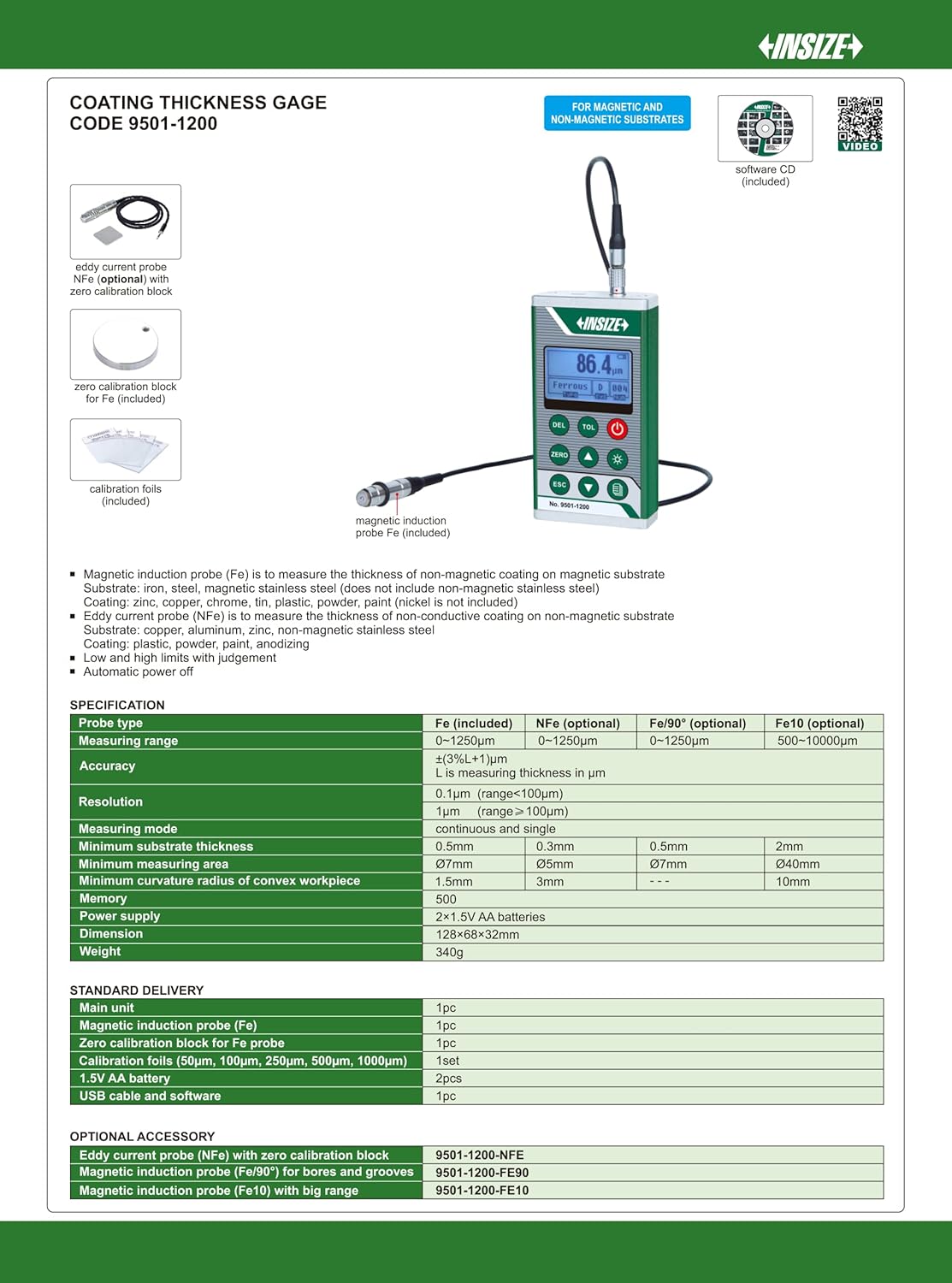
Figure 2: Diagram showing the main unit, various probes (magnetic induction and eddy current), zero calibration block, and calibration foils. This image also details the standard delivery items and optional accessories.
4. Nastavení
4.1 Instalace baterie
- Vyhledejte přihrádku na baterie na zadní straně měřidla.
- Otevřete kryt baterie.
- Insert two 1.5V AA batteries, ensuring correct polarity (+/-).
- Pevně zavřete kryt baterie.
4.2 Připojení sondy
Connect the desired measurement probe (Fe or NFe) to the probe port on the top of the main unit. Ensure the connector is firmly seated.
4.3 Zapnutí/vypnutí
Stiskněte tlačítko Moc button (red button) to turn the gauge on. Press and hold the Moc opětovným tlačítkem jej vypnete.
4.4 Initial Calibration (Zero Calibration)
Before first use or after changing probes, perform a zero calibration:
- Ensure the probe is clean.
- Place the probe firmly and flatly on the corresponding zero calibration block (e.g., Fe probe on Fe zero block).
- Stiskněte tlačítko NULA button. The display should show "0.0" or a value very close to zero.
- Repeat for the NFe probe and its respective zero block if applicable.
4.5 Calibration with Foils
For accurate measurements, especially when measuring different materials or ranges, calibrate using the provided calibration foils:
- Place a calibration foil (e.g., 100μm) on the zero calibration block.
- Place the probe firmly on the foil.
- Adjust the reading to match the foil's thickness using the up/down arrow buttons.
- Repeat with other foils as needed to cover the expected measurement range.
5. Návod k obsluze
5.1 Základní měření
- Ensure the gauge is powered on and calibrated.
- Select the appropriate probe (Fe for magnetic substrates, NFe for non-magnetic substrates). The gauge typically auto-detects the substrate type.
- Place the probe gently and perpendicularly onto the coated surface to be measured.
- The measurement reading will appear on the display. Hold the probe steady until the reading stabilizes.
- Lift the probe from the surface to take another measurement.
5.2 Režimy měření
The gauge supports different measurement modes:
- Režim jednoho měření: Takes one reading each time the probe is applied.
- Continuous Measurement Mode: Allows for continuous readings as the probe is moved across the surface. This is useful for scanning larger areas. Refer to the specific button on your device (often indicated by an icon) to switch between modes.
5.3 Ukládání a vyvolání dat
The gauge has internal memory to store measurement data. Use the designated buttons (e.g., MEM or similar icon) to save readings and recall them later. Consult the on-screen icons for navigation.
5.4 Tolerance Setting
The gauge allows setting upper and lower tolerance limits. If a measurement falls outside these limits, the gauge may provide an audible or visual alert. Use the TOL button to access and adjust tolerance settings.
5.5 Podsvícení
Stiskněte tlačítko Světlo button (often with a lightbulb icon) to turn the display backlight on or off for improved visibility in low-light conditions.
6. Údržba
6.1 Čištění
- Hlavní jednotku otřete měkkým, suchým hadříkem. Nepoužívejte abrazivní čisticí prostředky ani rozpouštědla.
- Keep the probe tip clean and free of debris. Use a soft cloth or cotton swab. Do not scratch the probe surface.
6.2 Výměna baterie
When the low battery indicator appears on the display, replace the batteries promptly to ensure accurate readings and prevent data loss. Refer to section 4.1 for battery installation instructions.
6.3 Skladování
Store the gauge and its accessories in the provided carrying case in a dry, dust-free environment, away from direct sunlight and extreme temperatures.
6.4 Kalibrační frekvence
Regular calibration is crucial for maintaining accuracy. It is recommended to perform zero calibration before each use or when changing measurement conditions. Full calibration with foils should be done periodically, or if you suspect inaccurate readings.
7. Řešení problémů
| Problém | Možná příčina | Řešení |
|---|---|---|
| Měřidlo se nezapne. | Vybité nebo nesprávně vložené baterie. | Vyměňte baterie nebo zkontrolujte polaritu. |
| Nepřesné údaje. | Probe tip dirty; improper calibration; incorrect substrate type selected; strong magnetic interference. | Clean probe tip; perform zero and foil calibration; ensure correct probe/mode for substrate; move away from magnetic sources. |
| Displej zobrazuje „Err“ nebo „OL“. | Measurement out of range; probe not properly seated; sensor error. | Ensure measurement is within specified range; re-seat probe; re-calibrate. If error persists, contact support. |
| Žádná odezva od tlačítek. | Zařízení zamrzlo; slabá baterie. | Vypněte a znovu zapněte; vyměňte baterie. |
8. Specifikace
| Parametr | Fe (Magnetic) | NFe (Non-Magnetic) |
|---|---|---|
| Rozsah měření | 0-1250μm | 0-1250μm |
| Přesnost | ±(3% + 1μm) | |
| Rezoluce | 0.1μm (range < 100μm), 1μm (range ≥ 100μm) | |
| Režim měření | Continuous and single | |
| Minimální tloušťka podkladu | 0.5 mm | 0.3 mm |
| Minimální měřicí plocha | Ø 7 mm | Ø 5 mm |
| Minimum Curvature Radius of Convex Workpiece | 1.5 mm | 3 mm |
| Paměť | 500 přečtení | |
| Napájení | 2x 1.5V AA baterie | |
| Dimenze | 128×60×32 mm | |
| Hmotnost | 340 g | |
Note: Specifications are subject to change without notice. Refer to the product packaging or manufacturer's webstránky s nejaktuálnějšími informacemi.
9. Záruka a podpora
Warranty information for the Insize Coating Thickness Gauge 9501-1200 is typically provided with your purchase documentation or can be found on the official Insize webstránky. Uschovejte si prosím doklad o koupi pro případ reklamace.
For technical support, service, or inquiries regarding optional accessories, please contact your local Insize distributor or visit the official Insize webstránky pro kontaktní informace.
Manufacturer: INSIZE
Date First Available: 4 September 2019
Ask a question about this manual
Ask about setup, troubleshooting, compatibility, parts, safety, or missing instructions. Manuals+ will review the question and use this page’s manual context to help answer it.