
1. Konec produktuview
The Acer Predator Cestus 310 is a gaming mouse designed for precision and comfort. Its ergonomic design supports a palm grip, reducing strain during extended use. Key features include adjustable DPI settings, durable mechanical switches, and customizable LED backlighting.
Klíčové vlastnosti
- Nastavitelné DPI: On-the-fly switching between 800, 1600, 2600, and 4200 DPI for varied gaming performance.
- LED podsvícení: Features 4 colored LED breath lights in the scroll wheel and logo.
- Odolné spínače: Mechanical switches rated for up to 10 million clicks.
- Ergonomický design: Optimized for a comfortable palm grip.
- Kabelové připojení: USB connection with a 5.9-foot braided cable.
Rozložení myši

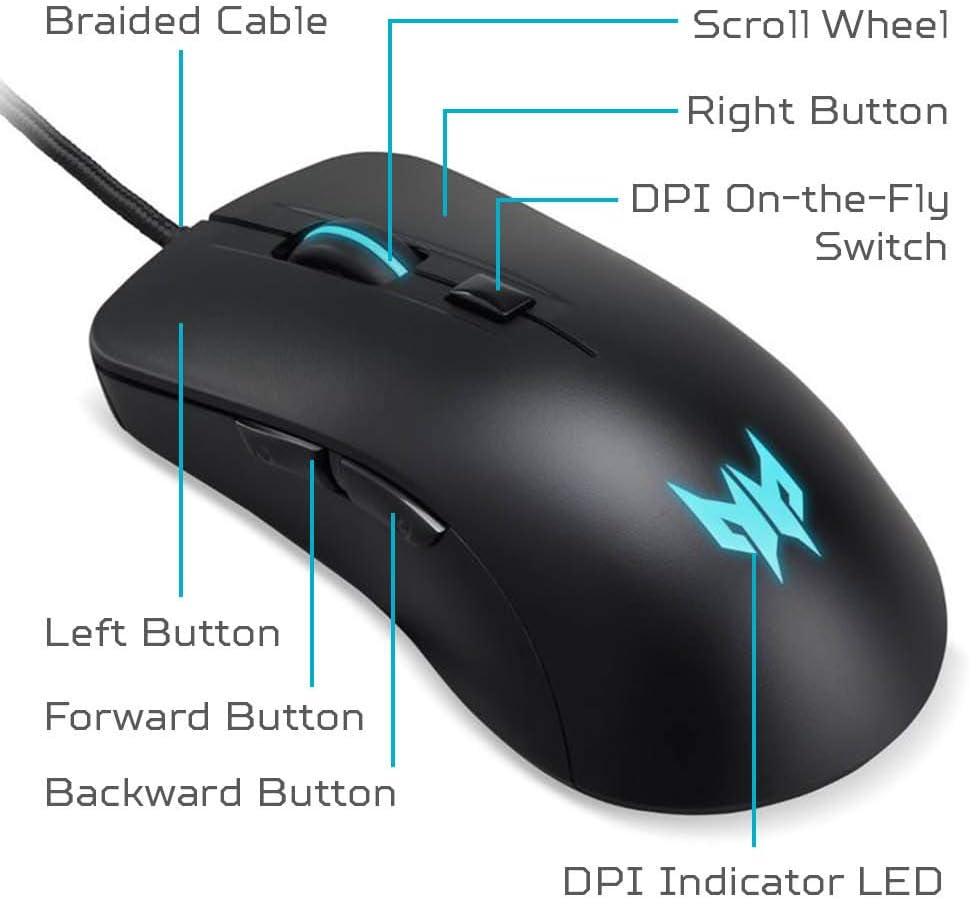
The image above illustrates the main components of the Cestus 310 mouse, including the braided USB cable, scroll wheel, left and right click buttons, DPI on-the-fly switch, forward and backward side buttons, and the DPI indicator LED.
2. Nastavení
Připojení myši
- Vyhledejte v počítači volný port USB.
- Plug the USB connector of the Acer Predator Cestus 310 Gaming Mouse into the USB port.
- The operating system (Windows or Mac) will automatically detect and install the necessary drivers. No additional software installation is required for basic functionality.
- Once installed, the mouse is ready for use. The LED backlighting will illuminate.
Ensure the USB cable is securely connected to your computer for optimal performance.
3. Návod k obsluze
Úprava DPI
The Acer Predator Cestus 310 features an on-the-fly DPI switch located behind the scroll wheel. Press this button to cycle through four preset DPI (Dots Per Inch) sensitivity levels:
- 800 DPI: Suitable for precise movements.
- 1600 DPI: Standardní citlivost pro všeobecné použití.
- 2600 DPI: Zvýšená citlivost pro rychlejší pohyb kurzoru.
- 4200 DPI: Highest sensitivity for rapid movements in gaming.

The DPI indicator LED will change color or pattern to reflect the current DPI setting, though specific color mapping is not user-configurable.
Funkce tlačítek
- Levé tlačítko: Primární funkce kliknutí.
- Pravé tlačítko: Funkce sekundárního kliknutí (kontextová nabídka).
- Rolovací kolečko: Posouvá obsah nahoru nebo dolů. Lze také stisknout pro funkci kliknutí prostředním tlačítkem myši.
- DPI On-the-Fly Switch: Cykluje mezi přednastavenými úrovněmi DPI.
- Tlačítko vpřed (boční): Naviguje vpřed web prohlížeče popř file průzkumníci.
- Tlačítko Zpět (Boční): Naviguje zpět web prohlížeče popř file průzkumníci.
LED osvětlení
The mouse features a breathing LED backlight in the scroll wheel and the Predator logo. The lighting cycles through 4 different colors. There is no software control for customizing the LED colors or effects; they operate automatically.

The LED lighting provides visual feedback and enhances the aesthetic of the mouse during operation.
4. Údržba
Čištění a péče
- Čištění povrchu: K otření povrchu myši použijte měkký, suchý hadřík, který nepouští vlákna. V případě odolné nečistoty lehceamphadřík vodou. Nepoužívejte agresivní chemikálie ani abrazivní čisticí prostředky.
- Cleaning the Optical Sensor: Periodically inspect the optical sensor on the underside of the mouse for dust or debris. Use a cotton swab or compressed air to gently clean the sensor area.
- Péče o kabely: Avoid sharply bending or twisting the USB cable to prevent internal damage. Store the mouse with the cable neatly coiled.
- Skladování: Pokud myš nepoužíváte, skladujte ji v čistém a suchém prostředí mimo dosah extrémních teplot.
5. Řešení problémů
If you encounter issues with your Acer Predator Cestus 310 Gaming Mouse, refer to the following common problems and solutions:
| Problém | Možné řešení |
|---|---|
| Myš nereaguje. |
|
| Pohyb kurzoru je nepravidelný nebo trhaný. |
|
| LED světla nefungují. |
|
| Buttons are not clicking properly. |
|
6. Technické specifikace
| Funkce | Detail |
|---|---|
| Značka | Acer |
| Název modelu | PMW910 (Cestus 310) |
| Technologie připojení | Kabelové USB |
| Délka kabelu | 5.9 stop (přibližně 1.8 metry) |
| Technologie detekce pohybu | Optical (Pixart 3519 Sensor) |
| Citlivost DPI | 800 / 1600 / 2600 / 4200 DPI (On-the-fly adjustable) |
| Rychlost sledování | 48 IPS (palců za sekundu) |
| Množství tlačítek | 6 (Left, Right, Scroll Click, DPI Switch, Forward, Backward) |
| Trvanlivost přepínače | Až 10 miliony kliknutí |
| Orientace rukou | Obouruký |
| Speciální funkce | Breathing Backlit LED (4 colors), Ergonomic Grip |
| Barva | Černý |
| Hmotnost položky | 133 gramů |
| Kompatibilní operační systémy | Windows, Mac |
| Zdroj napájení | Napájení přes USB (nejsou potřeba žádné baterie) |
| Číslo dílu výrobce | NP.MCE11.00U |
| UPC | 193199246387 |
7. Záruka a podpora
Informace o záruce
The Acer Predator Cestus 310 Gaming Mouse comes with a Jednoletá omezená záruka na díly a práci from the date of purchase. Please retain your proof of purchase for warranty claims. This warranty covers manufacturing defects and workmanship under normal use.
For full warranty terms and conditions, please refer to the warranty card included with your product or visit the official Acer support webmísto.
Zákaznická podpora
For technical assistance, troubleshooting beyond this manual, or warranty service, please contact Acer customer support. You can find contact information and additional resources on the official Acer webmísto:
Acer Official Webmísto: www.acer.com/support
When contacting support, please have your product model (PMW910) and serial number (if applicable) ready.