
1. Úvod
1.1 Konec produktuview
The Dacom GF7 TWS (True Wireless Stereo) Bluetooth Headset offers a compact and lightweight audio solution. Designed for wireless freedom, these earbuds feature Bluetooth 4.2 technology for stable connectivity and clear sound. The intelligent charging case provides convenient power on the go, ensuring your earbuds are ready when you are.

Image: Dacom GF7 TWS True Wireless Bluetooth Headset, showing both earbuds securely placed within their charging case. The case is open, revealing the earbuds and charging indicators.
1.2 Co je v krabici
Po vybalení zkontrolujte obsah balení:
- 2 x Dacom GF7 Headsets (Main and Subsidiary Earbuds)
- 1 x nabíjecí box
- 1 x USB nabíjecí kabel
- 2 x Earbud Tips (Pairs)
- 1 x přenosná taška
- 1 x Uživatelská příručka (Tento dokument)
2. Bezpečnostní informace
- Nevystavujte zařízení extrémním teplotám nebo vlhkosti.
- Zabraňte pádu zařízení nebo jeho vystavení silným nárazům.
- Nerozebírejte ani se nepokoušejte zařízení sami opravovat. Ztratíte tak záruku.
- Udržujte zařízení mimo dosah vody a jiných kapalin.
- Use only the provided charging cable and a compatible power source.
- Dlouhodobé vystavení hlasitým zvukům může způsobit poškození sluchu. Upravte hlasitost na střední úroveň.
3. Nastavení
3.1 Charging the Headset and Charging Box
Before first use, fully charge both the earbuds and the charging box.
- Place the earbuds into the charging box. Ensure they are correctly seated to initiate charging.
- Connect the USB charging cable to the charging box's port and the other end to a USB power adapter (not included) or a computer's USB port.
- The indicator lights on the charging box and earbuds will show charging status. Refer to the image below for visual guidance.
- Po úplném nabití odpojte nabíjecí kabel.
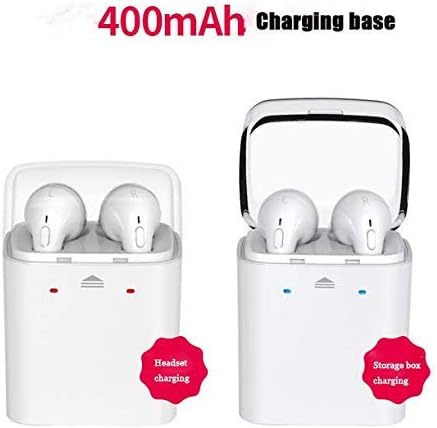
Image: Illustration of the Dacom GF7 TWS charging process. The left side shows earbuds charging within the case, indicated by red lights. The right side shows the charging case itself being charged, indicated by blue lights, with a label for its 400mAh capacity.
3.2 Párování se zařízením Bluetooth
The Dacom GF7 uses True Wireless Technology for seamless pairing. Follow these three steps:
- Krok 1: Zapněte napájení
Remove both earbuds from the charging box. They will automatically power on and attempt to connect to each other. You will hear an audible prompt indicating they are connected. - Step 2: Activate Bluetooth
Na smartphonu nebo zařízení s podporou Bluetooth přejděte do nastavení Bluetooth a ujistěte se, že je Bluetooth zapnutý. - Krok 3: Připojte se
Hledat available devices. Select "GF7" (or similar, e.g., "Dacom GF7") from the list. Once connected, you will hear a confirmation prompt.
Poznámka: If pairing fails, place the earbuds back into the charging case, close the lid, then reopen and try again. For single earbud use, simply remove one earbud from the case and pair it as described above.
4. Návod k obsluze
4.1 Multi-functional Button Controls
Each earbud features a multi-functional button for easy control of music and calls.

Image: A close-up of a hand interacting with the multi-functional button on a Dacom GF7 TWS earbud, illustrating how to press the button for control.
| Funkce | Akce |
|---|---|
| Zapnout | Remove from charging case (automatic) or long press button. |
| Vypnout | Place in charging case (automatic) or long press button. |
| Přehrát/Pozastavit hudbu | Single press button. |
| Přijmout/ukončit hovor | Single press button during an incoming call or active call. |
| Odmítnout hovor | Long press button during an incoming call. |
| Další stopa | Double press button (may vary by earbud/device). |
| Ovládání hlasitosti | Volume is controlled via the connected device. |
4.2 Nošení sluchátek do uší
Gently insert the earbuds into your ears. Adjust them for a comfortable and secure fit. The correct fit helps optimize sound quality and noise isolation.
5. Údržba
5.1 Čištění
- K čištění sluchátek a nabíjecího pouzdra použijte měkký, suchý hadřík, který nepouští vlákna.
- Nepoužívejte abrazivní čisticí prostředky, alkohol ani chemická rozpouštědla.
- Regularly clean the earbud tips and charging contacts to ensure proper function and hygiene.
5.2 Skladování
When not in use, store the earbuds in their charging case to protect them and keep them charged. Store the device in a cool, dry place, away from direct sunlight and extreme temperatures.
6. Řešení problémů
| Problém | Možné řešení |
|---|---|
| Sluchátka se k sobě nespárují. | Vložte obě sluchátka zpět do nabíjecího pouzdra, zavřete víko, počkejte několik sekund a poté je znovu vyjměte. Měla by se automaticky propojit. |
| Sluchátka se nepřipojují k zařízení. |
|
| Žádný zvuk nebo nízká hlasitost. |
|
| Problémy s nabíjením. |
|
7. Specifikace
| Funkce | Detail |
|---|---|
| Model | GF7 |
| Verze Bluetooth | V4.2 |
| Velikost ovladače | 8 mm |
| Impedance | 16 ohmů |
| Pracovní svtage | 3.2V-4.2V |
| Citlivost | -42 dB ± 2 dB |
| Frekvenční rozsah | 2.4-2.48 GHz |
| Bezdrátová vzdálenost | <10m (otevřený prostor) |
| Bluetooth Profiles | A2DP/AVRCP |
| Kompatibilita | Zařízení s podporou Bluetooth |
| Kapacita nabíjecího pouzdra | 400 XNUMX mAh |
| Kontrola hluku | Active Noise Cancellation (Note: Feature listed in specifications, actual performance may vary.) |
8. Záruka a podpora
8.1 Informace o záruce
Dacom products are designed and manufactured to the highest quality standards. For specific warranty terms and conditions, please refer to the warranty card included with your purchase or contact Dacom customer support. The warranty typically covers manufacturing defects for a specified period from the date of purchase.
8.2 Zákaznická podpora
If you encounter any issues or have questions regarding your Dacom GF7 TWS Headset, please contact Dacom customer support. Contact information can usually be found on the official Dacom webmístě nebo na obalu produktu.