
1. Úvod
Děkuji za nákupasing the Bewinner Portable Remote Control. This device is designed to provide convenient control over your PC or laptop's media functions, allowing you to navigate applications, play media, and execute custom shortcuts from a distance. This manual provides detailed instructions for setup, operation, maintenance, and troubleshooting to ensure optimal performance.

The Bewinner Portable Remote Control is designed for ease of use and portability, allowing you to control your PC media from a comfortable distance.
2. Bezpečnostní informace
Přečtěte si prosím a dodržujte tyto bezpečnostní pokyny, abyste předešli poškození produktu nebo zranění:
- Do not expose the remote control or USB receiver to water or excessive moisture.
- Zabraňte pádu zařízení nebo jeho vystavení silným nárazům.
- Nepokoušejte se dálkový ovladač rozebírat ani upravovat. Ztratíte tak záruku.
- Udržujte baterie mimo dosah dětí. Při požití okamžitě vyhledejte lékařskou pomoc.
- Použité baterie zlikvidujte v souladu s místními předpisy.
- Při instalaci dbejte na správnou polaritu baterie.
3. Obsah balení
Ověřte, zda jsou v balení přítomny všechny položky:
- 1 x Bewinner Portable Remote Control
- 1 x USB Infrared Receiver
- Note: 2 x AAA batteries are NOT included and must be purchased separately.
4. Konec produktuview
The Bewinner Portable Remote Control features a slim design with various buttons for comprehensive PC control.

Přední view of the remote control, highlighting its button layout.
Funkce tlačítek:
- Vypínač: Turns the computer on or off (requires system configuration).
- Tlačítko myši: Activates/deactivates mouse mode for cursor control using directional keys.
- Directional Keys (Up, Down, Left, Right): Navigation in menus, web pages, or mouse cursor movement.
- Tlačítko Enter: Potvrzuje výběr.
- Zvýšení/Snížení hlasitosti: Upravuje hlasitost systému.
- Ztlumit: Vypne/zapne zvuk.
- Play/Pause, Stop, Previous/Next Track: Ovládací prvky přehrávání médií.
- Celá obrazovka: Toggles full-screen mode for media players.
- My PC: Opens 'This PC' or 'My Computer'.
- Backspace: Performs a backspace action.
- Page Up/Down: Posouvá stránky.
- Karta: Performs a tab action.
- Esc: Escapes current action or closes menus.
- Desktop: Minimizes all windows to show the desktop.
- Numlock: Toggles numeric keypad functionality.
- Číselné klávesy (0-9): Zadejte čísla.
- Custom Shortcut Keys (A, B, C, D): Programmable keys for launching applications.

Detailní view of the top section of the remote, including power and custom shortcut buttons.

Detailní view of the bottom section of the remote, showing numeric and function keys.
5. Nastavení
5.1. Instalace baterie
- Najděte přihrádku na baterie na zadní straně dálkového ovladače.
- Posuňte kryt baterie dolů a otevřete jej.
- Vložte dvě baterie AAA a dbejte na správnou polaritu (+ a -).
- Replace the battery cover by sliding it back into position until it clicks.
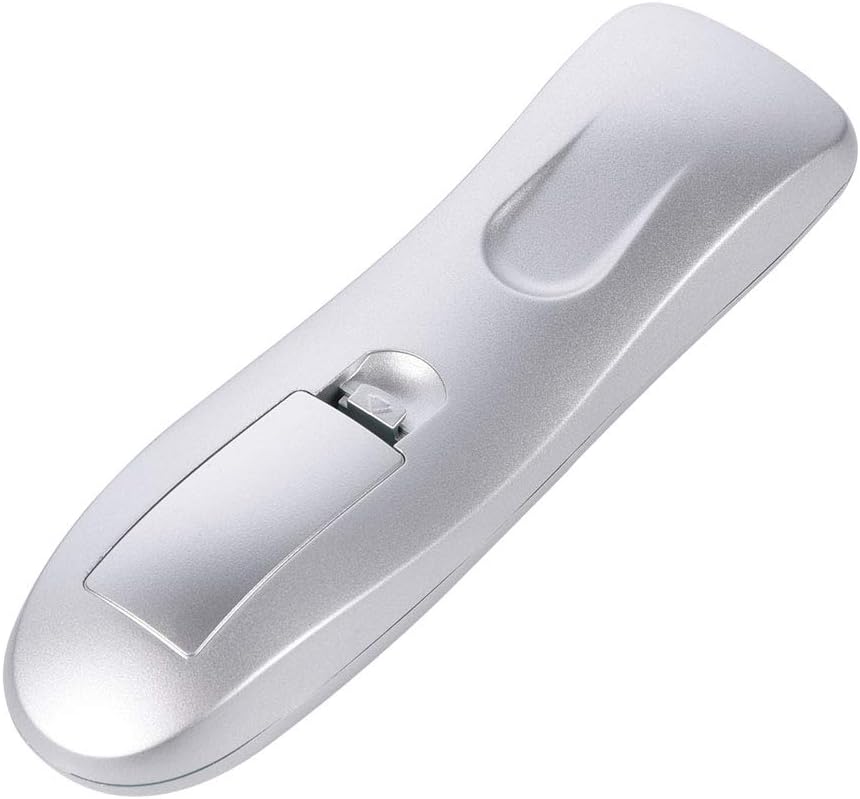
Chcete-li vložit baterie, otevřete přihrádku na baterie.

Ujistěte se, že je kryt baterie po instalaci bezpečně uzavřen.
5.2. Connecting the USB IR Receiver
- Vyhledejte volný USB port na vašem počítači nebo notebooku.
- Plug the USB Infrared Receiver into the USB port.
- The operating system (Windows 98/ME/XP/MCE/Vista/2000 and later) will automatically detect and install the necessary drivers. No manual driver installation is required.
- Once the drivers are installed, the remote control is ready for use.

The remote control and its accompanying USB Infrared Receiver.
6. Návod k obsluze
6.1. Základní ovládání
- Přímé ovládání: Most buttons (e.g., volume, media playback, page navigation) function directly without additional setup.
- Režim myši: Stiskněte tlačítko Myš button to activate cursor control. Use the directional keys to move the cursor. Press the Myš button again to exit mouse mode.
- Přenosová vzdálenost: The remote operates effectively up to 10 meters (approximately 33 feet) from the USB IR receiver. Ensure a clear line of sight between the remote and the receiver for optimal performance.

The remote control offers a transmission distance of up to 10 meters.
6.2. Customizing Shortcut Keys (A, B, C, D)
The remote features four customizable shortcut keys (A, B, C, D) that can be programmed to launch specific applications. Each shortcut key can be configured to start up to three programs.
To customize these keys, you will typically need to use a third-party software or the operating system's built-in shortcut management features. Refer to your operating system's documentation for detailed instructions on assigning custom shortcuts to applications.
6.3. Kompatibilita
The remote control is compatible with the following operating systems:
- Windows 98
- Windows ME
- Windows XP
- Windows MCE
- Windows Vista
- Windows 2000
- Later versions of Windows
It supports most common playback software, including but not limited to: WinDvd, RealPlayer, Winamp, MediaPlayer, PowerDvd, and web browsers like IE.
7. Údržba
7.1. Čištění
To clean the remote control, use a soft, dry cloth. Do not use liquid cleaners, aerosols, or solvents, as these may damage the device.
7.2. Výměna baterie
If the remote control's performance degrades or it stops responding, replace the AAA batteries. Refer to section 5.1 for battery installation instructions.
8. Řešení problémů
| Problém | Možná příčina | Řešení |
|---|---|---|
| Dálkový ovladač nereaguje. | Low or dead batteries. Incorrect battery polarity. USB receiver not properly connected. No line of sight. | Replace batteries. Check battery polarity. Ensure USB receiver is firmly plugged in. Ensure clear path between remote and receiver. |
| Pohyb kurzoru myši je nepravidelný nebo pomalý. | Weak signal. Obstruction between remote and receiver. | Move closer to the receiver. Remove any obstructions. Ensure direct line of sight. |
| Custom shortcut keys do not work. | Keys not programmed. Incorrect programming. | Refer to your operating system's documentation for programming custom shortcuts. Ensure the correct application path is set. |
| Dálkové ovládání funguje přerušovaně. | Interference. Low battery. | Ensure no other IR devices are causing interference. Replace batteries. |
9. Specifikace
- Značka: Bewinner
- Název modelu: Bewinnerrygza79bs3
- Technologie připojení: Infračervený
- Kompatibilní zařízení: Notebook, PC
- Maximální rozsah: 10 metrů
- Typ baterie: 2 x AAA (nejsou součástí balení)
- Množství tlačítek: 10 (including numeric and function keys)
- Speciální funkce: Universal control for PC media
- Podporované operační systémy: WIN98, WINME, WINXP, Windows MCE, Vista, WIN2000, and later Windows versions.
10. Záruka a podpora
Bewinner products are manufactured with quality and performance in mind. If you encounter any issues with your Portable Remote Control, please contact our customer service team.
For product support, technical assistance, or warranty inquiries, please reach out to the seller or manufacturer through the platform where the product was purchased. Our professional customer service team is available to assist you with any questions or concerns.