
Zavedení
This manual provides instructions for the Xtrasaver EN3R39S/EN3I39S remote control, designed as an original equipment manufacturer (OEM) replacement for various Sharp Smart 4K HDTV models. This remote control offers direct functionality without complex setup procedures.
Compatible Sharp TV Models include:
- LC-43N7002U, LC-43P7000, LC-43P7000U
- LC-50N7002U, LC-50N8002U, LC-50P7000, LC-50P7000U, LC-50P8000, LC-50P8000U
- LC-55N7002U, LC-55N8002U, LC-55P620, LC-55P620U, LC-55P7000, LC-55P7000U, LC-55P8000, LC-55P8000U
- LC-65N8002U, LC-65P6000, LC-65P6000U, LC-65P620, LC-65P620U, LC-65P8000, LC-65P8000U
Nastavení
The Xtrasaver EN3R39S/EN3I39S remote control is designed for immediate use with compatible Sharp Smart 4K HDTVs. No programming or pairing is required.
Instalace baterie
- Najděte kryt prostoru pro baterie na zadní straně dálkového ovladače.
- Posuňte kryt dolů nebo stiskněte západku a zvedněte jej, abyste přihrádku otevřeli.
- Vložte dvě nové alkalické baterie typu AAA a ujistěte se, že kladný (+) a záporný (-) pól správně odpovídají označením uvnitř přihrádky.
- Nasaďte kryt přihrádky na baterie tak, že jej zasunete zpět na místo, dokud bezpečně nezacvakne.
Once batteries are installed, the remote control is ready for operation.

Obrázek 1: Přední strana view of the Xtrasaver EN3R39S/EN3I39S remote control. This image displays the button layout, including power, input, number keys, volume, channel, navigation, and dedicated smart TV app buttons.
Návod k obsluze
Point the remote control directly at your Sharp Smart 4K HDTV. Ensure there are no obstructions between the remote and the TV's infrared receiver.
Klíčové funkce:
- Tlačítko napájení (●): Zapne nebo vypne televizor.
- Vstupní tlačítko: Cycles through available input sources (HDMI, AV, etc.).
- Číselná tlačítka (0-9): Directly select TV channels or input numerical data.
- Zvýšení/snížení hlasitosti (VOL +/-): Adjusts the TV's volume level.
- Kanál nahoru/dolů (CH +/-): Changes TV channels sequentially.
- Navigační tlačítko (nahoru, dolů, vlevo, vpravo, OK): Používá se k navigaci v nabídkách a potvrzování výběrů.
- Tlačítko Zpět: Návrat do předchozí nabídky nebo obrazovky.
- Apps Button: Accesses the TV's smart applications menu.
- Dedicated App Buttons (e.g., VUDU, Netflix, Fandango Now, YouTube, TikiLive, NRT, 4K Now): Provides direct access to specific streaming services or functions.
- Tlačítko ztlumení: Silences the TV audio.
- CC (Skryté titulky): Zapíná nebo vypíná skryté titulky.
- Theater, Sports, Aspect, Sleep: Access specific TV modes or functions.
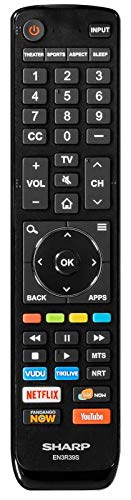
Obrázek 2: Úhlové view of the Xtrasaver EN3R39S/EN3I39S remote control, highlighting the ergonomic design and button placement.
Údržba
Výměna baterie
Replace batteries when the remote control becomes unresponsive or its range decreases. Always replace both batteries simultaneously with new AAA alkaline batteries. Do not mix old and new batteries, or different types of batteries.
Čištění
Pro čištění dálkového ovladače jemně otřete jeho povrch měkkým, suchým hadříkem. V případě odolných nečistot lehceamphadřík vodou. Nepoužívejte agresivní chemikálie, abrazivní čisticí prostředky ani nadměrnou vlhkost, protože by mohly poškodit elektroniku nebo povrchovou úpravu dálkového ovladače.
Skladování
Store the remote control in a cool, dry place away from direct sunlight and extreme temperatures. If the remote will not be used for an extended period, it is recommended to remove the batteries to prevent leakage and potential damage.
Odstraňování problémů
| Problém | Možná příčina | Řešení |
|---|---|---|
| Dálkové ovládání nefunguje. | Vybité nebo nesprávně vložené baterie. | Vyměňte baterie za nové alkalické baterie typu AAA a dbejte na správnou polaritu. |
| Remote control range is poor or intermittent. | Weak batteries; obstruction between remote and TV; remote not pointed at TV. | Replace batteries. Ensure a clear line of sight to the TV's IR receiver. Point the remote directly at the TV. |
| Konkrétní tlačítka nereagují. | Nečistoty nebo úlomky pod tlačítkem; vnitřní závada. | Clean the remote surface. If the issue persists, the remote may require replacement. |
| Televizor nereaguje na žádné příkazy dálkového ovladače. | TV is off or unplugged; TV's IR receiver is blocked or faulty. | Ensure the TV is powered on and plugged in. Check for any physical obstructions in front of the TV's IR receiver. |
Specifikace
| Funkce | Detail |
|---|---|
| Číslo modelu | EN3R39S (also compatible with EN3I39S) |
| Značka | Xtrasaver |
| Kompatibilní zařízení | Sharp Smart 4K HDTVs (specific models listed in Introduction) |
| Zdroj napájení | 2 x alkalické baterie AAA (nejsou součástí balení) |
| Barva | Černý |
| Speciální funkce | Ergonomický design |
| Maximální počet podporovaných zařízení | 1 (Televize) |
| Rozměry balení | 8.62 x 1.97 x 0.87 palce |
| Hmotnost položky | 3 unce |
| Datum první dostupnosti | 17. července 2019 |
Záruka a podpora
For warranty information and customer support regarding your Xtrasaver EN3R39S/EN3I39S remote control, please refer to the documentation provided at the time of purchase or contact the seller directly. As this product is manufactured by Xtrasaver, any specific warranty terms would be provided by them.
For technical assistance related to your Sharp Smart 4K HDTV, please consult your television's user manual or contact Sharp customer support.