
1. Úvod
This manual provides detailed instructions for the installation, operation, and maintenance of your Antec NX210 Mid-Tower ATX Computer Cabinet. Please read this manual thoroughly before beginning assembly or use to ensure proper functionality and safety.
The Antec NX210 is designed to accommodate ATX, Micro-ATX, and ITX motherboards, offering ample space for components and efficient cooling with pre-installed ARGB fans.
2. Bezpečnostní informace
Během instalace a provozu dodržujte následující bezpečnostní opatření:
- Před instalací nebo demontáží jakýchkoli součástí vždy odpojte napájecí kabel ze zásuvky, abyste předešli úrazu elektrickým proudem.
- S komponenty zacházejte opatrně, abyste předešli poškození statickou elektřinou. Zvažte použití antistatického náramku.
- Keep the cabinet away from direct sunlight, heat sources, and moisture.
- Zajistěte dostatečné větrání, abyste zabránili přehřátí. Neblokujte větrací otvory.
- Uchovávejte malé díly a nástroje mimo dosah dětí.
3. Obsah balení
Ověřte, zda jsou v balení přítomny všechny položky:
- Antec NX210 Mid-Tower ATX Computer Cabinet
- 4 x 120mm ARGB Fans (3 pre-installed in front, 1 pre-installed in rear)
- Accessory Box (screws, cable ties, etc.)
- Uživatelská příručka (tento dokument)
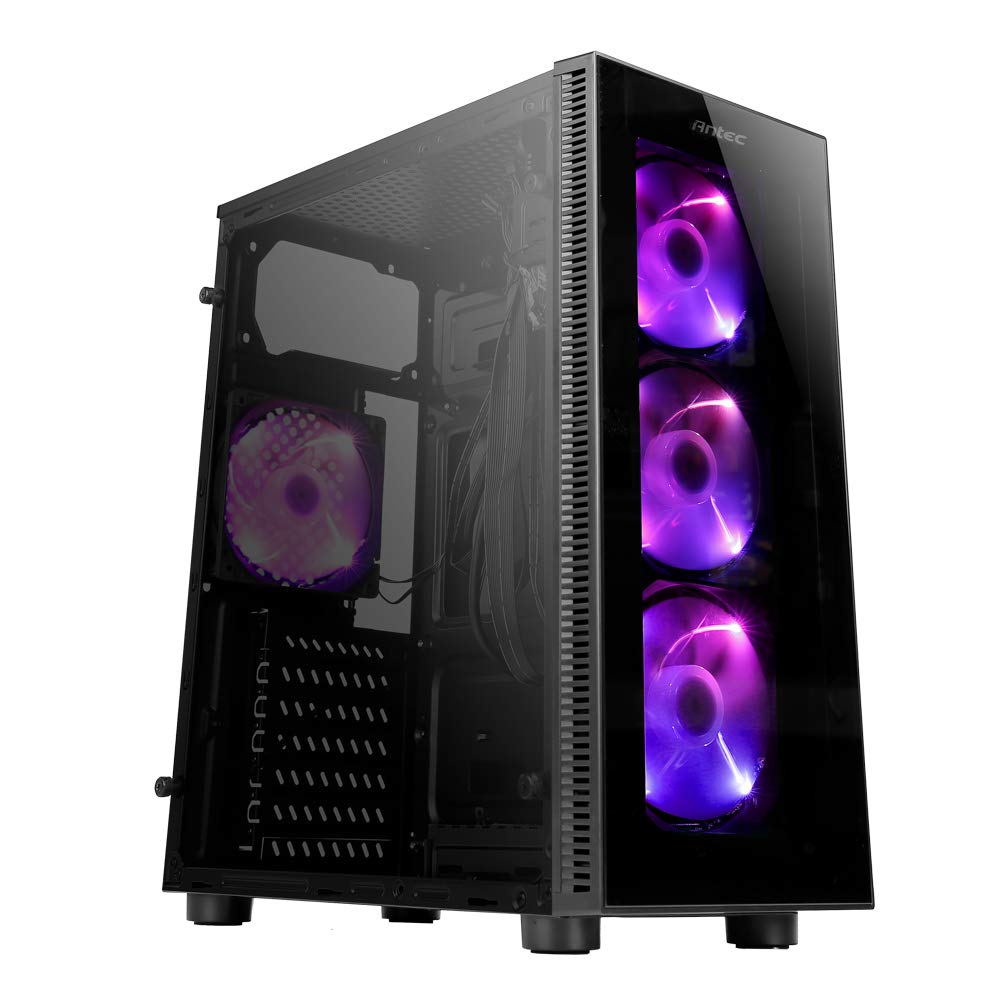
Image: Antec NX210 Mid-Tower ATX Computer Cabinet, showcasing its tempered glass side panel and front ARGB fans.
4. Product Features and Layout
4.1 Externí Views

Obrázek: Přední a zadní strana views of the Antec NX210 cabinet, highlighting the tempered glass front panel with ARGB fans and the rear I/O panel layout.

Image: Left side (tempered glass) and right side (solid panel) views of the Antec NX210 cabinet.
4.2 Horní panel I/O
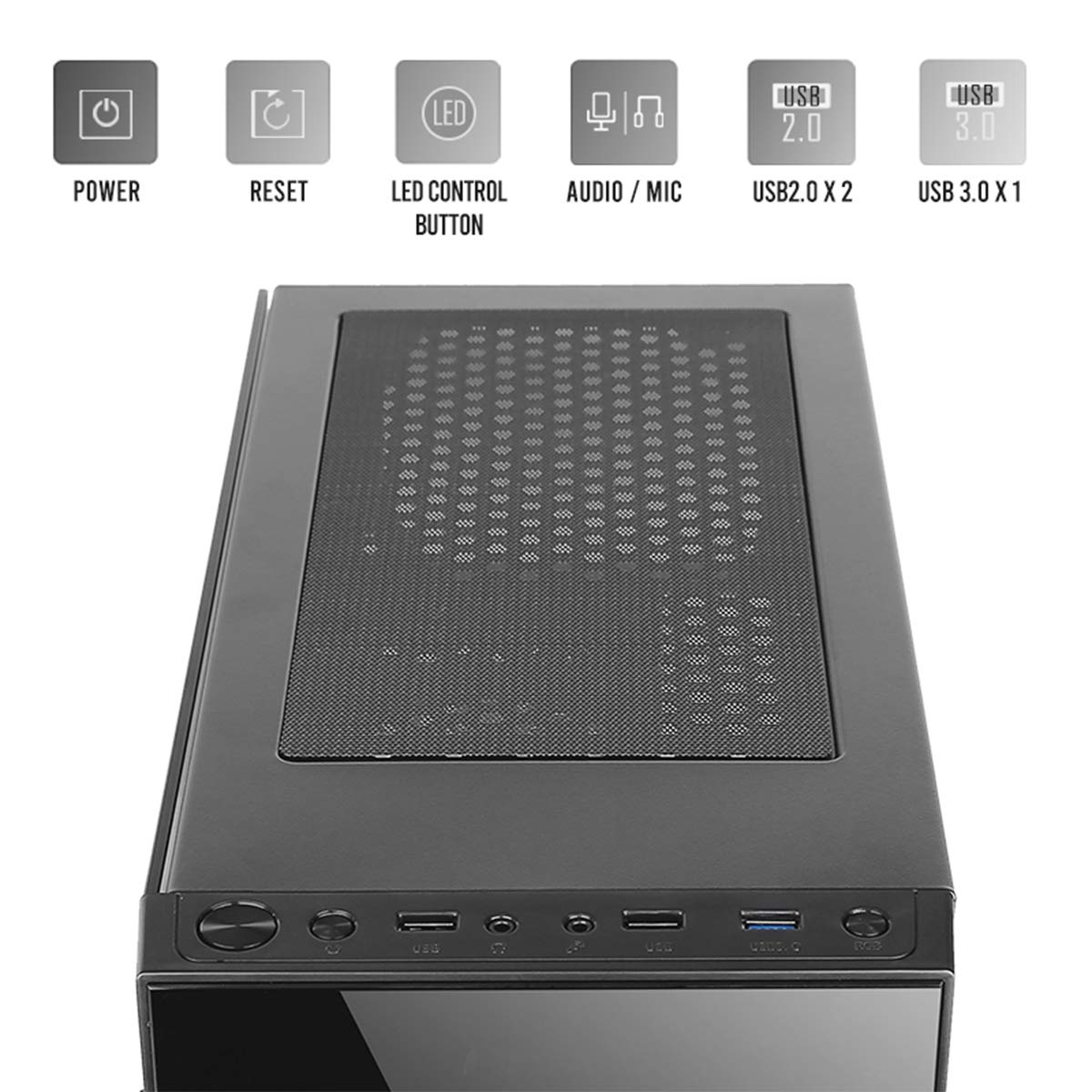
Image: Close-up of the top I/O panel, showing the Power button, Reset button, LED Control button, Audio/Mic jacks, 2x USB 2.0 ports, and 1x USB 3.0 port.
- Vypínač: Zapnutí nebo vypnutí systému.
- Resetovací tlačítko: Chcete-li restartovat systém.
- Ovládací tlačítko LED: To cycle through ARGB lighting effects for the pre-installed fans.
- Audio / Mic Jacks: Pro připojení sluchátek a mikrofonů.
- Porty USB 2.0 (x2): Pro připojení zařízení s rozhraním USB 2.0.
- Port USB 3.0 (x1): For connecting USB 3.0 devices, offering faster data transfer speeds.
4.3 Vnitřní uspořádání a podpora komponent

Image: Diagram illustrating the internal layout of the Antec NX210, indicating locations for motherboard, SSDs, HDDs, GPU, CPU cooler, and PSU.
- Podpora základní desky: Up to ATX (also supports Micro-ATX, ITX).
- 2.5" SSD Support: 3 drive bays.
- 3.5" HDD Support: 1 drive bay.
- Podpora grafických karet: Up to 310mm in length.
- Podpora chladičů CPU: Up to 155mm in height.
- Podpora PSU: Up to 220mm in length (top-mounted).
4.4 Chladicí systém

Image: Diagram showing fan and radiator mounting options for the Antec NX210, including pre-installed fans.
- Předinstalované ventilátory: 4 x 120mm ARGB fans (3 in front, 1 in rear).
- Front Fan Support: 3 x 120 mm.
- Podpora zadního ventilátoru: 1 x 120 mm.
- Podpora radiátorů: Front up to 240mm, Rear up to 120mm.
5. Nastavení a instalace
Follow these general steps for installing components into your Antec NX210 cabinet. Specific component manuals should be consulted for detailed installation instructions.
5.1 Příprava kabinetu
- Place the cabinet on a stable, flat surface.
- Sejměte boční panel z tvrzeného skla odšroubováním šroubů s křídlovou hlavou na zadní straně a opatrným vytažením panelu směrem ven.
- Remove the right-side metal panel by unscrewing the thumbscrews at the rear.
5.2 Instalace základní desky
- Install the I/O shield into the rear opening of the cabinet.
- Align your motherboard with the standoffs inside the cabinet. Ensure the standoffs match your motherboard's form factor (ATX, Micro-ATX, ITX).
- Zajistěte základní desku dodanými šrouby.
5.3 Instalace jednotky napájecího zdroje (PSU)
- The Antec NX210 supports a top-mounted ATX PS2 power supply.
- Slide the PSU into the designated top compartment from the rear of the cabinet.
- Secure the PSU with screws from the rear of the cabinet.
5.4 Instalace úložného disku (HDD/SSD)
- 3.5" pevný disk: Locate the 3.5" drive bay. Slide the HDD into the bay and secure it with screws.
- 2.5" SSD disk: Locate the 2.5" SSD mounting points behind the motherboard tray. Secure the SSDs with screws.
5.5 Instalace grafické karty (GPU)
- Remove the necessary PCIe slot covers from the rear of the cabinet.
- Insert the graphics card into the appropriate PCIe slot on the motherboard.
- Zajistěte grafickou kartu šrouby.
5.6 Správa kabelů
Pro vedení kabelů využijte výřezy pro vedení kabelů a úchyty za přihrádkou základní desky. Zlepší se tím proudění vzduchu a estetika.
5.7 Connecting Front Panel Cables
Connect the front panel cables (Power SW, Reset SW, HDD LED, Power LED, USB 2.0, USB 3.0, HD Audio) to the corresponding headers on your motherboard. Refer to your motherboard manual for exact pin layouts.
6. Návod k obsluze
6.1 Zapnutí
After all components are installed and cables connected, close both side panels. Connect the power cable to the PSU and a wall outlet. Press the Power button on the top I/O panel to turn on your system.
6.2 Ovládání ventilátoru ARGB
The pre-installed ARGB fans are connected to an internal controller. Use the Ovládací tlačítko LED on the top I/O panel to cycle through various lighting modes and effects. The fans will display a default lighting effect upon initial power-up.
7. Údržba
Regular maintenance helps ensure optimal performance and longevity of your computer cabinet.
- Prachové filtry: The Antec NX210 features a dust filter on the top panel. Regularly remove and clean this filter to prevent dust buildup and maintain good airflow.
- Čištění interiéru: Periodically open the side panels and use compressed air to remove dust from internal components and fan blades. Ensure the system is powered off and unplugged before cleaning.
- Čištění exteriéru: Vnější povrchy otřete měkkým, damp hadříkem. Nepoužívejte abrazivní čisticí prostředky ani rozpouštědla.
8. Řešení problémů
Pokud narazíte na problémy, zvažte následující základní kroky pro řešení problémů:
- Bez napájení:
- Ensure the PSU is properly connected to the wall outlet and the power switch on the PSU is in the 'ON' position.
- Verify that the front panel Power button cable is correctly connected to the motherboard header.
- Check all internal power connections (24-pin ATX, 8-pin CPU, PCIe power for GPU).
- Fans Not Spinning / ARGB Not Working:
- Ujistěte se, že všechny napájecí kabely ventilátorů jsou bezpečně připojeny k základní desce nebo řadiči ventilátorů.
- Verify ARGB cables are correctly connected to the internal controller and the controller is powered.
- Try pressing the LED Control Button on the top I/O panel to cycle effects.
- Nefunkční USB porty:
- Check that the USB 2.0 and USB 3.0 front panel cables are correctly connected to the corresponding headers on your motherboard.
For more complex issues, consult the manuals for your individual components or seek professional assistance.
9. Specifikace

Image: Diagram showing the physical dimensions of the Antec NX210 cabinet.
| Funkce | Detail |
|---|---|
| Model | NX210 |
| Typ pouzdra | Střední věž |
| Rozměry (D x Š x V) | 43.99 × 38.99 × 21.01 cm (přibližně 395 × 210 × 445 mm) |
| Materiál | SPCC, tvrzené sklo |
| Podpora základní desky | ATX, Micro-ATX, ITX |
| Rozšiřující sloty | 7 |
| Drive Bays | 1x 3.5" pevný disk, 3x 2.5" SSD |
| Přední I / O porty | Power, Reset, LED Control Button, MIC/Audio, 2 x USB 2.0, 1 x USB 3.0 |
| Předinstalované ventilátory | 4 x 120mm ARGB fans (3 front, 1 rear) |
| Podpora ventilátoru (přední) | 3 x 120 mm |
| Podpora ventilátoru (zadní) | 1 x 120 mm |
| Držák chladiče (přední) | Až 240 mm |
| Držák chladiče (zadní) | Až 120 mm |
| Maximální délka GPU | 310 mm |
| Maximální výška chladiče CPU | 155 mm |
| Podpora PSU | ATX PS2 (Top Mounted), Max length 220mm |
| Prachový filtr | Nahoru |
| Hmotnost položky | 4.8 kg |
10. Záruka a podpora
The Antec NX210 Computer Cabinet comes with a 1 rok záruka od data nákupu. Uschovejte si prosím doklad o koupi pro případné reklamace.
For technical support or warranty inquiries, please contact Antec customer service or your local distributor.
Výrobce: Antec Inc. 8F, No 107, Jhouzih St, Neihu District, Taipei City 114, Taiwan
Dovozce (Indie): Acro Engineering Company, Khasra No 522/1, Village Jonapur, Delhi - 110 030
Více informací a podpůrných zdrojů naleznete na oficiálních stránkách Obchod Antec na Amazonu.