
Zavedení
This manual provides instructions for the Digitus USB to Serial Adapter (Model DA-70167). This device enables data exchange between a personal computer with a USB port and various serial peripherals, such as machine controls, modems, and sensors. It is compliant with the USB 2.0 standard and features a PL2303GT chipset, offering customizable data transfer rates.
The adapter includes one USB 2.0 Male A connector and one D-SUB 9-Pin Male (RS232) connector, with gold-plated contacts for reliable connection. An 80 cm USB extension cable is also included for convenience.
Obsah balení
- 1 x Digitus USB to Serial Adapter (DA-70167)
- 1 x 80 cm USB Extension Cable
Konec produktuview

Obrázek 1: Digitus USB to Serial Adapter. This image shows the main view of the adapter, highlighting its compact design and the D-SUB 9-pin connector.

Obrázek 2: Connection points of the adapter. This diagram illustrates the RS232 (D-SUB 9-pin) and USB A 2.0 connectors on the adapter.

Obrázek 3: Detailní záběr view of the D-SUB 9-pin (RS232) male connector, showing the pin configuration.

Obrázek 4: View of the USB-A male connector, which plugs into the computer's USB port.
Nastavení
Follow these steps to set up your Digitus USB to Serial Adapter:
- Instalace ovladače: Before connecting the adapter, it is recommended to install the necessary drivers for the PL2303GT chipset. Drivers are typically available on the Digitus support website or can be automatically installed by your operating system upon first connection.
- Připojení k počítači: Plug the USB-A male connector of the adapter into an available USB 2.0 port on your computer. You may use the included 80 cm USB extension cable if needed.
- Připojení k sériovému zařízení: Connect the D-SUB 9-pin male (RS232) connector of the adapter to the serial port of your peripheral device (e.g., modem, machine control, label printer, barcode scanner, POS system, cash register, network switch). Ensure the screws on the D-SUB connector are tightened to secure the connection.

Obrázek 5: Diagram showing a one-to-one connection setup, illustrating the adapter connecting a label printer or other RS-232 device to a laptop/PC.

Obrázek 6: The USB to Serial Adapter connected to a network switch and a laptop, demonstrating a typical application.
Návod k obsluze
Once the adapter is physically connected and drivers are installed, your computer should recognize the new serial port. You can then use software applications that require serial communication to interact with your connected peripheral device.
- Identifying the COM Port: After installation, check your computer's Device Manager (Windows) or System Information (macOS/Linux) to identify the assigned COM port number for the USB to Serial Adapter. This port number will be used by your serial communication software.
- Configuring Software: Open your serial communication software (e.g., PuTTY, Tera Term, HyperTerminal) and configure it to use the identified COM port. Set the appropriate communication parameters such as baud rate (data transfer rate), data bits, parity, stop bits, and flow control, matching the requirements of your serial peripheral device. The adapter supports customizable data transfer rates between 75 bit and 128,000 bit per second.
- Výměna dat: Initiate data exchange through your software. The adapter will facilitate the communication between your computer's USB port and the serial device.
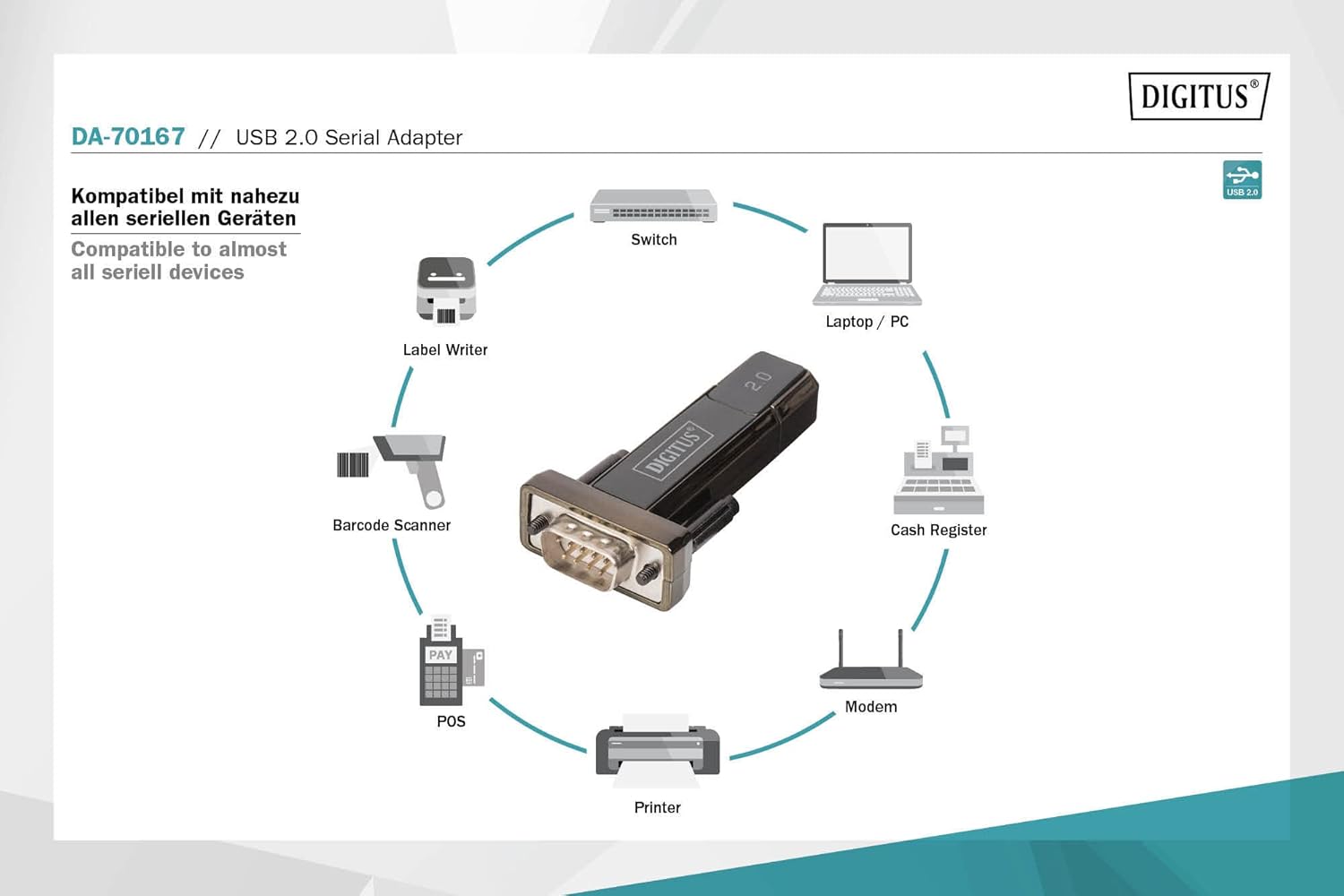
Obrázek 7: Diagram illustrating the wide range of devices compatible with the USB to Serial Adapter, including switches, laptops/PCs, label writers, barcode scanners, POS systems, printers, modems, and cash registers.
Údržba
The Digitus USB to Serial Adapter requires minimal maintenance. Follow these guidelines to ensure its longevity:
- Čištění: Use a soft, dry cloth to clean the exterior of the adapter. Do not use liquid cleaners or solvents.
- Skladování: Pokud adaptér nepoužíváte, skladujte jej na chladném a suchém místě mimo dosah přímého slunečního záření a extrémních teplot.
- Zacházení: Avoid dropping the adapter or subjecting it to strong impacts. Do not bend or twist the cable excessively.
- Péče o konektor: Keep the connectors free from dust and debris. If necessary, use compressed air to clean the ports.
Odstraňování problémů
| Problém | Možná příčina | Řešení |
|---|---|---|
| Počítač nerozpoznál adaptér. |
|
|
| Chyby komunikace se sériovým zařízením. |
|
|
| Pomalý přenos dat. |
|
|
Specifikace
| Číslo modelu | DA-70167 |
| Značka | Digitus |
| Konektory | 1x USB 2.0 Male A, 1x D-SUB 9-Pin Male (RS232) |
| Čipová sada | PL2303GT |
| USB Standardní | Kompatibilní s USB 2.0 |
| Rychlost přenosu dat | 75 bit to 128,000 bit per second (customizable) |
| Délka kabelu | 80 cm (USB extension cable included) |
| Barva | Černý |
| Hmotnost položky | 2.82 unce |
| Rozměry produktu (DxŠxV) | 3.94 x 5.91 x 1.57 palce |
| Kompatibilní zařízení | PC, various serial peripherals (machine controls, modems, sensors, etc.) |
Záruka a podpora
Informace o záruce a technickou podporu získáte na oficiálních stránkách společnosti Digitus. webnebo se obraťte na jejich zákaznický servis. Uschovejte si účtenku jako doklad o koupi pro případ reklamace.
Oficiální Digitus Webmísto: www.digitus.info