1. Úvod
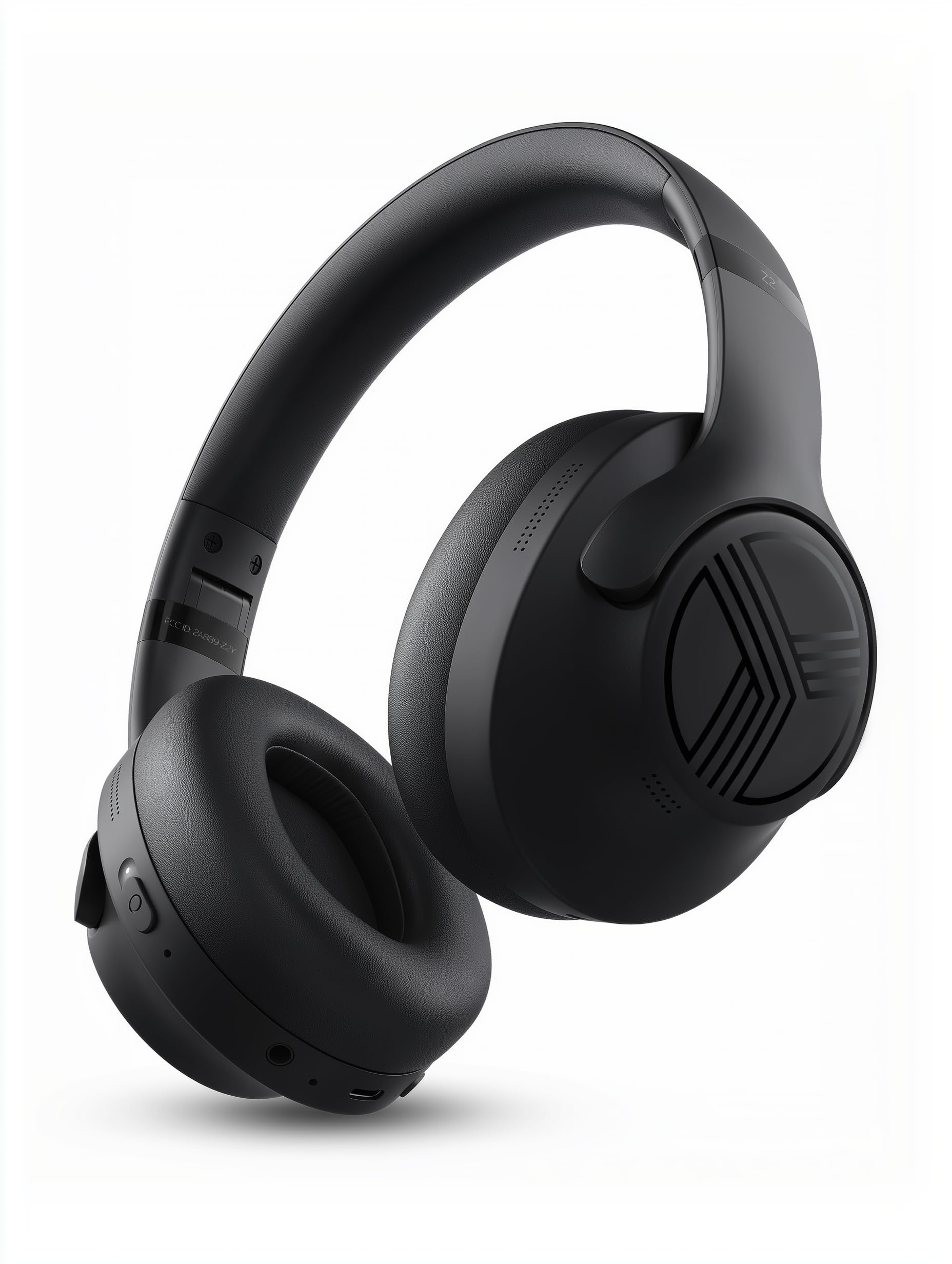
Thank you for choosing TREBLAB Z2 Hybrid Active Noise Cancelling Wireless Headphones. This manual provides essential information for setting up, operating, and maintaining your headphones to ensure optimal performance and longevity. Please read it carefully before use.
2. Co je v krabici
- TREBLAB Z2 Headphones
- TREBLAB Z2 Carrying Case
- 3.5mm audio kabel (AUX)
- Nabíjecí kabel USB typu C.
- User Manual; Quick Start Guide; Catalogue; Warranty card
3. Konec produktuview
Vlastnosti sluchátek
The TREBLAB Z2 headphones are designed for versatility and performance, featuring Hybrid Active Noise Cancelling (ANC) to minimize distractions, a long-lasting battery, and a comfortable, sweat-resistant design suitable for various activities.
- Hybridní aktivní potlačení hluku: Blocks external noise for immersive audio.
- Prodloužená hrací doba: Up to 58 hours of battery life (without ANC, at 70% volume).
- Hluboké basy: Powerful audio with balanced sound.
- IPX4 Water Resistant & Sweatproof: Durable for workouts and outdoor use.
- Bluetooth 5.3 a vícebodové připojení: Stable wireless connection to multiple devices.
- Vestavěný mikrofon: Clear voice pickup for calls.
- Skládací design: Lightweight and comfortable for extended wear and easy storage.
Ovládací prvky a porty
The headphones feature intuitive button controls for playback, volume, calls, and ANC activation. All controls and ports are conveniently located on the earcups.
- Power/Play/Pause/Phone Button: Central control for power, media playback, and call management.
- Tlačítko pro zvýšení hlasitosti/následující skladbu: Upravte hlasitost nebo přejděte na další skladbu.
- Tlačítko pro snížení hlasitosti/předchozí skladba: Nastavení hlasitosti nebo přechod na předchozí skladbu.
- Vypínač ANC: Activate or deactivate Active Noise Cancelling.
- Micro USB/USB Type-C Charging Port: Pro nabíjení sluchátek.
- AUX vstup (3.5mm jack): Pro kabelové připojení.
- Mikrofon: Pro handsfree hovory a hlasové asistenty.
- LED indikátor: Zobrazuje stav napájení, párování a nabíjení.
4. Nastavení
4.1 Nabíjení sluchátek
Before first use, fully charge your TREBLAB Z2 headphones. A full charge takes approximately 3 hours.
- Connect the USB Type-C charging cable to the charging port on the headphone.
- Druhý konec kabelu připojte ke kompatibilnímu zdroji napájení USB (např. síťový adaptér, USB port počítače).
- LED indikátor bude během nabíjení svítit červeně a po úplném nabití zhasne.
4.2 Párování Bluetooth
Pro připojení sluchátek k zařízení přes Bluetooth:
- Ujistěte se, že jsou sluchátka nabitá a vypnutá.
- Press and hold the Power/Play/Pause button for a few seconds until the LED indicator flashes blue and red, indicating pairing mode.
- Na svém zařízení (chytrý telefon, tablet, počítač) povolte Bluetooth a vyhledejte dostupná zařízení.
- Select "TREBLAB Z2" from the list of found devices.
- Po úspěšném spárování bude LED indikátor pomalu modře blikat a uslyšíte potvrzovací tón.
For multipoint connection, pair the first device, then disable Bluetooth on the first device. Put the headphones back into pairing mode and connect to the second device. Once connected, re-enable Bluetooth on the first device, and the headphones should connect to both.
5. Návod k obsluze
5.1 Zapnutí/vypnutí
- Zapnutí: Press and hold the Power/Play/Pause button for 3 seconds.
- Vypnout: Press and hold the Power/Play/Pause button for 5 seconds.
5.2 Přehrávání hudby
- Přehrát/pozastavit: Krátce stiskněte tlačítko Napájení/Přehrávání/Pozastavení.
- Další skladba: Long press the Volume Up/Next Track button.
- Předchozí skladba: Long press the Volume Down/Previous Track button.
- Zvýšit hlasitost: Short press the Volume Up/Next Track button.
- Snížit hlasitost: Short press the Volume Down/Previous Track button.
5.3 Správa hovorů
- Přijmout hovor: Krátce stiskněte tlačítko Napájení/Přehrávání/Pozastavení.
- Ukončit hovor: Během hovoru krátce stiskněte tlačítko Napájení/Přehrát/Pozastavit.
- Odmítnout hovor: Long press the Power/Play/Pause button for 2 seconds.
- Opakovaná volba: Double-press the Power/Play/Pause button.
5.4 Aktivní potlačení hluku (ANC)
To activate ANC, slide the ANC switch on the left earcup to the 'ON' position. The LED indicator will light up. Slide to 'OFF' to deactivate.
5.5 Hlasový asistent
Activate your device's voice assistant (Siri, Google Assistant, Alexa) by pressing the Power/Play/Pause button for 1 second.
6. Údržba
- Clean headphones with a soft, damp tkanina. Nepoužívejte agresivní chemikálie.
- Pokud sluchátka nepoužíváte, uchovávejte je v dodaném přepravním pouzdře, abyste je chránili před prachem a poškozením.
- Avoid exposing headphones to extreme temperatures, direct sunlight, or excessive moisture.
- Nepokoušejte se sluchátka rozebírat ani upravovat, jinak by došlo ke ztrátě záruky.
7. Řešení problémů
| Problém | Řešení |
|---|---|
| Sluchátka se nezapnou | Ujistěte se, že jsou sluchátka plně nabitá. |
| Nelze spárovat přes Bluetooth | Ensure headphones are in pairing mode (flashing blue/red LED). Turn off and on Bluetooth on your device. Clear previous pairings on your device. |
| Žádný zvuk nebo nízká hlasitost | Check volume levels on both headphones and connected device. Ensure headphones are properly paired. Try a wired connection with the AUX cable. |
| ANC nefunguje efektivně | Ensure ANC switch is in the 'ON' position. Check for proper fit of earcups over ears. |
8. Specifikace
| Funkce | Detail |
|---|---|
| Název modelu | Z2 |
| Kontrola hluku | Hybridní aktivní potlačení hluku |
| Verze Bluetooth | 5.3 |
| Dosah Bluetooth | 33 10 stop (XNUMX XNUMX metrů) |
| Výdrž baterie (max.) | Up to 58 hours (No ANC, 70% volume) |
| Výdrž baterie (ANC zapnuto) | Up to 51 hours (ANC + Wireless, 70% volume) |
| Doba nabíjení | 3 hodiny |
| Velikost zvukového ovladače | 40 milimetrů |
| Frekvenční odezva | 20 Hz - 20 kHz |
| Citlivost | 103 dB |
| Impedance | 32 ohmů |
| Úroveň odolnosti proti vodě | IPX4 (Water Resistant & Sweatproof) |
| Hmotnost položky | 8.5 uncí |
| Rozměry | 6.4 x 3.2 x 8 palce |
9. Záruka a podpora
Your TREBLAB Z2 headphones are covered by a 1-YEAR WARRANTY & 30-DAY RETURNS. For any questions, suggestions, or issues, please refer to the warranty card included in the box or contact TREBLAB customer support.
10. Galerie médií
Obrázky produktů