
Zavedení
This manual provides comprehensive instructions for the setup, operation, and maintenance of your Zerone Universal Remote Control. This remote is designed to function with various Pioneer DVD player models, offering a convenient replacement or secondary control unit.
Kompatibilita
The Zerone Universal Remote Control is compatible with the following Pioneer DVD player models:
- Pioneer VXX2811
- Pioneer VXX2914
- Pioneer VXX3218
- Pioneer VXX2801
- Pioneer VXX2800
- Pioneer VXX2913
For optimal performance, ensure your DVD player model is listed above.
Nastavení
1. Instalace baterie
- Najděte přihrádku na baterie na zadní straně dálkového ovladače.
- Posuňte kryt baterie dolů nebo stiskněte západku a zvedněte jej pro otevření.
- Vložte dvě (2) baterie AA 1.5 V a ujistěte se, že kladný (+) a záporný (-) pól správně shodují s označením uvnitř přihrádky.
- Nasaďte kryt baterie zpět jeho zasunutím zpět na místo, dokud bezpečně nezacvakne.
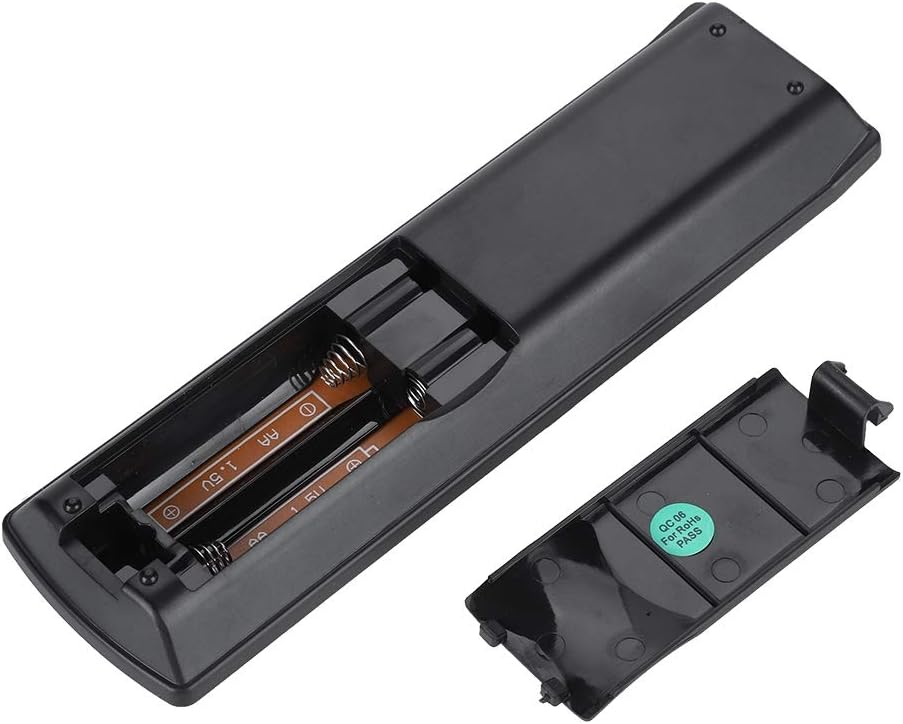
Obrázek: Zadní view of the Zerone remote control, showing the battery compartment cover.

Image: The battery compartment of the remote control with two AA batteries correctly inserted.
No programming or setup is required. Once batteries are installed, the remote is ready for use with compatible Pioneer DVD players.
Návod k obsluze
Point the remote control directly at your Pioneer DVD player. The effective control distance is typically over 8 meters (approximately 26 feet), though this may vary based on environmental factors and the specific DVD player model.

Obrázek: Přední strana view of the Zerone Universal Remote Control, displaying all buttons and their labels.
Klíčové funkce:
- STANDBY/ON: Powers the DVD player on or off.
- OTEVŘÍT ZAVŘÍT: Otevře nebo zavře zásuvku disku.
- AUDIO: Vybírá zvukové stopy nebo jazyky.
- TITULEK: Přepíná nebo vybírá možnosti titulků.
- ÚHEL: Změní viewing angle if supported by the DVD.
- Číselná tlačítka (0-9): Direct track selection or input.
- JASNÝ: Clears numerical input.
- ZADEJTE: Potvrzuje výběr.
- HORNÍ MENU: Accesses the main menu of the DVD.
- JÍDELNÍ LÍSTEK: Otevře nabídku disku.
- HOME MENU: Navigates to the home menu of the DVD player.
- NÁVRAT: Návrat na předchozí obrazovku nebo do nabídky.
- Směrová klávesnice (nahoru, dolů, vlevo, vpravo) a ENTER: Prochází menu a potvrzuje výběr.
- Playback Controls (Play, Pause, Stop, Fast Forward, Rewind, Skip Forward, Skip Backward): Standardní funkce přehrávání médií.
- REŽIM PŘEHRÁVÁNÍ: Volí režimy přehrávání (např. opakování, náhodné přehrávání).
- SURROUND: Adjusts surround sound settings.
- ZOOM: Zooms in or out on the video.
- ZOBRAZIT: Zobrazuje informace na obrazovce.

Image: A hand holding the Zerone remote control, demonstrating its ergonomic design and ease of use.

Image: The remote control positioned in front of a television displaying content, illustrating its intended use.

Image: A visual representation of the remote control's effective operating distance, indicating a range of over 8 meters.
Údržba
- Čištění: Dálkový ovladač otírejte měkkým, suchým hadříkem. Nepoužívejte tekuté čisticí prostředky ani abrazivní materiály.
- Výměna baterie: Vyměňte baterie, když dálkový ovladač reaguje pomalu nebo přestane fungovat. Vždy vyměňte obě baterie najednou za nové.
- Skladování: Dálkový ovladač skladujte na chladném a suchém místě mimo dosah přímého slunečního záření a extrémních teplot.
- Vyhněte se poškození: Do not drop the remote or expose it to water.
Odstraňování problémů
- Dálkové ovládání nereaguje:
- Ujistěte se, že jsou baterie správně vloženy se správnou polaritou.
- Vyměňte staré baterie za nové baterie typu AA.
- Check for any obstructions between the remote control and the DVD player's infrared sensor.
- Ensure you are within the effective operating range (typically within 8 meters).
- Některé funkce nefungují:
- Verify that your Pioneer DVD player model is listed in the compatibility section.
- Some advanced functions may be specific to the original remote or not supported by all DVD player models.
Specifikace
| Materiál pláště | High-grade ABS |
| Kontrolní vzdálenost | > 8 meters (316 inches) |
| Typ baterie | 2 x AA 1.5V Batteries (Not included) |
| Rozměry | Přibližně 174 x 49 x 20 mm (6.85 x 1.93 x 0.79 palce) |
| Hmotnost | Přibližně 75 g (2.46 unce) |
| Číslo modelu | 743562180017 |
Záruka a podpora
For warranty information or technical support, please refer to the documentation provided with your purchase or contact the manufacturer, Zerone, directly through their official channels. Keep your purchase receipt as proof of purchase.