
1. Úvod
This manual provides comprehensive instructions for the Gvirtue Universal Replacement Remote Control, model PN-15+EL. Designed as a direct replacement for various Panasonic TV remote controls, this device offers broad compatibility and essential functions for your television viewing experience. Please read this manual carefully to ensure proper setup and operation.
2. Konec produktuview
The Gvirtue PN-15+EL remote control is engineered to provide a seamless replacement experience for your Panasonic TV. It features a user-friendly design with essential buttons and a learning function for advanced customization.
2.1 Klíčové vlastnosti
- Univerzální kompatibilita: Works with a wide range of Panasonic LCD, LED, 3D, Smart, and 4K Ultra HD TV models.
- Funkce učení: Ability to learn functions directly from your original remote control.
- Podsvícená tlačítka: Designed for convenient use in low-light conditions.
- Ergonomický design: Lightweight and comfortable to grip, reducing the chance of slipping.
- Není vyžadováno žádné programování: Often works directly out of the box for basic functions.
- Rychlá odpověď: Stable performance with a fast response time of 0.2 seconds.
2.2 Kompatibilita
This remote is compatible with numerous Panasonic TV models and replaces many original Panasonic remote control models. A partial list of compatible TV models includes:
- TC-40AS520, TC-39AS530, TC-55AS530
- TC-42AS630, TC-50AS630, TC-60AS630
- TC-40AS520U, TC-39AS530U, TC-50AS530U, TC-55AS530U, TC-60AS530U
- TC-50AS530UE
- TC-42AS630U, TC-50AS630U, TC-60AS640U
- TC-50ASU534, TC-55LET64
- TC-32LX24, TC-42LD24, TC-42LS24
- TC-50PS24, TC-58PS24, TC-65PS24
- TC-L42ET60, TC-L47ET60, TC-L50ET60, TC-L55ET60
- TC-L32C22, TC-L22X2
- TC-L42U22, TC-L32U22, TC-L37U22, TC-L42U25
- TC-P42C2, TC-P50C2, TC-P46C2
- TC-P42U2, TC-P50U2
- TC-P42X2, TC-P50X2
- TC-P50GT50, TC-P55GT50, TC-P60GT50, TC-P65GT50
- TC-P55ST50, TC-P60ST
This remote also replaces original Panasonic remote models such as N2QAYB000100, N2QAYB000102, N2QAYB000221, N2QAYB000485, N2QAYB000779, and many others.
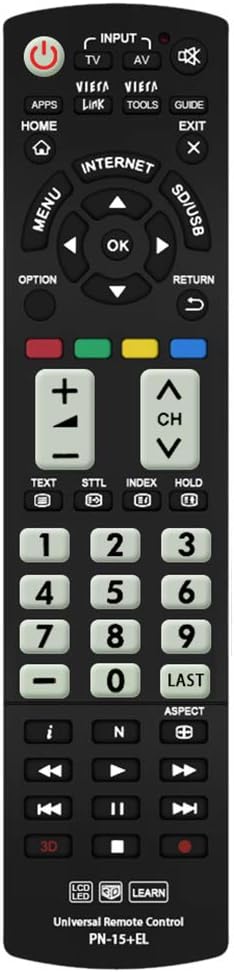
Obrázek: Přední strana view of the Gvirtue PN-15+EL Universal Replacement Remote Control.
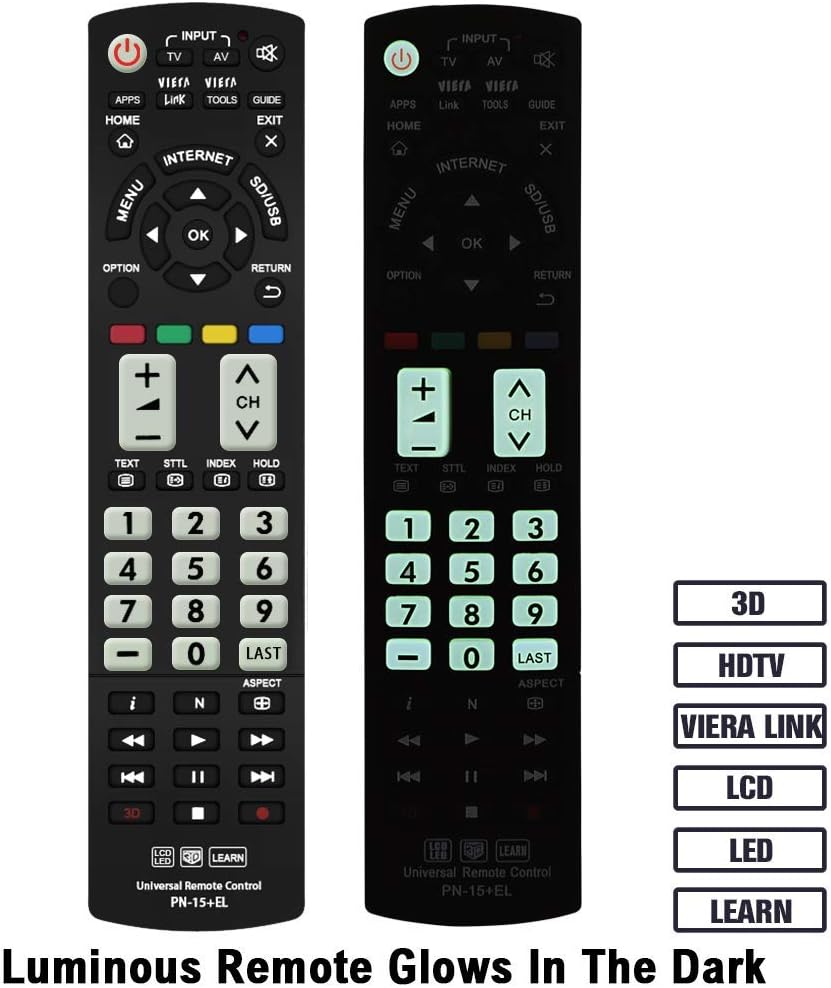
Image: The Gvirtue PN-15+EL remote control highlighting its luminous buttons for use in the dark.

Image: The Gvirtue PN-15+EL remote control shown alongside a list of compatible Panasonic TV models.
3. Nastavení
3.1 Instalace baterie
Dálkový ovladač vyžaduje k provozu dvě (2) baterie AAA (nejsou součástí balení). Pro instalaci baterií postupujte takto:
- Najděte kryt prostoru pro baterie na zadní straně dálkového ovladače.
- Posuňte kryt dolů nebo stiskněte západku (pokud je k dispozici) a otevřete přihrádku.
- Insert two fresh AAA batteries, ensuring the positive (+) and negative (-) terminals align correctly with the markings inside the compartment.
- Zavřete kryt prostoru pro baterie jeho zasunutím zpět na místo, dokud bezpečně nezacvakne.
Note: This remote control does not include batteries. Please purchase them separately.

Image: Illustration showing how to open the battery compartment and insert two AAA batteries into the Gvirtue PN-15+EL remote control.
3.2 První použití
For most compatible Panasonic TV models, the Gvirtue PN-15+EL remote control is designed to work immediately after battery installation without any additional programming or pairing. Simply point the remote at your TV and test its functions.
If the remote does not function correctly out of the box, or if you wish to customize specific buttons, refer to the "Learning Function" section below.
4. Návod k obsluze
This section details the functions of the buttons on your Gvirtue PN-15+EL remote control.

Image: Diagram illustrating the various function buttons on the Gvirtue PN-15+EL remote control.
4.1 Funkce tlačítek
- Tlačítko napájení (●): Zapíná a vypíná televizor.
- INPUT / TV / AV: Selects the TV input source directly.
- Odkaz VIERA: Activates Panasonic's Viera Link feature for integrated control of connected devices.
- NÁSTROJE: Displays frequently used functions or quick settings.
- PRŮVODCE: Displays the Electronic Program Guide (EPG).
- DOMOV: Enters the TV's home menu or smart TV interface.
- VÝSTUP: Ukončí aktuální menu nebo aplikaci.
- JÍDELNÍ LÍSTEK: Zobrazí hlavní nabídku na obrazovce.
- VOLBA: Displays available options for the current selection.
- NÁVRAT: Vrátí se do předchozí nabídky nebo obrazovky.
- Directional Pad (Up, Down, Left, Right) & OK: Prochází menu a potvrzuje výběr.
- Barevná tlačítka (červená, zelená, žlutá, modrá): Shortcut keys for interactive functions, often context-dependent.
- VOL +/-: Nastavuje úroveň hlasitosti.
- CH +/-: Mění kanály.
- Ztlumit: Ztlumí nebo zruší ztlumení zvuku televizoru.
- Numerická klávesnice (0-9): Přímý výběr kanálu.
- POSLEDNÍ: Vrátí se k předchozímu viewed kanál.
- 3D: Toggles the 3D function on or off (for compatible 3D TVs).
- Ovládání přehrávání médií (Přehrát, Pozastavit, Zastavit, Přetočit zpět, Rychle přetočit vpřed, Přeskočit): Ovládá přehrávání médií na kompatibilních zařízeních nebo funkce televizoru.
4.2 Funkce učení
The Gvirtue PN-15+EL remote control features a learning function, allowing you to program specific buttons to mimic functions from your original remote control. This is useful if certain advanced functions are not pre-programmed or if you want to consolidate controls.
Detailed instructions for activating and using the learning function are typically provided on a separate instruction sheet included with the product. Generally, the process involves:
- Entering a learning mode on the Gvirtue remote.
- Pointing your original remote at the Gvirtue remote.
- Pressing the desired button on the original remote, then the corresponding button on the Gvirtue remote to be programmed.
- Exiting the learning mode.
Refer to the specific learning function instructions provided with your remote for precise steps.
5. Údržba
Abyste zajistili dlouhou životnost a optimální výkon vašeho dálkového ovladače, dodržujte tyto pokyny pro údržbu:
- Čištění: Wipe the remote control with a soft, dry cloth. Do not use abrasive cleaners, solvents, or alcohol, as these can damage the surface and buttons.
- Výměna baterie: Vyměňte baterie, když dálkový ovladač začne reagovat pomalu nebo přestane fungovat. Vždy vyměňte obě baterie současně za nové stejného typu (AAA).
- Skladování: If the remote control will not be used for an extended period, remove the batteries to prevent leakage, which can damage the device. Store in a cool, dry place.
- Vyhněte se poškození: Do not drop the remote control, expose it to extreme temperatures, or immerse it in water. Keep it away from direct sunlight and heat sources.
6. Řešení problémů
If you encounter issues with your Gvirtue PN-15+EL remote control, refer to the following troubleshooting tips:
- Dálkové ovládání nereaguje:
- Zkontrolujte, zda jsou baterie vloženy správně se správnou polaritou (+/-).
- Vyměňte staré baterie za nové baterie AAA.
- Ujistěte se, že mezi dálkovým ovladačem a infračerveným senzorem televizoru nejsou žádné překážky.
- Make sure you are within the effective operating range (approximately 10 meters / 30 feet) and pointing the remote directly at the TV.
- Konkrétní tlačítka nefungují:
- If you used the learning function, try re-programming the problematic button.
- Some advanced functions might require specific TV settings or may not be supported by all Panasonic TV models.
- Remote Works Intermittently:
- To často signalizuje nízký stav baterie. Vyměňte baterie.
- Ujistěte se, že kontakty baterie jsou čisté a bez koroze.
If the issue persists after trying these steps, please contact Gvirtue customer support for further assistance.
7. Specifikace
| Model | PN-15+EL |
| Značka | Gvirtue |
| Materiál | ABS & Plastic |
| Technologie připojení | Infračervený (IR) |
| Kompatibilní zařízení | Panasonic Televisions (LCD, LED, 3D, Smart, 4K UHD) |
| Zdroj napájení | 2 x AAA baterie (nejsou součástí balení) |
| Rozměry produktu | Přibližně 6 x 2 x 0.7 palce (15.2 x 5.1 x 1.8 cm) |
| Hmotnost položky | Přibližně 3.2 uncí (90.7 gramů) |
| Speciální funkce | Backlit buttons, Ergonomic design, Learning function |

Image: Visual representation of the Gvirtue PN-15+EL remote control's key specifications.

Obrázek: Přední, boční a zadní strana views of the Gvirtue PN-15+EL remote control with dimensions indicated.
8. Záruka a podpora
Gvirtue products are designed for reliability and performance. While specific warranty details may vary, please retain your proof of purchase for any warranty claims.
For technical support, troubleshooting assistance, or inquiries regarding your Gvirtue PN-15+EL remote control, please contact Gvirtue customer service through their official channels or the retailer from whom you purchased the product.
You may find additional support resources by visiting the Gvirtue Store on Amazon.