
1. Úvod
The Dual DAB 3A Digital Radio Adapter is designed to upgrade your existing audio system with modern digital radio reception and Bluetooth streaming capabilities. This adapter allows you to enjoy DAB+ and FM radio broadcasts with clear digital quality and stream audio wirelessly from compatible devices. Its user-friendly interface and remote control ensure convenient operation.
2. Bezpečnostní informace
- Napájení: Používejte pouze dodaný síťový adaptér. Ujistěte se, že hlasitosttage odpovídá požadavkům uvedeným na adaptéru.
- Voda a vlhkost: Do not expose the device to rain, moisture, or dripping/splashing liquids. Keep it away from water sources.
- Větrání: Ensure adequate ventilation around the unit. Do not block ventilation openings. Avoid placing the device on soft surfaces that may obstruct airflow.
- Zdroje tepla: Uchovávejte zařízení mimo dosah zdrojů tepla, jako jsou radiátory, topná tělesa, sporáky nebo jiné spotřebiče produkující teplo.
- Čištění: Před čištěním odpojte napájení. Použijte měkký, suchý hadřík. Nepoužívejte tekuté čisticí prostředky ani aerosolové spreje.
- Servis: Nepokoušejte se tento výrobek opravit sami. Veškerý servis svěřte kvalifikovanému servisnímu personálu.
3. Obsah balení
Zkontrolujte prosím, zda jsou ve vašem balení obsaženy všechny níže uvedené položky:
- Dual DAB 3A Digital Radio Adapter
- Napájecí adaptér
- Dálkové ovládání
- Návod k obsluze
- External Wire Antenna
4. Konec produktuview
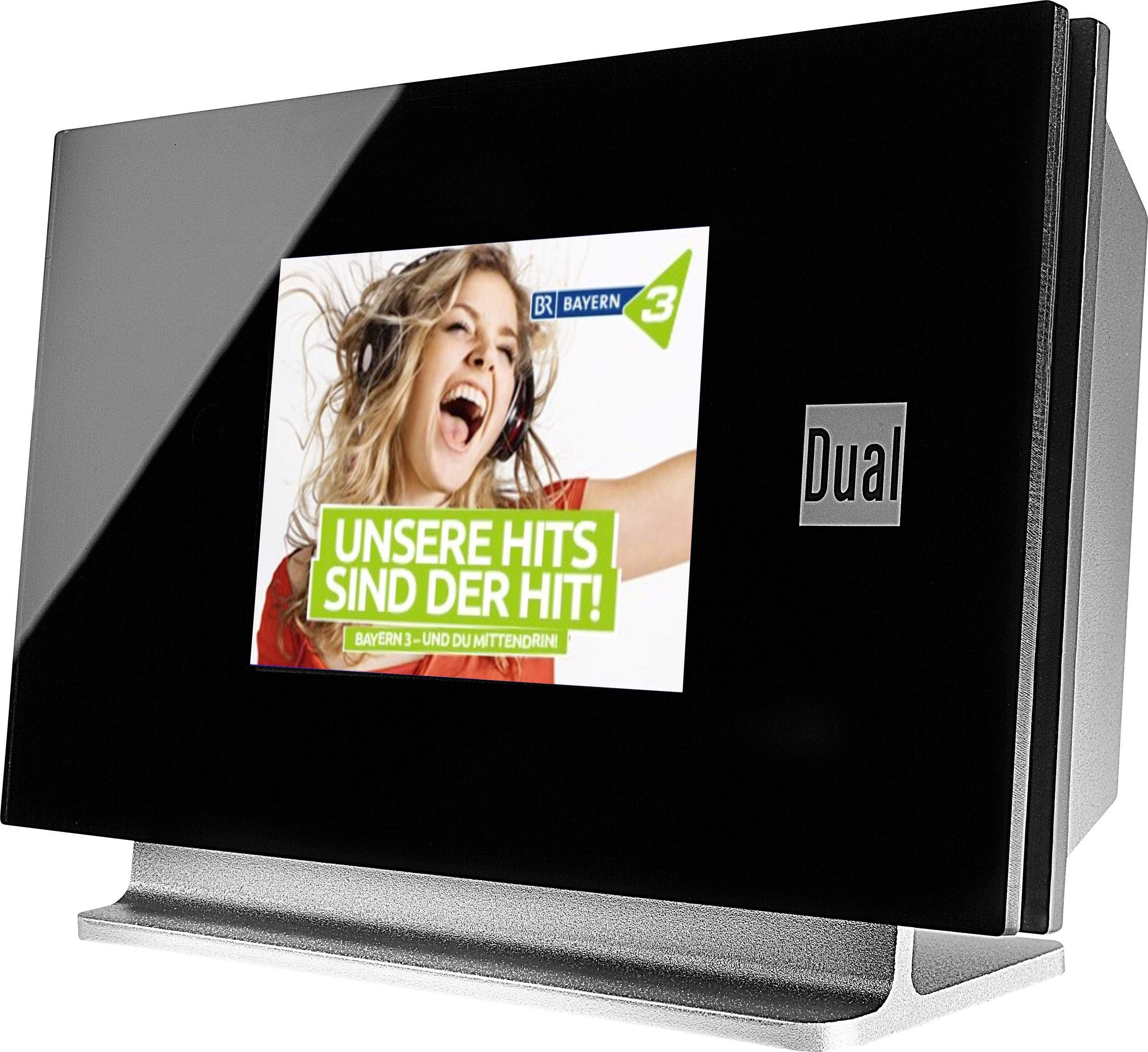
This image displays the Dual DAB 3A Digital Radio Adapter from a front-side angle. The front features a large, black TFT color display showing a radio station's album art and text. The side view indicates the product dimensions: 15 cm (width), 6 cm (depth), and 10.49 cm (height).
Přední panel
- Barevný TFT displej: Shows station information, track details, album art, and menu options.
Připojení zadního panelu
- Anténní vstup: For connecting the external wire antenna or a commercially available antenna.
- AUX-OUT: Audio output for connecting to an external ampzvlhčovač nebo audio systém.
- Příkon: Pro připojení síťového adaptéru.
Dálkové ovládání
The included remote control provides full functionality for navigating menus, changing stations, adjusting volume, and selecting input modes.
5. Nastavení
- Připojení antény: Connect the supplied external wire antenna to the antenna input on the rear panel of the DAB 3A adapter. For optimal reception, extend the antenna fully.
- Připojení k audio systému: Use an appropriate audio cable (not included) to connect the AUX-OUT port on the rear of the DAB 3A to an available audio input (e.g., AUX-IN, Line-IN) on your existing ampzesilovač nebo stereo systém.
- Připojte napájení: Plug the AC power adapter into the power input on the rear of the DAB 3A, then plug the adapter into a wall outlet.
- Zapnutí: Press the Power button on the unit or the remote control to turn on the adapter. The display will illuminate.
- Initial Scan (DAB+): Upon first power-on, the unit may automatically perform a scan for available DAB+ stations. Allow this process to complete.
6. Provoz
Zapnutí/vypnutí
- Stiskněte tlačítko Moc button on the unit or remote control to turn the device on or off.
Režim rádia DAB+
- Stiskněte tlačítko Režim button on the remote control until DAB+ mode is selected.
- If no stations are found or you wish to rescan, navigate to the 'Full Scan' option in the menu and confirm. The adapter will search for available DAB+ stations.
- Použijte Nahoru/dolů navigation buttons on the remote to browse through the list of available stations.
- Stiskněte OK/Enter vyberte stanici.
- The TFT display will show station name, program information, and potentially album art or weather data.
Režim rádia FM
- Stiskněte tlačítko Režim button on the remote control until FM mode is selected.
- Pro automatické vyhledávání stanic stiskněte a podržte tlačítko Skenovat button (or equivalent on remote). The adapter will tune to the next strong station.
- Pro ruční ladění použijte Nahoru/dolů navigation buttons to adjust the frequency.
Režim Bluetooth
- Stiskněte tlačítko Režim button on the remote control until Bluetooth mode is selected. The display will show 'Bluetooth Pairing' or similar.
- Na svém smartphonu nebo tabletu povolte Bluetooth a vyhledejte dostupná zařízení.
- Select 'Dual DAB 3A' from the list of devices to pair.
- Once paired, you can stream audio from your device to the DAB 3A adapter.
Režim AUX-IN
- Connect an external audio source (e.g., MP3 player, CD player) to the AUX-IN port on the rear of the DAB 3A using a 3.5mm audio cable (not included).
- Stiskněte tlačítko Režim button on the remote control until AUX-IN mode is selected.
- Audio from the connected external device will now play through your audio system.
7. Údržba
- Čištění jednotky: Disconnect the power adapter before cleaning. Use a soft, dry, lint-free cloth to wipe the surface of the unit. Do not use abrasive cleaners, waxes, or solvents.
- Čištění displeje: Gently wipe the TFT display with a soft, dry microfiber cloth. Avoid pressing hard on the screen.
- Skladování: Pokud budete jednotku skladovat delší dobu, odpojte ji od napájení a uložte ji na chladném a suchém místě mimo dosah přímého slunečního záření a extrémních teplot.
8. Řešení problémů
| Problém | Možná příčina | Řešení |
|---|---|---|
| Žádná síla | Napájecí adaptér není připojen nebo je zásuvka vadná. | Ujistěte se, že je napájecí adaptér bezpečně připojen k jednotce a k funkční zásuvce. |
| Špatný příjem DAB+/FM | Antenna not properly connected or poor signal strength. | Ensure the antenna is fully extended and properly connected. Try repositioning the antenna or the unit. Consider using a stronger external antenna if available. |
| Párování Bluetooth se nezdařilo | Bluetooth not enabled on source device or adapter is not in pairing mode. | Ensure Bluetooth is enabled on your smartphone/tablet and the DAB 3A is in Bluetooth mode. Try restarting both devices. |
| Žádný zvuk | Volume too low, incorrect input selected on amplifier, or audio cable issue. | Increase the volume on both the DAB 3A and your ampzáchranář. Zajistěte, aby vaše amplifier is set to the correct input (e.g., AUX-IN). Check the audio cable connections. |
9. Specifikace
- Model: 75862
- Technologie tuneru: DAB Plus, FM
- Konektivita: Bluetooth
- Podporovaná rádiová pásma: FM, DAB+
- Typ displeje: Barevný displej
- Zdroj napájení: AC adaptér
- Hardwarové rozhraní: Bluetooth
- Kompatibilní zařízení: Chytrý telefon, notebook
- Speciální vlastnosti: Bluetooth, Dálkové ovládání
- Rozměry produktu: 15 x 6 x 10.5 cm
- Hmotnost položky: 540 g
10. Záruka a podpora
This product comes with a standard manufacturer's warranty. For detailed warranty information, please refer to the warranty card included in your package or visit the official Dual website. For technical support, troubleshooting assistance, or service inquiries, please contact Dual customer support through their official channels.