
1. Konec produktuview
The TP-Link Archer T4U Plus is an AC1300 Dual Band Wireless USB Adapter designed to provide high-speed Wi-Fi connectivity for desktop computers. It supports the 802.11ac Wi-Fi standard, offering speeds of up to 867 Mbps on the 5 GHz band and 400 Mbps on the 2.4 GHz band. Equipped with dual high-gain antennas and a USB 3.0 interface, it aims to enhance wireless range and data transfer efficiency.

The TP-Link Archer T4U Plus USB WiFi Adapter, featuring two high-gain antennas and a USB 3.0 cable for connection to a computer.
2. Obsah balení
Ověřte, zda váš balíček obsahuje následující položky:
- AC1300 Dual Antennas High-Gain Wireless USB Adapter (Archer T4U Plus)
- 1-meter USB 3.0 Cable
- Průvodce rychlou instalací
- Zdrojové CD (s ovladači)
3. Pokyny k nastavení
3.1 Instalace hardwaru
- Rozbalte adaptér: Carefully remove the Archer T4U Plus adapter and its USB cable from the packaging.
- Připojte kabel USB: Connect one end of the provided 1-meter USB 3.0 cable to the USB 3.0 port on the Archer T4U Plus adapter.
- Připojení k počítači: Plug the other end of the USB 3.0 cable into an available USB 3.0 port on your desktop computer. For optimal performance, use a USB 3.0 port (typically blue inside).
- Umístění adaptéru: Place the adapter in a location that allows for good signal reception, ideally away from obstructions. The adjustable antennas can be rotated and angled for best performance.

The Archer T4U Plus adapter shown connected to a USB port via its included cable, illustrating its desktop placement.
3.2 Instalace ovladače
The Archer T4U Plus requires drivers to function correctly. Drivers can be installed via the included Resource CD or by downloading them from the TP-Link webmísto.
For Windows Operating Systems (Windows 11/10/8.1/8/7/XP):
- Použití zdrojového CD: Insert the Resource CD into your computer's CD-ROM drive. Follow the on-screen instructions to install the drivers.
- Stahování z TP-Linku Webmísto: If your computer lacks a CD-ROM drive, visit the official TP-Link support website, search for "Archer T4U Plus", and download the latest drivers for your specific Windows version. Run the downloaded installer and follow the prompts.
- Automatic Installation (Windows 10/11): In some cases, Windows 10 or 11 may automatically detect and install the necessary drivers upon connecting the adapter. Verify installation in Device Manager under "Network Adapters".
For Mac OS (10.15 and earlier):
- Stahování z TP-Linku Webmísto: Navštivte oficiální podporu TP-Link website, search for "Archer T4U Plus", and download the latest drivers for your Mac OS version.
- Nainstalujte ovladače: Otevřete stažené file and follow the installation instructions. You may need to restart your computer after installation.
4. Návod k obsluze
4.1 Připojení k bezdrátové síti
Once the drivers are successfully installed, you can connect to a Wi-Fi network:
- Nastavení sítě pro přístup:
- Windows: Klikněte na ikonu Wi-Fi v systémové liště (pravý dolní roh obrazovky).
- Operační Systém Mac: Klikněte na ikonu Wi-Fi v panelu nabídek (v pravém horním rohu obrazovky).
- Vyberte síť: Zobrazí se seznam dostupných bezdrátových sítí. Vyberte požadovanou síť (SSID).
- Zadejte heslo: If prompted, enter the Wi-Fi password (security key) for your network.
- Připojit: Klikněte na tlačítko „Připojit“ pro navázání bezdrátového připojení.
4.2 Provoz ve dvou pásmech
The Archer T4U Plus supports both 2.4 GHz and 5 GHz Wi-Fi bands. You can choose the band that best suits your needs:
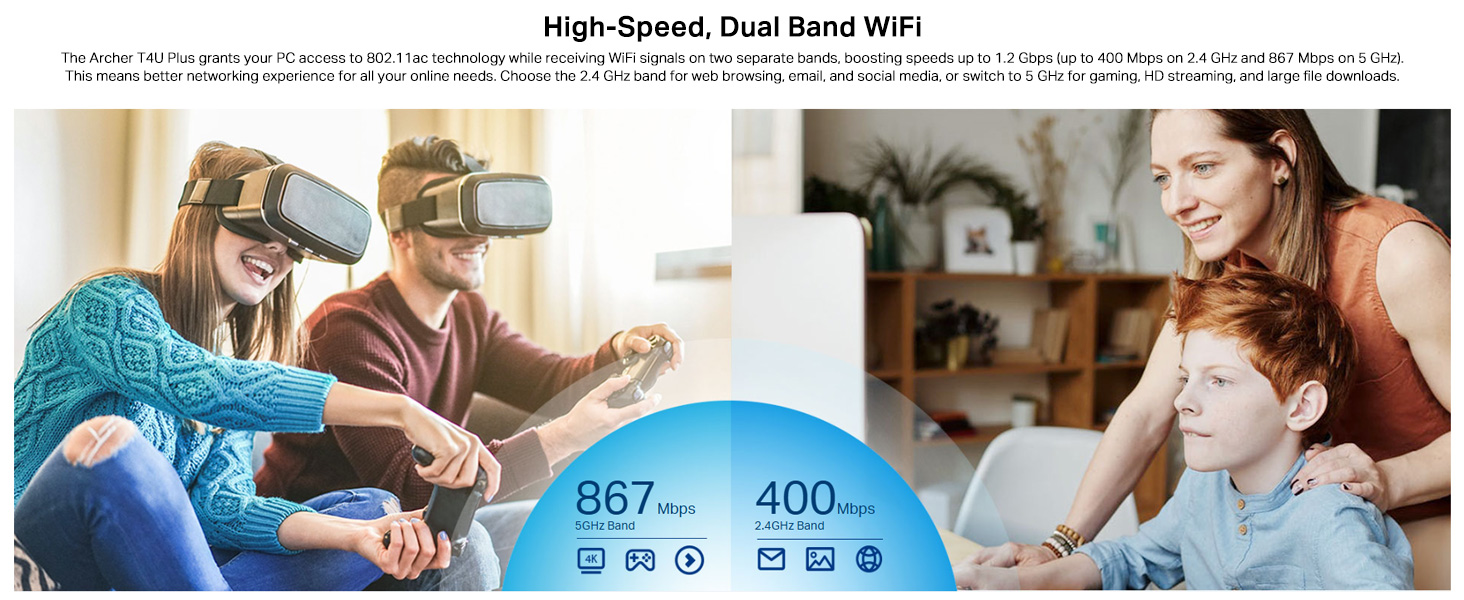
- Pásmo 2.4 GHz: Offers broader coverage and better penetration through walls, suitable for general internet use like web prohlížení a e-mail.
- Pásmo 5 GHz: Provides faster speeds and less interference, ideal for bandwidth-intensive activities such as online gaming, HD video streaming, and large file převody.
Your router may broadcast separate SSIDs for each band (e.g., "MyWiFi_2.4GHz" and "MyWiFi_5GHz"). Select the appropriate network from the available list.

An image illustrating the dual-band capabilities of the adapter, showing 867 Mbps on the 5GHz band for activities like 4K streaming and gaming, and 400 Mbps on the 2.4GHz band for web prohlížení a e-mail.
4.3 Enhanced Coverage and MU-MIMO
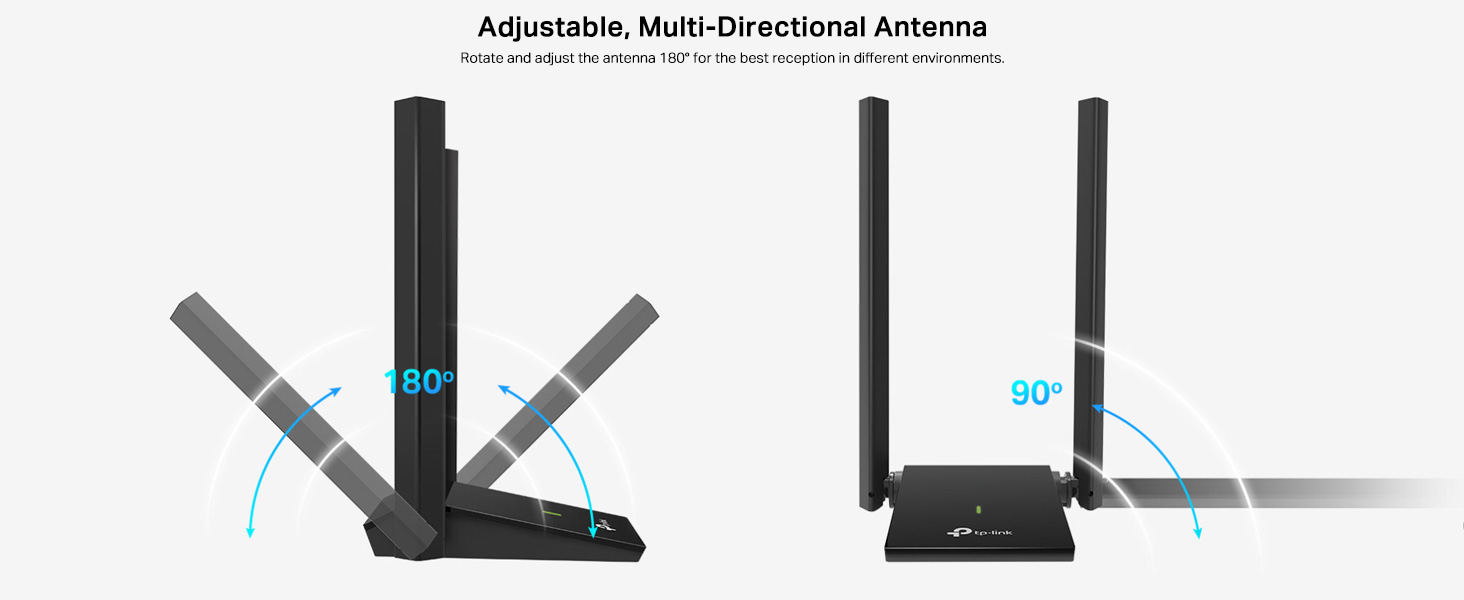
The dual high-gain antennas are designed to improve signal transmission and reception, extending your wireless coverage. For optimal performance, adjust the antennas to point towards your wireless router.
Illustrates the flexibility of the adapter's antennas, which can be rotated 180 degrees and adjusted 90 degrees for optimal signal reception.
The adapter also supports MU-MIMO technology. When used with a compatible MU-MIMO router, this technology allows the adapter to communicate with multiple devices simultaneously, improving network throughput and efficiency.
A visual representation of MU-MIMO technology, showing how the Archer T4U Plus adapter, when paired with a compatible router, can communicate with multiple devices simultaneously for improved network efficiency.
5. Údržba
- Udržujte ovladače aktualizované: Pravidelně kontrolujte podporu TP-Link webstránky s nejnovějšími ovladači pro zajištění optimálního výkonu a kompatibility.
- Vyčistěte zařízení: K čištění adaptéru použijte měkký, suchý hadřík. Nepoužívejte tekuté čisticí prostředky ani rozpouštědla.
- Správné umístění: Ensure the adapter is placed in a well-ventilated area and not covered, to prevent overheating.
- Zabezpečené připojení: Ensure the USB cable is securely connected to both the adapter and your computer to prevent intermittent disconnections.
6. Řešení problémů
- Žádné připojení k Wi-Fi:
- Ujistěte se, že je adaptér správně připojen k portu USB.
- Verify that the drivers are correctly installed. Check Device Manager (Windows) or System Information (Mac OS) for the adapter's status.
- Restartujte počítač a router.
- Zkuste se připojit k jinému portu USB.
- Pomalé rychlosti Wi-Fi:
- Ensure you are connected to the 5 GHz band if available and your router supports it, for faster speeds.
- Upravte antény adaptéru pro lepší příjem signálu.
- Minimalizujte fyzické překážky mezi adaptérem a routerem.
- Zkontrolujte, zda nedochází k rušení jinými zařízeními (např. mikrovlnnými troubami, bezdrátovými telefony).
- Aktualizujte ovladače adaptéru na nejnovější verzi.
- Časté výpadky:
- Ujistěte se, že kabel USB není uvolněný.
- Zkuste jiný USB port, nejlépe USB 3.0.
- Check for updated drivers.
- Ensure the adapter is not overheating.
- Problémy s instalací ovladačů:
- Disable any antivirus or firewall software temporarily during installation.
- Download drivers directly from the official TP-Link webweb pro váš konkrétní operační systém.
- For Linux users, specific driver installation steps may be required, often involving command-line instructions. Refer to community forums or TP-Link's support for detailed guidance.
7. Specifikace
| Funkce | Popis |
|---|---|
| Značka | TP-Link |
| Číslo modelu | Archer T4U Plus |
| Hardwarové rozhraní | USB 3.0 |
| Bezdrátové Standardní | 802.11ac |
| Rychlost přenosu dat | 1300 Mb/s (867 Mb/s na 5 GHz, 400 Mb/s na 2.4 GHz) |
| Antény | Dual High-Gain 5dBi Antennas |
| Operační systémy | Windows 11/10/8.1/8/7/XP, Mac OS 10.15 and earlier |
| Rozměry (D x Š x V) | 8.4L x 15.6W x 1.9H centimetrů |
| Hmotnost položky | 100 gramů |
| Barva | Černý |
8. Záruka a technická podpora
8.1 Informace o záruce
Tento produkt je dodáván s a 3letá záruka výrobceUschovejte si prosím doklad o koupi pro případ reklamace.
8.2 Technická podpora
For technical assistance, driver downloads, or further inquiries, please contact TP-Link support:
- TP-Link India Private Limited
- Adresa: Green Industrial Park, Dongri Pada, Poman, Kaman-Bhiwandi Road, Vasai East, Palghar, Maharashtra – 401208
- Bezplatný kontakt: 1800 2094 168
- E-mailová podpora: support.in@tp-link.com
- Výrobce: TP-Link Corporation, jižní budova, č. 5 Keyuan Road, centrální zóna, vědeckotechnický park, Nanshan, Šen-čen, PR Čína
For the most up-to-date support information and resources, please visit the official TP-Link webmísto.