
Zavedení
This user manual provides comprehensive instructions for the Andoer HDV-201LM 1080P FHD Digital Video Camera. It covers setup, operation, maintenance, and troubleshooting to help you get the most out of your device. The Andoer HDV-201LM is a portable digital video camera designed for capturing high-quality photos and videos, making it ideal for preserving memories.
Obsah balení
Po otevření balení se prosím ujistěte, že obsahuje všechny následující položky:
- 1 x Digital Video Camera
- 1 x brašna na fotoaparát
- 2 x Rechargeable Batteries (one already in camera)
- 1 x USB kabel
- Kabel 1 x AV
- 1 x Dálkové ovládání
- 1 x Uživatelská příručka (anglicky)

Image: All items included in the Andoer HDV-201LM package, including the camera, batteries, cables, remote, and bag.
Nastavení
1. Instalace baterie
The camera comes with two 3.7V 1500mAh rechargeable batteries. One battery is typically pre-installed. Before first use, ensure you remove any insulating film from the battery terminals.
- Open the battery compartment cover, usually located at the bottom or side of the camera.
- Insert the battery, ensuring the correct polarity as indicated inside the compartment.
- Bezpečně zavřete kryt bateriového prostoru.
- Charge the battery fully before initial use using the provided USB cable.

Image: The Andoer HDV-201LM camera, two rechargeable batteries, and the remote control, illustrating the main components.
2. Instalace paměťové karty
The camera requires an SD card (not included) for storing photos and videos. A Class 10 or higher SD card is highly recommended for optimal performance and smooth recording.
- Vyhledejte slot pro SD kartu, obvykle poblíž prostoru pro baterii.
- Vložte SD kartu kovovými kontakty ve správném směru, dokud nezacvakne.
- Chcete-li kartu vyjmout, jemně ji zatlačte, dokud nevyskočí.
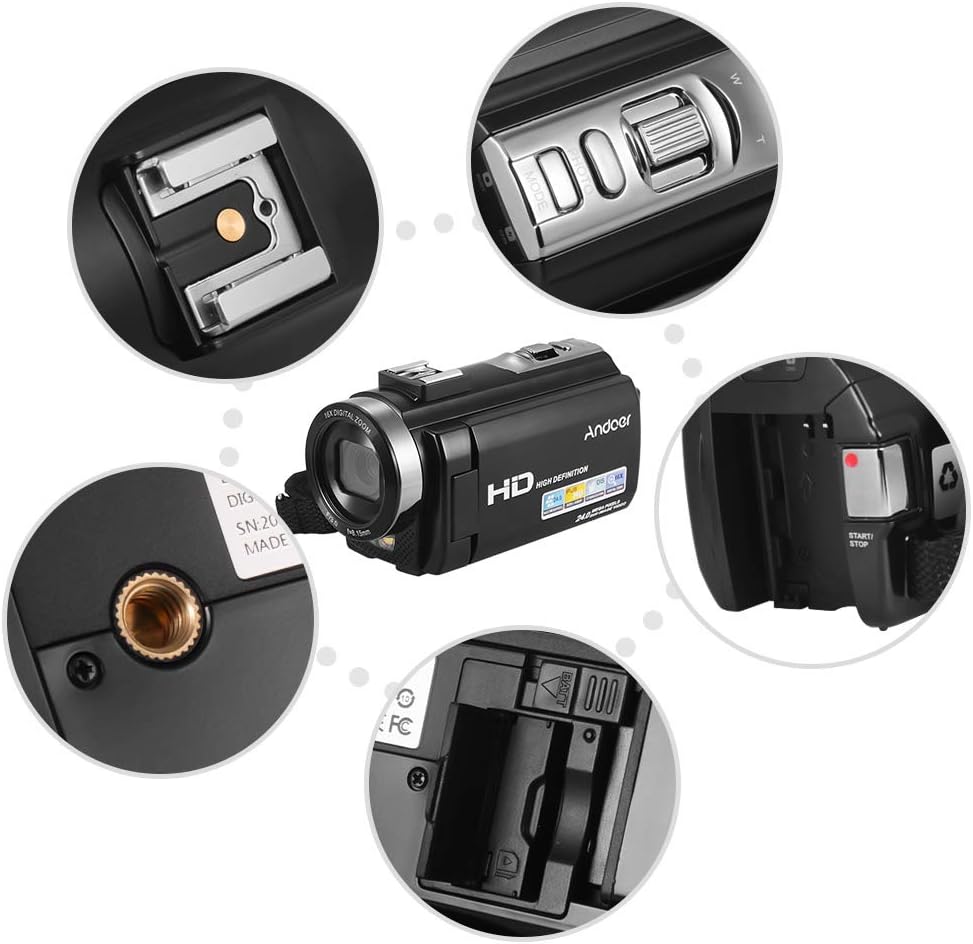
Obrázek: Detail views of various camera components, including the SD card slot, hot shoe mount, and control buttons.
3. Attaching External Accessories
The camera features a hot shoe mount for connecting external accessories such as microphones or LED video lights (sold separately).
- Slide the accessory onto the hot shoe mount located on top of the camera.
- Secure the accessory if it has a locking mechanism.
- For external microphones, connect the audio cable to the camera's microphone input port.

Image: Illustration of the hot shoe mount on the Andoer HDV-201LM camera, showing how external microphones and LED lights can be attached.
Návod k obsluze
1. Zapnutí/vypnutí
- To power on, open the LCD screen or press the MOC tlačítko.
- To power off, close the LCD screen or press and hold the MOC tlačítko.
2. Nahrávání videí
The camera supports 1080P FULL HD video recording.
- Zapněte fotoaparát.
- Ensure the camera is in video recording mode (usually indicated by a video camera icon on the screen). If not, press the MODE tlačítko pro přepnutí.
- Stiskněte tlačítko START/STOP button to begin recording. The recording indicator will light up.
- Stiskněte tlačítko START/STOP dalším tlačítkem nahrávání zastavíte.
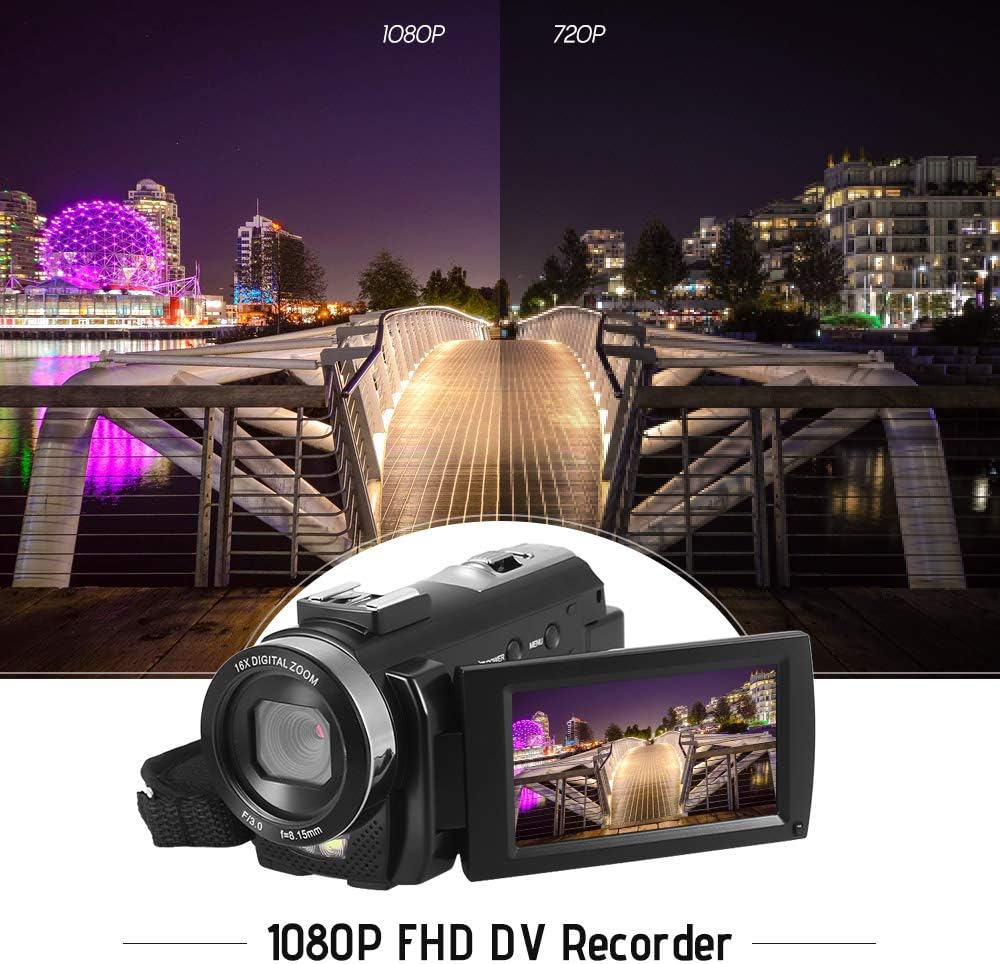
Image: Comparison of 1080P and 720P video quality, highlighting the 1080P FHD capability of the Andoer HDV-201LM camcorder.
3. Fotografování
The camera can capture still images up to 24MP (interpolation).
- Zapněte fotoaparát.
- Stiskněte tlačítko MODE button to switch to photo mode (indicated by a camera icon).
- Kompozice snímku se provede pomocí LCD displeje.
- Stiskněte tlačítko FOTOGRAFIE button (shutter button) to take a picture.
4. Používání LCD obrazovky
The 3.0-inch TFT-LCD screen offers 270° rotation for flexible viewing úhly.
- Rotate the screen to face forward for self-recording or to various angles for comfortable viewIng.
- The screen displays recording status, battery level, mode, and other settings.

Image: The Andoer HDV-201LM camera with its rotatable LCD screen open, showing the camera's compact design.
5. Digitální zoom
The camera features 16X digital zoom.
- Použijte W (širokoúhlý) a T (Teleobjektiv) buttons, typically located near the top of the camera, to zoom in or out.
- Note: Digital zoom may reduce image quality compared to optical zoom.

Image: Demonstrates the 16X digital zoom capability of the Andoer HDV-201LM, showing a zoomed-in view of a subject.
6. Nastavení nabídky
Access the menu to adjust various camera settings:
- Stiskněte tlačítko MENU tlačítko pro vstup do nabídky nastavení.
- Pro výběr možností použijte navigační tlačítka (nahoru/dolů/doleva/vpravo).
- Stiskněte tlačítko OK tlačítko pro potvrzení výběru.
- Stiskněte MENU znovu k výstupu.
Mezi klíčová nastavení patří:
- Vyvážení bílé: Auto, Daylight, Cloudy, Fluorescent, Tungsten.
- režim: Auto, Night, Portrait, Landscape, Backlight, Sport, Party, Beach, High Sensitivity.
- Vystavení: Adjust brightness from ±3.0EV.
- Samospoušť: Off, 2s, 5s, 10s.
- Automatické vypnutí: OFF, 1min, 3min, 5min.
- Další funkce: Face detection, smile capture, beauty face, anti-shake.

Image: A user holding and operating the Andoer HDV-201LM camera, demonstrating its portability and ease of use.
7. Připojení k počítači (USB)
You can connect the camera to a computer to transfer files.
- Ujistěte se, že je kamera zapnutá.
- Připojte fotoaparát k počítači pomocí dodaného kabelu USB.
- Fotoaparát se v počítači zobrazí jako vyměnitelná disková jednotka.
- You can now access and transfer your photos and videos.
Supported Operating Systems: Windows XP/Vista/7/8/10.

Obrázek: Detail view of the USB and TV output ports on the Andoer HDV-201LM camera, indicating connectivity options.
8. Connecting to a TV (AV Output)
View your recordings directly on a television using the AV cable.
- Connect one end of the AV cable to the camera's AV output port.
- Connect the other end to the AV input ports on your television (yellow for video, white/red for audio).
- Vyberte správný AV vstupní zdroj na vašem televizoru.
TV Output Standards: NTSC/PAL.
9. Pomocí dálkového ovládání
Přiložené dálkové ovládání umožňuje pohodlné ovládání na dálku.
- Ensure the remote control battery (1 x 3V CR2025) is installed correctly.
- Point the remote control towards the camera's IR receiver.
- Use the buttons on the remote to control recording, playback, zoom, and menu navigation.
Údržba
1. Čištění fotoaparátu
- K čištění těla fotoaparátu použijte měkký, suchý hadřík.
- Pro čištění čočky a LCD obrazovky použijte speciální hadřík a roztok na čištění čoček. Nepoužívejte abrazivní materiály.
- Nepoužívejte silné čisticí prostředky ani rozpouštědla.
2. Péče o baterie
- Pokud baterie nepoužíváte, skladujte je na chladném a suchém místě.
- Vyhněte se častému úplnému vybíjení baterií, abyste prodloužili jejich životnost.
- Pokud fotoaparát nebudete delší dobu používat, vyjměte baterii.
3. Skladování
- Store the camera in its camera bag to protect it from dust and scratches.
- Chraňte fotoaparát před extrémními teplotami, vlhkostí a přímým slunečním zářením.
Odstraňování problémů
| Problém | Možná příčina | Řešení |
|---|---|---|
| Fotoaparát se nezapne. | Battery is dead or not inserted correctly. Insulating film on battery. | Charge the battery. Reinsert the battery correctly. Remove insulating film. |
| Nelze nahrávat video/fotit. | No SD card or SD card full/corrupted. Incorrect mode. | Insert a valid SD card. Delete files or format SD card. Switch to correct mode. |
| Špatná kvalita obrazu/videa. | Lens is dirty. Low light conditions. Digital zoom used excessively. | Clean the lens. Use LED fill light. Avoid excessive digital zoom. |
| Dálkové ovládání nefunguje. | Battery dead or incorrectly inserted. Obstruction between remote and camera. | Replace/reinsert remote battery. Ensure clear line of sight to IR receiver. |
| Fotoaparát se zasekne nebo přestane reagovat. | Softwarová závada. | Vyjměte a znovu vložte baterii pro resetování fotoaparátu. |
Specifikace
| Funkce | Detail |
|---|---|
| Značka | Andoer |
| Číslo modelu | HDV-201LM |
| Senzor | 8MP CMOS Sensor, max. 24MP (interpolation) |
| Externí paměť | SD Card, max. 32G (Not included, Class 10+ recommended) |
| Objektiv fotoaparátu | Ff (F/3.0 f=8.15mm) |
| Obrazovka | 3.0 Inch TFT-LCD (16:9), 270° rotation |
| Video Format & Resolution | AVI, 1920*1080P FULL HD/30fps, 1280*720 HD/30fps, VGA 640*480/30fps, QVGA 320*240/30fps |
| Image Format & Resolution | JPG, 5600*4200 (24MP Interpolation) / 5200*3900 (20MP Interpolation) / 4608*3456 (16MP Interpolation) / 4000*3000 (12MP Interpolation) / 3648*2736 (10MP Interpolation) / 3648*2048 HD (7M-Wide Interpolation) / 2592*1944 (5MP) / 2048*1536 (3MP) / 1920*1080 HD (2M-Wide) / 640*480 VGA |
| Vyvážení bílé | Auto/ Daylight/ Cloudy/ Fluorescent/ Tungsten |
| Režim | Auto/Night/Portrait/Landscape/Backlight/Sport/Party/Beach/High Sensitivity |
| Vystavení | ± 3.0 EV |
| Samospoušť | Vypnuto, 2 s, 5 s, 10 s |
| Automatické vypnutí | OFF/1min/ 3min/ 5min |
| USB port | USB 2.0 |
| Výstup televizoru | NTSC / PAL |
| Podpora operačního systému | Windows XP/Vista/7/8/10 |
| Napájení kamery | 1 * Battery 3.7V 1500mAh (included) |
| Baterie dálkového ovládání | 1 * 3V CR2025 Battery |
| Velikost fotoaparátu | 13.5 * 5.5 * 6.5 cm / 5.3 * 2.2 * 2.6 palce |
| Hmotnost fotoaparátu | 273g / 9.6oz (With battery) |
Záruka a podpora
This product comes with standard manufacturer support. For extended coverage, consider the following options:
- 1letý prodloužený záruční plán
- 2 Years Extended Warranty Plan
For technical support or warranty claims, please refer to the contact information provided with your purchase documentation or visit the official Andoer webmísto.