
Amazon Echo Show 8 (1st Gen, 2019 release)
Uživatelská příručka k Echo Show 8 (1. generace)
Your comprehensive guide to setting up, operating, and maintaining your Amazon Echo Show 8.
Zavedení
The Amazon Echo Show 8 (1st Gen, 2019 release) is a smart display designed to enhance your daily life with Alexa. Featuring an 8-inch HD screen and stereo sound, it allows you to manage your day, connect with loved ones through video calls, enjoy entertainment, control smart home devices, and personalize your experience. This manual provides detailed instructions to help you get the most out of your device.
Co je v krabici
Upon unboxing your Echo Show 8, ensure all components are present:
- Zařízení Echo Show 8
- Napájecí adaptér (30 W) s kabelem (4.9 m)
- Průvodce rychlým startem
Nastavení
Setting up your Echo Show 8 is a straightforward process, often simplified by Amazon Wi-Fi simple setup technology.
- Zapnutí: Connect the power adapter to your Echo Show 8 and plug it into a wall outlet. The device will power on automatically.
- Výběr jazyka: Postupujte podle pokynů na obrazovce a vyberte preferovaný jazyk.
- Wi-Fi připojení: Select your Wi-Fi network from the list and enter the password. The Echo Show 8 supports dual-band Wi-Fi (802.11a/b/g/n/ac).
- Amazon Account Login: Log in with your Amazon account credentials. If you don't have one, you will be prompted to create one.
- Registrace zařízení: Your device will register to your Amazon account.
- Time Zone and Location: Confirm your time zone and location settings.
- Konzultace: The device may offer a brief tutorial on how to navigate and use its features.
The Alexa app is compatible with Fire OS, Android, and iOS devices and is also accessible via your web browser for further management and customization.
Ovládání Echo Show 8
The Echo Show 8 can be operated using voice commands with Alexa or through its touch screen interface.
Voice Commands (Alexa)
Simply say "Alexa" followed by your command. Exampzahrnují:
- „Alexo, jaké je počasí?“
- „Alexo, pusť hudbu.“
- „Alexo, zavolej [jméno kontaktní osoby].“
- "Alexa, show me my photos."
- "Alexa, turn off the lights."

Image: Echo Show 8 displaying current weather conditions, demonstrating its ability to provide glanceable information.
Navigace dotykovou obrazovkou
Swipe down from the top of the screen to access quick settings and the home menu. Swipe left from the right edge to view cards with suggestions and information. Tap on icons and options to interact with the device.
Vlastnosti
The Echo Show 8 offers a wide range of features to simplify and enrich your daily routines:
- Video Calling & Messaging: Connect with friends and family who have the Alexa app or an Echo device with a screen. Make announcements to other devices in your home.

Image: A user making a video call on the Echo Show 8, highlighting its communication capabilities.
- Zábava: Ask Alexa to show you movie trailers, TV shows, movies, or the news. Listen to radio stations, podcasts, and audiobooks.
- Ovládání chytré domácnosti: Voice control compatible devices or manage them on the easy-to-use display. Ask Alexa to show you security cameras, control lights, and adjust thermostats.

Image: The Echo Show 8 displaying a live feed from a nursery camera, illustrating its smart home monitoring feature.
- Personalizace: Show off your albums from Amazon Photos. Customize your home screen. Create morning routines to start your day.
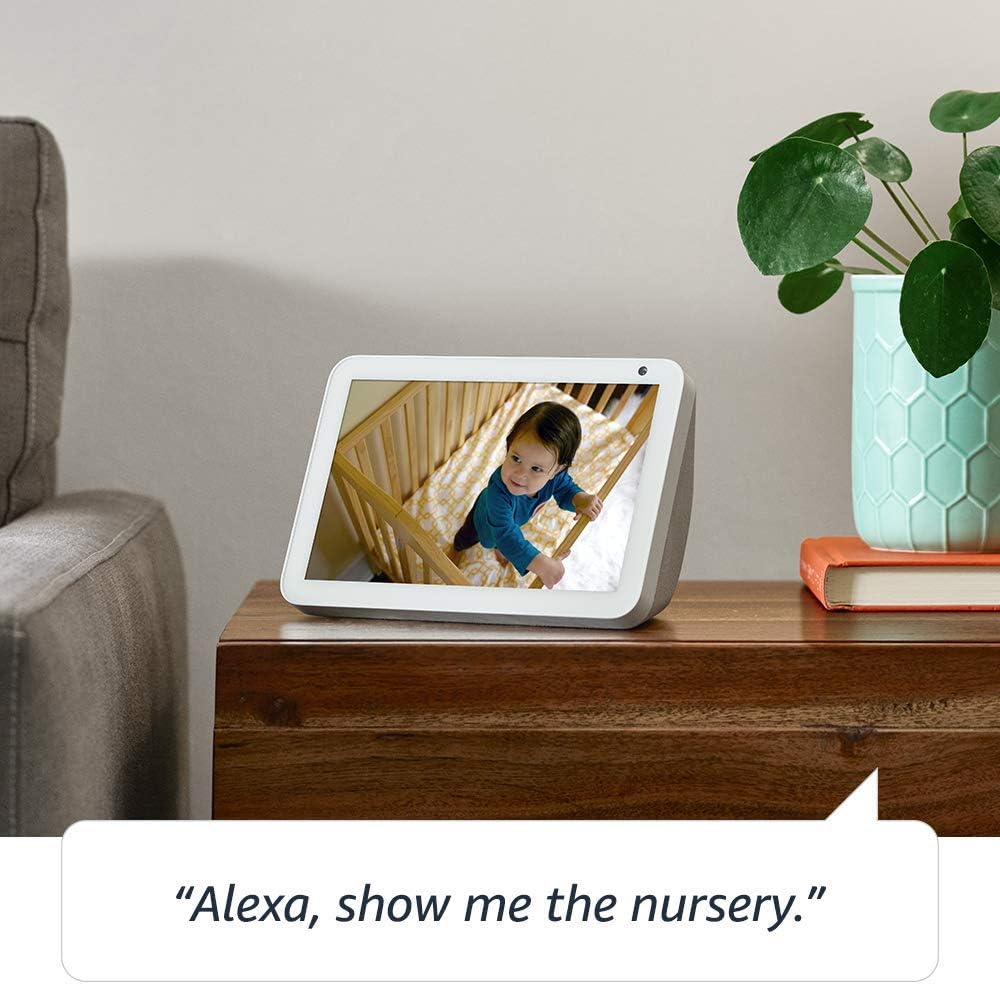
Image: The Echo Show 8 displaying a scenic photo from a user's Amazon Photos album, demonstrating its personalization options.
- Denní pomoc: Cook along to step-by-step recipes. Easily update to-do lists and calendars. Glance at weather and traffic on your way out.
Funkce ochrany osobních údajů
The Echo Show 8 is designed with privacy in mind, offering several controls:
- Tlačítko vypnutí mikrofonu/fotoaparátu: Electronically disconnect the microphones and camera with one press of a button.
- Vestavěná závěrka fotoaparátu: Slide the built-in shutter to physically cover the camera lens.

Image: A finger activating the physical camera shutter on the Echo Show 8, demonstrating a privacy control feature.
- Technologie probuzení slov: Alexa devices are designed to detect only your chosen wake word (e.g., "Alexa").
- Indikátory streamování: Visual indicators show when Alexa is streaming your request to the cloud.
- Správa hlasových nahrávek: Schopnost view and delete your voice recordings through the Alexa app or Alexa Privacy Hub.
Pro více informací navštivte Centrum ochrany osobních údajů Alexa.
Údržba
To ensure the longevity and optimal performance of your Echo Show 8, follow these maintenance guidelines:
- Čištění: Use a soft, lint-free cloth to clean the screen and exterior. Avoid abrasive cleaners or sprays directly on the device.
- Umístění: Place the device on a stable, flat surface away from direct sunlight, heat sources, and moisture. Ensure proper ventilation.
- Aktualizace softwaru: The device automatically receives software updates. Ensure it is connected to Wi-Fi to receive these updates, which improve performance and add new features.
Odstraňování problémů
If you encounter issues with your Echo Show 8, try the following steps:
- Bez napájení:
- Ujistěte se, že je napájecí adaptér bezpečně připojen k zařízení i k funkční zásuvce.
- Zkuste jinou zásuvku.
- Problémy s připojením Wi-Fi:
- Ověřte, zda je vaše heslo k Wi-Fi správné.
- Restartujte Wi-Fi router a modem.
- Přesuňte Echo Show 8 blíže k Wi-Fi routeru.
- Alexa neodpovídá:
- Ensure the microphone is not muted (check the microphone/camera off button).
- Mluvte jasně a normální hlasitostí.
- Zkuste zařízení restartovat tak, že ho na několik sekund odpojíte a znovu zapojíte.
- Problémy s obrazovkou:
- Pokud obrazovka nereaguje, zkuste zařízení restartovat.
- Ensure the screen is clean and free of smudges.
- Obnovení továrního nastavení: As a last resort, you can perform a factory reset. This will erase all your personal data and settings. To do this, go to Settings > Device Options > Reset to Factory Defaults.
Specifikace
| Funkce | Detail |
|---|---|
| Velikost | 7.9”x 5.4”x 3.9” (200mm x 135mm x 99mm) |
| Hmotnost | 36.6 unce (1037 gramů) |
| Zobrazit | 8.0 ”dotykový displej |
| Fotoaparát | 1MP camera with built-in shutter |
| Wi-Fi připojení | Dual-band Wi-Fi supports 802.11a/b/g/n/ac Wi-Fi networks. Does not support connecting to ad-hoc (or peer-to-peer) Wi-Fi networks. |
| Připojení Bluetooth | Advanced Audio Distribution Profile (A2DP) support for audio streaming from your mobile device to Echo Show 8 or from Echo Show 8 to your Bluetooth speaker. Audio/Video Remote Control Profile (AVRCP) for voice control of connected mobile devices. Hands-free voice control is not supported for Mac OS X devices. Bluetooth speakers requiring PIN codes are not supported. |
| Zvuk | 2.0” (52 mm) neodymium speakers with passive bass radiator |
| Systémové požadavky | Echo Show 8 comes ready to connect to your WiFi. The Alexa app is compatible with Fire OS, Android, and iOS devices and also accessible via your web browser. Supported operating systems. Certain skills and services may require subscription or other fees. |
| Procesor | MediaTek MT 8163 |
| Jazyk | Alexa mluví anglicky a španělsky |
Funkce usnadnění
The Echo Show 8 includes various accessibility features to personalize Alexa to your abilities:
- Klepnutím na Alexu: Access Alexa via touch through on-screen tiles or a keyboard.
- Adaptivní poslech: Poskytuje více času na domluvení, než Alexa odpoví.
- Preferované tempo mluvení: Ovládejte, jak rychle nebo pomalu Alexa mluví.
- Titulky Alexa, titulky hovorů, skryté titulky: U podporovaného obsahu poskytněte textové titulky.
- Ukaž a řekni: Helps customers who are blind or visually impaired identify products by saying “Alexa, what am I holding.”
- HlasView Čtečka obrazovky: Enables access for customers who are blind or visually impaired.
- Zvětšovací program obrazovky: Enables zooming in/out and panning around the screen.
- Upozornit na poblíž: Plays notification sounds when you’re detected near your Echo device.
- Kindle Čtení nahlas: Alexa vám může nahlas číst knihy z Kindle.
- Text v reálném čase: Enables typing live text in a video call.
- Mezi další nastavení patří Inverze barev, Korekce barev, Vyžádat zvuk a další.
To enable these features, go to Settings → Accessibility on your Echo Show 8.
Záruka a podpora
Your Certified Refurbished Echo Show 8 comes with a 1-year limited warranty and service, similar to a new device. Use of Echo Show 8 is subject to Amazon's terms and conditions.
For further assistance, visit the Amazon Device Support page or contact Amazon Customer Service.
Ask a question about this manual
Ask about setup, troubleshooting, compatibility, parts, safety, or missing instructions. Manuals+ will review the question and use this page’s manual context to help answer it.