
1. Úvod
The MASTECH MS8260E is a versatile 2000-count digital multimeter designed for a wide range of electrical and electronic measurements. It features a large LCD display, non-contact voltage (NCV) detection, and capabilities for measuring AC/DC voltage, AC/DC current, resistance, capacitance, and inductance. This manual provides essential information for the safe and effective operation, maintenance, and troubleshooting of your device.
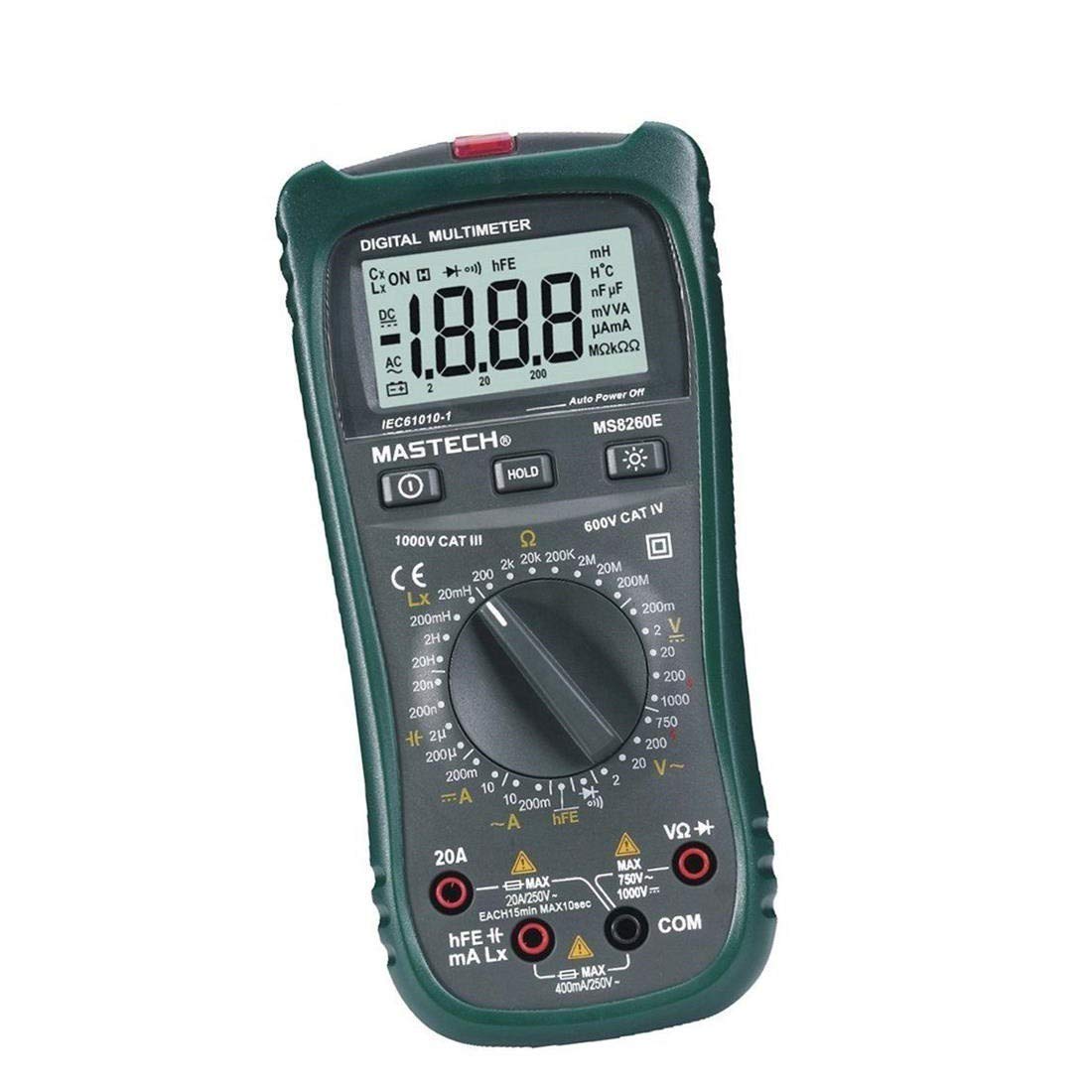
Obrázek 1: Přední strana view of the MASTECH MS8260E Digital Multimeter, showing the LCD display, function rotary switch, and input jacks.
2. Bezpečnostní informace
Pro zajištění bezpečného provozu a servisu měřiče dodržujte tyto bezpečnostní pokyny:
- Před použitím měřicího přístroje si přečtěte a pochopte všechny pokyny v tomto návodu.
- Vždy dodržujte místní a národní bezpečnostní předpisy.
- Nepoužívejte měřicí přístroj, pokud se jeví poškozený nebo pokud je narušena izolace měřicích vodičů.
- Observe the input limits for each measurement range to prevent electrical shock or damage to the meter. This meter is rated for CAT.IV 600V.
- Buďte opatrní při práci s objtagnad 30 V AC RMS, 42 V peak nebo 60 V DC. Tyto objemytages představují nebezpečí úrazu elektrickým proudem.
- Vždy odpojte napájení obvodu a vybijte všechny vysokonapěťovétage capacitors before making resistance, continuity, diode, or capacitance measurements.
- Pro zajištění přesných údajů ihned vyměňte baterii, jakmile se zobrazí indikátor slabé baterie.
- Nepoužívejte měřič v prostředí s výbušnými plyny, parami nebo prachem.
3. Konec produktuview
The MS8260E multimeter is equipped with several features to facilitate accurate and convenient measurements:
- Large 2000 Counts LCD Display: Poskytuje jasné digitální údaje.
- Vestavěný bezkontaktní svtage (NCV) Detector: Detekuje AC svtage greater than 110V without physical contact, indicated by a flash warning.
- Funkce uchování dat: Zmrazí zobrazenou hodnotu pro snadné zaznamenání.
- Podsvícení displeje: Improves visibility in dimly lit conditions.
- Automatické vypnutí: Šetří životnost baterie automatickým vypnutím měřiče po určité době nečinnosti.
- Indikace slabé baterie: Alerts the user when the battery needs replacement.
- Indikace polarity: Automatically displays negative polarity.
- 30-Range Rotary Switch: Selects various measurement functions including AC/DC voltage, AC/DC current, resistance, capacitance, inductance, diode check, continuity test, and transistor (hFE) check.
4. Nastavení
4.1 Instalace baterie
The MS8260E requires one 9V battery (NEDA 1604/6F22). To install or replace the battery:
- Ensure the meter is turned off and disconnect all test leads from the input terminals.
- Najděte kryt přihrádky na baterie na zadní straně měřiče.
- Odšroubujte upevňovací šroub(y) a sejměte kryt.
- Insert the 9V battery, observing the correct polarity.
- Nasaďte kryt prostoru pro baterie a zajistěte jej šroubem (šrouby).
4.2 Připojení měřicích kabelů
Always connect the black test lead to the "COM" (common) input jack. Connect the red test lead to the appropriate input jack based on the desired measurement:
- Pro svtage, Resistance, Capacitance, Inductance, Diode, Continuity, and hFE measurements: Connect the red lead to the "VΩCAPHz" jack.
- For Current measurements up to 200mA: Connect the red lead to the "mA" jack.
- For Current measurements up to 10A: Connect the red lead to the "10A" jack.
Ensure test leads are fully inserted into the jacks before taking measurements.
5. Návod k obsluze
Turn the rotary switch to the desired function. The meter will display "OL" (Overload) if no input is present or if the input exceeds the range.
5.1 DC svtage měření (DCV)
- Set the rotary switch to the desired DCV range (200mV, 2V, 20V, 200V, 1000V).
- Connect the black test lead to the "COM" jack and the red test lead to the "VΩCAPHz" jack.
- Připojte měřicí vodiče k měřené součástce nebo obvodu a dodržte polaritu.
- Přečtěte si svtage hodnota na LCD displeji.
5.2 AC svtage měření (ACV)
- Set the rotary switch to the desired ACV range (2V, 20V, 200V, 750V).
- Connect the black test lead to the "COM" jack and the red test lead to the "VΩCAPHz" jack.
- Připojte měřicí vodiče k AC napětítage zdroj.
- Přečtěte si svtage hodnota na LCD displeji.
5.3 DC Current Measurement (DCA)
- Set the rotary switch to the desired DCA range (200mA, 10A).
- For measurements up to 200mA, connect the red lead to the "mA" jack. For measurements up to 10A, connect the red lead to the "10A" jack. The black lead connects to "COM".
- Otevřete obvod, kde má být měřen proud, a zapojte měřič sériově se zátěží.
- Odečtěte aktuální hodnotu na LCD displeji.
5.4 AC Current Measurement (ACA)
- Set the rotary switch to the desired ACA range (200mA, 10A).
- For measurements up to 200mA, connect the red lead to the "mA" jack. For measurements up to 10A, connect the red lead to the "10A" jack. The black lead connects to "COM".
- Otevřete obvod, kde má být měřen proud, a zapojte měřič sériově se zátěží.
- Odečtěte aktuální hodnotu na LCD displeji.
5.5 Měření odporu (Ω)
- Set the rotary switch to the desired Ω range (200Ω, 2kΩ, 20kΩ, 200kΩ, 2MΩ, 20MΩ, 200MΩ).
- Connect the black test lead to "COM" and the red test lead to "VΩCAPHz".
- Ujistěte se, že obvod je bez napětí a všechny kondenzátory jsou vybité.
- Connect the test leads across the resistor or component.
- Odečtěte hodnotu odporu na LCD displeji.
5.6 Capacitance Measurement (CAP)
- Set the rotary switch to the desired CAP range (20nF, 200nF, 2uF, 200uF).
- Connect the black test lead to "COM" and the red test lead to "VΩCAPHz".
- Před připojením měřicích vodičů se ujistěte, že je kondenzátor zcela vybitý.
- Připojte měřicí vodiče přes kondenzátor.
- Odečtěte hodnotu kapacity na LCD displeji.
5.7 Inductance Measurement (L)
- Set the rotary switch to the desired Inductance range (20mH, 200mH, 2H, 20H).
- Connect the black test lead to "COM" and the red test lead to "VΩCAPHz".
- Connect the test leads across the inductor.
- Read the inductance value on the LCD display.
5.8 Test diod
- Set the rotary switch to the Diode symbol.
- Connect the black test lead to "COM" and the red test lead to "VΩCAPHz".
- Připojte červený vodič k anodě a černý vodič ke katodě diody. Proud proudu vpředtagZobrazí se pokles (obvykle 0.5 V až 0.8 V pro křemíkové diody).
- Reverse the leads. The display should show "OL" for a good diode.
5.9 Test kontinuity
- Set the rotary switch to the Continuity symbol.
- Connect the black test lead to "COM" and the red test lead to "VΩCAPHz".
- Připojte měřicí vodiče k obvodu nebo součástce.
- Pokud je odpor nižší než přibližně 30 Ω, ozve se bzučák, který signalizuje přerušení obvodu.
5.10 Transistor (hFE) Test
- Nastavte otočný přepínač do polohy hFE.
- Identify the type (NPN or PNP) and pinout (Emitter, Base, Collector) of the transistor.
- Insert the transistor leads into the corresponding sockets in the hFE test socket on the meter.
- Odečtěte hodnotu hFE (zesílení stejnosměrného proudu) na LCD displeji.
5.11 Nekontaktní svtage (NCV) Detekce
- Nastavte otočný přepínač do polohy NCV.
- Hold the top front part of the meter near the AC voltage source (e.g., an electrical outlet or insulated wire).
- Pokud AC svtage greater than 110V is detected, the NCV indicator light will flash, and the buzzer may sound.
6. Údržba
6.1 Čištění
Otřete měřič reklamouamp cloth and a mild detergent. Do not use abrasives or solvents. Ensure the meter is dry before use.
6.2 Výměna baterie
When the "BAT" symbol appears on the display, the battery needs to be replaced. Refer to Section 4.1 for battery installation instructions.
6.3 Výměna pojistky
If the current measurement function fails, the fuse may need replacement. This operation should only be performed by qualified personnel. Refer to the service manual or contact customer support for fuse specifications and replacement procedures.
6.4 Skladování
If the meter is not to be used for an extended period, remove the battery to prevent leakage and damage to the meter. Store the meter in a cool, dry place away from direct sunlight.
7. Řešení problémů
| Problém | Možná příčina | Řešení |
|---|---|---|
| Žádný nebo slabý displej | Low battery; Meter off | Replace battery; Turn on meter |
| Zobrazuje se „OL“ | Input exceeds range; Open circuit (for resistance/continuity) | Select higher range; Check circuit connection |
| Nesprávné údaje | Low battery; Incorrect range selected; Poor test lead contact | Replace battery; Select appropriate range; Ensure good contact |
| Měření proudu nefunguje | Spálená pojistka | Replace fuse (by qualified personnel) |
8. Specifikace
| Funkce měření | Rozsah | Přesnost |
|---|---|---|
| DC svtage (DCV) | 200mV, 2V, 20V, 200V, 1000V | ±0.5% (200mV-200V), ±0.8% (1000V) |
| AC svtage (ACV) | 2V, 20V, 200V, 750V | ±0.8% (2V-200V), ±1.2% (750V) |
| DC proud (DCA) | 200mA, 10A | ±1.5% (200mA), ±2.0% (10A) |
| AC proud (ACA) | 200mA, 10A | ±1.8% (200mA), ±3.0% (10A) |
| Odpor (Ω) | 200Ω, 2kΩ, 20kΩ, 200kΩ, 2MΩ, 20MΩ, 200MΩ | ±0.8% (200Ω-2MΩ), ±1.0% (20MΩ), ±5.0% (200MΩ) |
| Kapacita (CAP) | 20nF, 200nF, 2uF, 200uF | ±4.0% (20nF-2uF), ±5.0% (200uF) |
| Indukčnost (L) | 20mH, 200mH, 2H, 20H | ±3.0 % |
| Zvuková kontinuita | Buzzer sounds at <30Ω | N/A |
| Test diod | 1 mA, 2.8 V | N/A |
| Tranzistor (hFE) | 0–1,000 | N/A |
Obecné specifikace:
- Zobrazit: LCD s 2000 čísly
- Hodnocení bezpečnosti: CAT.IV 600V
- Moc: 9V battery (NEDA 1604/6F22)
- Hmotnost: Approximately 1 kg (including battery)
9. Záruka a podpora
For warranty information, technical support, or service inquiries, please refer to the warranty card included with your product or visit the official Mastech website. Do not attempt to repair the meter yourself, as this may void the warranty and pose safety risks.