
1. Úvod
This document provides comprehensive instructions for the Easytry123 Replacement Remote Control. This remote is designed to function as a substitute for the original remote controls of various ONKYO Home Theater System models. Please review this manual to ensure proper setup and operation.
While this replacement remote is designed for broad compatibility, some advanced or specific functions present on your original remote may not be fully supported. Refer to the original ONKYO system manual for detailed functions of your specific home theater unit.
2. Kompatibilní modely
This Easytry123 Replacement Remote Control is compatible with the following ONKYO Home Theater System models:
- ONKYO HT-R670
- ONKYO HT-S6200
- ONKYO HT-R570
- ONKYO HT-S5200
- ONKYO HT-S5200S
- ONKYO HT-S7100
- ONKYO HT-R960
- ONKYO HT-S9100THX
- ONKYO HT-R560
- ONKYO HT-R667
If your specific ONKYO model is not listed above, this replacement remote may not be fully compatible.
3. Nastavení
3.1 Instalace baterie
- Najděte přihrádku na baterie na zadní straně dálkového ovladače.
- Posuňte kryt přihrádky na baterie dolů nebo ven, abyste jej otevřeli.
- Vložte dvě (2) baterie AAA (nejsou součástí balení) a ujistěte se, že kladný (+) a záporný (-) pól správně odpovídají označením uvnitř přihrádky.
- Nasaďte kryt přihrádky na baterie tak, že jej zasunete zpět na místo, dokud bezpečně nezacvakne.
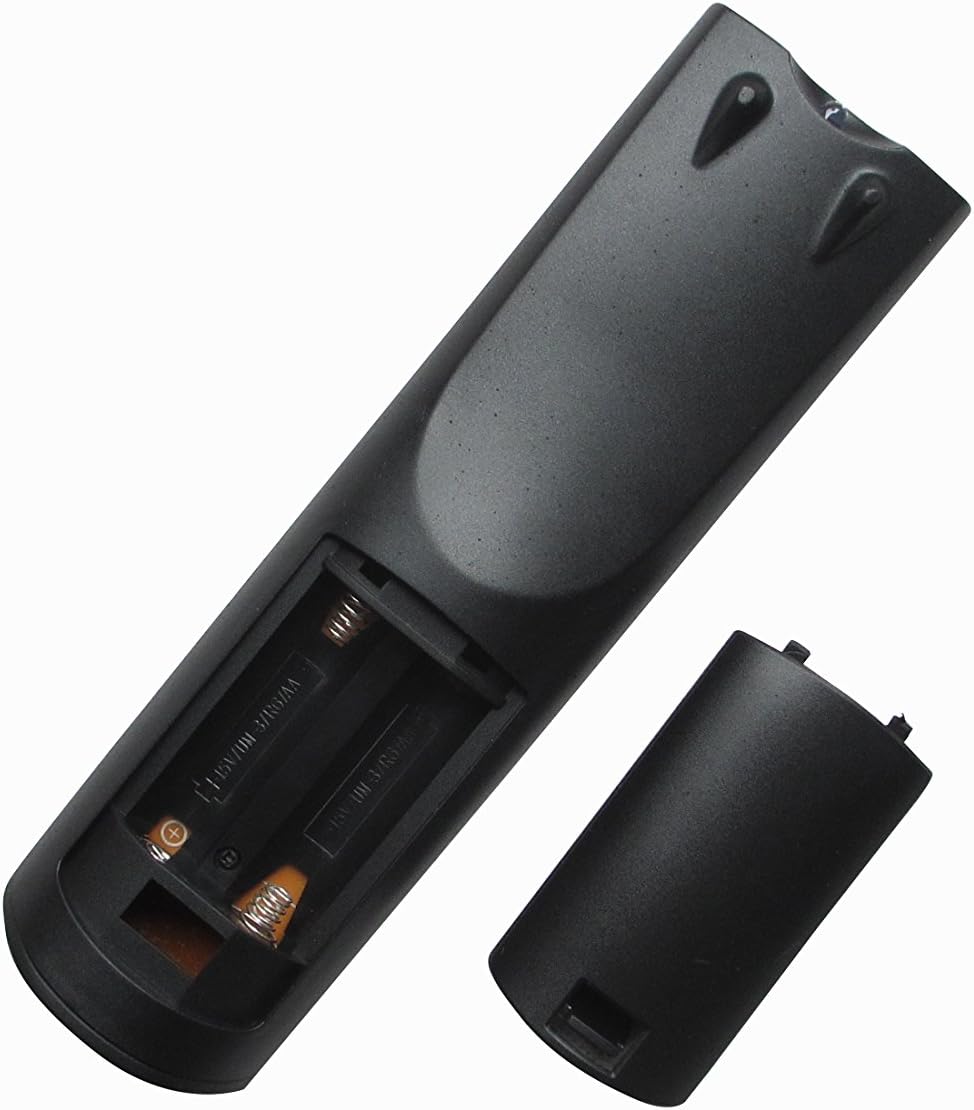
Obrázek 1: Zpět view of the remote control with the battery compartment open, illustrating the correct orientation for AAA battery insertion.
The remote control does not require any programming. Once batteries are installed, it is ready for use with compatible ONKYO Home Theater Systems.
4. Návod k obsluze
4.1 Rozložení dálkového ovladače

Obrázek 2: Přední strana view of the Easytry123 replacement remote control, displaying the arrangement and labeling of all operational buttons.
4.2 Základní funkce
Point the remote control directly at the infrared receiver on your ONKYO Home Theater System. Ensure there are no obstructions between the remote and the system.
- V POHOTOVOSTNÍM REŽIMU: Powers the system on or puts it into standby mode.
- INPUT SELECTOR (e.g., DVD, CD, TUNER, AUX): Vybere požadovaný zdroj audio/video vstupu.
- VOL +/-: Upravuje hlavní úroveň hlasitosti.
- ZTLUMIT: Toggles the audio mute function.
- NAVIGATION (Up, Down, Left, Right, ENTER): Používá se k navigaci v nabídkách a potvrzování výběrů.
- NÁVRAT: Vrátí se do předchozí nabídky nebo obrazovky.
- PLAY/PAUSE, STOP, SKIP (<<, >>): Ovládá funkce přehrávání médií.
- POČET TLAČÍTEK (0-9): Used for direct track selection, radio station tuning, or inputting numerical values.
- ZOBRAZIT: Changes the information displayed on the system's screen.
- DÁLKOVÝ REŽIM: Switches the remote's operating mode for controlling different components (e.g., TV, DVD). Note that full functionality for external devices may vary.
5. Údržba
- Čištění: To clean the remote, gently wipe it with a soft, dry cloth. Do not use liquid cleaners, solvents, or abrasive materials, as these can damage the remote's surface or internal components.
- Výměna baterie: Replace batteries when the remote's response becomes sluggish or stops functioning. Always replace both batteries simultaneously with new AAA batteries. Do not mix old and new batteries, or different types of batteries.
- Skladování: Pokud dálkový ovladač nebudete delší dobu používat, vyjměte baterie, abyste zabránili vytečení a možnému poškození. Dálkový ovladač skladujte na chladném a suchém místě mimo dosah přímého slunečního záření.
6. Řešení problémů
- Dálkové ovládání nereaguje:
- Zkontrolujte, zda jsou baterie vloženy správně se správnou polaritou (+/-).
- Vyměňte baterie za nové.
- Ensure there are no obstructions between the remote and the ONKYO system's infrared receiver.
- Confirm you are within the effective range and pointing the remote directly at the system.
- Omezená funkčnost:
- This is a replacement remote; some advanced or specific functions of your original ONKYO remote may not be replicated.
- Ensure the remote is in the correct 'REMOTE MODE' if applicable for controlling different devices.
- Verify your ONKYO system model is listed in the 'Compatible Models' section of this manual.
- Tlačítka se zasekávají nebo nereagují:
- This may indicate internal damage or dirt. Do not attempt to disassemble the remote.
- Ensure the remote is kept clean and dry.
7. Specifikace
| Funkce | Popis |
|---|---|
| Značka | Easytry123 |
| Technologie připojení | Infračervený (IR) |
| Kompatibilní zařízení | ONKYO Home Theater Systems (specific models listed in Section 2) |
| Maximální počet podporovaných zařízení | 1 (controls the primary ONKYO system) |
| Speciální funkce | Ergonomický design |
| Zdroj napájení | 2 x AAA baterie (nejsou součástí balení) |
8. Záruka a podpora
Specific warranty information for this Easytry123 replacement remote control is not provided in the product details. For any warranty claims, technical support, or further inquiries, please contact the seller directly through your purchase platform.
Uschovejte si prosím doklad o koupi pro případné žádosti o podporu.