
1. Úvod
This document serves as the user manual for the Easytry123 replacement remote control, model Easytry7591. This remote is designed to operate various ONKYO AV receiver models. Please note that as a replacement unit, some advanced or specific functions present on your original remote may not be fully supported. It is crucial to verify that your ONKYO AV receiver model is listed in the compatible models to ensure proper functionality.
Compatible ONKYO AV Receiver Models:
- RC-768M
- RC-810M
- TX-NR809
- TX-NR1009
- RC-771M
- TX-NR1008
- TX-NR808
- TX-NR708
- RC-812M
- TX-NR5009
2. Nastavení: Instalace baterie
The Easytry123 replacement remote control requires batteries for operation. Batteries are not included with the remote control.
- Najděte přihrádku na baterie: Turn the remote control over. The battery compartment cover is typically located on the back of the remote.
- Otevřete kryt: Posuňte kryt přihrádky na baterie dolů nebo stiskněte západku a zvedněte jej pro otevření.
- Vložte baterie: Insert two AAA batteries (not included) into the compartment. Ensure the positive (+) and negative (-) terminals of the batteries align correctly with the polarity indicators inside the compartment. Incorrect insertion can prevent the remote from functioning.
- Zavřete kryt: Nasaďte kryt přihrádky na baterie tak, že jej zasunete zpět na místo, dokud bezpečně nezacvakne.
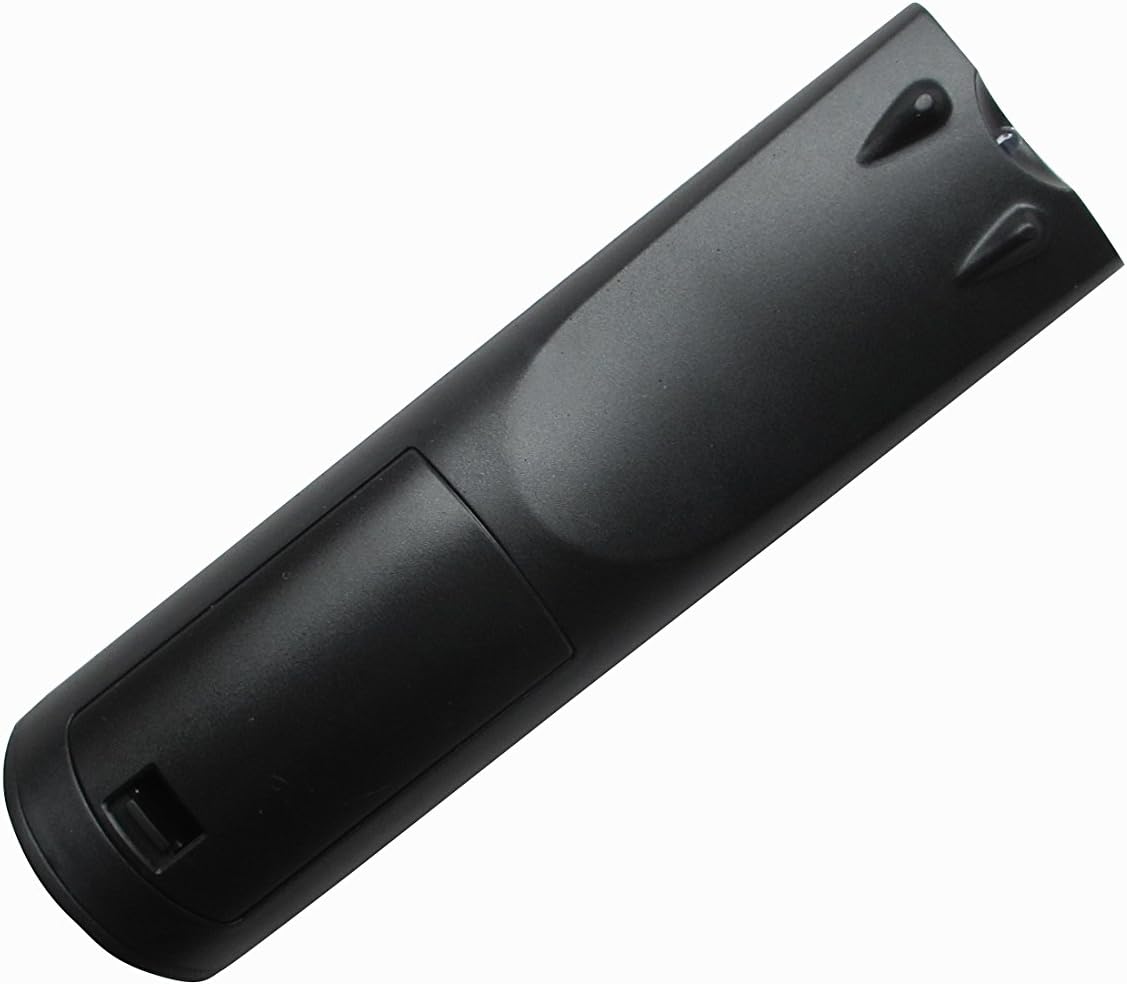
Obrázek 1: Zpět view dálkového ovladače, znázorňující umístění přihrádky na baterie.
3. Návod k obsluze
Once batteries are installed, the remote control is ready for use with your compatible ONKYO AV receiver. Point the remote directly at the AV receiver's infrared sensor.
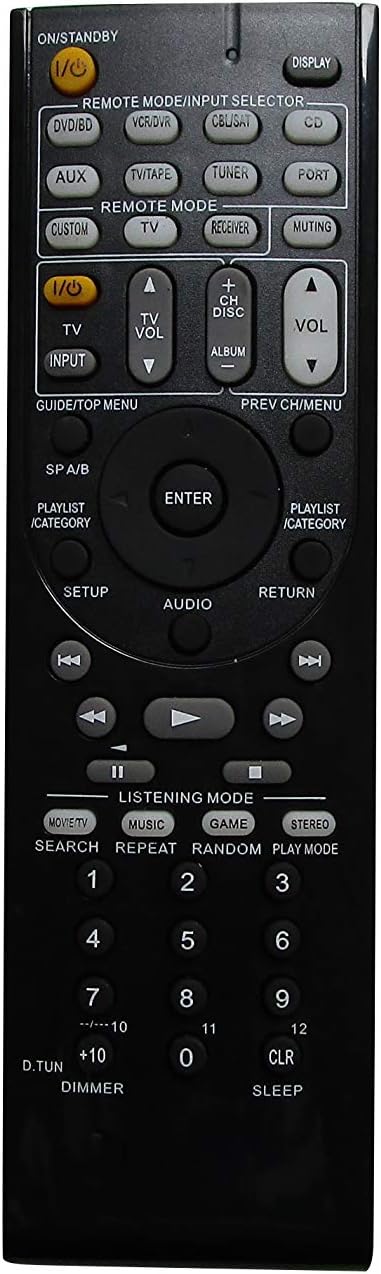
Obrázek 2: Přední strana view of the Easytry123 remote control, displaying its button layout.
Základní funkce:
- Power (I/O STANDBY): Press this button to turn the AV receiver on or off.
- Input Selector (REMOTE MODE/INPUT SELECTOR buttons like DVD/BD, VCR/DVR, CBL/SAT, CD, AUX, TV/TAPE, TUNER, PORT, CUSTOM, TV, RECEIVER): Use these buttons to select the desired audio/video input source connected to your AV receiver.
- Volume Control (VOL +/-): Adjust the master volume level of your AV receiver.
- Muting (MUTING): Temporarily mutes the audio output. Press again to restore sound.
- Navigation (GUIDE/TOP MENU, PREV CH/MENU, ENTER, AUDIO, RETURN, PLAYLIST/CATEGORY, Arrow Buttons): These buttons are used to navigate menus, select options, and control playback functions within your AV receiver's interface.
- Playback Controls (PLAY, PAUSE, STOP, FAST FORWARD, REWIND, SKIP): Control media playback for connected devices.
- Listening Mode (MOVIE/TV, MUSIC, GAME, STEREO): Select different audio listening modes for optimized sound experience.
- Numeric Keypad (0-9, +10, D.TUN, CLR, SLEEP): Used for direct input, channel selection, or other specific functions depending on your receiver model.
Důležitá poznámka: This is a replacement remote. While it offers core functionalities, it may not replicate every specific button or advanced feature of your original ONKYO remote. Refer to your ONKYO AV receiver's original manual for detailed information on specific functions and their corresponding remote commands.
4. Údržba
Správná péče prodlouží životnost vašeho dálkového ovladače.
- Čištění: Dálkový ovladač otřete měkkým, suchým hadříkem. V případě odolné nečistoty lehceampen the cloth with water and then wipe dry immediately. Do not use abrasive cleaners, solvents, or alcohol.
- Výměna baterie: Vyměňte baterie, když dálkový ovladač začne reagovat pomalu nebo přestane fungovat. Vždy vyměňte obě baterie současně za nové stejného typu (AAA).
- Skladování: Pokud dálkový ovladač nebudete delší dobu používat, vyjměte baterie, abyste zabránili vytečení a možnému poškození. Skladujte na chladném a suchém místě mimo dosah přímého slunečního záření.
- Vyhněte se poškození: Do not drop the remote control, expose it to extreme temperatures, or immerse it in liquids.
5. Řešení problémů
If you experience issues with your Easytry123 replacement remote control, try the following steps:
- Dálkové ovládání nereaguje:
- Check if the batteries are inserted correctly, observing polarity (+/-).
- Vyměňte staré baterie za nové baterie AAA.
- Ensure there are no obstructions between the remote control and the AV receiver's infrared sensor.
- Ujistěte se, že se nacházíte v efektivním provozním dosahu a míříte dálkovým ovladačem přímo na přijímač.
- Některé funkce nefungují:
- As a replacement remote, some specific or advanced functions may not be supported. This is normal for universal or replacement remotes.
- Verify that your AV receiver model is explicitly listed as compatible.
- Consult your ONKYO AV receiver's original manual to confirm the expected remote command for the function.
- Rušení:
- Strong light sources (e.g., direct sunlight, fluorescent lights) can interfere with infrared signals. Try operating the remote in a different lighting condition.
If problems persist after trying these steps, please contact the seller for further assistance.
6. Specifikace
| Číslo modelu | Easytry7591 |
| Značka | Easytry123 |
| Kompatibilní zařízení | ONKYO AV Receivers (Specific models listed in Introduction) |
| Zdroj napájení | 2 x AAA baterie (nejsou součástí balení) |
| Barva | Černý |
| Hmotnost položky | 3.36 unce (přibližně 95 gramů) |
| Rozměry balení | 3 x 2 x 1 palce (přibližně 7.6 x 5.1 x 2.5 cm) |
| Speciální funkce | Ergonomický design |
7. Záruka a podpora
Specific warranty information for the Easytry123 replacement remote control is not provided in the product details. For any warranty-related inquiries, technical support, or assistance with product functionality, please contact the seller directly through your purchase platform.