
Easytry123 Easytry7607
Návod k obsluze náhradního dálkového ovladače Easytry123
Model: Easytry7607 for Integra A/V Receivers
Zavedení
This manual provides instructions for the Easytry123 Replacement Remote Control, Model Easytry7607. This remote is designed as a replacement for various Integra A/V Receiver models, including DTR-40.4, DTR-40.3, DTR-30.7, DTR-20.7, DTR-30.4, DHC-80.3, and DTR-50.3, and their corresponding original remote models like RC-833M, RC-899M, RC-838M, and RC-811M. Please read this manual carefully before use to ensure proper operation.
Nastavení
1. Instalace baterie
Dálkový ovladač vyžaduje dvě baterie AAA (nejsou součástí balení). Pro jejich instalaci postupujte takto:
- Najděte přihrádku na baterie na zadní straně dálkového ovladače.
- Stiskněte jazýček a posuňte kryt baterie dolů, abyste jej otevřeli.
- Vložte dvě baterie typu AAA a ujistěte se, že kladný (+) a záporný (-) pól správně shodují s označením uvnitř přihrádky.
- Zasuňte kryt baterie zpět na místo, dokud bezpečně nezapadne.
Obrázek 1: Back of the remote control with the battery cover removed, illustrating the battery insertion process. Note the polarity markings inside the compartment.
Důležité: Ensure batteries are inserted with correct polarity. Incorrect installation can damage the remote control. Do not mix old and new batteries, or different types of batteries.
Operace
Základní funkce
This replacement remote control operates using infrared (IR) technology. Point the remote directly at your Integra A/V Receiver. Ensure there are no obstructions between the remote and the receiver's IR sensor.

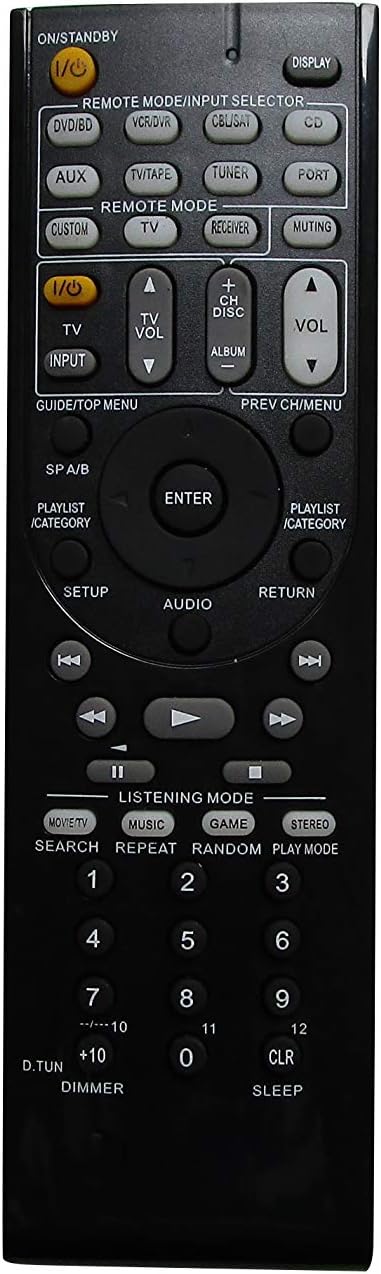
Obrázek 2: Přední view of the remote control, showing the layout of all buttons for various functions.
The remote features standard buttons for power, volume control, input selection, and navigation. Refer to Obrázek 2 for the button layout. Press the corresponding button for the desired function.
Poznámky ke kompatibilitě
- This remote is a replacement and may not offer all the exact same features or button functions as your original Integra remote.
- It does not support programming or learning functions. Remote codes cannot be entered or modified.
- Functionality is dependent on the specific Integra A/V Receiver model. While designed for compatibility, some advanced or model-specific functions may not be supported.
Údržba
Čištění
Dálkový ovladač jemně otřete měkkým, suchým hadříkem. Nepoužívejte tekuté čisticí prostředky, spreje ani abrazivní materiály, protože by mohly poškodit povrch dálkového ovladače nebo jeho vnitřní součásti.
Výměna baterie
Replace batteries when the remote's response becomes sluggish or stops working. Follow the battery installation steps outlined in the Nastavení section. Always replace both batteries at the same time with new AAA alkaline batteries.
Odstraňování problémů
- Dálkové ovládání nereaguje:
- Zkontrolujte, zda jsou baterie vloženy správně se správnou polaritou.
- Vyměňte staré baterie za nové alkalické baterie typu AAA.
- Ensure there is a clear line of sight between the remote control and the A/V receiver's IR sensor. Remove any obstructions.
- Ověřte, zda je dálkový ovladač namířen přímo na přijímač.
- Některé funkce nefungují:
- This is a replacement remote and may not support all functions of your original Integra remote. Refer to the Poznámky ke kompatibilitě in the Operation section.
- The remote does not support programming or learning functions.
- Remote feels loose or rattles:
- Ujistěte se, že je kryt baterie bezpečně uzavřen.
- If internal components feel loose, contact the seller for assistance.
Specifikace
| Značka | Easytry123 |
| Číslo modelu | Easytry7607 |
| Kompatibilní zařízení | Integra A/V Receivers (DTR-40.4, DTR-40.3, DTR-30.7, DTR-20.7, DTR-30.4, DHC-80.3, DTR-50.3, etc.) |
| Technologie připojení | Infračervený (IR) |
| Typ ovladače | Ovládání tlačítkem |
| Typ baterie | 2 x alkalické baterie AAA (nejsou součástí balení) |
| Barva | Černý |
| Speciální funkce | Ergonomický design |
Informace o záruce
Specific warranty details for this product are provided by the seller, Easytry123. Please refer to your purchase documentation or contact the seller directly for information regarding warranty coverage and terms.
Zákaznická podpora
For any questions, concerns, or technical assistance not covered in this manual, please contact the seller, Easytry123, through the platform where the purchase was made. Provide your order number and a detailed description of the issue for prompt support.
Ask a question about this manual
Ask about setup, troubleshooting, compatibility, parts, safety, or missing instructions. Manuals+ will review the question and use this page’s manual context to help answer it.