
1. Úvod
Thank you for choosing the Wendry Ergonomic Vertical USB Wired Mouse. This manual provides essential information for setting up, operating, and maintaining your new mouse. Designed for left-handed users, this vertical mouse promotes a natural hand and wrist posture, aiming to reduce strain and discomfort during extended computer use. Its ergonomic design, adjustable DPI settings, and programmable buttons enhance productivity and comfort for various tasks, including office work, graphic design, and gaming.
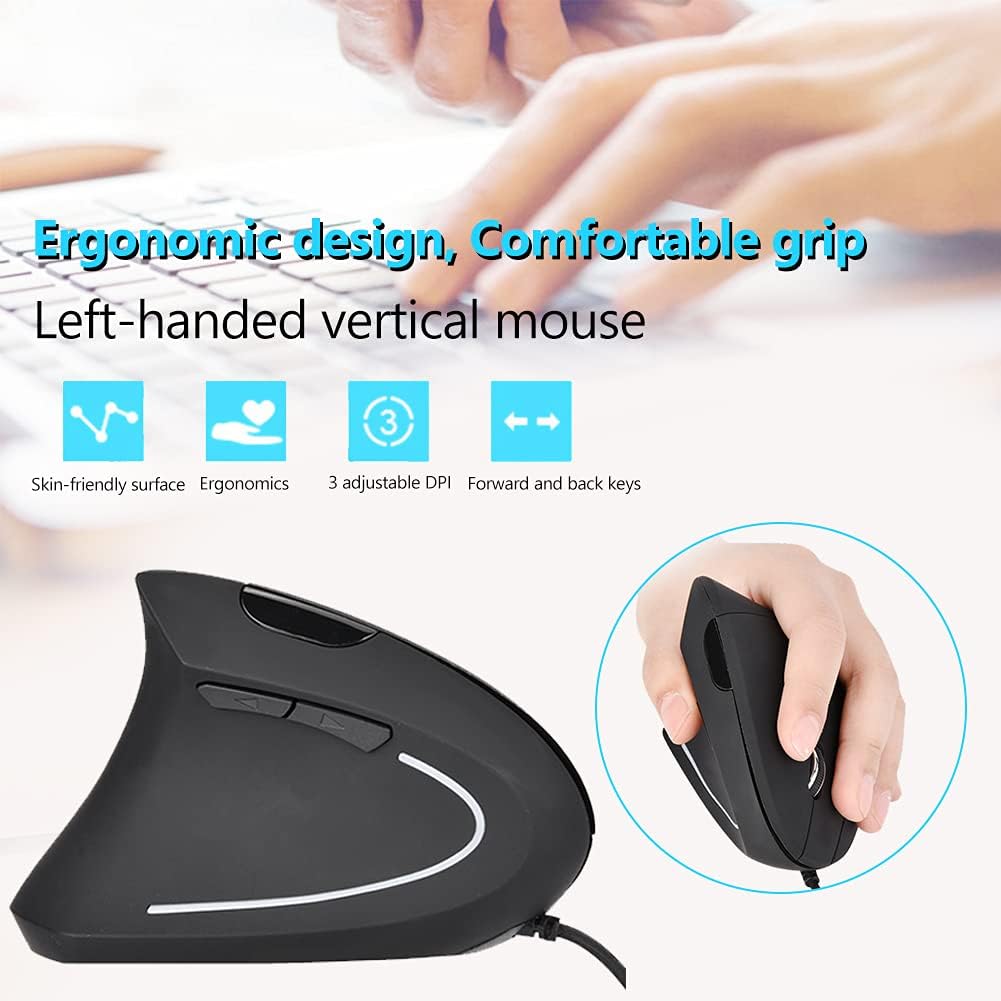
Image 1: The Wendry Ergonomic Vertical USB Wired Mouse, showcasing its design features including a skin-friendly surface, ergonomic shape, 3 adjustable DPI settings, and dedicated forward/back keys.
2. Konec produktuview
The Wendry Ergonomic Vertical USB Wired Mouse is engineered to provide a comfortable and efficient user experience. Key features include:
- Ergonomický design: Vertical orientation to relieve wrist tension through comfortable thumb and pinky support, and contoured palm support.
- Left-Handed Specific: Tailored for left-handers to align with palm and wrist muscles.
- Nastavitelné DPI: Three levels of DPI settings (800/1200/1600) for precise cursor control.
- 6 programovatelných tlačítek: Customize functions for enhanced workflow.
- Web Switch Keys: Dedicated forward and back buttons for easy web navigace na stránce.
- Optical Tracking Technology: Premium optical engine for quicker response, smoother tracking, and higher precision.
- Široká kompatibilita: Supports most operating systems including Windows 2000, 7, 8, 98, Vista, ME, and OS.
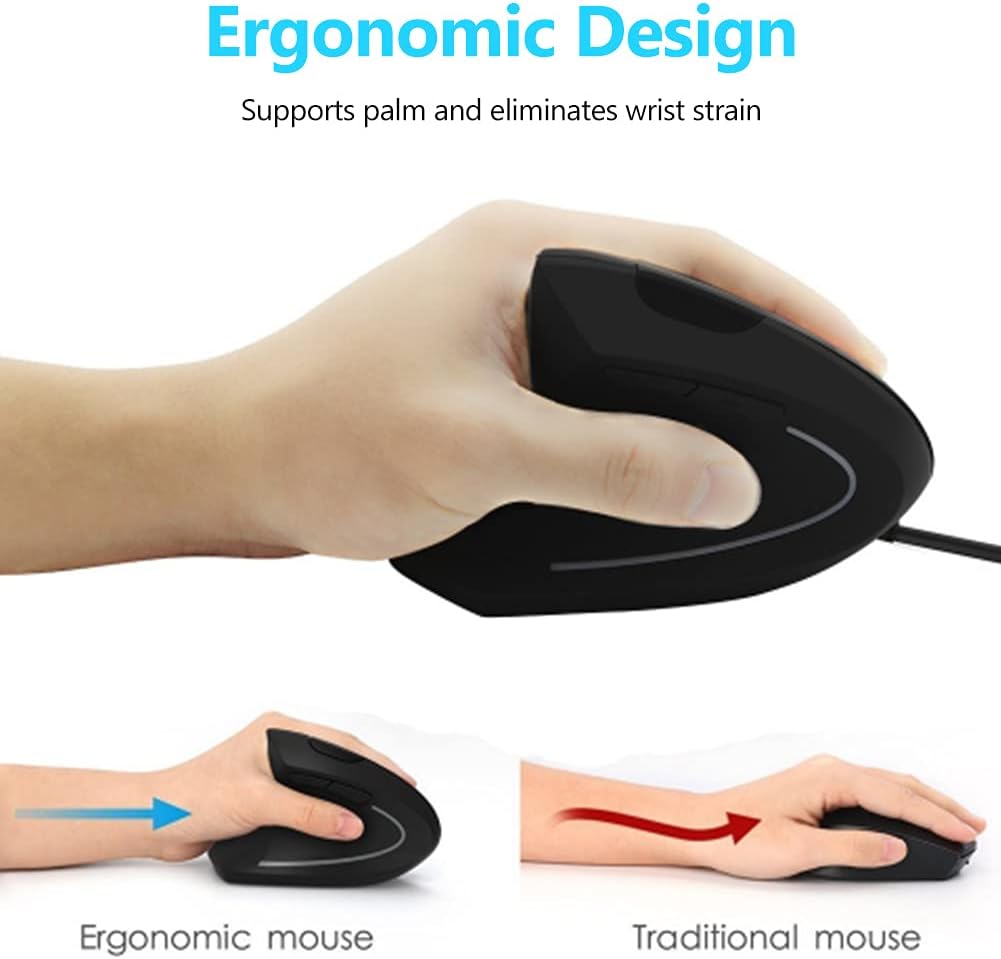
Image 2: A visual comparison demonstrating the ergonomic advantage of the vertical mouse, showing how it supports the palm and reduces wrist strain compared to a traditional horizontal mouse.
3. Pokyny k nastavení
Setting up your Wendry Ergonomic Vertical USB Wired Mouse is a simple plug-and-play process:
- Připojte kabel USB: Locate an available USB port on your computer (laptop, desktop, notebook, PC, etc.).
- Pevně zasuňte USB konektor myši do USB portu.
- Instalace ovladače: The mouse is plug-and-play and typically does not require any additional driver installation. Your operating system should automatically detect and configure the device.
- Připraven k použití: Po připojení je myš připravena k okamžitému použití.

Obrázek 3: Podrobný view of the USB connector, which is used to connect the mouse to your computer.
4. Návod k obsluze
Familiarize yourself with the various buttons and functions of your vertical mouse for optimal control:
- Levé tlačítko: Standardní funkce levého kliknutí.
- Pravé tlačítko: Standardní funkce kliknutí pravým tlačítkem myši.
- Rolovací kolečko: Procházejte dokumenty nahoru nebo dolů a web stránky. Lze na ně také kliknout prostředním tlačítkem myši.
- Tlačítko DPI: Located on the top of the mouse, press this button to cycle through the 3 adjustable DPI settings (800/1200/1600). This allows you to adjust cursor sensitivity to your preference.
- Tlačítka vpřed/vzad: Located on the side, these buttons allow for quick navigation between web pages or folders (e.g., going back or forward in your browser history).

Image 4: An illustration detailing the location and labels of the six programmable buttons on the vertical mouse, including the DPI button, left/right click, scroll wheel, and forward/backward buttons.

Image 5: A visual guide to using the forward and back buttons, highlighting their convenience for navigating web stránky a files with a single click.
Oficiální video produktu
Video 1: An official product video from Wendryer demonstrating the Ergonomic Vertical USB Wired Mouse in use, highlighting its design and functionality.
5. Údržba
Abyste zajistili dlouhou životnost a optimální výkon myši, dodržujte tyto jednoduché tipy pro údržbu:
- Čištění: K otření povrchu myši použijte měkký, suchý hadřík. V případě odolné nečistoty lehceampOtřete hadřík vodou nebo jemným čisticím roztokem. Vyhněte se agresivním chemikáliím nebo abrazivním materiálům.
- Optický senzor: Pravidelně kontrolujte optický senzor na spodní straně myši, zda není zaprášený nebo znečištěný. Jemně jej očistěte vatovým tamponem nebo stlačeným vzduchem.
- Péče o kabely: Abyste předešli poškození, neohýbejte ani netahejte za kabel USB. Pokud kabel nepoužíváte, uložte jej úhledně.
6. Řešení problémů
If you encounter any issues with your mouse, refer to the following troubleshooting steps:
- Myš nereaguje:
- Ujistěte se, že je kabel USB bezpečně zapojený do funkčního portu USB v počítači.
- Zkuste zapojit myš do jiného USB portu.
- Restartujte počítač.
- Inaccurate or Jerky Cursor Movement:
- Vyčistěte optický senzor na spodní straně myši.
- Ujistěte se, že myš používáte na vhodném povrchu (např. podložka pod myš nebo nereflexní, rovnoměrný povrch).
- Adjust the DPI setting using the DPI button to see if a different sensitivity improves performance.
- Nefunkční tlačítka:
- Ujistěte se, že je myš správně připojena.
- Vyzkoušejte myš na jiném počítači, abyste zjistili, zda je problém s myší nebo s nastavením počítače.
7. Specifikace
Detailed specifications for your Wendry Ergonomic Vertical USB Wired Mouse:
| Funkce | Specifikace |
|---|---|
| Rozměry produktu | 4.92 x 2.95 x 2.44 palce |
| Hmotnost položky | 4.9 unce |
| Číslo modelu položky | Wendrymcb5iqnw3g |
| Technologie připojení | USB, kabelové |
| Speciální funkce | Ergonomický design |
| Technologie detekce pohybu | Optický |
| Nastavitelné úrovně DPI | 800. 1200. 1600 |
| Počet tlačítek | 6 |
| Barva | Černý |
| Výrobce | Wendry |
| První dostupný termín | 28. května 2019 |
8. Záruka a podpora
For any product inquiries, technical assistance, or warranty claims, please contact Wendry customer support through the retailer's platform or the official brand webwebu. Uschovejte si prosím doklad o koupi pro ověření záruky.