
Zavedení
This manual provides detailed instructions for setting up, operating, and maintaining your Aluratek 17-inch WiFi Digital Photo Frame (Model AWS17F). This digital photo frame features a touchscreen IPS LCD display, 16GB of internal memory, and offers easy wireless photo sharing capabilities. Please read this manual thoroughly to ensure optimal performance and longevity of your device.
Co je v krabici
- 17.3 inch WiFi Digital Photo Frame with Touchscreen IPS LCD Display and 16GB Built-in Memory
- Napájecí adaptér
- Návod k použití (tento dokument)
- Registrační karta
Konec produktuview
Klíčové vlastnosti
- Bezdrátové sdílení fotografií: Share photos from anywhere in the world with a mobile internet connection.
- Touchscreen IPS LCD: User-friendly interface for fast navigation on the 17.3" display.
- Crisp, Clear Pictures: True digital LCD panel at 1920 x 1080 resolution with a 16:9 aspect ratio.
- Mobile App, Email, Social Media Support: Send photos via the dedicated smartphone app, Facebook Messenger, Twitter, or email.
- Snadné použití: Fast and easy navigation through touchscreen menus with no complex setup.
- Vestavěná paměť: 16GB internal memory for storing photos and videos.
- SD Card/USB Support: View photos and videos directly from an SD/SDHC card (up to 32GB) or USB flash drive.
- Clock, Calendar, Weather: Integrated functions to display time, date, and local weather.
- Digital Signage Solution: Suitable for displaying content in business environments.
Produkt Views

Přední view of the Aluratek 17-inch WiFi Digital Photo Frame displaying its main menu interface.
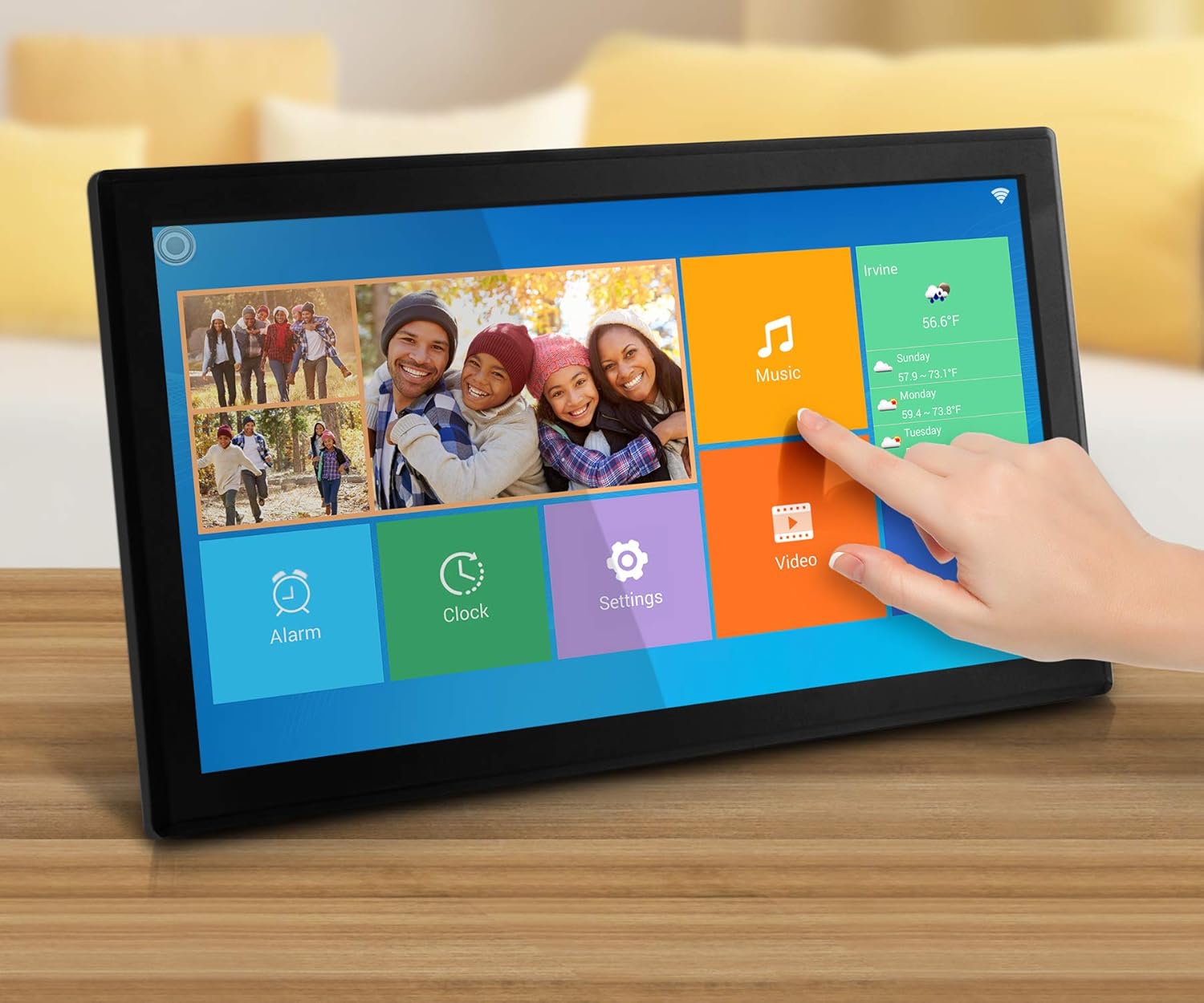
The digital photo frame showcasing a collage of family pictures on its vibrant display.

Zadní view of the frame, highlighting the power input, USB port, SD card slot, and the integrated stand.

Boční profíkfile of the digital photo frame, illustrating its slim design and extended stand for tabletop use.
Nastavení
- Zapnutí: Connect the provided power adapter to the frame and plug it into an electrical outlet. The frame will automatically power on.
- Počáteční nastavení: Follow the on-screen prompts to select your language, time zone, and other basic settings.
- Připojení k Wi-Fi:
- Navigate to the "Settings" menu on the touchscreen.
- Select "Wi-Fi" and choose your home network from the list.
- Zadejte heslo k Wi-Fi pomocí klávesnice na obrazovce.
- Potvrďte připojení.
- Install the Aluratek Smart Frame App:
- Download the "Aluratek Smart Frame" app from the Apple App Store (for iOS devices) or Google Play Store (for Android devices).
- Otevřete aplikaci a vytvořte si účet.
- Pair your frame with the app by following the in-app instructions. This typically involves entering a unique Frame ID displayed on your digital photo frame.
- Email Setup for Photo Sharing:
- The frame will have a unique email address (e.g., yourframeID@wififrame.com).
- You can send photos directly to this email address from any device.
- For Facebook sharing, send a message to "Aluratek WiFi Frame" on Facebook Messenger with the subject line 'bd+frame ID' (e.g., bd123456) to bind your Facebook account.
Video: Konecview of the Aluratek Digital Photo Frame, demonstrating initial setup and app connectivity for photo sharing. This video shows how to connect the frame to Wi-Fi and send photos using the companion app.
Návod k obsluze
- Navigace na dotykové obrazovce:
- Tap icons to open applications (e.g., Photos, Music, Video, Settings).
- Swipe left or right to navigate through photos in a slideshow.
- Pinch to zoom in or out on images.
- Viewfotky a videa:
- From the home screen, tap the "Photos" or "Video" icon to access your media.
- Media can be stored on internal memory, an SD card, or a USB drive.
- The frame supports various image and video formats.
- Nastavení prezentace:
- Within the photo viewer, tap the "Settings" icon (often a gear symbol).
- Upravte Interval prezentace to control how long each photo is displayed (e.g., 5, 10, 15 seconds, 1 minute, 5 minutes).
- Vyberte a Efekt přechodu prezentace (e.g., random, fade, wipe).
- Povolit nebo zakázat Hudba na pozadí during slideshows.
- Multi-Photo Display:
- Some display modes allow showing multiple photos on one screen simultaneously. Check the display settings within the photo application for available layouts.
Video: This video demonstrates the touchscreen functionality and various display options of the Aluratek Digital Photo Frame, including swiping through images and accessing settings.
Správa médií
- Sending Photos via App: Use the Aluratek Smart Frame app to select and send photos directly from your smartphone to the frame. Photos will appear in the frame's internal storage or designated album.
- Sending Photos via Email: Email photos to the frame's unique email address. The frame will automatically download and display them.
- Using SD Card/USB Drive: Insert an SD/SDHC card (up to 32GB) or a USB flash drive into the designated slot on the frame. The frame will detect the storage device, allowing you to browse and play media directly or transfer it to internal memory.
- Interní úložiště: The 16GB internal memory can store a large number of photos and short videos. Manage files through the frame's interface or by connecting it to a computer (if supported).
Pokročilé funkce
- Clock, Calendar, Weather: Access these features from the main menu. Configure your location in settings for accurate weather updates.
- Poplach: Set alarms through the "Alarm" icon on the home screen.
- Digitální značení: The frame can be used to display advertisements, announcements, or other informational content in a business setting. Configure specific media playlists and display schedules through the settings.
Údržba
- Čištění: K čištění obrazovky a rámu používejte měkký, suchý hadřík. Nepoužívejte abrazivní čisticí prostředky ani rozpouštědla.
- Umístění: Place the frame on a stable, flat surface or mount it securely on a wall. Ensure adequate ventilation.
- Řízení spotřeby: Always use the provided power adapter. Unplug the device during electrical storms or when not in use for extended periods.
Odstraňování problémů
| Problém | Možné řešení |
|---|---|
| Rám se nezapne. | Ujistěte se, že je napájecí adaptér bezpečně připojen k rámu i k funkční elektrické zásuvce. Zkuste jinou zásuvku. |
| Nelze se připojit k Wi-Fi. | Ověřte heslo k Wi-Fi. Ujistěte se, že je rámeček v dosahu routeru. Restartujte rámeček i router. |
| Photos sent via app/email do not appear. | Check your internet connection. Ensure the frame is properly paired with the app/email account. Verify the frame's unique email address is correct. Some apps may have limits on the number of photos sent at once; try sending fewer. |
| Frame loses settings after power outage. | This may indicate a software or internal battery issue. Ensure the frame is connected to a stable power source. Contact Aluratek support if the issue persists. |
| Touchscreen is unresponsive or slow. | Restart the frame. Ensure the screen is clean and free of debris. If the issue continues, a factory reset might be necessary (refer to System Settings). |
| Images appear pixelated or unclear. | Zajistěte originální obrázek files are of high resolution. The frame's display resolution is 1920 x 1080. Lower resolution images will appear less sharp. |
Specifikace
- Značka: Aluratek
- Číslo modelu: AWS17F
- Velikost obrazovky: 17.3 palců
- Typ displeje: Dotykový IPS LCD displej
- Rezoluce: 1920 x 1080 (1080p)
- Poměr stran: 16:9
- Vnitřní paměť: 16 GB
- Konektivita: Wi-Fi (802.11 b/g/n)
- Způsob ovládání: Touchscreen, Mobile App
- Kompatibilní zařízení: Personal Computer, Smartphones
- Zdroj napájení: Elektrický kabel
- Materiál rámu: Plast
- Rozměry položky (D x Š): 18.1"L x 3"W (Note: L typically refers to width and W to depth for frames.)
- Hmotnost položky: 4.2 libry
Záruka a podpora
The Aluratek 17-inch WiFi Digital Photo Frame (AWS17F) comes with a 1letá omezená záruka. For technical support, troubleshooting assistance, or warranty claims, please refer to the contact information provided on your registration card or visit the official Aluratek webmísto.