
CATA UC-10
Uživatelská příručka koupelnového ventilátoru Cata UC-10
Model: UC-10 (1255000) | Brand: CATA
1. Úvod
This manual provides essential information for the safe and efficient operation, installation, and maintenance of your Cata UC-10 Bathroom Fan. Please read this manual thoroughly before installation and use, and keep it for future reference.
The Cata UC-10 is a high-performance bathroom fan designed for efficient ventilation with very low energy consumption and quiet operation. Its silver-grey finish offers a discreet aesthetic suitable for various interiors, particularly bathrooms and WCs.
2. Bezpečnostní informace
Důležité bezpečnostní pokyny:
- Před jakoukoli instalací, údržbou nebo čištěním vždy odpojte napájení.
- Instalaci musí provést kvalifikovaný elektrikář v souladu s místními předpisy pro elektroinstalaci.
- Tento spotřebič není určen pro použití osobami (včetně dětí) se sníženými fyzickými, smyslovými nebo duševními schopnostmi nebo nedostatečnými zkušenostmi a znalostmi, pokud na ně nedohlíží osoba odpovědná za jejich bezpečnost nebo jim nebyla poskytnuta instrukce ohledně používání spotřebiče.
- Děti by měly být pod dozorem, aby bylo zajištěno, že si se spotřebičem nebudou hrát.
- The device features double insulation and must not be earthed.
- Ensure the fan is installed in a location where it is protected from direct water spray. The fan has an IP44 protection rating, offering protection against water splashes from all sides.
- Do not block the air inlets or outlets of the fan.
- Maximální okolní teplota pro provoz je 40 °C.
3. Obsah balení
Ověřte, zda jsou všechny součásti přítomny a nepoškozené:
- Cata UC-10 Bathroom Fan Unit
- Installation Screws and Wall Plugs (typically included)
- Návod k použití (tento dokument)

Obrázek 3.1: Přední strana view of the Cata UC-10 Bathroom Fan, showing the silver-grey casing and the central fan grille.
4. Nastavení a instalace
The Cata UC-10 fan is designed for wall or ceiling mounting and can be installed in 100 mm (NW 100) diameter tubes or bays. It features a specially designed back valve to prevent backdraught.
4.1. Kontroly před instalací
- Ensure the power supply is disconnected at the main circuit breaker.
- Confirm the mounting surface is flat and stable.
- Verify the ducting diameter is compatible (100 mm).
4.2. Montážní pokyny
- Připravte si místo pro montáž: Mark the drilling points on the wall or ceiling using the fan's mounting holes as a template. Ensure the location allows for proper air circulation and access for wiring.
- Vrtací otvory: Drill holes at the marked points suitable for the provided wall plugs and screws.
- Secure the Fan Casing: Attach the fan casing to the wall or ceiling using the screws. Ensure it is firmly secured.
- Připojení kabeláže: Connect the electrical wiring to the fan's terminal block. Refer to the wiring diagram (if provided in physical manual) for correct connections. The fan operates on 240 Volts and features double insulation, meaning it does not require an earth connection.
- Install Ducting: Connect the 100 mm ducting to the fan's outlet. Ensure a tight seal to prevent air leakage.
- Konečná montáž: Secure any covers or grilles.

Obrázek 4.1: Zadní view of the fan, illustrating the duct connection point for 100mm pipes.
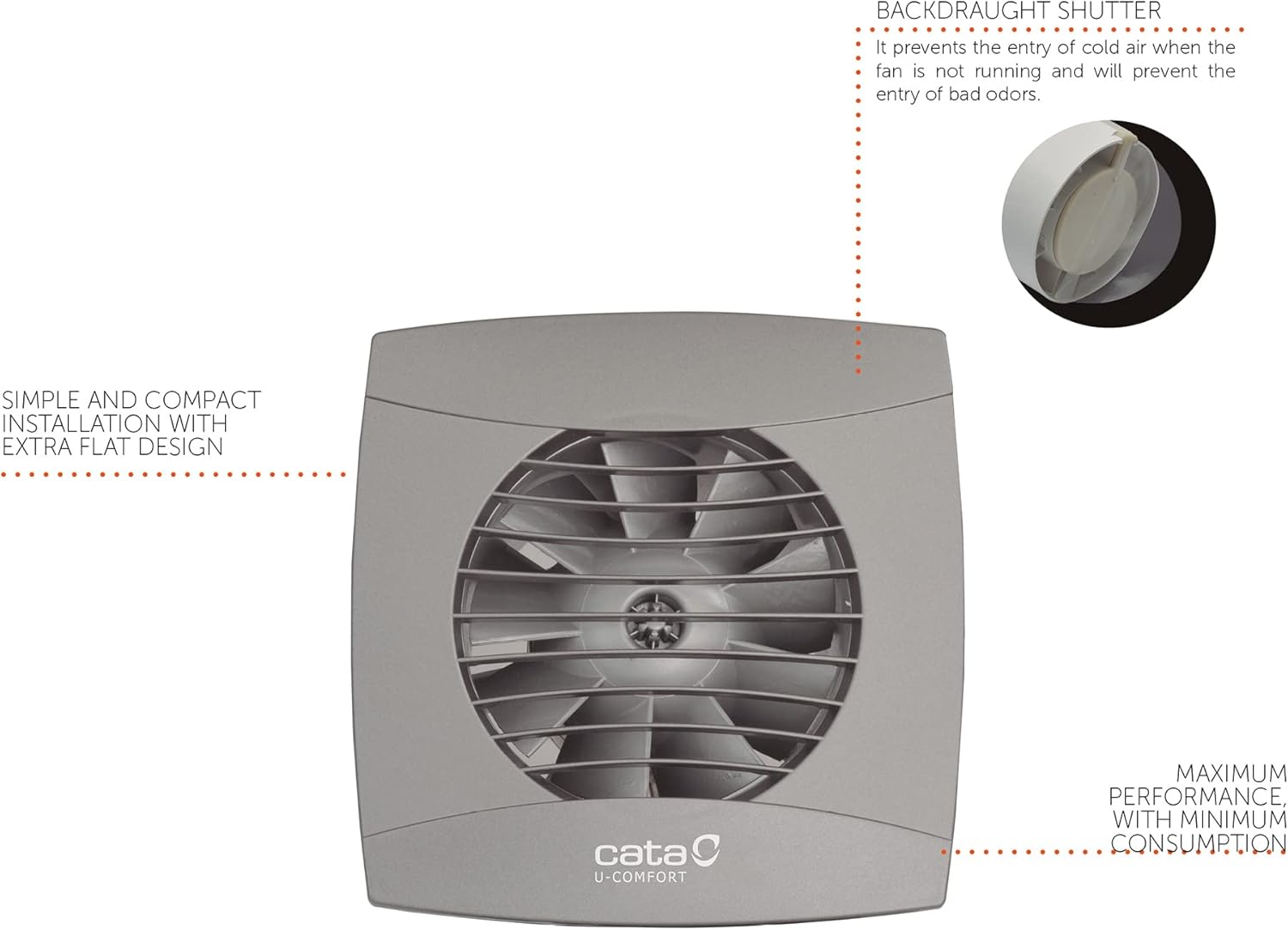
Figure 4.2: Diagram highlighting the backdraught shutter, which prevents cold air entry and odors when the fan is off, and the simple, compact installation design.

Obrázek 4.3: Přample of the Cata UC-10 fan installed on a wall in a bathroom setting, demonstrating its discreet appearance.
5. Návod k obsluze
The Cata UC-10 fan is controlled via a button (external switch, not part of the fan unit itself). Once installed and wired, its operation is straightforward.
5.1. Základní obsluha
- Zapínání: Activate the external switch connected to the fan. The fan will begin to operate, extracting air from the room.
- Vypínání: Deactivate the external switch. The fan will stop, and the integrated back valve will close to prevent backdraught.
5.2. Vlastnosti
- High Performance Turbine: Ensures efficient air extraction.
- Nízká hladina hluku: Pracuje tiše s hlučností 26 dB.
- Nízká spotřeba energie: Only 8 Watts.
- Back Valve: Prevents cold air and odors from entering when the fan is not running.
- Ochrana IP44: Protected against water splashes, suitable for bathroom environments.

Figure 5.1: Visual representation of key features: extra flat design, very quiet operation (26 dB), high energy efficiency (8 W), and included backflow dampehm.
6. Údržba
Pravidelná údržba zajišťuje dlouhou životnost a optimální výkon vašeho ventilátoru Cata UC-10.
6.1. Čištění
- Frekvence: Clean the fan grille and exterior periodically, depending on usage and environmental conditions.
- Postup:
- Odpojit napájení: Always turn off the power supply to the fan at the main circuit breaker before cleaning.
- Čistý exteriér: Použijte měkký, damp cloth with mild detergent to wipe down the exterior casing and grille. Do not use abrasive cleaners or solvents.
- Clean Interior (if accessible): If dust has accumulated inside the fan, carefully remove the front grille (if detachable) and gently clean the fan blades with a soft brush or vacuum cleaner. Do not use water directly on internal components.
- Znovu sestavit: Ensure all parts are dry before reassembling and restoring power.
6.2. Obecná péče
- Do not attempt to lubricate the motor or bearings; they are designed for maintenance-free operation.
- Regularly check for any unusual noises or vibrations, which may indicate a problem.
7. Řešení problémů
If you encounter issues with your Cata UC-10 fan, refer to the following table for common problems and solutions.
| Problém | Možná příčina | Řešení |
|---|---|---|
| Ventilátor se nezapne. | Žádné napájení. Vadné zapojení kabeláže. External switch issue. | Zkontrolujte jistič a zásuvku. Zkontrolujte zapojení kabeláže (poraďte se s kvalifikovaným elektrikářem). Otestujte externí spínač. |
| Ventilátor je hlučný. | Ucpání lopatek ventilátoru. Volná montáž. Damaged bearings. | Disconnect power and check for obstructions. Clean blades if necessary. Ujistěte se, že je ventilátor bezpečně namontován. Contact customer support if bearings are suspected to be damaged. |
| Špatné odsávání vzduchu. | Ucpané potrubí. Lopatky ventilátoru jsou znečištěné. Back valve stuck. | Zkontrolujte potrubí, zda není ucpané. Vyčistěte lopatky ventilátoru. Inspect back valve for proper operation. |
| Ventilátor nadměrně vibruje. | Nesprávná montáž. Unbalanced fan blades. | Re-secure the fan to the mounting surface. Check for debris on blades; if blades are bent or damaged, contact support. |
Pokud problém přetrvává i po vyzkoušení těchto řešení, kontaktujte zákaznickou podporu CATA.
8. Specifikace
| Atribut | Hodnota |
|---|---|
| Značka | CATA |
| Číslo modelu | 1255000 (UC-10 STD Silver Standard) |
| Rozměry (D x Š x V) | 15 x 7.75 x 15 cm |
| Hmotnost | 650 gramů |
| Barva | Stříbro |
| Materiál | Plast (ABS) |
| svtage | 240 voltů |
| Spotřeba energie | 8 wattů |
| Úroveň hluku | 26 dB |
| Kapacita průtoku vzduchu | 110 m³/h |
| Hodnocení ochrany | IP44 (Protection against water splashes) |
| Typ montáže | Montáž na stěnu nebo na strop |
| Průměr potrubí | 100 mm |
| Max. Teplota okolí | 40 °C |
| Izolace | Double Insulation (No earthing required) |

Figure 8.1: Technical dimensions of the fan, showing a square face of 150mm x 150mm and a depth of 77.5mm for the duct, with an overall depth including the front grille of 18.5mm.
9. Záruka a podpora
CATA ELECTRODOMÉSTICOS, S.L. is committed to providing high-quality products. For warranty information and technical support, please refer to the official CATA webstránky nebo se obraťte na svého místního distributora.
Kontaktní údaje:
- For specific warranty terms, please consult the documentation provided at the time of purchase or visit the manufacturer's official webmísto.
- For technical assistance or spare parts inquiries, contact CATA customer service. Information regarding spare parts availability is not provided in this document.
Note: Product specifications are subject to change without prior notice for product improvement.
Ask a question about this manual
Ask about setup, troubleshooting, compatibility, parts, safety, or missing instructions. Manuals+ will review the question and use this page’s manual context to help answer it.