
1. Úvod
The Cooler Master MWE 600 White 230V V2 power supply unit (PSU) provides a reliable and efficient power solution for your computer system. Designed with 80 PLUS White 230V EU efficiency, a DC-to-DC + LLC circuit design, a single +12V rail, active PFC, and a temperature-sensitive HDB fan, this PSU delivers stable and consistent power. This manual will guide you through the installation, operation, maintenance, and troubleshooting of your MWE 600 White 230V V2 PSU.
2. Bezpečnostní informace
Please read and understand all safety instructions before installing or operating this product. Failure to do so may result in personal injury or damage to the product and connected components.
- Hazardous Voltage: Do not open the power supply cover. There are no user-serviceable parts inside. Opening the unit will void the warranty.
- Zdroj napájení: Před instalací nebo údržbou se ujistěte, že je zdroj napájení odpojen od zásuvky střídavého proudu.
- Větrání: Neblokujte žádné větrací otvory napájecího zdroje. Zajistěte dostatečné proudění vzduchu kolem jednotky.
- Prostředí: Install the power supply in a dry, well-ventilated area, away from heat sources, moisture, and direct sunlight.
- Základy: Ensure the power supply and your computer system are properly grounded.
- Kompatibilita: Use only the cables provided with this power supply. Ensure all connections are secure and correctly oriented.
3. Obsah balení
Ověřte, zda jsou v balení přítomny všechny položky:
- Cooler Master MWE 600 White 230V V2 Power Supply Unit
- AC napájecí kabel
- Montážní šrouby
- Uživatelská příručka (tento dokument)
4. Konec produktuview
The MWE 600 White 230V V2 is designed for optimal performance and reliability. Key features include:
- 600 Watts Exceptional Efficiency: Exceeds 80 PLUS 230V EU energy efficiency standards, outperforming generic 80 PLUS Bronze competitors at medium load.
- Silent HDB Fan: The integrated 120mm fan utilizes superior hydro-dynamic bearings (HDB) to minimize noise levels (below 35.5 dBA at 1500 RPM max).
- Stabilní dodávka energie: Supports Intel's low power states for motherboard protection and features a DC-DC with LLC circuit for efficient 12V to 3V and 5V conversion without energy loss.
- Jedna +12V větev: Ensures all system components receive consistent power from a single, stable source.
- Compact Cabling: Non-modular flat black cables save space and offer flexibility, ideal for smaller cases and maintaining internal airflow.

Obrázek 4.1: Celkově view of the Cooler Master MWE 600 White 230V V2 Power Supply Unit.

Figure 4.2: Close-up of the quiet Hydro-Dynamic Bearing (HDB) fan, designed for minimal noise.
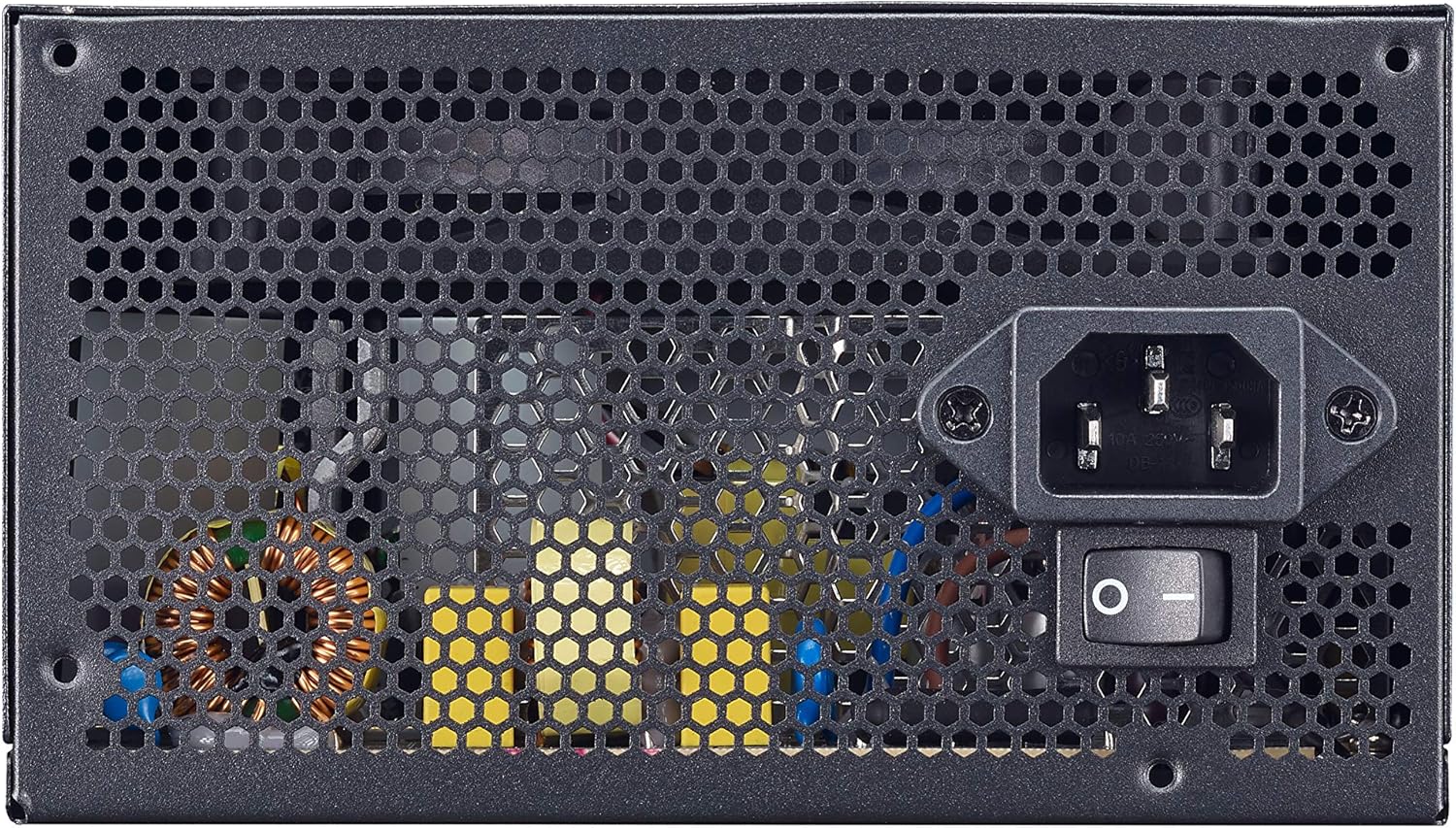
Figure 4.3: Rear panel showing the AC power input and the main power switch.

Obrázek 4.4: Rozložené view illustrating the internal layout and components of the power supply unit.
5. Nastavení a instalace
Follow these steps to properly install your Cooler Master MWE 600 White 230V V2 power supply:
- Připravte si systém: Ujistěte se, že je počítač zcela vypnutý a odpojený od zásuvky. Otevřete kryt počítače.
- Demontáž starého zdroje (pokud je k dispozici): Odpojte všechny kabely od starého napájecího zdroje a vyjměte jej ze skříně.
- Instalace nového zdroje: Carefully place the MWE 600 White 230V V2 into the PSU mounting bay of your computer case. Ensure the fan is oriented correctly (usually facing downwards or upwards, depending on your case design, for optimal airflow). Secure the PSU with the provided mounting screws.
- Připojení napájení základní desky: Connect the 24-pin ATX power cable to your motherboard's 24-pin connector. Ensure it clicks into place.
- Připojení napájení CPU: Connect the 4+4-pin EPS/ATX 12V cable to your motherboard's CPU power connector.
- Connect Graphics Card Power (PCI-e): If your graphics card requires additional power, connect the appropriate 6+2-pin PCI-e power cables from the PSU to your graphics card.
- Connect SATA/Peripheral Power: Connect SATA power cables to your storage drives (HDDs, SSDs) and other peripherals as needed.
- Správa kabelů: Utilize the flat black cables to manage and route them efficiently within your case to improve airflow and aesthetics.
- Zavřete pouzdro a připojte napájení: Close your computer case. Connect the AC power cord to the PSU's AC inlet and then plug the other end into a wall outlet.
6. Návod k obsluze
After successful installation, operating your power supply is straightforward:
- Zapnutí: Ensure the main power switch on the back of the PSU (Figure 4.3) is in the "I" (On) position. Then, press the power button on your computer case.
- Vypnout: To turn off your computer, use the operating system's shutdown procedure. For a complete power cycle, switch the PSU's main power switch to the "O" (Off) position after shutting down the system.
- Normální provoz: The PSU will automatically regulate power delivery to your components. The HDB fan will operate as needed to maintain optimal temperatures, adjusting its speed based on load and temperature.
7. Údržba
Pravidelná údržba pomáhá zajistit dlouhou životnost a optimální výkon vašeho zdroje napájení.
- Čištění prachu: Periodically (e.g., every 3-6 months), power off and unplug your computer. Use compressed air to gently clean dust from the PSU's fan grille and ventilation openings. Hold the fan blades to prevent them from spinning rapidly during cleaning, which can damage the bearings.
- Kontrola kabelů: Občas zkontrolujte všechna připojení napájecích kabelů, abyste se ujistili, že jsou bezpečná a nepoškozená.
- Kontrola prostředí: Ensure the computer's environment remains clean, cool, and dry to prevent dust buildup and overheating.
8. Řešení problémů
Pokud narazíte na problémy se zdrojem napájení, postupujte podle následujících běžných kroků pro řešení problémů:
- Bez napájení:
- Ujistěte se, že je napájecí kabel bezpečně zapojený do zdroje napájení i do zásuvky.
- Verify the main power switch on the PSU is in the "I" (On) position.
- Otestujte zásuvku ve zdi pomocí jiného zařízení, abyste se ujistili, že je pod proudem.
- Check all internal power connections (24-pin, CPU, PCI-e, SATA) to ensure they are firmly seated.
- Nestabilita systému/náhodné vypnutí:
- This could indicate insufficient power or a faulty component. Ensure your system's power requirements do not exceed the PSU's 600W capacity.
- Check for overheating. Ensure the PSU fan and case fans are operating correctly and are free of dust.
- If possible, test the PSU with a different system or a PSU tester.
- Hlasitý hluk ventilátoru:
- While the HDB fan is designed for quiet operation, excessive noise might indicate dust buildup. Clean the fan as described in the Maintenance section.
- Ensure the PSU is not under extreme load, which can cause the fan to spin faster.
If problems persist after trying these steps, please contact Cooler Master support.
9. Specifikace
Detailed technical specifications for the Cooler Master MWE 600 White 230V V2 power supply:
| Funkce | Hodnota |
|---|---|
| Značka | Cooler Master |
| Název modelu | MWE White-v2 |
| Číslo modelu | MPE-6001-ACABW-EU |
| Barva | BÍLÁ V2 |
| Form Factor | ATX |
| Výstupní výkon | 600 wattů |
| Způsob chlazení | Vzduch (120mm ventilátor s pevným diskem) |
| Certifikace účinnosti | 80 PLUS 230V EU White |
| Rozměry (D x Š x V) | 14 x 15 x 8.6 cm |
| Hmotnost položky | 1.5 kg |
| Kompatibilní zařízení | Osobní počítač |
| Typ konektoru | SATA (and other standard ATX connectors) |
DC Output Table

Figure 9.1: Detailed DC output specifications for the MWE 600 White 230V V2.
| DC výstup | +5V | +3.3V | +12V | -12V | +5Vsb |
|---|---|---|---|---|---|
| proud (A) | 18A | 18A | 49A | 0.3A | 3A |
| Výkon (W) | 120W | 120W | 588W | 3.6W | 15W |
| Celkový výkon | 600W | ||||
10. Záruka a podpora
The Cooler Master MWE 600 White 230V V2 power supply comes with a standard limited manufacturer's warranty.
- Záruční doba: 3 roky od data nákupu.
- Záruční krytí: This warranty covers defects in materials and workmanship under normal use. It does not cover damage resulting from accident, misuse, abuse, improper installation, unauthorized repairs, or modifications.
- Technická podpora: For technical assistance, warranty claims, or further information, please visit the official Cooler Master webnebo kontaktujte jejich zákaznickou podporu.
Oficiální produkt Cooler Master Webmísto: www.coolermaster.com