
Konec produktuview
This document provides instructions for the Easytry123 Replacement Remote Control, model RAV325, designed for various Yamaha AV receivers. This remote is a replacement unit and may not offer all functions identical to your original remote. Please verify button layout for compatibility.
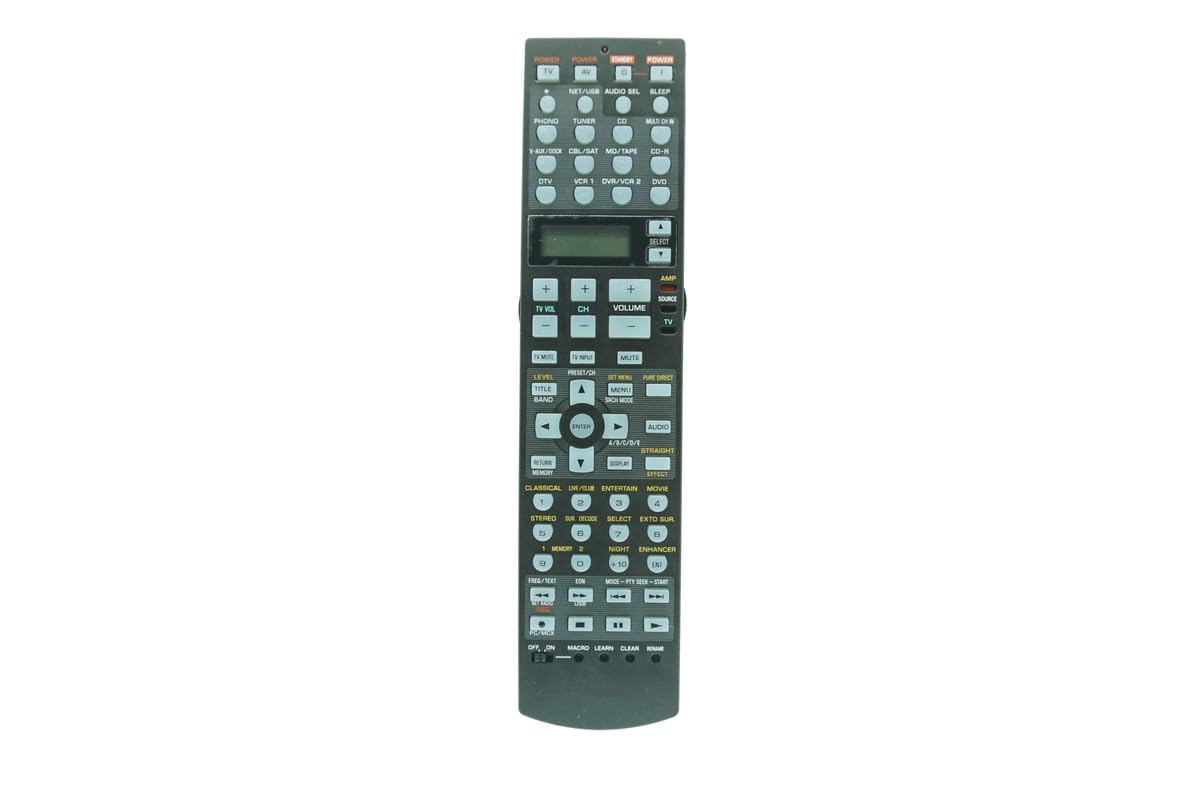
Obrázek: Přední strana view of the Easytry123 RAV325 replacement remote control. It features a black body with various control buttons for audio/video functions, including power, input selection, volume, and navigation.
Kompatibilní modely
This replacement remote control is compatible with a range of Yamaha AV receiver models. While the specific model of this remote is RAV325, it is designed to replace and function with the following Yamaha remote models:
- RAV250
- WC552800
- HTR-5740
- HTR-5750
- RX-V450
- DSPAX450
- HTR-5740B
- HTR-5740S
- HTR-5750S
- RAV272
- RAV273
- RAV353
- RAV352
- RAV323
- RAV361
- RAV362
- RAV358
- RAV359
- RAV363 (or other compatible part numbers)
Before use, compare the button layout of this remote with your original remote to ensure all desired functions are present.
Nastavení
Instalace baterie
Dálkový ovladač vyžaduje dvě (2) baterie typu AA (nejsou součástí balení). Pro instalaci baterií postupujte takto:
- Najděte kryt prostoru pro baterie na zadní straně dálkového ovladače.
- Press down on the latch and slide the cover downwards to open the compartment.
- Vložte dvě baterie typu AA a ujistěte se, že kladný (+) a záporný (-) pól správně shodují s označením uvnitř přihrádky.
- Zasuňte kryt přihrádky na baterie zpět na místo, dokud bezpečně nezacvakne.
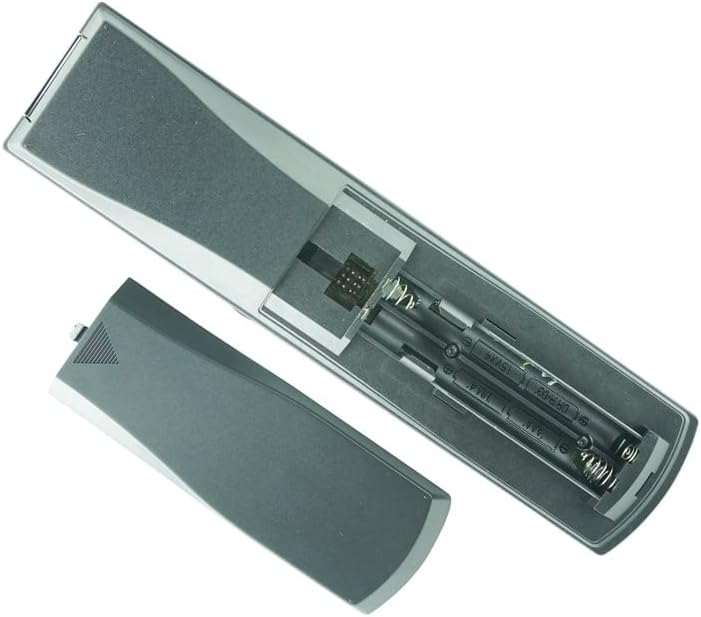
Image: Back of the remote control with the battery cover removed, revealing the battery slots. Two AA batteries are shown correctly inserted.
Poznámka:
- Nekombinujte staré a nové baterie.
- Nekombinujte alkalické, standardní (uhlíkovo-zinkové) nebo dobíjecí (nikl-kadmiové) baterie.
- Pokud dálkový ovladač nebudete delší dobu používat, vyjměte baterie.
Návod k obsluze
This remote control is designed to function immediately upon battery installation for compatible Yamaha AV receivers. No programming is typically required for basic functions.
Základní funkce
- Moc: Stiskněte tlačítko MOC button to turn the AV receiver on or off.
- Výběr vstupu: Use the input buttons (e.g., CD, DVD, TUNER) to select the desired audio/video source.
- Ovládání hlasitosti: Použijte OBJEM + a OBJEM - tlačítky pro nastavení úrovně zvuku.
- Ztlumit: Stiskněte tlačítko ZTLUMIT tlačítko pro dočasné ztlumení zvuku. Dalším stisknutím zvuk obnovíte.
- Navigace: Použijte směrová tlačítka se šipkami (UP, DOLŮ, VLEVO, PRÁVO) a ENTER button for menu navigation.
Pokročilé funkce (pokud existují)
Some advanced functions, such as programming or specific receiver settings, may require referring to your Yamaha AV receiver's original manual for detailed instructions, as this replacement remote's functionality may vary slightly from the original.
Video: Demonstration of a similar Yamaha AV receiver remote control. This video illustrates the physical appearance and basic handling of the remote, including button presses and battery compartment access. While the video shows a RAV315 model, the general operation and battery installation steps are similar for the RAV325.
Údržba
- Čištění: K čištění dálkového ovladače používejte měkký, suchý hadřík. Nepoužívejte tekuté čisticí prostředky ani abrazivní materiály.
- Skladování: Dálkový ovladač skladujte na chladném a suchém místě mimo přímé sluneční světlo a extrémní teploty.
- Výměna baterie: Replace batteries when the remote's response becomes inconsistent or stops working.
Odstraňování problémů
| Problém | Možná příčina | Řešení |
|---|---|---|
| Dálkový ovladač nereaguje | Dead or incorrectly installed batteries. Obstruction between remote and receiver. Remote out of range. | Replace batteries, ensuring correct polarity. Remove any obstructions. Move closer to the receiver. |
| Některé funkce nefungují | Remote is a replacement and may not have all original functions. Incorrect mode selected on receiver. | Refer to your AV receiver's manual for specific function compatibility. Ensure the receiver is in the correct operating mode. |
| Remote LED not lighting up | Batteries are completely dead or remote is faulty. | Vyměňte baterie. Pokud problém přetrvává, kontaktujte zákaznickou podporu. |
Specifikace
- Číslo modelu: RAV325
- Značka: Easytry123
- Materiál: ABS plast
- Zdroj napájení: 2 x AA baterie (nejsou součástí balení)
- Barva: Černý
- Maximální počet podporovaných zařízení: 1 (for direct control of the specified Yamaha AV receiver)
Záruka a podpora
For warranty information or technical support, please refer to the seller's policies or contact the seller directly through the platform where the product was purchased. This manual does not include specific warranty details as they may vary.