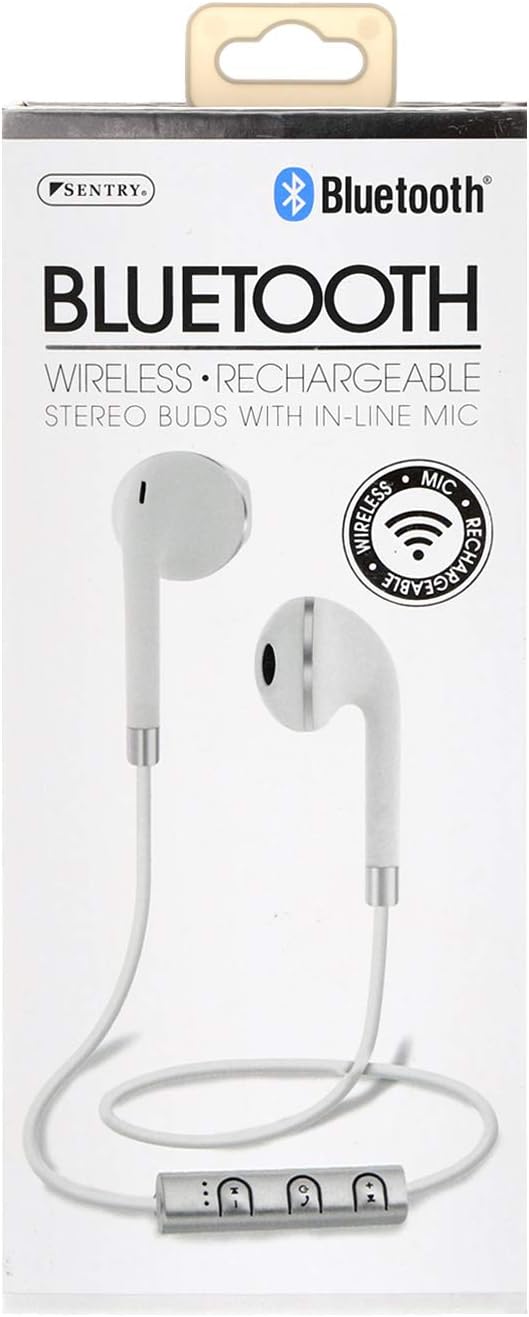
SENTRY Bluetooth® Wireless Stereo Earbuds with Mic - Model BT879
Oficiální uživatelská příručka
Zavedení
Děkuji za nákupasing the SENTRY Bluetooth® Wireless Stereo Earbuds with Mic, Model BT879. These earbuds are designed to provide a high-quality audio experience with the convenience of wireless connectivity. This manual will guide you through the setup, operation, and maintenance of your new earbuds.
Pro optimální výkon a dlouhou životnost si před použitím pečlivě přečtěte tento návod k obsluze a uschovejte si jej pro budoucí použití.
Důležité bezpečnostní informace
VAROVÁNÍ:
This product contains chemicals known to the State of California to cause cancer and birth defects or other reproductive harm. Please handle with care and dispose of responsibly.
Nevystavujte sluchátka extrémním teplotám, vlhkosti nebo korozivním materiálům.
Do not disassemble or attempt to repair the earbuds yourself. This may void the warranty and cause damage.
Uchovávejte mimo dosah dětí a domácích zvířat.
Vyhněte se dlouhodobému poslechu při vysoké hlasitosti, abyste předešli poškození sluchu.
Co je v krabici
Your SENTRY Bluetooth® Wireless Stereo Earbuds package should contain the following items:
Image: The SENTRY BT879 earbuds displayed in their retail packaging, showcasing the earbuds, in-line controls, and the included deluxe carry pouch.
Průvodce nastavením
1. Nabíjení sluchátek
Before first use, ensure your earbuds are fully charged. The earbuds are equipped with a Lithium-ion battery.
Locate the charging port on the in-line control unit.
Connect the provided USB charging cable to the earbuds and plug the other end into a USB power source (e.g., computer USB port, wall adapter).
An indicator light will typically show the charging status. Refer to the light behavior for full charge indication (e.g., light turns off or changes color).
Image: Close-up of the SENTRY BT879 earbuds, highlighting the in-line control unit which houses the charging port and control buttons.
2. Spárování se zařízením Bluetooth
The SENTRY BT879 earbuds are compatible with devices that have Bluetooth capabilities and microphone support.
Ujistěte se, že jsou sluchátka nabitá a vypnutá.
Press and hold the power button on the in-line control unit until the indicator light begins to flash, indicating pairing mode. (Typically blue/red flashing).
Na svém zařízení (chytrý telefon, tablet, počítač) přejděte do nastavení Bluetooth.
Hledat available devices. The earbuds should appear as "SENTRY BT879" or similar.
Select the earbuds from the list to initiate pairing.
Once successfully paired, the indicator light on the earbuds will typically stop flashing and remain solid blue, or turn off. A voice prompt may also confirm the connection.
Dosah Bluetooth je přibližně 10 metrů (33 stop).
Návod k obsluze
The in-line control unit allows for easy management of your audio and calls.
Ovládací tlačítka nadview
Obrázek: Podrobný view of the SENTRY BT879 in-line control unit, showing the various buttons for power, volume, and track control.
In-Line Control Functions
Tlačítko/Akce
Funkce
Tlačítko napájení (střední)
Press and Hold: Power On/Off, Enter Pairing Mode
Single Press (Music): Play/Pause
Single Press (Call): Answer/End Call
Double Press (Call): Redial Last Number
Press and Hold (Call): Reject Incoming Call
Zvýšení hlasitosti (+)
Jedno stisknutí: Zvýšení hlasitosti
Stisknutí a podržení: Další skladba
Snížit hlasitost (-)
Jedno stisknutí: Snížení hlasitosti
Stisknutí a podržení: Předchozí skladba
Přehrávání hudby
Na přehrát nebo pozastavit hudbu, stiskněte Tlačítko napájení jednou.
Chcete-li přeskočit na další skladba, stiskněte a podržte Zvýšení hlasitosti (+) tlačítko.
Chcete-li jít do předchozí skladba, stiskněte a podržte Snížit hlasitost (-) tlačítko.
Na upravit hlasitost, stiskněte tlačítko Zvýšení hlasitosti (+) or Snížit hlasitost (-) tlačítka krátce.
Uskutečňování a přijímání hovorů
Na přijmout příchozí hovor, stiskněte tlačítko Tlačítko napájení jednou.
Na ukončení aktivního hovoru, stiskněte tlačítko Tlačítko napájení jednou.
Na odmítnout příchozí hovor, stiskněte a podržte Tlačítko napájení po dobu přibližně 2 sekund.
Na znovu vytočit poslední číslo, dvakrát stiskněte Tlačítko napájení.
Vestavěný in-line mikrofon allows for clear hands-free communication.
Péče a údržba
Proper care will ensure the longevity and optimal performance of your SENTRY earbuds.
Čištění: Use a soft, dry, lint-free cloth to clean the earbuds. Do not use abrasive cleaners, alcohol, or chemical solvents. Gently wipe the ear tips and the body of the earbuds.
Skladování: When not in use, store the earbuds in the provided deluxe travel friendly carry pouch to protect them from dust, dirt, and physical damage.
Teplota: Avoid exposing the earbuds to extreme temperatures (hot or cold) as this can affect battery life and internal components.
vlhkost: Keep the earbuds dry. Do not immerse them in water or expose them to excessive moisture.
Odstraňování problémů
If you encounter issues with your earbuds, please refer to the following common problems and solutions:
Problém
Možná příčina / řešení
Sluchátka se nezapínají.
Battery is depleted. Charge the earbuds fully.
Power button not held long enough. Press and hold the power button until the indicator light appears.
Nelze spárovat se zařízením.
Earbuds are not in pairing mode. Ensure the indicator light is flashing (e.g., blue/red).
Bluetooth is off on your device. Enable Bluetooth in your device's settings.
Earbuds are already connected to another device. Disconnect from the previous device or turn off Bluetooth on that device.
Distance too far. Ensure earbuds are within 10 meters of your device.
Interference. Move away from other wireless devices or strong electromagnetic fields.
Zkuste zařízení v telefonu zapomenout a znovu ho spárovat.
Žádný zvuk nebo nízká hlasitost.
Volume on earbuds or device is too low. Increase volume using the '+' button on the earbuds and on your device.
Earbuds are not properly connected. Re-pair the earbuds with your device.
Audio output setting on your device is incorrect. Ensure audio is routed to the Bluetooth earbuds.
Kvalita zvuku je špatná nebo přerušovaná.
Distance from device is too far or there are obstacles. Reduce distance and remove obstructions.
Low battery. Charge the earbuds.
Interference from other wireless devices. Move to an area with less interference.
Mikrofon nefunguje.
Ensure the earbuds are properly connected and selected as the audio input device on your phone/computer.
Check for any mute functions on your device or in the application you are using.
Technické specifikace
Funkce
Specifikace
Model
BT879
Konektivita
Bezdrátové Bluetooth
Dosah Bluetooth
10 metrů
Jednotka řidiče
15 mm
Frekvenční odezva
20 Hz - 20 kHz
Impedance
32 ohmů
Citlivost
100 dB +/- 3dB
Typ baterie
Lithium-iontová
Typ ovládání
In-line Control Buttons
Mikrofon
Ano (v řadě)
Materiál
Kov, plast, silikon
Barva
Bílý
Umístění uší
V uchu
Form Factor
V uchu
Jack pro sluchátka
Žádný Jack
Rozměry produktu
3.5 x 6.75 x 3.8 palce
Hmotnost položky
5.4 unce
Výrobce
Hlídka
UPC
080068548799, 800685487994
Záruka a podpora
SENTRY Industries is committed to customer satisfaction. While specific warranty details are not provided in this manual, most SENTRY products come with a limited warranty against defects in materials and workmanship.
For warranty claims, technical support, or further assistance, please visit the official SENTRY webnebo se obraťte na jejich zákaznické oddělení. Uschovejte si doklad o koupi pro případné dotazy týkající se záruky.
Ask about setup, troubleshooting, compatibility, parts, safety, or missing instructions. Manuals+ will review the question and use this page’s manual context to help answer it.