
Feit Electric A19 (ASIN: B07RL48PFF)
Feit Electric Smart Wi-Fi LED Color Changing Dimmable 60W Light Bulbs User Manual
Model: A19 (ASIN: B07RL48PFF)
Značka: Feit Electric
Konec produktuview
The Feit Electric Smart Wi-Fi LED Color Changing Dimmable 60W Light Bulbs offer advanced lighting control for your home. These A19 shape bulbs provide 800 lumens of brightness and are designed for indoor use. They feature color-changing capabilities, tunable white light, and dimming functionality, all controllable via a smartphone app or voice commands through compatible smart assistants.

Image: Front packaging of the Feit Electric Smart Wi-Fi LED Light Bulbs, showing two bulbs and features like Wi-Fi connectivity, Energy Star rating, 800 lumens brightness, and compatibility with Alexa, Siri, and Google Assistant.
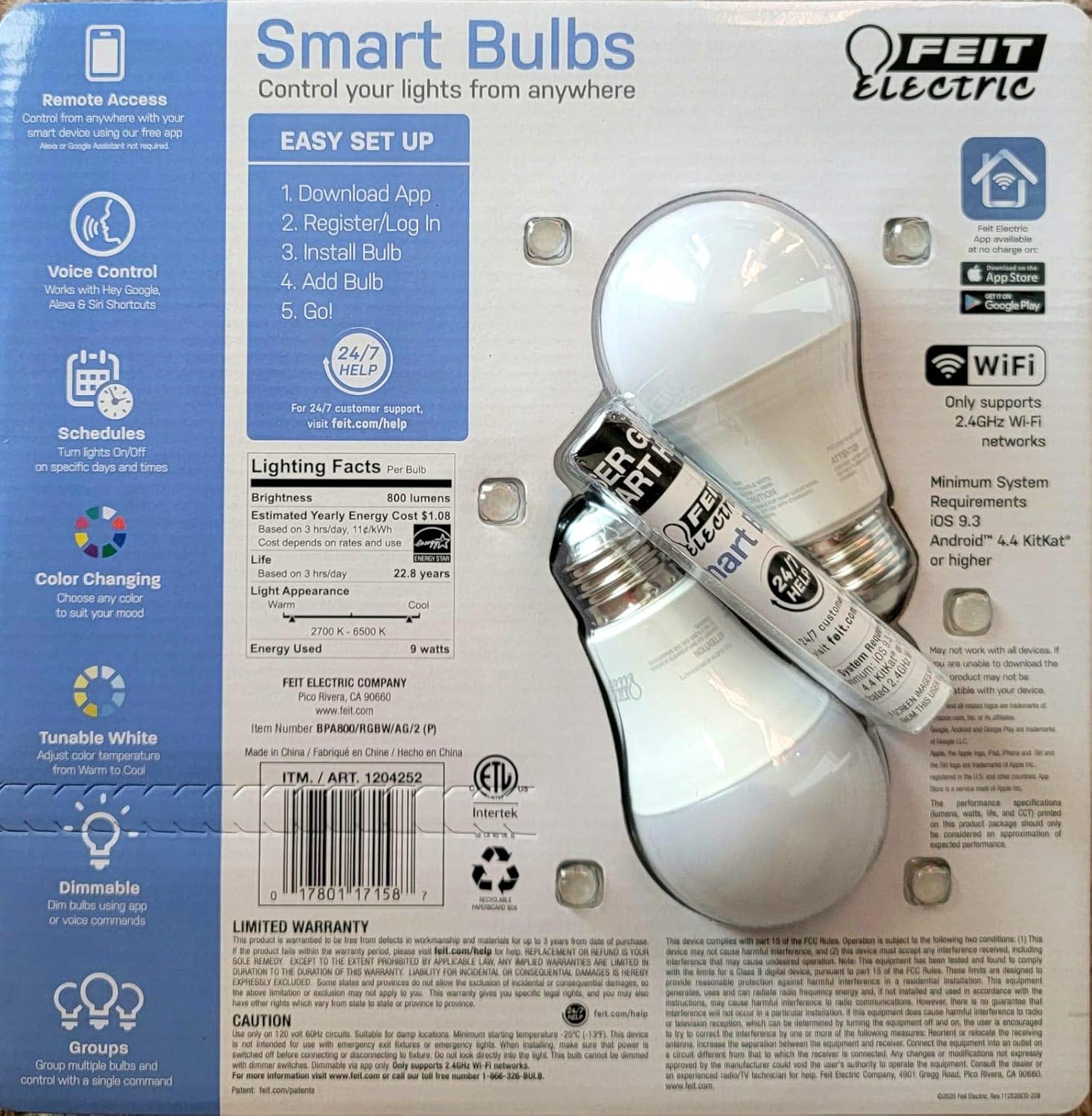
Image: Back packaging of the Feit Electric Smart Wi-Fi LED Light Bulbs, detailing easy setup steps, lighting facts (800 lumens, $1.08 estimated yearly cost, 22.8 years life), and system requirements.
Klíčové vlastnosti
- Color Changing and Tunable White: Adjust light color from millions of options or choose from various shades of white (2700K-6500K).
- Stmívatelné: Smooth dimming from 100% down to 1% via the app or voice commands.
- Hlasové ovládání: Works seamlessly with Amazon Alexa, Google Assistant, and Siri Shortcuts.
- Vzdálený přístup: Control your lights from anywhere using the Feit Electric mobile app.
- jízdní řády: Set custom schedules to turn lights on/off at specific times.
- Energeticky účinný: 9W power consumption, equivalent to a 60W incandescent bulb, with an estimated yearly energy cost of $1.08.
- Dlouhá životnost: Designed to last up to 22.8 years based on 3 hours of daily use.
Průvodce nastavením
Follow these steps to set up your Feit Electric Smart Wi-Fi LED Bulbs:
- Download the Feit Electric App: Hledat "Feit Electric" in the Apple App Store or Google Play Store and download the official app.
- Registrace/Přihlášení: Otevřete aplikaci a vytvořte si nový účet nebo se přihlaste, pokud jej již máte.
- Nainstalujte žárovku: Screw the Feit Electric Smart Wi-Fi LED bulb into any standard E26 medium base light fixture. Ensure the fixture is powered on.
- Add the Bulb in App:
- Open the Feit Electric app.
- Klepnutím na ikonu „+“ přidáte nové zařízení.
- Select "Lighting" and then "Light Source (Wi-Fi)".
- Follow the in-app instructions to connect the bulb to your 2.4GHz Wi-Fi network. (Note: These bulbs only support 2.4GHz Wi-Fi networks).
- The bulb will blink to indicate pairing mode. If it doesn't, turn the light switch off and on 5 times to reset it.
- Go!: Once connected, you can rename your bulb and start controlling it from the app.
For a visual guide, you can scan the QR code on the product packaging for a "HOW TO" video (if available).
Návod k obsluze
Ovládání aplikací
The Feit Electric app provides full control over your smart bulbs:
- Zapnuto/Vypnuto: Tap the power icon next to the bulb's name to turn it on or off.
- Jas: Pomocí posuvníku upravte úroveň jasu od 1 % do 100 %.
- Výběr barvy: Access the color wheel to choose from millions of colors.
- Nastavení bílého světla: Select different shades of white, from warm (2700K) to cool (6500K).
- scény: Apply pre-set scenes or create custom scenes for different moods or activities.
- jízdní řády: Set daily or weekly schedules for your lights to turn on/off automatically.
- Seskupení: Group multiple bulbs together to control them simultaneously.
Hlasové ovládání
Integrate your Feit Electric Smart Bulbs with your preferred voice assistant:
- Amazon Alexa:
- Enable the "Feit Electric" skill in the Alexa app.
- Objevte zařízení.
- Example commands: "Alexa, turn on [Light Name]", "Alexa, dim [Light Name] to 50%", "Alexa, set [Light Name] to blue".
- Asistent Google:
- Link your Feit Electric account in the Google Home app.
- Example commands: "Hey Google, turn off [Light Name]", "Hey Google, change [Light Name] to warm white".
- Zkratky Siri:
- Create custom Siri Shortcuts within the Feit Electric app or Apple's Shortcuts app to control your lights with voice commands.
- Example: "Hey Siri, good morning lights" (if you've set up a shortcut for this).
Údržba
Feit Electric Smart Wi-Fi LED bulbs are designed for long-lasting performance with minimal maintenance. Follow these general guidelines:
- Čištění: Před čištěním se ujistěte, že je žárovka vypnutá a vychladlá. Otřete měkkým, suchým hadříkem. Nepoužívejte tekuté ani abrazivní čisticí prostředky.
- Instalace: Always ensure the bulb is securely screwed into the fixture. Do not overtighten.
- Prostředí: These bulbs are designed for indoor use in dry locations. Avoid exposure to water or high humidity.
- Přepětí: While LED bulbs are generally robust, consider using surge protectors for your lighting circuits in areas prone to power fluctuations.
Odstraňování problémů
If you encounter issues with your Feit Electric Smart Wi-Fi LED Bulbs, try the following solutions:
| Problém | Možná příčina / řešení |
|---|---|
| Bulb not connecting to Wi-Fi / App |
|
| Žárovka nereaguje na hlasové příkazy |
|
| Bulb is flickering or dimming unexpectedly |
|
Specifikace
| Funkce | Detail |
|---|---|
| Značka | Feit Electric |
| Typ světla | LED |
| Speciální funkce | Color Changing, Tunable White |
| Wattage | 9 Watts (60 Watts Incandescent Equivalent) |
| Velikost tvaru žárovky | A19 |
| Světlá barva | Více barev |
| svtage | 110 voltů |
| Počet jednotek | 2 Počet |
| Teplota barev | 2700-6500 Kelvinů |
| Jas | 800 XNUMX lumenů |
| Tvar | Kolo |
| Materiál | Měď |
| Technologie připojení | Wi-Fi (pouze 2.4 GHz) |
| Vnitřní/venkovní použití | Krytý |
| Typ ovladače | Amazon Alexa, Google Assistant, Siri Shortcuts |
| Index podání barev (CRI) | 80 |
| Odhadované roční náklady na energii | $1.08 (based on 3 hrs/day) |
| Životnost | 22.8 let (při 3 hodinách denně) |
| UPC | 810744036599 |
| ASIN | B07RL48PFF |
Záruka a podpora
For customer support, warranty information, and additional resources, please visit the official Feit Electric webmísto:
Feit Electric offers 24/7 customer support to assist with any questions or issues you may have regarding your smart bulbs.
Ask a question about this manual
Ask about setup, troubleshooting, compatibility, parts, safety, or missing instructions. Manuals+ will review the question and use this page’s manual context to help answer it.