
1. Úvod
This manual provides instructions for the proper setup, operation, and maintenance of your Ohaus CR5200 Compass Series Portable Balance. Please read this manual thoroughly before using the balance to ensure correct operation and to prevent damage.
The Ohaus CR5200 is a portable digital balance designed for accurate weighing with a capacity of 5200 grams and a readability of 1 gram. It supports multiple weighing units including grams (g), ounces (oz), pounds:ounces (lb:oz), troy ounces (ozt), and pennyweights (dwt).

Obrázek 1.1: Nahoře view of the Ohaus CR5200 Compass Series Portable Balance, showing the display and control buttons.
2. Bezpečnostní informace
- Operate the balance on a stable, level surface free from vibrations and drafts.
- Nevystavujte váhu extrémním teplotám, vlhkosti nebo přímému slunečnímu záření.
- Do not overload the balance beyond its maximum capacity of 5200 grams.
- Keep the balance clean and free from dust and debris.
- Use only the specified power source (3 AA batteries or compatible AC adapter).
3. Nastavení
3.1 Vybalení
Carefully remove the balance from its packaging. Inspect the balance for any signs of damage. Retain the packaging for future transport or storage.
3.2 Powering the Balance
The Ohaus CR5200 can be powered by three AA alkaline batteries or an external AC adapter (not included, but compatible with the side power port).
Instalace baterie:
- Locate the battery compartment on the underside of the balance.
- Otevřete kryt bateriového prostoru.
- Insert three AA alkaline batteries, ensuring correct polarity (+/-).
- Bezpečně zavřete kryt bateriového prostoru.

Obrázek 3.1: Spodní strana view of the balance with the battery compartment open, showing three AA batteries installed.
Připojení externího napájení:
If using an AC adapter, connect it to the power input port located on the side of the balance. Ensure the adapter meets the specified voltage and current requirements (e.g., 12V 0.5A).

Obrázek 3.2: Boční strana view of the balance, highlighting the external power input port.
3.3 Umístění
Place the balance on a firm, level, and stable surface. Avoid locations near air vents, windows, or equipment that generates vibrations or electromagnetic interference.
4. Návod k obsluze
4.1 Zapnutí/vypnutí
- Zapnutí: Stiskněte tlačítko [ON/OFF] button. The display will show a self-test sequence and then settle at 0.0 g.
- Vypnutí: Stiskněte a podržte tlačítko [ON/OFF] dokud se displej nevypne.
4.2 Selecting Weighing Units
The balance supports multiple weighing units: grams (g), ounces (oz), pounds:ounces (lb:oz), troy ounces (ozt), and pennyweights (dwt).
- To change the weighing unit: Press the [JEDNOTKA] button (often labeled with 'g' and an arrow). Each press cycles through the available units.
4.3 Funkce tárování
The tare function allows you to zero out the weight of a container, so only the weight of the contents is measured.
- Položte prázdnou nádobu na vážící misku. Na displeji se zobrazí její hmotnost.
- Stiskněte tlačítko [TARE/ZERO] button (often labeled with '→0←'). The display will reset to 0.0.
- Vložte vážený materiál do nádoby. Na displeji se zobrazí čistá hmotnost materiálu.
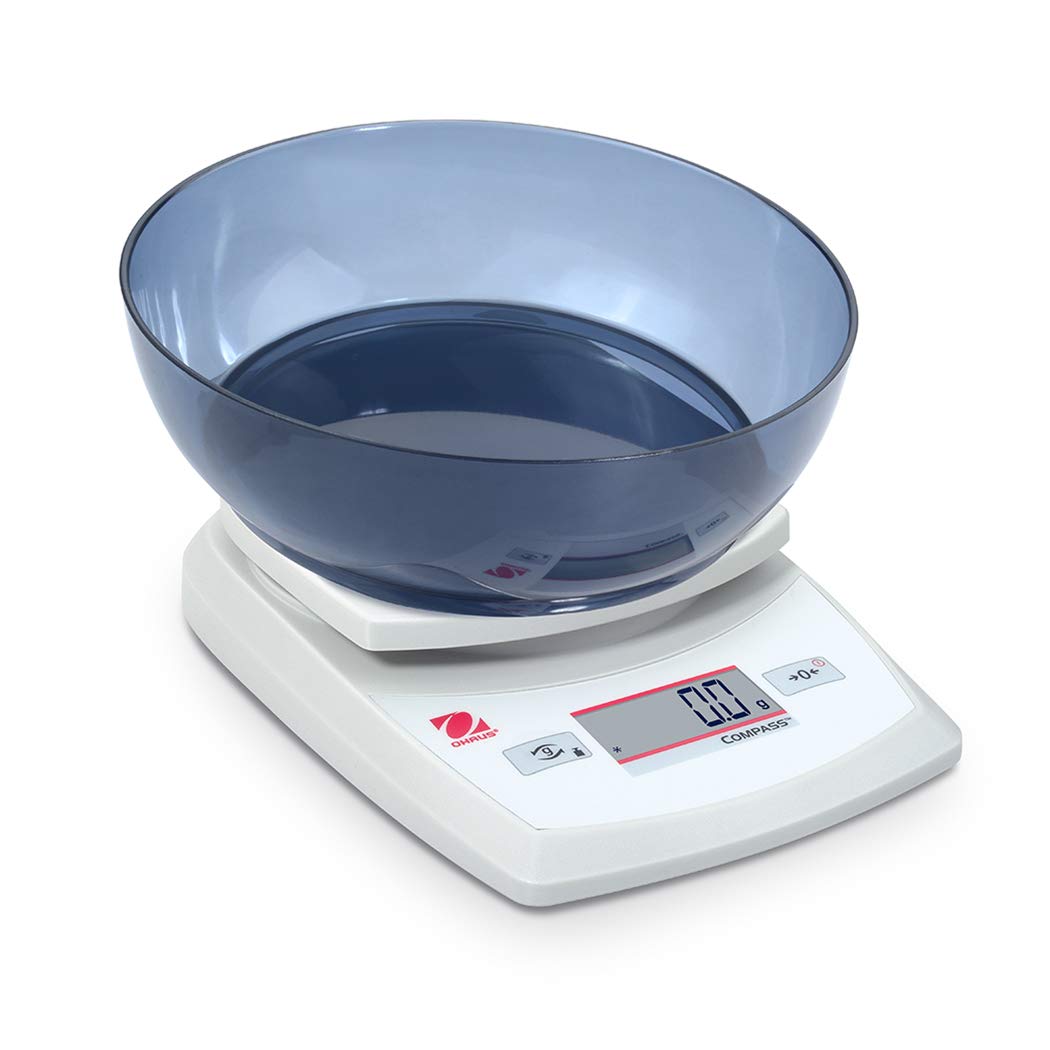
Image 4.1: The balance with an empty bowl on the weighing pan, ready for the tare function.
4.4 Základní vážení
- Ensure the balance is powered on and the display shows 0.0 in the desired weighing unit.
- Opatrně umístěte vážený předmět do středu vážicí misky.
- Počkejte, až se displej stabilizuje. Zobrazí se stabilní hmotnost.
- Vyjměte předmět z pánve.
4.5 External Calibration
The Ohaus CR5200 features external calibration. This process requires a known calibration weight (not included) to ensure accuracy. Refer to the full Ohaus CR Series manual for detailed calibration procedures specific to your model.

Image 4.2: The balance with a cylindrical calibration weight placed on the weighing pan.
5. Údržba
5.1 Čištění
- Otřete vnější povrch váhy měkkým hadříkemamp tkanina. Nepoužívejte abrazivní čisticí prostředky nebo rozpouštědla.
- Ensure no liquids enter the balance housing or display.
- Keep the weighing pan clean to ensure accurate readings.
5.2 Výměna baterie
When the battery indicator appears on the display, replace the three AA alkaline batteries as described in Section 3.2.
5.3 Skladování
When not in use for extended periods, remove the batteries to prevent leakage. Store the balance in a dry, dust-free environment. The Ohaus CR5200 is designed for portability and can be stored in a protective case (if available).

Image 5.1: The Ohaus CR5200 balance shown alongside its protective carrying case.
6. Řešení problémů
| Problém | Možná příčina | Řešení |
|---|---|---|
| Vyvážení se nezapne. | Dead or incorrectly installed batteries; no AC power. | Replace batteries or check AC adapter connection. Ensure correct battery polarity. |
| Nepřesné nebo nestabilní hodnoty. | Unstable surface; drafts; electromagnetic interference; balance needs calibration. | Move balance to a stable, level surface. Shield from drafts. Recalibrate the balance (refer to Section 4.5). |
| Display shows "Err" or error code. | Overload; internal error. | Remove excess weight if overloaded. Power cycle the balance. If error persists, contact Ohaus support. |
| Tare function not working. | Balance not stable; button not pressed correctly. | Ensure balance is stable and display is settled. Press the TARE/ZERO button firmly. |
7. Specifikace
| Funkce | Specifikace |
|---|---|
| Číslo modelu | CR5200 |
| Kapacita | 5200 5.2 g (XNUMX kg) |
| Čitelnost | 1 g |
| Jednotky vážení | g, oz, lb:oz, ozt, dwt |
| Typ kalibrace | Externí |
| Zdroj napájení | 3 AA alkaline batteries (included) or AC adapter (not included) |
| Typ zobrazení | Digitální |
| Materiál | Plast |
| Rozměry produktu (D x Š x V) | 23.62 x 17.02 x 5.59 cm |
| Hmotnost položky | 408.23 g (přibližně 14.4 unce) |
| Speciální funkce | Přenosný |
8. Záruka a podpora
Pro informace o záruce, technickou podporu nebo servisní dotazy kontaktujte zákaznický servis Ohaus nebo navštivte oficiální stránky Ohaus. webwebu. Uschovejte si účtenku jako doklad o koupi.