
1. Úvod
Thank you for choosing the Dacom Athlete G05 Bluetooth Headset. This manual provides comprehensive instructions to help you set up, operate, and maintain your new wireless headphones. Please read this manual carefully before use to ensure optimal performance and longevity of your device.
2. Obsah balení
Ověřte, zda jsou v balení obsaženy všechny níže uvedené položky:
- 1 x Dacom Athlete G05 Bluetooth Headset
- 1 x USB nabíjecí kabel
- 1 x Uživatelská příručka (tento dokument)
3. Konec produktuview
The Dacom Athlete G05 is a wireless stereo earphone designed for sports and running, featuring a comfortable in-ear design with ear hooks for secure fit. It connects via Bluetooth V4.1.
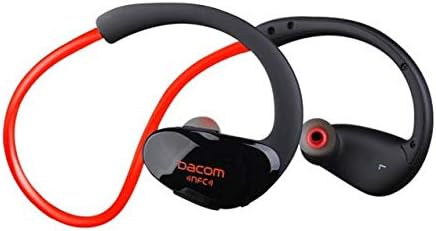
Obrázek 3.1: Přední view of the Dacom Athlete G05 Bluetooth Headset, showing the earbud and ear hook design.
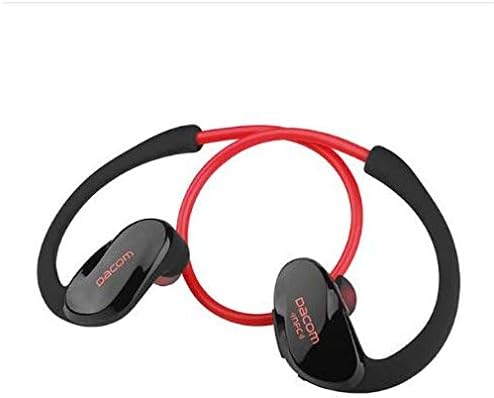
Obrázek 3.2: Zadní view of the Dacom Athlete G05 Bluetooth Headset, illustrating the connecting cable between the two earbuds.
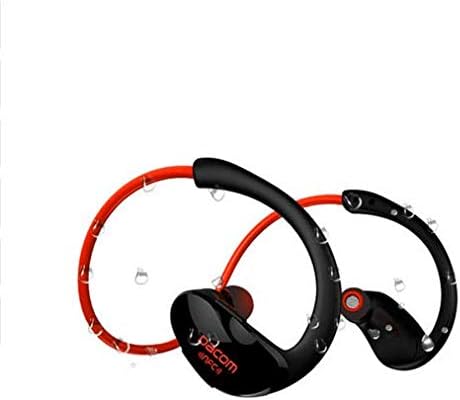
Obrázek 3.3: Dacom Athlete G05 Bluetooth Headset demonstrating water resistance, suitable for sports activities.
4. Nastavení
4.1 Nabíjení headsetu
Before first use, fully charge your Dacom Athlete G05 headset. A full charge typically takes approximately 1.5 to 2 hours.
- Připojte dodaný nabíjecí kabel USB k nabíjecímu portu na sluchátkách.
- Connect the other end of the USB cable to a power adapter (DC5V 150mAh output recommended) or a computer's USB port.
- The battery indicator light will illuminate during charging and change color or turn off once fully charged.
A fully charged headset provides approximately 8 hours of talk time or music playback, and up to 180 hours of standby time.
4.2 Párování Bluetooth
To connect your headset to a Bluetooth-enabled device (e.g., smartphone, tablet):
- Ujistěte se, že je sluchátko plně nabité a vypnuté.
- Press and hold the multi-function button on the headset until the Bluetooth indicator light flashes red and blue alternately, indicating it is in pairing mode.
- Na svém zařízení povolte Bluetooth a vyhledejte dostupná zařízení.
- Select "Dacom Athlete G05" (or similar name) from the list of found devices.
- Pokud se zobrazí výzva k zadání hesla, zadejte „0000“ (čtyři nuly).
- Once paired, the Bluetooth indicator light will flash blue slowly or turn solid blue, and you will hear a confirmation tone.
The headset supports Bluetooth V4.1 and profiles such as Headset, Handsfree, A2DP, AVRC, and APT-X.
5. Návod k obsluze
5.1 Zapnutí/vypnutí
- Zapnutí: Press and hold the multi-function button for approximately 3 seconds until the indicator light flashes blue and you hear a power-on tone.
- Vypnout: Press and hold the multi-function button for approximately 5 seconds until the indicator light flashes red and you hear a power-off tone.
5.2 Správa hovorů
- Přijmout hovor: Short press the multi-function button when a call comes in.
- Ukončit hovor: Během hovoru krátce stiskněte multifunkční tlačítko.
- Odmítnout hovor: Při příchozím hovoru stiskněte a podržte multifunkční tlačítko po dobu 2 sekund.
- Znovu vytočit poslední číslo: Dvojitým stisknutím multifunkčního tlačítka neprobíhá hovor.
5.3 Přehrávání hudby
- Přehrát/pozastavit: Krátce stiskněte multifunkční tlačítko.
- Další skladba: Dlouze stiskněte tlačítko pro zvýšení hlasitosti.
- Předchozí skladba: Dlouze stiskněte tlačítko pro zvýšení hlasitosti.
- Zvýšit hlasitost: Krátce stiskněte tlačítko Hlasitost +.
- Snížit hlasitost: Krátce stiskněte tlačítko Hlasitost -.
Note: The headset features touch control for various functions.
6. Údržba a péče
- Keep the headset dry. Do not expose it to extreme temperatures or humidity.
- Pravidelně čistěte sluchátka a nabíjecí kontakty měkkým, suchým hadříkem.
- Zabraňte pádu sluchátek na zem nebo jejich vystavení silným nárazům.
- Pokud sluchátka nepoužíváte, skladujte je na chladném a suchém místě.
- Nepokoušejte se rozebírat ani upravovat sluchátka, jinak by došlo ke ztrátě záruky.
7. Řešení problémů
| Problém | Možné řešení |
|---|---|
| Sluchátka se nezapínají. | Ensure the headset is fully charged. Connect to a power source and try again. |
| Nelze spárovat se zařízením. |
|
| Žádný zvuk nebo nízká hlasitost. |
|
| Přerušované připojení. |
|
8. Specifikace
| Funkce | Detail |
|---|---|
| Název produktu | Athlete sports Bluetooth headset |
| Číslo modelu | G05 |
| Verze Bluetooth | V4.1 |
| Bluetooth třída | třída 2 |
| Podporováno Profiles | Headset, Handsfree, A2DP, AVRC, APT-X |
| Nabíjecí vstup | DC5V 150mAh (Power adapter output) |
| Typ baterie | High-performance lithium polymer battery |
| Doba hovoru | Přibližně 8 hodiny |
| Doba přehrávání | Přibližně 8 hodiny |
| Pohotovostní doba | Přibližně 180 hodiny |
| Frekvenční rozsah zvuku | 20Hz-20kHz |
| BT Radio Frequency | 2.400-2.481 GHz |
| Výstupní impedance | 16Ω 3mW |
| Citlivost | 100-105 dB |
| Sluchátka Form Factor | V uchu |
| Technologie připojení | Bezdrátový |
| Kontrolní metoda | Dotek |
| Materiál | Plast |
| Barva | Červený |
9. Záruka a podpora
Dacom products are manufactured to the highest quality standards. For warranty information or technical support, please refer to the warranty card included with your purchase or visit the official Dacom webstránky. Uschovejte si prosím doklad o koupi pro případ reklamace.