
Zavedení
This manual provides detailed instructions for the setup, operation, and maintenance of your Homtime C1 Mini Snooze Alarm Clock. Please read this manual thoroughly before using the product to ensure proper function and longevity.

Image: The Homtime C1 Mini Alarm Clock, light blue in color, is shown on a decorative tray next to a small potted plant. The digital display shows the time 20:08.
Konec produktuview
The Homtime C1 Mini is a compact digital alarm clock designed for convenience and functionality. It features a clear LCD display, dual USB charging ports for mobile devices, and a snooze function. Its design is suitable for various environments including bedrooms, offices, and for travel.
Klíčové vlastnosti:
- Digitální zobrazení času
- Funkce Snooze
- Dvě USB nabíjecí porty
- Dimmable LCD Screen
- Kompaktní a přenosný design
Obsah balení:
- Homtime C1 Mini Alarm Clock
- Napájecí adaptér
- Uživatelská příručka (tento dokument)
Nastavení
- Připojení napájení: Connect the provided power adapter to the DC input port on the back of the alarm clock. Plug the adapter into a standard wall outlet. The display will illuminate.
- Battery Installation (Optional for backup): For time and alarm settings backup during power outages, install 3 AAA batteries (not included) into the battery compartment located on the bottom of the unit. Ensure correct polarity.
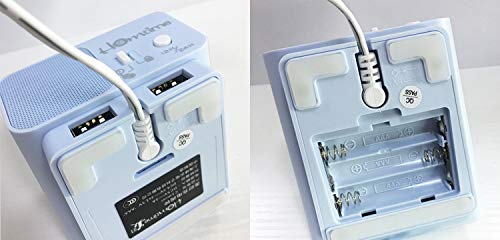
Image: A split image showing the bottom of the Homtime C1 Mini. The left side displays the rear with two USB charging ports and a power input. The right side shows the open battery compartment, designed for AAA batteries.
Návod k obsluze
1. Nastavení času
- Stiskněte a podržte "Nastavení času" button (usually located on the top or back) until the hour digits begin to flash.
- Použijte "+" or "-" buttons to adjust the hour. Pay attention to AM/PM indicators if present.
- Stiskněte tlačítko "Nastavení času" znovu stiskněte tlačítko pro potvrzení hodin a přechod k nastavení minut.
- Použijte "+" or "-" tlačítka pro nastavení minut.
- Stiskněte tlačítko "Nastavení času" button one last time to save the time setting.
2. Nastavení alarmu
- Stiskněte a podržte "Alarm Set" tlačítko, dokud nezačnou blikat číslice hodin budíku.
- Použijte "+" or "-" tlačítka pro nastavení hodiny budíku.
- Stiskněte tlačítko "Alarm Set" button again to confirm the alarm hour and move to alarm minute adjustment.
- Použijte "+" or "-" tlačítka pro nastavení minut budíku.
- Stiskněte tlačítko "Alarm Set" button one last time to save the alarm setting.
- Chcete-li aktivovat/deaktivovat budík, stiskněte tlačítko "Alarm On/Off" button (or a dedicated alarm icon button). An alarm icon will appear on the display when active.
3. Funkce odložení buzení
When the alarm sounds, press the large button on the top of the clock (often labeled "Podřimovat" or simply the main control button). The alarm will pause for approximately 9 minutes and then sound again. To turn off the alarm completely, press any other button or let it sound for its full duration.
4. Zobrazte jas
The LCD screen has multiple brightness levels. Press the "Stmívač" button (or a dedicated light icon button) repeatedly to cycle through the available brightness settings (e.g., High, Medium, Low, Off).
5. Nabíjecí porty USB
The Homtime C1 Mini features dual USB charging ports on the back of the unit. These ports are designed to charge compatible mobile devices such as smartphones and tablets. Simply connect your device's USB charging cable to one of the ports. Charging will begin automatically.
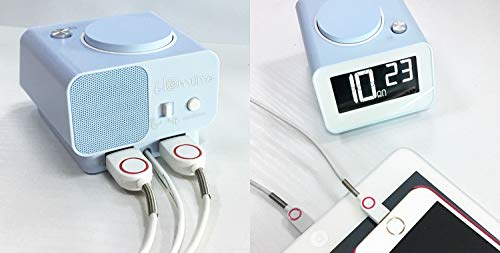
Obrázek: Zadní strana view of the Homtime C1 Mini alarm clock, showing two white USB charging cables plugged into its dual USB ports. This illustrates the charging functionality.
Údržba
- Čištění: Otřete jednotku měkkým, suchým hadříkem. Nepoužívejte abrazivní čisticí prostředky ani rozpouštědla, protože by mohly poškodit povrch.
- Moc: Ensure the power adapter is securely connected. Disconnect from power during extended periods of non-use.
- Prostředí: Avoid placing the clock in direct sunlight, near heat sources, or in excessively humid environments.
Odstraňování problémů
| Problém | Možná příčina | Řešení |
|---|---|---|
| Displej hodin je prázdný. | Žádná síla ani sílatage. | Check power adapter connection. If using battery backup, ensure batteries are installed correctly and are not depleted. |
| Alarm se nespustí. | Budík není aktivovaný nebo je nesprávně nastavený. | Ensure the alarm is turned ON (alarm icon visible). Verify the alarm time is set correctly. |
| Nabíjení přes USB nefunguje. | Problém s kabelem nebo nekompatibilita zařízení. | Try a different USB cable. Ensure the device is compatible with USB charging. Check if the clock is powered on. |
| Displej je příliš jasný/tmavý. | Je třeba upravit nastavení jasu. | Press the "Dimmer" button to cycle through brightness levels. |
Specifikace
- Značka: Homtime
- Model: C1 Mini
- Typ displeje: Digitální LCD
- Zdroj napájení: Electrical (AC Adapter)
- Bateriová záloha: 3 x AAA baterie (nejsou součástí balení)
- Speciální vlastnosti: Alarm, Dual USB Charging Ports, Dimmable Screen
- Materiál rámu: Akrylonitrilbutadienstyren, plast
- Typ montáže: Stolní deska
- Země původu: Čína
Záruka a podpora
For warranty information and customer support, please refer to the warranty card included with your product or visit the official Homtime webmísto. Uschovejte si doklad o koupi pro případ záručních reklamací.
For further assistance, you may contact Homtime customer service through their official channels. Please have your model number (C1 Mini) and purchase details ready.