
1. Úvod
This manual provides comprehensive instructions for the setup, operation, and maintenance of your Drawmer CMC2 Compact Monitor Controller. Please read this manual thoroughly before using the device to ensure proper functionality and to maximize its performance.
2. Bezpečnostní informace
- Napájení: Use only the factory-supplied 15V DC power supply. Using an incorrect power supply may damage the unit and void the warranty.
- Větrání: Zajistěte dostatečné větrání kolem jednotky. Neblokujte větrací otvory.
- vlhkost: Nevystavujte jednotku dešti, vlhkosti ani nadměrné vlhkosti.
- Čištění: Před čištěním odpojte napájení. Použijte suchý, měkký hadřík. Nepoužívejte tekuté čisticí prostředky ani aerosoly.
- Servis: Veškerý servis svěřte kvalifikovanému servisnímu personálu. Nepokoušejte se jednotku sami otevírat ani opravovat.
3. Obsah balení
Ověřte, zda váš balíček obsahuje následující položky:
- Drawmer CMC2 Compact Monitor Controller
- 15V DC Power Supply Unit
- Uživatelská příručka (tento dokument)
4. Konec produktuview
4.1 Ovládací prvky na předním panelu
The front panel provides all primary controls for audio monitoring and source selection.

Obrázek 4.1: Přední strana view of the Drawmer CMC2 Compact Monitor Controller, showing all knobs and buttons for input selection, speaker selection, master volume, headphone control, and mix check functions.
- AUX INPUT Knob: Adjusts the level of the auxiliary input.
- SOURCE SELECT Buttons (I/P1, I/P2, AUX): Vybere aktivní zdroj zvukového vstupu.
- SPEAKER SELECT Buttons (A, B, SUB): Activates the selected speaker outputs.
- MASTER VOLUME Knob: Controls the overall output level to the selected speakers.
- Tlačítko MUTE: Mutes all speaker outputs.
- HEADPHONE Knob: Upravuje hlasitost pro sluchátkový výstup.
- MIX CHECK Buttons (ØREV, MONO, DIM): Provides phase reverse, mono sum, and dim functions for mix analysis.
- AUX INPUT (3.5mm Jack): Front panel auxiliary input for portable devices.
- HEADPHONE Output (6.35mm Jack): Front panel headphone output.
4.2 Připojení zadního panelu
The rear panel houses all audio input and output connectors, along with the power input.

Obrázek 4.2: Zadní view of the Drawmer CMC2 Compact Monitor Controller, displaying the DC power input, speaker outputs (Mono/Sub, R-B-L, R-A-L), and inputs (R-2-L, R-1-L).
- DC=15V Input: Connect the supplied 15V DC power adapter here.
- Vypínač: Toggles the unit's power on/off.
- SPEAKER OUTPUTS (MONO/SUB, R-B-L, R-A-L): Balanced XLR outputs for connecting up to two pairs of stereo monitors (A and B) and a mono subwoofer.
- INPUTS (R-2-L, R-1-L): Balanced XLR inputs for two stereo audio sources.
5. Nastavení
Follow these steps to set up your CMC2 controller:
- Připojení napájení: Connect the supplied 15V DC power adapter to the 'DC=15V' input on the rear panel. Plug the adapter into a suitable power outlet. Do not power on the unit yet.
- Vstupní připojení:
- Connect your primary audio source (e.g., audio interface, mixer) to the 'INPUTS R-1-L' using balanced XLR cables.
- Connect a secondary audio source to the 'INPUTS R-2-L' using balanced XLR cables.
- For portable devices, connect to the front panel 'AUX INPUT' (3.5mm jack) or the rear panel RCA auxiliary inputs (if available on your model, refer to specific product documentation).
- Připojení reproduktorů:
- Connect your main studio monitors to the 'SPEAKER OUTPUTS R-A-L' using balanced XLR cables.
- If using a second pair of monitors, connect them to 'SPEAKER OUTPUTS R-B-L'.
- If using a subwoofer, connect it to the 'SPEAKER OUTPUTS MONO/SUB'.
- Připojení sluchátek: If desired, connect your headphones to the front panel 'HEADPHONE' 6.35mm jack.
- Zapnutí: Once all connections are secure, press the power switch on the rear panel to turn on the CMC2.
6. Návod k obsluze
This section details the functions of the CMC2's controls.
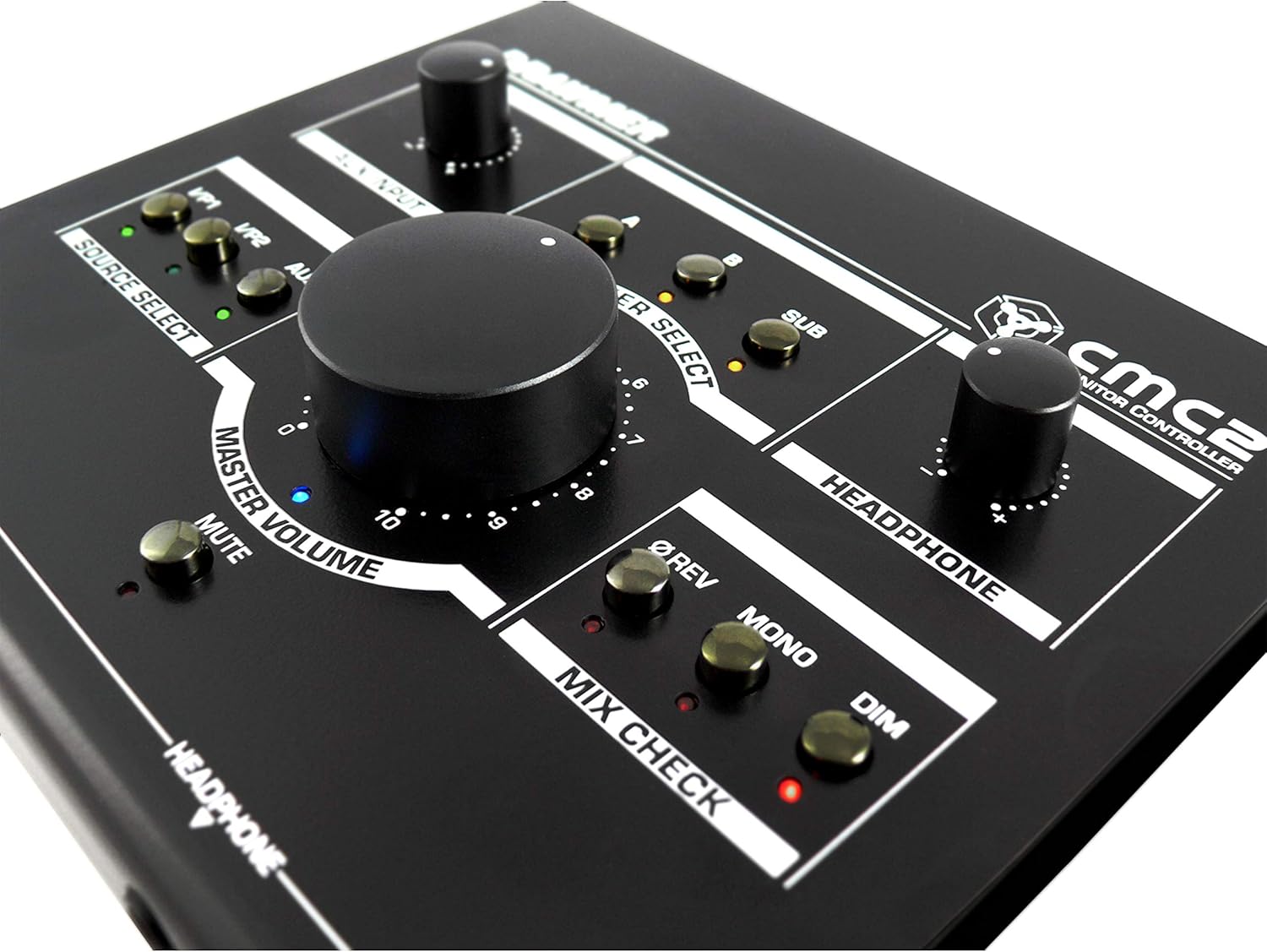
Obrázek 6.1: Detail view of the Drawmer CMC2 front panel, highlighting the master volume, source select, speaker select, headphone, and mix check controls.
6.1 Výběr zdroje
- Stiskněte tlačítko I/P1 button to select the audio source connected to Input 1.
- Stiskněte tlačítko I/P2 button to select the audio source connected to Input 2.
- Stiskněte tlačítko AUX button to select the auxiliary input (front panel 3.5mm jack).
- Only one source can be active at a time. The LED next to the selected button will illuminate.
6.2 Výběr reproduktorů
- Stiskněte tlačítko A button to route the selected source to Speaker Output A.
- Stiskněte tlačítko B button to route the selected source to Speaker Output B.
- Stiskněte tlačítko SUB button to route the selected source to the Subwoofer Output.
- Multiple speaker outputs can be active simultaneously (e.g., A and SUB). The LEDs indicate active outputs.
6.3 Ovládání hlasitosti
- Otočte velký HLAVNÍ HLASITOST knob clockwise to increase the output level to the selected speakers, and counter-clockwise to decrease it.
- Otočte SLUCHÁTKA knob to adjust the listening level for connected headphones.
- Otočte VSTUP AUX knob to adjust the input level of the auxiliary source.
6.4 Mix Check Functions
- Stiskněte tlačítko ØREV button to reverse the phase of the right channel, useful for checking phase compatibility.
- Stiskněte tlačítko MONO button to sum the stereo signal to mono, allowing you to check for mono compatibility issues in your mix.
- Stiskněte tlačítko ZTLUMIT button to temporarily reduce the output volume by a fixed amount, useful for quick listening level changes without losing your main volume setting.
6.5 Funkce ztlumení
- Stiskněte tlačítko ZTLUMIT button to instantly silence all active speaker outputs. The LED will illuminate when mute is active. Press again to unmute.
7. Údržba
The Drawmer CMC2 is designed for reliable operation with minimal maintenance.
- Čištění: Udržujte jednotku čistou otíráním suchým, měkkým hadříkem, který nepouští vlákna. Nepoužívejte abrazivní čisticí prostředky ani rozpouštědla.
- Prostředí: Operate the unit in a clean, dry environment, away from direct sunlight, heat sources, and excessive dust.
- Větrání: Ujistěte se, že ventilační otvory nejsou zablokované, aby nedošlo k přehřátí.
8. Řešení problémů
If you encounter issues with your CMC2, refer to the following common problems and solutions:
- Bez napájení:
- Ensure the 15V DC power adapter is securely connected to the unit and a working power outlet.
- Zkontrolujte, zda je vypínač na zadním panelu v poloze „ON“.
- Žádný audio výstup:
- Verify that the correct input source (I/P1, I/P2, or AUX) is selected and its LED is illuminated.
- Ensure that at least one speaker output (A, B, or SUB) is selected and its LED is illuminated.
- Check that the MASTER VOLUME knob is turned up and the MUTE button is not active (LED off).
- Confirm all audio cables are securely connected to both the CMC2 and your speakers/audio sources.
- Test with different cables or audio sources to isolate the problem.
- Zkreslený zvuk:
- Reduce the input level from your audio source.
- Lower the MASTER VOLUME on the CMC2.
- Zkontrolujte, zda nejsou poškozené audio kabely.
- Headphone Output Not Working:
- Ensure headphones are fully plugged into the front panel jack.
- Adjust the HEADPHONE volume knob.
- Vyzkoušejte to s jiným párem sluchátek.
If the problem persists, contact Drawmer customer support or your authorized dealer for assistance.
9. Specifikace
| Název modelu | CMC2 |
| Značka | Kreslíř |
| Doporučená použití | Monitorování zvuku |
| Technologie připojení | XLR, RCA (Auxiliary) |
| Režim zvukového výstupu | Stereo |
| Typ reproduktoru | Monitor |
| Rozměry produktu | 13 x 9 x 3 palce (33 x 22.86 x 7.62 cm) |
| Hmotnost položky | 3 libry (1.36 kg) |
| Výrobce | Kreslíř |
10. Záruka a podpora
The Drawmer CMC2 Compact Monitor Controller is covered by a manufacturer's warranty. Please refer to the warranty card included with your product or visit the official Drawmer webpodrobné záruční podmínky naleznete na webu.
For technical support, service, or further inquiries, please contact your authorized Drawmer dealer or the Drawmer customer support team through their official channels.