
1. Úvod
This manual provides comprehensive instructions for the setup, operation, maintenance, and troubleshooting of your Canyon CNS-SW71SS Smartwatch. Please read this manual carefully before using your device to ensure proper function and longevity.
The Canyon CNS-SW71SS Smartwatch is designed to help you monitor your fitness activities and stay connected. It features a 1.22-inch color screen, multi-sport modes, heart rate monitoring, sleep tracking, and notification alerts. Its IP68 water resistance makes it suitable for various environments.
2. Konec produktuview
2.1 Klíčové vlastnosti
- 1.22-inch color touch screen display.
- Multi-sport mode for tracking various activities.
- Daily activity monitoring: calories, steps, heart rate, and sleep.
- Notifications for incoming calls, SMS, emails, calendar events, and social media.
- Music control and remote camera function.
- Smart alarm and weather data display.
- Výdrž baterie až 7 dní.
- IP68 water resistance (submersible up to 1 meter for 30 minutes).
- Připojení Bluetooth 4.0.
- Compatible with iOS and Android operating systems.
- Comes with two interchangeable wristbands: metal and TPU.
2.2 Komponenty
The Canyon CNS-SW71SS Smartwatch consists of the main watch unit, interchangeable wristbands, and a charging cable.

Obrázek 1: Přední strana view of the Canyon CNS-SW71SS Smartwatch, showing the display with steps, distance, calories, and heart rate data.

Obrázek 2: Úhlové view of the Canyon CNS-SW71SS Smartwatch, featuring a silver metal mesh strap and a round display.
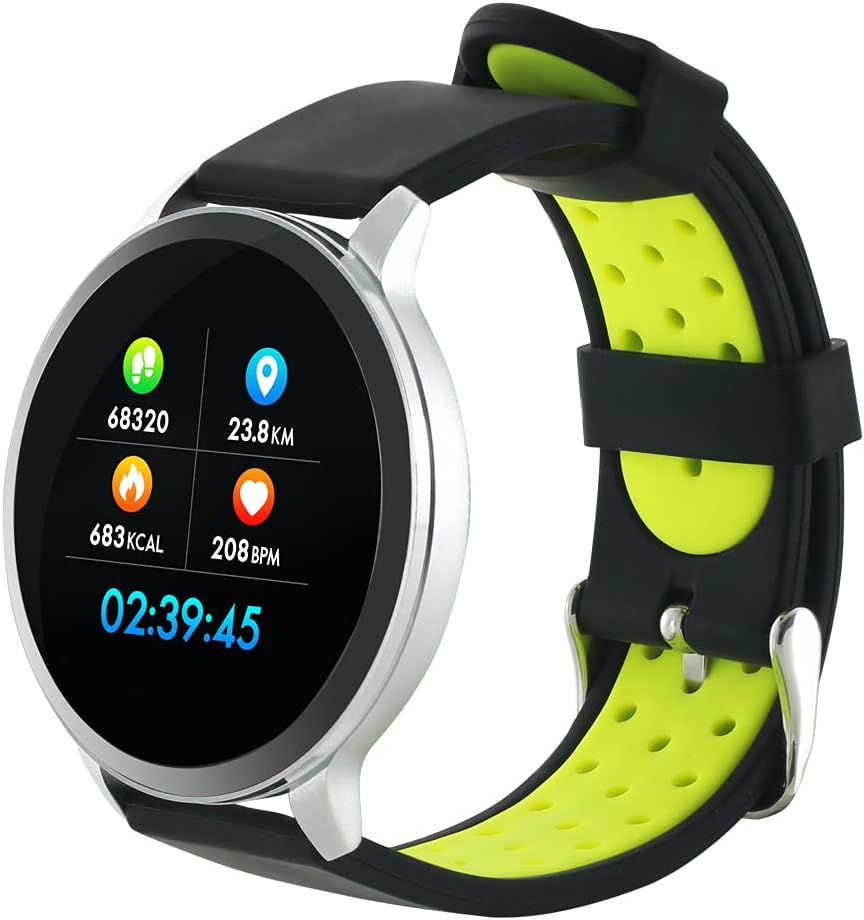
Figure 3: The Canyon CNS-SW71SS Smartwatch shown with an alternative black and lime green TPU strap, highlighting its interchangeable design.

Obrázek 4: Zadní view of the Canyon CNS-SW71SS Smartwatch, displaying the optical heart rate sensor and magnetic charging contacts.

Figure 5: The retail packaging for the Canyon CNS-SW71SS Smartwatch, illustrating key features and the included two straps.
3. Nastavení
3.1 Nabíjení chytrých hodinek
- Connect the charging cable to a USB power adapter (not included) or a computer's USB port.
- Align the magnetic charging pins of the cable with the charging contacts on the back of the smartwatch. The watch will vibrate and display a charging icon.
- Allow approximately 2-3 hours for a full charge. A full charge provides up to 7 days of usage.
3.2 Installing the Canyon Fit Application
- Scan the QR code provided in the packaging or search for "Canyon Fit" in your smartphone's app store (Google Play Store for Android, Apple App Store for iOS).
- Stáhněte a nainstalujte aplikaci.
- Open the Canyon Fit app and follow the on-screen instructions to create an account and set up your profile.
3.3 Párování s vaším smartphonem
- Ujistěte se, že jsou vaše chytré hodinky nabité a zapnuté.
- Povolte na svém smartphonu Bluetooth.
- Otevřete aplikaci Canyon Fit.
- Navigate to the device pairing section within the app (usually found under 'Device' or 'Profile').
- Select your smartwatch (e.g., "CNS-SW71SS") from the list of available devices.
- Pokud se zobrazí výzva, potvrďte požadavek na párování na smartphonu i chytrých hodinkách.
3.4 Attaching/Changing Wristbands
The smartwatch comes with two wristbands (metal and TPU) that can be interchanged. To attach or change a wristband, locate the quick-release pins on the underside of the strap. Slide the pin to detach the current strap and then align and slide the pin of the new strap into the corresponding holes on the watch body until it clicks into place.
4. Návod k obsluze
4.1 Základní navigace
- Dotyková obrazovka: Swipe left/right to navigate through different functions and menus. Swipe up/down to view oznámení nebo rychlé nastavení.
- Boční tlačítko: Press the side button to return to the main watch face or to wake up the screen. A long press may access power options or specific features depending on the context.
4.2 Sledování fyzické zdatnosti
- Multisportovní režim: Access the 'Workout' or 'Sport' menu on your watch. Select your desired activity (e.g., running, cycling, walking) to start tracking. The watch will record duration, distance, calories burned, and heart rate.
- Denní aktivita: The watch automatically tracks your steps, distance, and calories burned throughout the day. View these statistics on the watch face or in the Canyon Fit app.
- Monitorování srdeční frekvence: The watch continuously monitors your heart rate. You can also manually initiate a heart rate measurement from the heart rate interface.
- Sledování spánku: Wear the smartwatch to bed, and it will automatically track your sleep patterns, including deep sleep, light sleep, and wake times. View detailed sleep analysis in the Canyon Fit app.
4.3 Oznámení
Once paired with your smartphone and with notification permissions granted in the Canyon Fit app, your smartwatch will display alerts for:
- Příchozí hovory
- SMS zprávy
- e-maily
- Kalendář událostí
- Social Media Apps (e.g., WhatsApp, Facebook, InstagRAM)
Přejetím prstem nahoru po ciferníku view recent notifications. You can dismiss notifications from the watch.
4.4 Doplňkové funkce
- Ovládání hudby: While music is playing on your phone, you can use the watch to play/pause, skip tracks, and adjust volume.
- Vzdálená kamera: Open the camera function in the Canyon Fit app. Use your smartwatch as a remote shutter button to take photos on your phone.
- Inteligentní alarm: Set alarms through the Canyon Fit app. The watch will vibrate to wake you up gently.
- Údaje o počasí: Once connected to your phone, the watch will display current weather conditions and forecasts for your location.
5. Údržba
5.1 Čištění
- Otřete obrazovku a tělo hodinek měkkým hadříkemamp tkanina.
- For the metal strap, use a soft brush to gently clean any debris. For the TPU strap, wash with mild soap and water.
- Před nabíjením se ujistěte, že jsou nabíjecí kontakty čisté a suché.
- K čištění nepoužívejte agresivní chemikálie nebo abrazivní materiály.
5.2 Voděodolnost (IP68)
The Canyon CNS-SW71SS Smartwatch is IP68 rated, meaning it is resistant to dust and can be immersed in water up to 1 meter deep for a maximum of 30 minutes. While it can withstand splashes, rain, and brief immersion, it is not recommended for hot showers, saunas, or diving, as steam and high water pressure can compromise the seals.
- Do not press any buttons while the watch is submerged.
- Po kontaktu s vodou hodinky důkladně osušte.
5.3 Péče o baterii
- Vyhněte se častému úplnému vybíjení baterie.
- Zařízení pravidelně nabíjejte, i když jej nepoužíváte, abyste zachovali jeho stav.
- Pokud hodinky delší dobu nepoužíváte, skladujte je na chladném a suchém místě.
6. Řešení problémů
- Hodinky se nezapínají: Ujistěte se, že jsou hodinky plně nabité. Připojte je k nabíječce alespoň na 30 minut.
- Nelze spárovat se smartphonem:
- Zkontrolujte, zda je ve vašem telefonu povoleno Bluetooth.
- Ensure the Canyon Fit app has necessary permissions.
- Restartujte telefon i chytré hodinky.
- Zkuste zařízení zrušit a znovu spárovat prostřednictvím aplikace.
- Nezobrazují se oznámení:
- Check notification settings in the Canyon Fit app and your phone's system settings.
- Ujistěte se, že jsou hodinky připojeny přes Bluetooth.
- Nepřesné údaje o tepové frekvenci/aktivitě:
- Ujistěte se, že hodinky máte na zápěstí pevně připevněné, ne příliš těsné ani příliš volné.
- Vyčistěte senzor na zadní straně hodinek.
- Environmental factors or certain movements can affect accuracy.
- Obrazovka nereaguje: Try restarting the smartwatch by holding down the side button. If unresponsive, allow the battery to fully drain and then recharge.
7. Specifikace
| Název modelu | CNS-SW71SS |
| Značka | KAŇON |
| Velikost displeje | 1.22 palců |
| Kompatibilita operačního systému | Android, iOS |
| Technologie připojení | Bluetooth 4.0 |
| Hodnocení odolnosti proti vodě | IP68 |
| Speciální funkce | Wireless Charging (implied by product data), Multi-Sport Mode, Heart Rate Monitor, Sleep Tracker, Notifications |
| Kompatibilní zařízení | Smartphone |
| Baterie | Dobíjecí (1 kus je součástí balení) |
| Možnosti barev | Black, Lime Green, Silver |
8. Záruka a podpora
For warranty information and technical support, please refer to the documentation included with your purchase or visit the official Canyon website. You can also contact Canyon customer service for assistance with product issues or inquiries.
Online podpora: https://canyon.eu/support/ (Napřampodkaz, ověřte prosím oficiální stránku podpory)