
1. Úvod
The Eizo ColorEdge CS2731 is a 27-inch IPS LCD monitor designed for creative professionals who demand exceptional color accuracy and image quality. This manual provides detailed instructions for setting up, operating, and maintaining your monitor to ensure optimal performance.

Obrázek 1.1: Přední strana view of the Eizo ColorEdge CS2731 Monitor, showcasinjeho elegantním designem a zobrazovacími možnostmi.
2. Klíčové vlastnosti
- 27-inch Wide Gamut LCD: Features a 2560x1440 resolution IPS panel for fine detail and wide viewing úhly.
- 99% Adobe RGB Color Space: Ensures accurate reproduction of a wide range of colors, crucial for professional photo and video editing.
- Hardware Calibration Support: Compatible with free calibration software (ColorNavigator 7) for precise color management.
- Všestranné vstupy: Includes USB Type-C, DisplayPort, HDMI, and DVI-D for broad connectivity.
- 5letá záruka výrobce: Poskytuje dlouhodobou záruku kvality a spolehlivosti produktů.
3. Nastavení
3.1 Vybalení a montáž
Carefully remove the monitor and its components from the packaging. Assemble the stand according to the included quick setup guide, ensuring all connections are secure before placing the monitor on a stable surface.
3.2 Připojení monitoru
Connect the monitor to your computer using one of the available input ports. The ColorEdge CS2731 supports USB Type-C, DisplayPort, HDMI, and DVI-D connections. For optimal performance and color depth, DisplayPort or USB Type-C are recommended.

Figure 3.1: USB Type-C connection allows for video, USB signal, and power delivery (up to 60W) with a single cable.
Ensure the power cable is securely connected to the monitor and a power outlet. The monitor supports 240 Volts input.
3.3 Fyzické úpravy
The monitor stand allows for various adjustments to enhance your viewing comfort and efficiency:
- Nastavení výšky: Adjust the monitor's height to your eye level.
- Nastavení sklonu: Tilt the screen forward or backward to reduce glare and improve viewúhel.
- Funkce pivotu: Otočení obrazovky o 90 stupňů pro zobrazení na výšku viewing, ideal for editing long documents or images.

Figure 3.2: Adjusting the monitor height for ergonomic viewIng.


Figure 3.3: Monitor tilt adjustments (+5° to -35°).
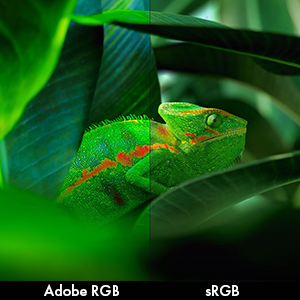
Figure 3.4: Monitor pivot function for portrait orientation.
4. Obsluha monitoru
4.1 Zapnutí/vypnutí
Press the power button located on the front bezel to turn the monitor on or off. The power indicator light will illuminate when the monitor is active.
4.2 Color Management and Calibration
The Eizo ColorEdge CS2731 is designed for precise color reproduction. It features a wide color gamut covering 99% of the Adobe RGB color space, ensuring accurate and vibrant colors.

Figure 4.1: Illustration of the monitor's 99% Adobe RGB color gamut coverage, ideal for creative work.
The monitor also includes a Digital Uniformity Equalizer (DUE) to ensure consistent brightness and chromaticity across the entire screen, minimizing variations that can affect color accuracy.

Figure 4.2: The Digital Uniformity Equalizer corrects tone deviations for consistent display across the screen.
For hardware calibration, use Eizo's ColorNavigator 7 software. This software, combined with an optional calibration sensor, simplifies the calibration process and ensures predictable, accurate results across all units.

Figure 4.3: ColorNavigator 7 software facilitates precise hardware calibration for various creative workflows.
Video 4.1: Overview of the ColorEdge CS Series Monitors, highlighting their features for creative professionals, including color reproduction, image quality, and ease of use. This video demonstrates the wide color gamut, digital uniformity equalizer, and hardware calibration capabilities.
5. Údržba
5.1 Čištění monitoru
To clean the monitor screen, gently wipe it with a soft, lint-free cloth. For stubborn smudges, slightly dampOmyjte hadřík vodou nebo roztokem na čištění obrazovky. Nepoužívejte agresivní chemikálie ani abrazivní materiály.
5.2 Obecná péče
Keep the monitor in a well-ventilated area, away from direct sunlight and excessive heat or moisture. Avoid placing heavy objects on the monitor or its cables. When moving the monitor, ensure it is powered off and disconnected from all cables.
6. Řešení problémů
6.1 Bez napájení
- Zkontrolujte, zda je napájecí kabel pevně připojen k monitoru i k elektrické zásuvce.
- Zkontrolujte, zda je zásuvka funkční, zapojením jiného zařízení.
6.2 Žádný obraz na obrazovce
- Verify that the video cable (USB-C, DisplayPort, HDMI, or DVI-D) is securely connected to both the monitor and your computer.
- Ensure the correct input source is selected on the monitor's OSD (On-Screen Display) menu.
- Check your computer's display settings to ensure it is configured to output to the monitor.
6.3 Color Inaccuracies
- Perform a hardware calibration using Eizo ColorNavigator 7 software and a compatible sensor.
- Ujistěte se, že máte aktuální ovladače grafické karty.
- Check the monitor's color mode settings in the OSD menu.
For further assistance, please refer to the comprehensive troubleshooting guide available on the Eizo support webmísto.
7. Specifikace

Figure 7.1: Key dimensions of the Eizo ColorEdge CS2731 Monitor.
| Atribut | Hodnota |
|---|---|
| Velikost obrazovky | 27 palce |
| Rezoluce | 2560 x 1440 (QHD širokoúhlý 1440p) |
| Poměr stran | 1.78:1 |
| Jas obrázku | 350 cd/m2 |
| Popis povrchu obrazovky | Matný |
| Vstupy | USB Type-C, DisplayPort, HDMI, DVI-D |
| Celkový počet portů USB | 3 |
| svtage | 240 voltů |
| Hmotnost položky | 22.2 libry |
| Číslo modelu položky | CS2731-BK |
| Datum první dostupnosti | 8. dubna 2019 |
Note: Some regional models may have specific voltage requirements or warranty limitations. Refer to your product's specific documentation.

Figure 7.2: Specific warranty and input voltage information for models intended for the Japanese market.
8. Záruka a podpora
The Eizo ColorEdge CS2731 monitor comes with a 5letá záruka výrobce. Tato záruka se vztahuje na vady materiálu a zpracování při běžném používání.
For warranty claims, technical support, or additional product information, please visit the official Eizo support webnebo kontaktujte jejich zákaznický servis. Více informací a zdrojů naleznete na Eizo Store on Amazon.
Please note that the warranty may be region-specific. For example, some models may have a warranty valid only in Japan, as indicated in certain product images.