
1. Úvod
This manual provides essential information for the safe and effective operation, maintenance, and troubleshooting of your Sharp KC-G60EUW Air Purifier with Humidifier. Please read this manual thoroughly before using the appliance and keep it for future reference.
The Sharp KC-G60EUW is designed to purify and humidify the air in rooms up to 50 square meters. It features a 5-stage filtration system and Plasmacluster Ion technology to improve air quality by removing various pollutants, allergens, and odors.
2. Bezpečnostní informace
Při používání elektrických spotřebičů vždy dodržujte základní bezpečnostní opatření, abyste snížili riziko požáru, úrazu elektrickým proudem a zranění.
- Zajistěte napájení objtage odpovídá štítku s výkonem na jednotce.
- Neprovozujte jednotku s poškozeným napájecím kabelem nebo zástrčkou.
- Keep the unit away from water and moisture. Do not immerse in water.
- Neblokujte vstupy nebo výstupy vzduchu.
- Před čištěním nebo prováděním jakékoli údržby odpojte jednotku ze zásuvky.
- Tento spotřebič není určen pro použití osobami (včetně dětí) se sníženými fyzickými, smyslovými nebo duševními schopnostmi nebo nedostatečnými zkušenostmi a znalostmi, pokud na ně nedohlíží osoba odpovědná za jejich bezpečnost nebo jim nebyla poskytnuta instrukce ohledně používání spotřebiče.
- Nepoužívejte jednotku v blízkosti hořlavých plynů nebo hořlavých materiálů.
3. Konec produktuview
The Sharp KC-G60EUW combines air purification and humidification functions. Key components include the control panel, air inlets/outlets, water tank, and a multi-stagsystém elektronických filtrů.
3.1 Hlavní jednotka

Obrázek 3.1: Přední view of the Sharp KC-G60EUW Air Purifier, showing the Sharp logo and Plasmacluster ion indicator.
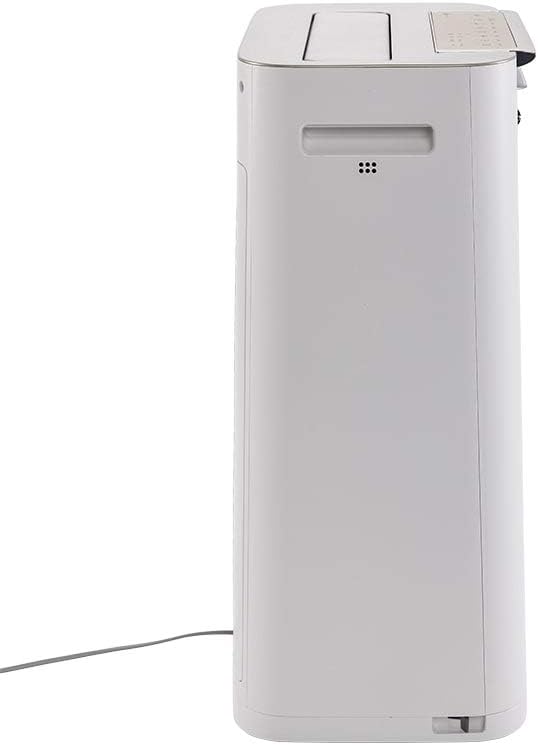
Obrázek 3.2: Strana view of the Sharp KC-G60EUW Air Purifier, illustrating its slim profile and power cord connection.
3.2 Ovládací panel
The control panel is located on the top of the unit and allows you to manage all functions.

Obrázek 3.3: Nahoru view of the Sharp KC-G60EUW, showing the control panel with various function buttons and indicators.

Obrázek 3.4: Detailní view of the control panel buttons, including Power, Mode, Humidification, Spot, and Intelligent Auto mode.
3.3 Filtrační systém
The unit employs a 5-stage filtration system for comprehensive air purification:
- Předfiltr: Captures large particles like dust, hair, and pet dander (up to 240 microns).
- Carbon Filter with Silica Gel: Absorbs unpleasant odors, volatile organic compounds (VOCs) such as benzene, formaldehyde, and benzo(a)pyrene. The silica gel layer enhances the removal of nitrogen and sulfur oxides.
- HEPA H13 filtr: Removes 99.97% of PM 2.5 particles, pollen, and other fine airborne allergens.
- Humidifier Filter: Retains sediment from water, reducing scale buildup and ensuring clean humidification.
- Plasmacluster Ionizer: Generates positive and negative ions to neutralize airborne viruses, bacteria, mold spores, and odors.
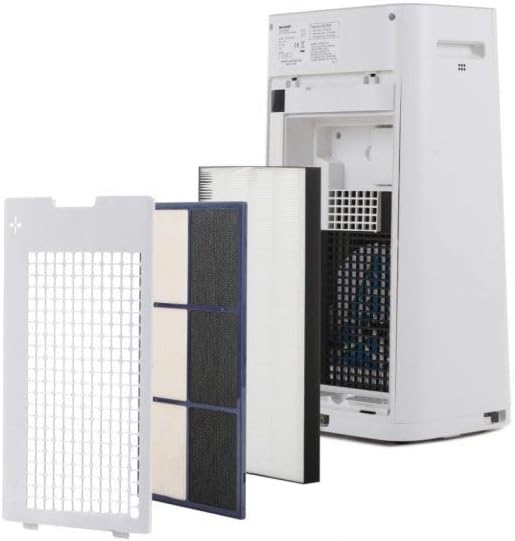
Obrázek 3.5: Multi-stage filtration system of the Sharp KC-G60EUW, showing the individual filters removed from the back of the unit.
4. Nastavení
Follow these steps to set up your air purifier for the first time:
- Rozbalte jednotku: Opatrně vyjměte čističku vzduchu z obalu. Obal si uschovejte pro budoucí přepravu nebo skladování.
- Odstraňte obal filtru: Open the back cover of the unit. Remove all filters (pre-filter, carbon filter, HEPA filter) and unwrap them from their protective plastic bags. Reinstall the filters in the correct order, ensuring they are securely seated. Refer to Image 3.5 for filter arrangement.
- Naplnění nádrže na vodu (pro zvlhčování): Remove the water tank from the side of the unit. Fill it with clean tap water. Do not use distilled water or water with additives. Reinsert the water tank securely.
- Umístění jednotky: Place the air purifier on a flat, stable surface, ensuring there is adequate space (at least 20 cm) around the air inlets and outlets for optimal airflow.
- Připojte napájení: Zapojte napájecí kabel do vhodné elektrické zásuvky.
5. Návod k obsluze
The Sharp KC-G60EUW offers various operating modes and settings.
5.1 Zapnutí/vypnutí
- Stiskněte tlačítko ON/OFF tlačítko na ovládacím panelu pro zapnutí nebo vypnutí jednotky.
5.2 Výběr režimu
Stiskněte tlačítko MODE button to cycle through different purification modes:
- Automatický režim: The unit automatically adjusts fan speed and humidification based on sensor readings (dust, odor, humidity). This is the recommended mode for general use.
- Maximální režim: Operates at maximum fan speed for rapid air purification.
- Střední režim: Medium fan speed for balanced purification.
- Nízký režim: Nízké otáčky ventilátoru pro tichý provoz.
- Režim spánku: Operates at the lowest fan speed with dimmed indicators for undisturbed sleep.
5.3 Funkce zvlhčování
To activate or deactivate humidification:
- Stiskněte tlačítko HUMIDIFY ON/OFF button. The humidification indicator will light up when active.
- Ensure the water tank is filled for humidification to function.
5.4 Plasmacluster Ion Function
The Plasmacluster Ion function is typically active by default. If there is a dedicated button, press the ION button to toggle it on or off. The Plasmacluster indicator will confirm its status.
5.5 Intelligent Auto Mode
Stiskněte tlačítko INTELIGENTNÍ REŽIM button to engage the advanced automatic operation, which optimizes purification and humidification based on environmental conditions detected by the unit's sensors.
6. Údržba
Pravidelná údržba zajišťuje optimální výkon a prodlužuje životnost čističky vzduchu.
6.1 Čištění předfiltru
- Frekvence: Approximately once a month, or when the filter indicator lights up.
- Postup:
- Odpojte jednotku.
- Odstraňte zadní panel.
- Opatrně vyjměte předfiltr.
- Use a vacuum cleaner to remove dust and debris from the pre-filter. For stubborn dirt, wash it gently with water and a mild detergent. Rinse thoroughly and allow it to air dry completely before reinstalling.
- Reinstall the pre-filter and back panel.
6.2 Cleaning the Humidifier Filter and Water Tank
- Frekvence: Weekly or as needed, especially if scale buildup is visible.
- Postup:
- Odpojte jednotku.
- Remove the water tank and humidifier filter assembly.
- Vyprázdněte zbývající vodu z nádrže.
- Vyčistěte nádržku na vodu měkkým kartáčem a jemným čisticím prostředkem. Důkladně opláchněte.
- Clean the humidifier filter by rinsing it under running water. For scale buildup, soak the filter in a descaling solution (e.g., citric acid solution) as per the solution's instructions, then rinse thoroughly.
- Allow all parts to air dry completely before reassembling and reinstalling.
6.3 HEPA and Carbon Filter Replacement
- Frekvence: The HEPA and Carbon filters are not washable and must be replaced periodically. Refer to the filter replacement indicator on the unit or the manufacturer's recommendations (typically every 2-5 years depending on usage and air quality).
- Postup:
- Odpojte jednotku.
- Remove the back panel and the old HEPA and Carbon filters.
- Install new, genuine Sharp replacement filters, ensuring correct orientation.
- Zavřete zadní panel.
- Reset the filter replacement indicator (refer to the control panel instructions, usually by pressing and holding a specific button for 3 seconds).
7. Řešení problémů
If you encounter issues with your Sharp KC-G60EUW, refer to the following common problems and solutions:
| Problém | Možná příčina | Řešení |
|---|---|---|
| Jednotka se nezapne. | Žádné napájení. | Zkontrolujte, zda je napájecí kabel bezpečně zapojený do jednotky a do zásuvky. Ujistěte se, že je zásuvka funkční. |
| Žádné zvlhčování. | Water tank is empty or not properly installed. Humidification function is off. | Fill the water tank. Ensure the tank is correctly seated. Press the HUMIDIFY ON/OFF button. |
| Slabé proudění vzduchu nebo špatné čištění. | Filters are dirty or blocked. Air inlets/outlets are obstructed. | Clean the pre-filter. Check if HEPA/Carbon filters need replacement. Ensure no objects are blocking air vents. |
| Neobvyklý hluk. | Cizí předmět uvnitř jednotky. Filtry nejsou správně nainstalovány. | Unplug the unit and check for any foreign objects. Reinstall filters correctly. If noise persists, contact customer support. |
| Zápach přetrvává. | Carbon filter is saturated. | Replace the carbon filter. |
Pokud problém přetrvává i po vyzkoušení těchto řešení, kontaktujte zákaznickou podporu Sharp.
8. Specifikace
| Funkce | Detail |
|---|---|
| Číslo modelu | KC-G60EUW |
| Značka | Ostrý |
| Použitelná podlahová plocha | Až 50 m² (7 300 čtverečních stop) |
| Max Purification Efficiency | 408 m³/h |
| Max Humidification Efficiency | 630 ml/h |
| Úroveň hluku | 24 dB (minimum) |
| Filtrační systém | 5-stage (Pre-filter, Carbon, HEPA H13, Humidifier, Plasmacluster Ionizer) |
| Particle Retention (Pre-filter) | Až 240 mikronů |
| Speciální funkce | Plasmacluster Technology, Intelligent AUTO mode |
| Zdroj napájení | Elektrický kabel |
| Kontrolní metoda | Dálkové ovládání, tlačítkové ovládání |
| Hmotnost položky | 28.44 libry (přibližně 12.9 kg) |
9. Záruka a podpora
Sharp products are manufactured to high-quality standards and are warranted against manufacturing defects. For specific warranty terms and conditions, please refer to the warranty card included with your product or visit the official Sharp webstránky pro váš region.
For technical assistance, troubleshooting beyond this manual, or to order replacement parts/filters, please contact Sharp customer support:
- Online podpora: Visit the official Sharp support webmísto.
- Telefonická podpora: Viz dokumentace k produktu nebo informace od Sharpu. webstránky s místními kontaktními čísly.
- When contacting support, please have your model number (KC-G60EUW) and serial number ready.