
Zavedení
This manual provides instructions for the safe and efficient operation of your RIDGID R84086B 18-Volt Cordless Mini Bluetooth Radio. This compact and versatile device offers portable audio entertainment and device charging, featuring AM/FM radio, Bluetooth connectivity, and an auxiliary input. It is powered by RIDGID 18-Volt batteries and can also function as a power bank for charging other devices.
Bezpečnostní informace
Před použitím tohoto výrobku si vždy přečtěte a pochopte všechna bezpečnostní varování a pokyny. Nedodržení těchto pokynů může vést k úrazu elektrickým proudem, požáru a/nebo vážnému zranění.
- Do not expose the radio to rain or wet conditions. Water entering the radio will increase the risk of electric shock.
- Use only with specified battery packs. Using any other battery packs may create a risk of injury and fire.
- Do not operate the radio in explosive atmospheres, such as in the presence of flammable liquids, gases, or dust.
- Keep the radio away from heat sources, direct sunlight, and extreme temperatures.
- Always ensure the battery is properly seated before use.
Konec produktuview
Familiarize yourself with the components of your RIDGID R84086B radio.
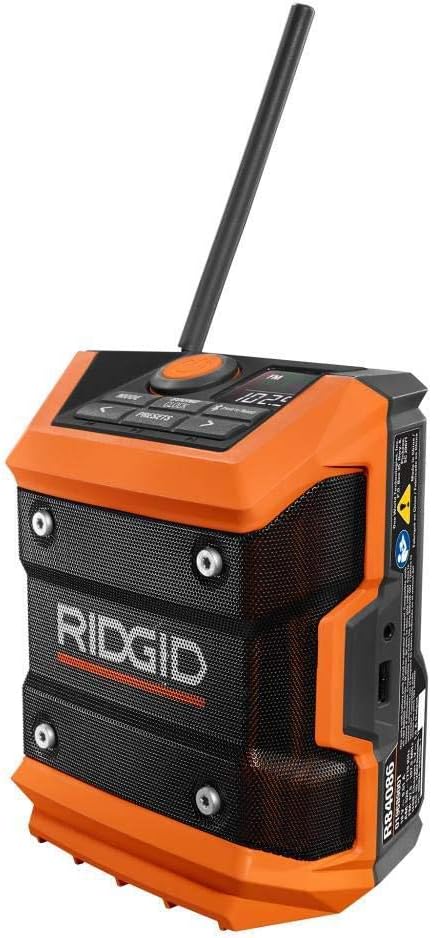
Obrázek 1: Přední strana view of the RIDGID R84086B radio, showing the control panel, speaker, and extended antenna.

Figure 2: The RIDGID R84086B radio in a workshop setting, demonstrating its portability and use with a smartphone.
Nastavení
Instalace baterie
- Ujistěte se, že je rádio vypnuté.
- Align a charged RIDGID 18-Volt battery pack with the battery port on the radio.
- Zasuňte baterii do portu, dokud bezpečně nezacvakne na místo.
Nastavení antény
For optimal radio reception, extend and adjust the antenna as needed. The antenna can be rotated and tilted to improve signal strength.
Návod k obsluze
Zapnutí/vypnutí
Press the orange power button located on the control panel to turn the radio on or off.
Výběr režimu
Stiskněte tlačítko MODE button to cycle through available audio sources: FM Radio, AM Radio, Bluetooth, and Auxiliary (AUX) input.
Radio Tuning (AM/FM)
- Vyberte režim FM nebo AM pomocí MODE tlačítko.
- Use the left (<) a vpravo (>) arrow buttons to manually tune to a desired frequency.
- Chcete-li stanici uložit jako předvolbu, stiskněte a podržte tlačítko PRESETS button, then use the arrow buttons to select a preset number and press PRESETS znovu pro potvrzení.
Párování pomocí Bluetooth
- Vyberte režim Bluetooth pomocí MODE button. The Bluetooth icon on the display will flash, indicating it is in pairing mode.
- Na svém mobilním zařízení povolte Bluetooth a vyhledejte dostupná zařízení.
- Select "RIDGID Radio" from the list of devices to pair. Once paired, the Bluetooth icon will stop flashing and remain solid.
Pomocný vstup
To use the auxiliary input, connect an audio device (e.g., smartphone, MP3 player) to the 3.5mm AUX port on the side of the radio using a standard audio cable. Select AUX mode using the MODE tlačítko.
Nastavení zvuku
Stiskněte tlačítko SOUND/CLOCK button to access sound settings. Use the arrow buttons to adjust bass and treble levels for your preferred audio experience.
Funkce powerbanky
The radio features a USB port that allows you to charge compatible devices. Connect your device to the USB port using an appropriate charging cable. The radio's battery will provide power to charge your device.
Video: Demonstration of the RIDGID R84086B radio's features, including battery installation, mode selection, radio tuning, auxiliary input, and power bank functionality.
Údržba
Čištění
Rádio pravidelně čistěte měkkým, damp hadříkem. Nepoužívejte agresivní chemikálie ani abrazivní čisticí prostředky. Ujistěte se, že všechny porty jsou bez prachu a nečistot.
Péče o baterie
Store battery packs in a cool, dry place away from direct sunlight. Do not store battery packs in a discharged condition. Always charge batteries fully before extended storage.
Odstraňování problémů
Žádná síla
- Ujistěte se, že je akumulátor plně nabitý a správně vložený.
- Check for any obstructions in the battery port.
Špatný příjem rádia
- Extend and adjust the antenna for better signal.
- Move the radio to a different location to avoid interference.
Problémy s připojením Bluetooth
- Ujistěte se, že je rádio v režimu párování Bluetooth.
- Ujistěte se, že je na vašem mobilním zařízení zapnutá funkce Bluetooth a že je v dosahu.
- Zkuste zařízení zrušit a znovu spárovat.
Specifikace
| Značka | RIDGID |
| Číslo modelu | R84086B |
| Technologie připojení | Bluetooth |
| Zdroj napájení | Battery Powered (RIDGID 18-Volt) |
| Hmotnost položky | 1.75 libry |
| Kompatibilní zařízení | Smartphone |
| Hardwarové rozhraní | USB |
| UPC | 723548648427 |
Záruka a podpora
Informace o záruce
This product comes with a 90-day limited warranty. Please refer to the warranty card included with your purchase for full terms and conditions.
Zákaznická podpora
For technical assistance, troubleshooting, or warranty claims, please contact RIDGID customer support. Contact information can typically be found on the official RIDGID webwebu nebo na obalu vašeho produktu.