
auna 388-BT
auna 388-BT Stereo System
Uživatelská příručka
Důležité bezpečnostní pokyny
Please read these instructions carefully before operating the unit and retain them for future reference. Adhere to all warnings and instructions provided with the product.
- Zdroj napájení: Přístroj připojujte pouze k typu zdroje napájení popsanému v návodu k obsluze nebo vyznačenému na spotřebiči.
- Větrání: Zajistěte řádné větrání. Neblokujte žádné větrací otvory. Instalujte v souladu s pokyny výrobce.
- Voda a vlhkost: Nepoužívejte tento přístroj v blízkosti vody nebo vamp prostředí.
- Čištění: Clean only with a dry cloth. Unplug the unit from the wall outlet before cleaning.
- Teplo: Neinstalujte v blízkosti zdrojů tepla, jako jsou radiátory, tepelné regulátory, kamna nebo jiná zařízení (včetně amplifikátory), které produkují teplo.
- Ochrana napájecího kabelu: Chraňte napájecí kabel před šlapáním nebo přiskřípnutím, zejména u zástrček, zásuvek a v místě, kde vychází z přístroje.
- Servis: Nepokoušejte se sami opravovat tento produkt, protože otevřením nebo sejmutím krytů se můžete vystavit nebezpečnému objtage nebo jiná nebezpečí. Veškeré opravy svěřte kvalifikovanému servisnímu personálu.
- Vstup objektu a kapaliny: Nikdy nestrkejte do tohoto výrobku otvory jakéhokoli druhu, protože by se mohly dotknout nebezpečného objemutage body nebo zkratované části, které by mohly způsobit požár nebo úraz elektrickým proudem. Nikdy na výrobek nelijte žádnou tekutinu.
Konec produktuview
The auna 388-BT is a versatile stereo system designed to play various audio formats, including vinyl records, CDs, cassette tapes, and digital audio via USB, SD card, and Bluetooth. It features an integrated FM radio tuner and includes two external speakers for stereo sound.

Obrázek 1: Přední strana view of the auna 388-BT stereo system with turntable, main unit, and two external speakers.
Hlavní komponenty:
- Hlavní jednotka: Houses the turntable, CD player, cassette decks, radio tuner, and control panel.
- External Speakers (x2): Zajistěte stereo audio výstup.
- Dálkové ovládání: Pro pohodlné ovládání na dálku.
- Protiprachový kryt: Chrání gramofon před prachem.
Front Panel Controls and Features:

Obrázek 2: Detailní view of the main unit's front panel, showing the display, control buttons, and input ports.
- Vypínač: Zapíná nebo vypíná jednotku.
- Function/Source Selector: Switches between Phono/BT, Tape, CD/USB/SD, and Tuner modes.
- Ovládání hlasitosti: Upravuje celkovou úroveň zvukového výstupu.
- LCD displej: Zobrazuje aktuální režim, informace o skladbě, rádiovou frekvenci atd.
- USB port: Pro připojení USB flash disků.
- Slot pro SD/MMC kartu: Pro vkládání paměťových karet SD nebo MMC.
- Jack pro sluchátka (3.5 mm): Pro soukromý poslech.
- Zásobník na CD: For inserting audio CDs and MP3-CDs.
- Cassette Decks (Deck 1 & Deck 2): Pro přehrávání a nahrávání kazetových pásek.
- Ovládání přehrávání: Přehrát, Pozastavit, Zastavit, Rychle vpřed, Přetočit vzad, Přeskočit skladbu.
- Tlačítko nahrávání: Initiates recording to cassette or USB.
Připojení zadního panelu:

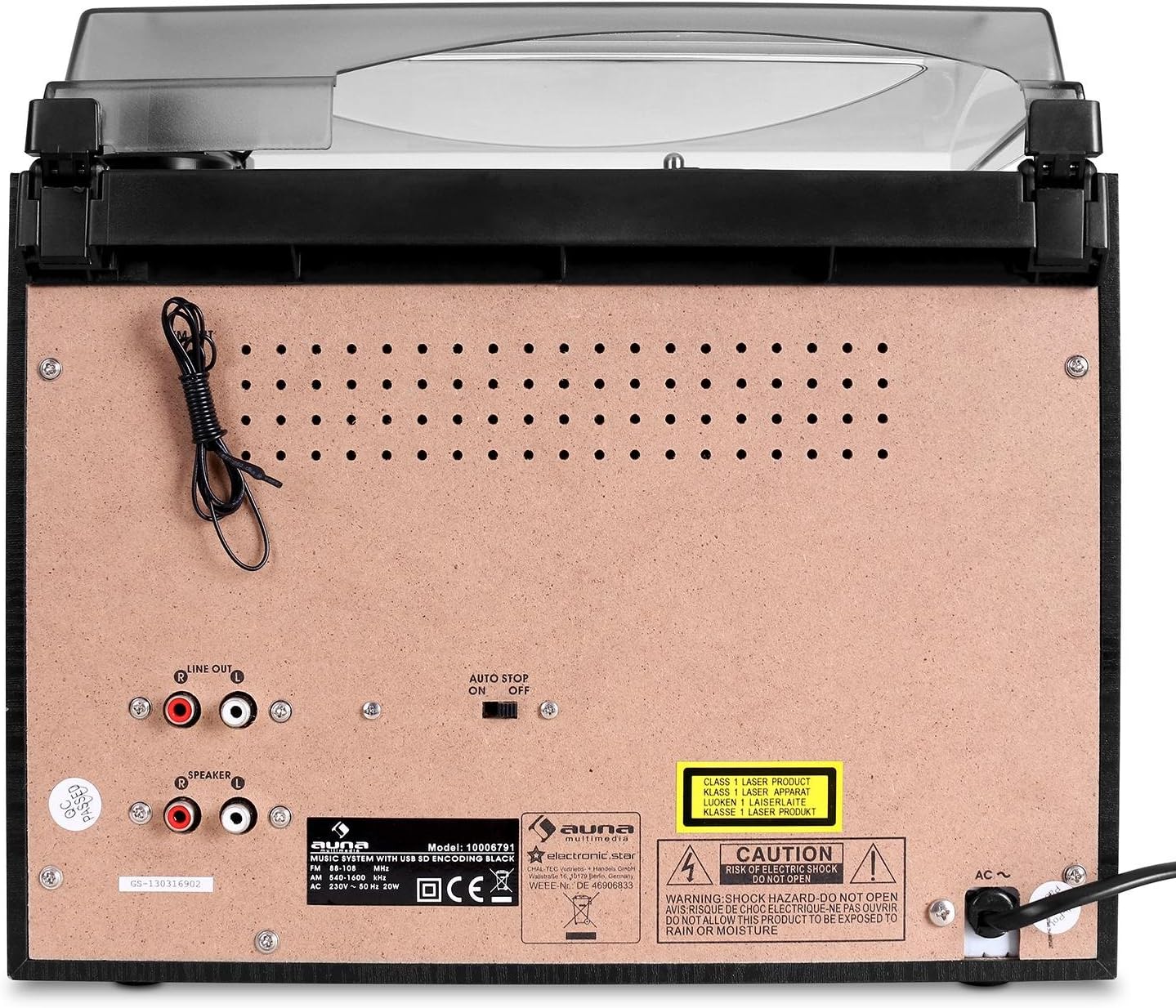
Figure 3: Rear panel of the main unit, displaying speaker outputs, line out, and power input.
- Speaker Outputs (RCA): Připojte dodané externí reproduktory.
- Linkový výstup (RCA): Pro připojení k externímu ampzesilovač nebo aktivní reproduktory.
- Anténa FM: Integrated wire antenna for radio reception.
- Vstup střídavého proudu: Připojte napájecí kabel.
- Automatický vypínač: For turntable auto-stop function.
Nastavení
1. Vybalení a umístění:
- Opatrně vyjměte všechny součásti z obalu.
- Place the main unit on a stable, flat surface, away from direct sunlight, heat sources, and excessive dust or moisture.
- Zajistěte dostatek prostoru kolem jednotky pro větrání.
2. Připojení reproduktorů:
The auna 388-BT comes with two external speakers. Connect them to the main unit using the provided speaker cables.

Obrázek 4: Zadní view of the external speakers, showing the integrated audio cables for connection to the main unit.
- Locate the RCA speaker output jacks on the rear of the main unit.
- Connect the RCA plugs from the speaker cables into the corresponding speaker output jacks (Left and Right) on the main unit.
- Position the speakers to the left and right of the main unit for optimal stereo separation.
3. Připojení napájení:
- Ensure the unit's power switch is in the "OFF" position.
- Plug the AC power cord into the AC power input on the rear of the main unit.
- Plug the other end of the power cord into a standard AC wall outlet (230V, 50Hz).
Návod k obsluze
Obecný provoz:
- Zapnutí/vypnutí: Stiskněte tlačítko MOC tlačítko na předním panelu nebo dálkovém ovladači pro zapnutí nebo vypnutí jednotky.
- Nastavení hlasitosti: Otočte OBJEM knoflík na předním panelu nebo použijte VOL+ / VOL- tlačítka na dálkovém ovladači.
- Výběr zdroje: Stiskněte tlačítko FUNKCE button repeatedly on the front panel or use the dedicated source buttons on the remote control (PHONO/BT, TAPE, CD/USB/SD, TUNER) to select the desired audio source.
Obsluha gramofonu:
- Zvedněte protiprachový kryt.
- Umístěte vinylovou desku na talíř gramofonu.
- Select the appropriate speed (33 or 45 RPM) using the speed selector switch. For 45 RPM records, place the included adapter on the spindle.
- Move the tone arm from its rest and gently place the stylus on the desired groove of the record. The platter will start spinning automatically.
- To stop playback, lift the tone arm and return it to its rest. The platter will stop spinning.
- The AUTOMATICKÉ ZASTAVENÍ switch on the rear panel controls whether the turntable stops automatically at the end of a record.
Ovládání CD přehrávače:
- Stiskněte tlačítko CD/USB/SD vyberte režim CD.
- Stiskněte tlačítko OTEVŘÍT/ZAVŘÍT tlačítko pro otevření přihrádky na CD.
- Place a CD (audio CD or MP3-CD) with the label side facing up into the tray.
- Stiskněte OTEVŘÍT/ZAVŘÍT again to close the tray. The unit will read the disc and begin playback automatically.
- Použijte PLAY/PAUSE, ZASTÁVKA, PŘESKOČTE dopředua PŘESKOČIT ZPĚT tlačítka pro ovládání přehrávání.
- Přehrávání programu: Refer to the detailed instructions in the full manual for programming specific track orders.
Obsluha kazetového přehrávače/magnetofonu:
- Stiskněte tlačítko PÁSKA tlačítko pro výběr režimu kazety.
- Open the cassette deck door (Deck 1 or Deck 2) and insert a cassette tape.
- Použijte ovládací prvky přehrávání (HRÁT, STOP/EJECT, RYCHLE VPŘED, ZPĚT) to control tape playback.
- Záznam: To record from the radio or turntable to a cassette, select the desired source (TUNER or PHONO), then press the ZÁZNAM button on the cassette deck. Ensure a blank tape is inserted.
- High-Speed Dubbing: Use Deck 1 for playback and Deck 2 for recording to dub tapes at high speed.
Radio (FM) Operation:
- Stiskněte tlačítko TUNER tlačítko pro výběr režimu rádia.
- Extend the FM wire antenna on the rear of the unit for better reception.
- Použijte LADĚNÍ knoflík nebo TUNE+ / TUNE- tlačítek na dálkovém ovladači pro ruční naladění stanice.
- Automatické skenování: Stiskněte a podržte PLAY/PAUSE button (or similar on remote) to automatically scan and save available stations.
Provoz Bluetooth:
- Stiskněte tlačítko PHONO/BT Stisknutím tlačítka vyberte režim Bluetooth. Na displeji se zobrazí „BT“ a bude blikat, což znamená, že je zařízení v režimu párování.
- Enable Bluetooth on your external device (smartphone, tablet, etc.) and search for "auna 388-BT" or similar.
- Select the unit from the list of available devices to pair. Once connected, the "BT" indicator will stop flashing.
- You can now play audio from your Bluetooth device through the stereo system. Use your device's controls for playback.
USB/SD Playback and Digitalization:
Obrázek 5: Detailní view of the USB port and SD/MMC card slot on the front panel.
- Vložte USB flash disk do USB portu nebo SD/MMC kartu do slotu pro kartu.
- Stiskněte tlačítko CD/USB/SD pro výběr režimu USB nebo SD. Přístroj automaticky detekuje a začne přehrávat MP3 files.
- Pro navigaci mezi skladbami použijte ovládací prvky přehrávání.
- Digitalization (Recording to USB/SD):
- Select the source you wish to record from (Turntable, CD, or Radio).
- Ujistěte se, že je vložen USB disk nebo SD karta.
- Spusťte přehrávání zdrojového materiálu.
- Stiskněte tlačítko ZÁZNAM button on the main unit. The recording indicator will light up.
- Stiskněte ZÁZNAM again to stop recording. The recorded audio will be saved as an MP3 file na USB disku nebo SD kartě.
Údržba
- Čištění jednotky:
- Před čištěním vždy odpojte jednotku ze zásuvky.
- K otření vnějších povrchů použijte měkký, suchý hadřík.
- Nepoužívejte abrazivní čisticí prostředky, vosky ani rozpouštědla, protože by mohly poškodit povrchovou úpravu.
- Péče o stylus:
- Gently clean the stylus tip periodically with a soft brush, brushing from back to front.
- Nedotýkejte se stylusu prsty.
- Replace the stylus when sound quality deteriorates or if the stylus is visibly damaged.
- Protiprachový kryt: Pokud gramofon nepoužíváte, mějte kryt proti prachu zavřený, aby se v něm nehromadil prach.
- Péče o CD/kazety: Handle CDs and cassettes by their edges. Store them in their cases to prevent scratches and dust.
Odstraňování problémů
| Problém | Možná příčina | Řešení |
|---|---|---|
| Žádná síla | Napájecí kabel není připojen; zásuvka není aktivní. | Ensure power cord is securely plugged in. Check if the power outlet is working. |
| Žádný zvuk z reproduktorů | Příliš nízká hlasitost; Reproduktory nejsou připojeny; Vybrán nesprávný zdroj. | Increase volume. Check speaker connections to the main unit. Select the correct audio source. |
| Turntable not spinning or distorted sound | Speed setting incorrect; Stylus dirty or damaged; Auto Stop switch off. | Check if 33/45 RPM switch matches the record. Clean or replace stylus. Ensure Auto Stop switch is set correctly. |
| CD přeskakuje nebo se nepřehrává | CD je znečištěné nebo poškrábané; CD je nesprávně vloženo. | Clean the CD with a soft cloth. Ensure the CD is inserted label-side up. Try another CD. |
| Bluetooth se nepřipojuje | Jednotka není v režimu párování; Zařízení je příliš daleko; Bluetooth na externím zařízení je vypnutý. | Ensure unit is in Bluetooth pairing mode (BT flashing). Move device closer. Enable Bluetooth on your device. |
| USB/SD not recognized or playing | Nesprávný file format; USB/SD card corrupted; Card inserted incorrectly. | Zajistit files are MP3 format. Try reformatting the USB/SD card (backup data first). Reinsert the card correctly. |
Specifikace
| Značka: | auna |
| Model: | 388-BT |
| Napájení: | AC 230 V, 50 Hz |
| Spotřeba energie: | 25W |
| Rozměry hlavní jednotky (Š x V x H): | 31.8 x 28.5 x 28.5 cm |
| Speaker Dimensions (W x H x D): | 14.7 x 22.5 x 14.2 cm |
| Hmotnost hlavní jednotky: | Přibl. 3.8 kg |
| Speaker Weight (each): | Přibl. 950 g |
| Konektivita: | Bluetooth, USB, SD/MMC, Stereo RCA Line In, Stereo RCA Line Out, 3.5mm Headphone Jack |
| Podporovaná média: | Vinyl Records (33/45 RPM), Audio CD, MP3-CD, Cassette Tapes, MP3 (USB/SD) |
| Výstupní výkon reproduktoru: | 2 x 5W / 4 ohms |
| Digitalization Format: | MP3 (128 kbps, 44.1 kHz) |
Záruka a podpora
This product is covered by a manufacturer's warranty. Please refer to the warranty card included with your purchase or contact your retailer for specific warranty terms and conditions.
For technical support or service inquiries, please contact the auna customer service department or your local distributor. Contact information can typically be found on the manufacturer's webwebu nebo v dokumentaci k nákupu.
Ask a question about this manual
Ask about setup, troubleshooting, compatibility, parts, safety, or missing instructions. Manuals+ will review the question and use this page’s manual context to help answer it.