
1. Úvod
This manual provides detailed instructions for the proper use and maintenance of your HOPESTAR H13 Bluetooth Speaker. Please read this manual thoroughly before operating the device to ensure optimal performance and longevity. Keep this manual for future reference.
2. Obsah balení
Ověřte, zda jsou v balení přítomny všechny položky:
- HOPESTAR H13 Bluetooth Speaker
- Nabíjecí kabel
- Uživatelská příručka
3. Konec produktuview
Familiarize yourself with the components and controls of your HOPESTAR H13 speaker.
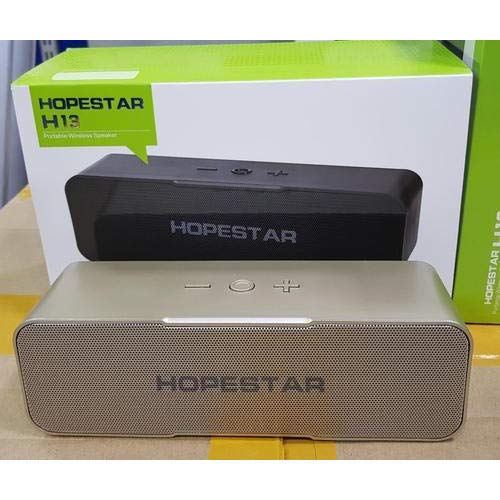
An image showing the HOPESTAR H13 portable wireless speaker in gold color, alongside its packaging box. The speaker features a mesh grille and control buttons on top, including power, volume down, and volume up.
Ovládací tlačítka:
- Vypínač: Press and hold to turn the speaker ON/OFF. Press once to Play/Pause music or Answer/End calls.
- Snížit hlasitost (-): Stisknutím snížíte hlasitost.
- Zvýšení hlasitosti (+): Stisknutím zvýšíte hlasitost.
4. Nastavení
Počáteční nabíjení:
Before first use, it is recommended to fully charge the HOPESTAR H13 speaker. Connect the provided charging cable to the speaker's charging port and a compatible USB power adapter (not included). The charging indicator light will illuminate during charging and turn off once the battery is full.
Zapnutí/vypnutí:
- Otočit ON: Press and hold the Power Button until you hear an audible prompt.
- Otočit VYPNUTO: Press and hold the Power Button again until you hear an audible prompt.
5. Návod k obsluze
Bluetooth párování:
- Ensure the HOPESTAR H13 speaker is powered on and in pairing mode (indicated by a flashing LED light, if present).
- Activate Bluetooth on your source device (e.g., smartphone, tablet, computer).
- Hledat 'HOPESTAR H13' in the list of available Bluetooth devices.
- Select 'HOPESTAR H13' to initiate the pairing process.
- A confirmation sound will indicate successful pairing. The LED light will typically become solid.
Once paired, the speaker will automatically connect to the last paired device when powered on, if the device's Bluetooth is active and within range.
Přehrávání hudby:
- Přehrát/pozastavit: Stiskněte jednou tlačítko napájení.
- Nastavení hlasitosti: Use the Volume Down (-) and Volume Up (+) buttons on the speaker, or control volume directly from your connected device.
Vyřizování hovorů:
- Přijmout/ukončit hovor: Press the Power Button once when a call comes in or to end an ongoing call.
6. Nabíjení
The HOPESTAR H13 speaker is powered by a built-in Lithium Ion battery. To charge the speaker:
- Connect the small end of the charging cable to the speaker's charging port.
- Connect the USB end of the charging cable to a USB power source (e.g., computer USB port, USB wall adapter).
- Kontrolka nabíjení bude ukazovat stav nabíjení.
- Po úplném nabití odpojte nabíjecí kabel.
7. Údržba
- Clean the speaker with a soft, dry cloth. Do not use liquid cleaners, abrasive materials, or solvents.
- Neponořujte reproduktor do vody, protože není vodotěsný.
- Reproduktor skladujte na chladném a suchém místě mimo dosah přímého slunečního záření a extrémních teplot.
- Vyvarujte se pádu reproduktoru nebo jej nevystavujte silným nárazům.
8. Řešení problémů
| Problém | Možná příčina | Řešení |
|---|---|---|
| Reproduktor se nezapne | Baterie je vybitá | Reproduktor plně nabijte pomocí dodaného kabelu. |
| Žádný zvuk z reproduktoru | Volume too low; Not paired; Device not playing | Increase volume on both speaker and source device. Ensure speaker is paired correctly. Check if music is playing on the source device. |
| Připojení Bluetooth je nestabilní nebo se odpojuje | Too far from source device; Interference | Move the source device closer to the speaker (within 10 meters). Avoid obstacles between devices. Re-pair the speaker with your device. |
| Nelze spárovat se zařízením | Speaker not in pairing mode; Bluetooth off on device | Ensure speaker is powered on and in pairing mode. Turn on Bluetooth on your source device and search again. |
9. Specifikace
- Značka: HOPESTAR
- Model: H13
- Technologie připojení: Bluetooth
- Zdroj napájení: Napájení baterií (1 lithium-iontová baterie je součástí balení)
- Způsob ovládání: Dotek
- Hmotnost položky: 500 g
- Vodotěsný: Žádný
- Zahrnuté komponenty: Reproduktor, nabíjecí kabel, uživatelská příručka
10. Záruka a podpora
The HOPESTAR H13 Bluetooth Speaker comes with a Záruka 6 měsíců od data nákupu. Tato záruka se vztahuje na výrobní vady vzniklé při běžném používání.
For technical support, warranty claims, or further assistance, please contact your original retailer or visit the official HOPESTAR webstránky pro kontaktní informace.