
Zavedení
This instruction manual provides essential information for the setup, operation, and maintenance of your Superior Electronics Universal Remote Control, model SUPTRB016. This remote is designed as a direct replacement for Telefunken televisions, including Smart TV models, and requires no programming for immediate use. Its ergonomic design and durable construction ensure comfortable and reliable control of your TV.
Nastavení
1. Vložení baterií
The remote control requires two (2) AAA batteries (not included). Follow these steps to insert them:
- Najděte kryt prostoru pro baterie na zadní straně dálkového ovladače.
- Posuňte kryt dolů nebo stiskněte západku pro jeho otevření.
- Vložte dvě baterie typu AAA a ujistěte se, že kladný (+) a záporný (-) pól správně shodují s označením uvnitř přihrádky.
- Nasaďte zpět kryt přihrádky na baterie a zasuňte jej zpět na místo, dokud bezpečně nezacvakne.

Figure 1: Inserting AAA batteries into the remote control.
2. První použití
Once batteries are inserted, the remote control is ready for immediate use. No additional programming or code entry is required. Simply point the remote at your Telefunken TV and begin operating it.
Návod k obsluze
The Superior Electronics SUPTRB016 remote control replicates the functions of your original Telefunken TV remote. Ensure a clear line of sight between the remote control and your TV's infrared receiver for optimal performance.

Figure 2: Remote control layout with streaming service buttons.
Klíčové funkce:
- Vypínač: Zapíná nebo vypíná televizor.
- Číselná tlačítka (0-9): Pro přímý výběr kanálu.
- Zvýšení/Snížení hlasitosti: Nastavuje hlasitost TV.
- Kanál nahoru/dolů: Mění televizní kanály.
- Tlačítko ztlumení: Ztlumí nebo zruší ztlumení zvuku televizoru.
- Navigační tlačítko (OK, nahoru, dolů, vlevo, vpravo): Používá se pro navigaci v menu a výběr.
- Zpět/Výstup: Návrat na předchozí obrazovku nebo opuštění nabídky.
- Tlačítka chytré televize: Dedicated buttons provide quick access to popular streaming applications such as Netflix, YouTube, and Prime Video (functionality depends on your TV model and internet connection).
- Zdroj/vstup: Vybere vstupní zdroj (HDMI, AV atd.).
- Nabídka/Informace: Accesses TV menus and displays information.
The remote operates effectively within a maximum range of 10 meters, provided there are no obstructions between the remote and the TV's infrared sensor.
Údržba
Pro zajištění dlouhé životnosti a optimálního výkonu vašeho dálkového ovladače dodržujte tyto jednoduché pokyny pro údržbu:
- Čištění: Wipe the remote control with a soft, dry cloth. Avoid using liquid cleaners or abrasive materials, as these can damage the surface or internal components.
- Výměna baterie: Vyměňte baterie, když dálkový ovladač reaguje pomalu nebo přestane fungovat. Vždy vyměňujte obě baterie současně za nové baterie AAA. Nekombinujte staré a nové baterie ani různé typy baterií.
- Skladování: Dálkový ovladač skladujte na chladném a suchém místě mimo dosah přímého slunečního záření a extrémních teplot.
- Vyhněte se kapkám: While constructed with durable materials, excessive drops or impacts can cause damage.
Odstraňování problémů
Pokud máte problémy s dálkovým ovladačem, podívejte se na následující běžná řešení:
| Problém | Možná příčina | Řešení |
|---|---|---|
| Dálkové ovládání vůbec nefunguje. | Vybité nebo nesprávně vložené baterie. | Check battery orientation. Replace with fresh AAA batteries. |
| Dálkové ovládání funguje přerušovaně. | Weak batteries, obstruction, or remote too far from TV. | Replace batteries. Ensure clear line of sight to TV. Move closer to the TV (within 10 meters). |
| Konkrétní tlačítka nereagují. | Porucha tlačítka nebo televizor nepodporuje funkci. | Ensure your TV model supports the specific function (e.g., Smart TV apps). If other buttons work, the specific button might be faulty. |
| TV does not respond to remote. | TV's IR sensor blocked or TV is not a Telefunken model. | Clear any obstructions in front of the TV's IR sensor. Verify that your TV is a Telefunken brand. |
Specifikace
- Model: SUPTRB016
- Značka: Špičková elektronika
- Rozměry: 5 x 1.5 x 19 cm
- Hmotnost: 90 gramů
- Potřebné baterie: 2x AAA (1.5V)
- Baterie v ceně: Žádný
- Technologie připojení: Infračervený
- Maximální rozsah: 10 metrů
- Kompatibilní zařízení: Telefunken Televisions (LED, LCD, OLED, Smart TV models)
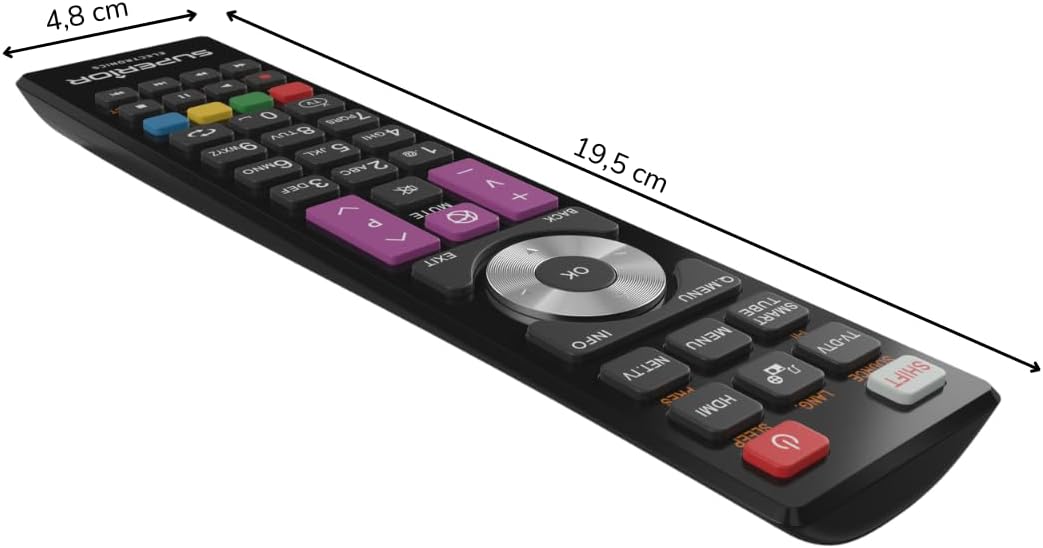
Obrázek 3: Rozměry dálkového ovladače.
Záruka a podpora
For warranty information, please refer to the terms and conditions provided by your retailer at the time of purchase or contact Superior Electronics directly. For additional support or inquiries, you may visit the official Superior Electronics store on Amazon: