
Zavedení
This manual provides instructions for the Easytry123 replacement remote control, designed for use with various Sony DVD Home Theater Systems. This remote offers essential functions for controlling your compatible Sony device.
Důležitá poznámka: This is a replacement remote. While it provides core functionality, some advanced or specific features of your original remote may not be fully supported. Please ensure your Sony system model is listed as compatible before use.
Obsah balení
- 1 x Easytry123 Replacement Remote Control
Poznámka: Batteries are not included. This remote requires 2 AA batteries.
Nastavení
1. Instalace baterie
Instalace baterií:
- Najděte přihrádku na baterie na zadní straně dálkového ovladače.
- Stiskněte západku a vysuňte kryt baterie.
- Vložte dvě (2) baterie typu AA a ujistěte se, že kladný (+) a záporný (-) pól správně odpovídají označením uvnitř přihrádky.
- Zasuňte kryt baterie zpět na místo, dokud bezpečně nezapadne.

Image: The back of the remote control with the battery cover removed, revealing the battery slots. This illustrates where to insert the two AA batteries.
2. První použití
This remote control operates using infrared (IR) technology and typically does not require programming for compatible Sony models. Once batteries are installed, point the remote directly at your Sony Home Theater System and begin operation.
Návod k obsluze
The Easytry123 replacement remote control features a standard layout for intuitive operation of your Sony Home Theater System. Below is an overview klíčových tlačítek a jejich funkcí.
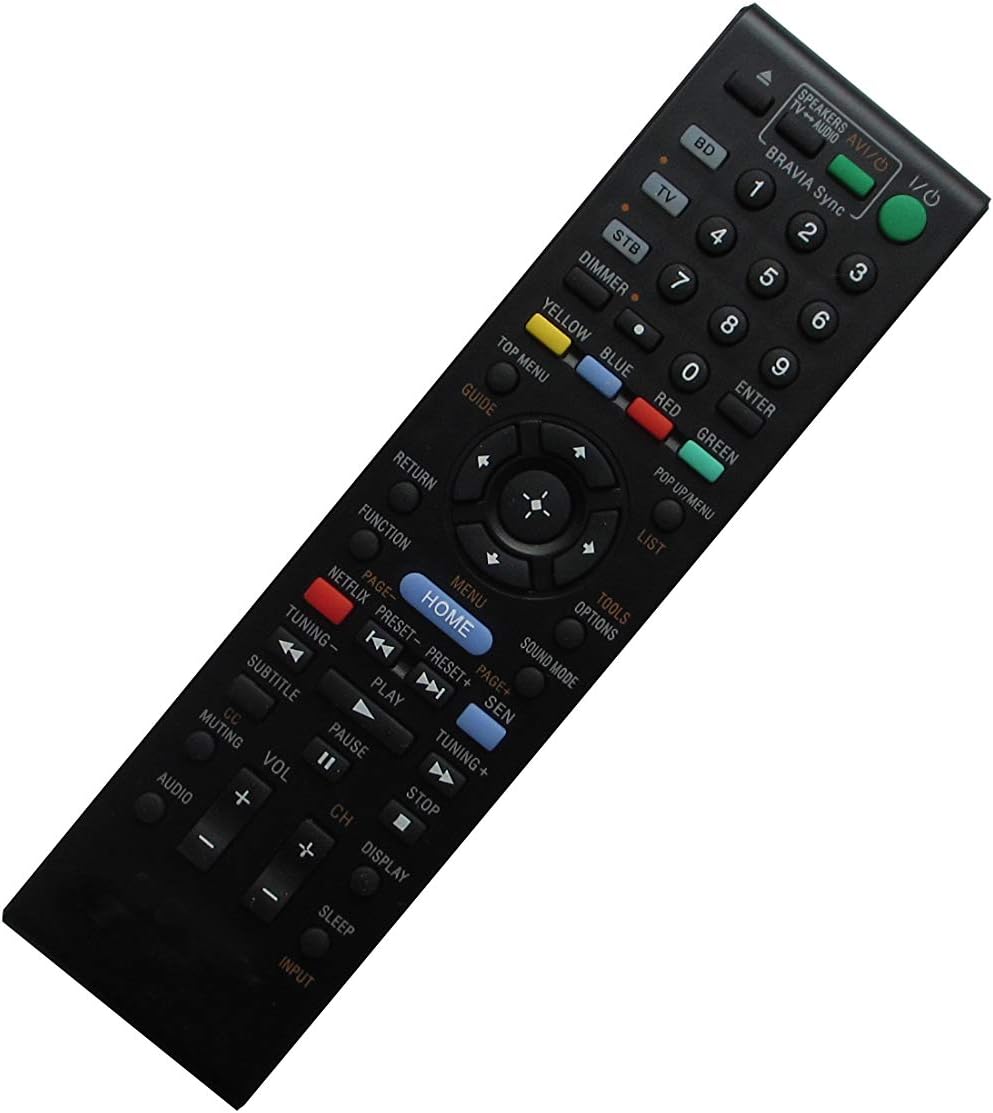
Image: The front face of the remote control, displaying all buttons including power, input selection, number pad, navigation, volume, channel, and playback controls.
Funkce tlačítka Overview:
- Napájení (vstupy/výstupy): Zapíná nebo vypíná systém.
- Input Selectors (BD, TV, STB): Přepíná mezi různými vstupními zdroji.
- Numerická klávesnice (0-9): Pro přímý výběr kanálu nebo zadávání čísel.
- Hlasitost (+/-): Upravuje úroveň hlasitosti zvuku.
- Kanál (+/-): Changes TV channels or navigates through lists.
- Ztlumení: Ztlumí nebo zapne zvuk.
- Domov: Accesses the main menu or home screen of your system.
- Menu: Opens the system's menu.
- Navigační tlačítka (nahoru, dolů, vlevo, vpravo, Enter): Používá se k navigaci v nabídkách a potvrzování výběrů.
- Návrat: Návrat na předchozí obrazovku nebo do nabídky.
- Ovládání přehrávání (Přehrát, Pozastavit, Zastavit, Rychle vpřed, Přetočit zpět, Přeskočit): Ovládá přehrávání médií.
- Subtitle (CC): Toggles subtitles or closed captions.
- Zvuk: Vybírá zvukové stopy nebo režimy.
- Spát: Sets a sleep timer for the system.
- Zobrazit: Zobrazuje informace na obrazovce.
- Barevná tlačítka (červená, zelená, žlutá, modrá): Functionality varies depending on the specific menu or application.
Údržba
Čištění dálkového ovladače
K čištění dálkového ovladače použijte měkký, suchý hadřík. V případě odolných nečistot jej lehce setřete.ampOtřete hadřík vodou nebo jemným neabrazivním čisticím prostředkem. Nepoužívejte agresivní chemikálie nebo abrazivní materiály, protože by mohly poškodit povrch dálkového ovladače nebo jeho vnitřní součásti.
Výměna baterie
Replace batteries when the remote's responsiveness decreases or it stops functioning. Always replace both batteries at the same time with new AA batteries. Do not mix old and new batteries, or different types of batteries.
Skladování
When not in use for extended periods, remove the batteries to prevent leakage, which can damage the remote control.
Odstraňování problémů
- Dálkové ovládání nereaguje:
- Zkontrolujte, zda jsou baterie vloženy správně se správnou polaritou.
- Vyměňte staré baterie za nové.
- Ensure there are no obstructions between the remote and the Sony Home Theater System's IR receiver.
- Confirm that the remote is pointed directly at the system.
- Omezená funkčnost:
- As a replacement remote, some advanced features of your original Sony remote may not be supported. Refer to your Sony system's original manual for specific functions.
- Ensure your Sony model is listed as compatible with this replacement remote.
Specifikace
- Značka: Easytry123
- Kompatibilní zařízení: Sony DVD Home Theater Systems (e.g., 148944011, RM-ADP060, HBD-L800, BDV-N890, RM-ADP092, BDV-N7100, BDV-N7100W, BDV-N8100, RM-ADP077)
- Technologie připojení: Infračervený (IR)
- Typ ovladače: Ovládání tlačítkem
- Speciální funkce: Ergonomický design
- Potřebné baterie: 2 x AA (nejsou součástí balení)
Záruka a podpora
For product support or inquiries, please contact the seller, Easytry123, through the platform where the purchase was made. Information regarding specific warranty terms may be available from the seller at the time of purchase.