
Zavedení
The MUSKY DY28 is a versatile device combining a Bluetooth speaker, smart touch lamp, alarm clock, and MP3 player into a single unit. This manual provides instructions for its setup, operation, and maintenance to ensure optimal performance.
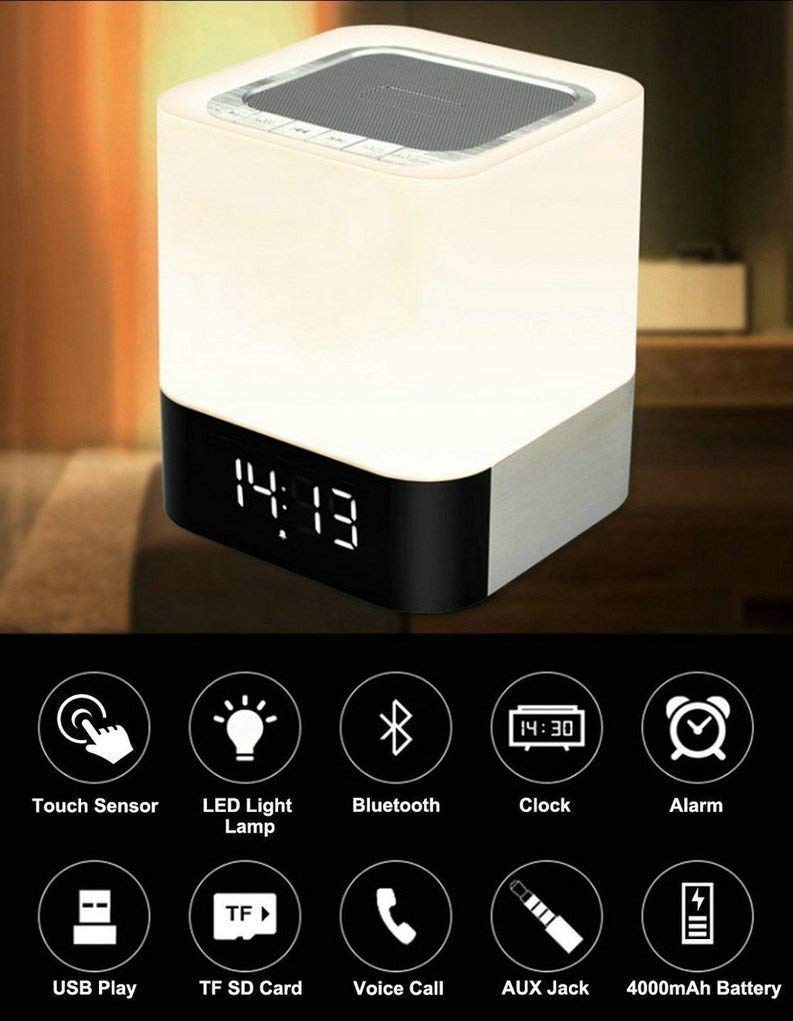
Image: The MUSKY DY28 device, showcasing its integrated clock display and touch-sensitive light panel.
Obsah krabice
- MUSKY DY28 Bluetooth Speaker
- Uživatelská příručka
- Nabíjecí kabel
Vlastnosti produktu
- Multifunkční: Bluetooth speaker, smart touch lamp, alarm clock, and MP3 player.
- Bluetooth 4.0: Easy and stable connection with Bluetooth-enabled devices.
- Nastavitelné LED světlo: Warm LED light with adjustable brightness (Max 20 Lumen) via touch sensor.
- Digital Clock & Alarm: Big digit 12/24H alarm clock with calendar, alarm, and sleep mode functions.
- Více režimů přehrávání: Supports MP3 playback via USB, micro TF/SD Card, and 3.5mm AUX input.
- Kvalita zvuku: 5W single acoustic driver with enhanced passive low-frequency radiator for clear sound and solid bass.
- Dlouhá výdrž baterie: Built-in 4000mAh battery provides up to 15 hours of lighting or 9 hours of music playback (depending on usage).
- Hands-free volání: Integrated microphone for answering calls.
Nastavení
1. Nabíjení zařízení
Before first use, fully charge the speaker. Connect the provided USB charging cable to the charging port on the device and to a standard USB power adapter (not included) or a computer's USB port. The charging indicator will show the charging status.
2. Zapnutí/vypnutí
Locate the Power On/Off switch on the device. Slide the switch to the 'ON' position to power on the speaker. Slide it to 'OFF' to power off.
3. Párování Bluetooth
- Ensure the speaker is powered on and in Bluetooth mode (indicated by a flashing blue light or voice prompt).
- Na svém mobilním zařízení povolte Bluetooth a vyhledejte dostupná zařízení.
- Select 'MUSKY DY28' from the list of devices.
- Once paired, the speaker will indicate a successful connection (e.g., solid blue light or voice prompt).
4. Nastavení času a budíku
Refer to the detailed control diagram for button locations. Use the 'Mode' button to cycle through functions until the clock setting is displayed. Use the 'Previous' and 'Next' buttons to adjust hours and minutes, and the 'Play/Pause' button to confirm. For alarm settings, follow a similar procedure, activating the alarm function and setting the desired time.

Obrázek: Podrobný view of the MUSKY DY28's control panel, highlighting buttons for power, charging, audio inputs, playback, volume, and the touch sensor.
Návod k obsluze
1. Přehrávání hudby
The DY28 supports multiple music sources:
- Režim Bluetooth: After successful pairing, play music from your connected device. Use the speaker's 'Play/Pause', 'Previous', and 'Next' buttons to control playback.
- Vstup USB: Vložte USB flash disk obsahující MP3 filedo portu USB. Reproduktor se automaticky přepne do režimu USB a spustí přehrávání.
- Micro TF/SD Card: Insert a micro TF/SD card with MP3 files into the Micro SD Slot. The speaker will automatically switch to TF/SD card mode and play music.
- Vstup AUX: Connect an external audio device using a 3.5mm AUX cable to the AUX port. The speaker will switch to AUX mode. Control playback from your external device.

Image: Visual guide demonstrating the three primary ways to play music on the DY28: via Bluetooth, Micro SD card, and USB drive.
2. Light Operation
The top panel of the speaker features a touch sensor for controlling the LED light. Tap the touch sensor to turn the light on/off and cycle through different brightness levels. The light offers a warm glow suitable for various environments.

Image: The MUSKY DY28 speaker illuminated, serving as a night light with its digital clock display visible in a low-light environment.
3. Alarm Clock Functions
Once the alarm is set, it will sound at the designated time. To snooze, tap the touch sensor. To turn off the alarm, press the 'Mode' button or power off the device. The sleep mode feature allows the lamp and speaker to automatically turn off after a set period.
4. Volání s volnýma rukama
When a call comes in while connected via Bluetooth, the speaker will ring. Press the 'Play/Pause' button to answer the call. Press it again to end the call. The integrated microphone allows for hands-free conversation.
Specifikace
| Funkce | Detail |
|---|---|
| Značka | PIŽMOVÝ |
| Číslo modelu | DY28 |
| Technologie připojení | Pomocný, Bluetooth, USB |
| Typ bezdrátové technologie | Bluetooth |
| Typ montáže | Stolní držák |
| Typ reproduktoru | Regál |
| Vlastnosti produktu | Light for emergency use |
| Typ ovladače | Touchpad |
| Kontrolní metoda | Dotek |
| Barva | Bílý |
| Kapacita baterie | 4000 mAh (vestavěný) |
| Battery Life (Lighting) | Až 15 hodin |
| Výdrž baterie (přehrávání hudby) | Až 9 hodin |
| Doba nabíjení | 2-4 hodin |
| Dosah Bluetooth | 33 stop / 10 metrů |
| Zdroj napájení | Napájení z baterie |
| Počet zvukových kanálů | 5 wattů |
| Je voděodolný | VĚRNÝ |
| Hmotnost položky | 700 gramů |
| Kompatibilní zařízení | MP3 přehrávač, chytrý telefon, tablet |
Odstraňování problémů
- Bez napájení: Ujistěte se, že je zařízení plně nabité. Zkontrolujte, zda je vypínač v poloze „ON“.
- Nelze spárovat Bluetooth: Make sure the speaker is in Bluetooth pairing mode. Ensure your device's Bluetooth is enabled and within range (10 meters). Try restarting both devices.
- Žádný zvuk: Check the volume level on both the speaker and your connected device. Ensure the correct input mode (Bluetooth, USB, TF/SD, AUX) is selected.
- Světlo nefunguje: Tap the touch sensor on the top of the speaker. Ensure the device has sufficient battery charge.
- Alarm nezní: Verify the alarm time is set correctly and the alarm function is activated.
Údržba
- Zařízení čistěte měkkým, suchým hadříkem. Nepoužívejte abrazivní čisticí prostředky ani rozpouštědla.
- Nevystavujte reproduktor extrémním teplotám, přímému slunečnímu záření nebo vysoké vlhkosti.
- Pokud zařízení delší dobu nepoužíváte, skladujte jej na chladném a suchém místě.
- Nepokoušejte se zařízení rozebírat ani opravovat sami, jinak ztratíte záruku.
Oficiální video produktu
Video: Official product video demonstrating the key features and functions of the MUSKY DY28 Bluetooth Speaker, Smart Touch Lamp, and Alarm Clock.
Záruka a podpora
Informace o záruce a zákaznické podpoře naleznete v dokumentaci dodané s vaším nákupem nebo se obraťte přímo na výrobce. Uschovejte si doklad o koupi pro případné reklamace.