
Zavedení
Thank you for choosing the EZQuest USB C Hub Docking Station 8-in-1. This manual provides detailed instructions for setting up, operating, and maintaining your device. Please read this manual thoroughly before use to ensure optimal performance and longevity of your product.
Konec produktuview
The EZQuest USB C Hub Docking Station 8-in-1 is designed to expand the connectivity of your USB-C enabled devices, offering a comprehensive solution for various peripherals and display needs. It features multiple ports for data transfer, video output, network connection, and power delivery.
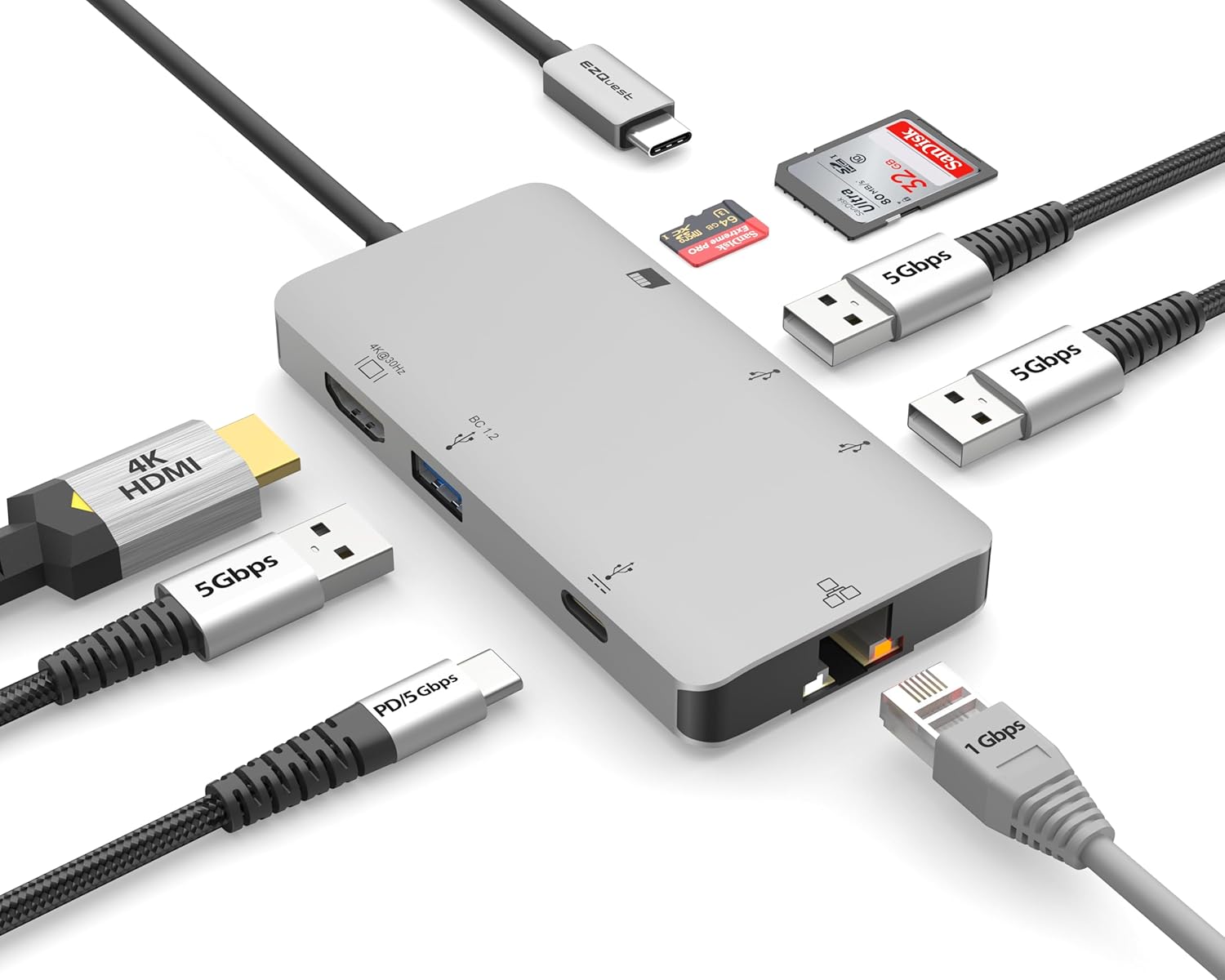
Image: The EZQuest USB C Hub Docking Station 8-in-1, showcasindíky kompaktnímu designu a integrovanému kabelu USB-C.

Image: A diagram illustrating the 8-in-1 expansion capabilities of the hub, including HDMI, USB-C PD, USB 3.0, Ethernet, and card readers.
Pokyny pro nastavení
- Připojení k hostitelskému zařízení: Plug the integrated USB-C cable of the EZQuest hub into an available USB-C/Thunderbolt 3/4 port on your laptop, tablet, or smartphone.
- Napájení (volitelné): For charging your host device, connect your USB-C power adapter to the USB-C Power Delivery port on the hub. The hub supports up to 100W input with 85W pass-through charging.
- HDMI displej: Connect an HDMI cable from your monitor to the HDMI port on the hub for 4K 30Hz video output.
- Ethernetové připojení: For a stable wired network, connect an Ethernet cable to the Gigabit Ethernet port on the hub.
- USB periferie: Connect your USB-A devices (e.g., mouse, keyboard, external hard drive) to the three USB-A 3.0 ports.
- SD/Micro SD Cards: Insert your SD or Micro SD cards into the respective slots for data transfer.

Image: A user connecting the EZQuest USB C Hub to a laptop's USB-C port.

Image: Illustrates connecting a power adapter to the hub for pass-through charging of a laptop.
Návod k obsluze
Výstup displeje (HDMI)
The HDMI port supports 4K resolution at 30Hz. Connect an HDMI-enabled display to extend or mirror your desktop for enhanced productivity or multimedia viewing. Ensure your display and device support 4K 30Hz for optimal performance. Note that the USB-C ports on the hub are for data and power delivery, not for connecting a monitor.
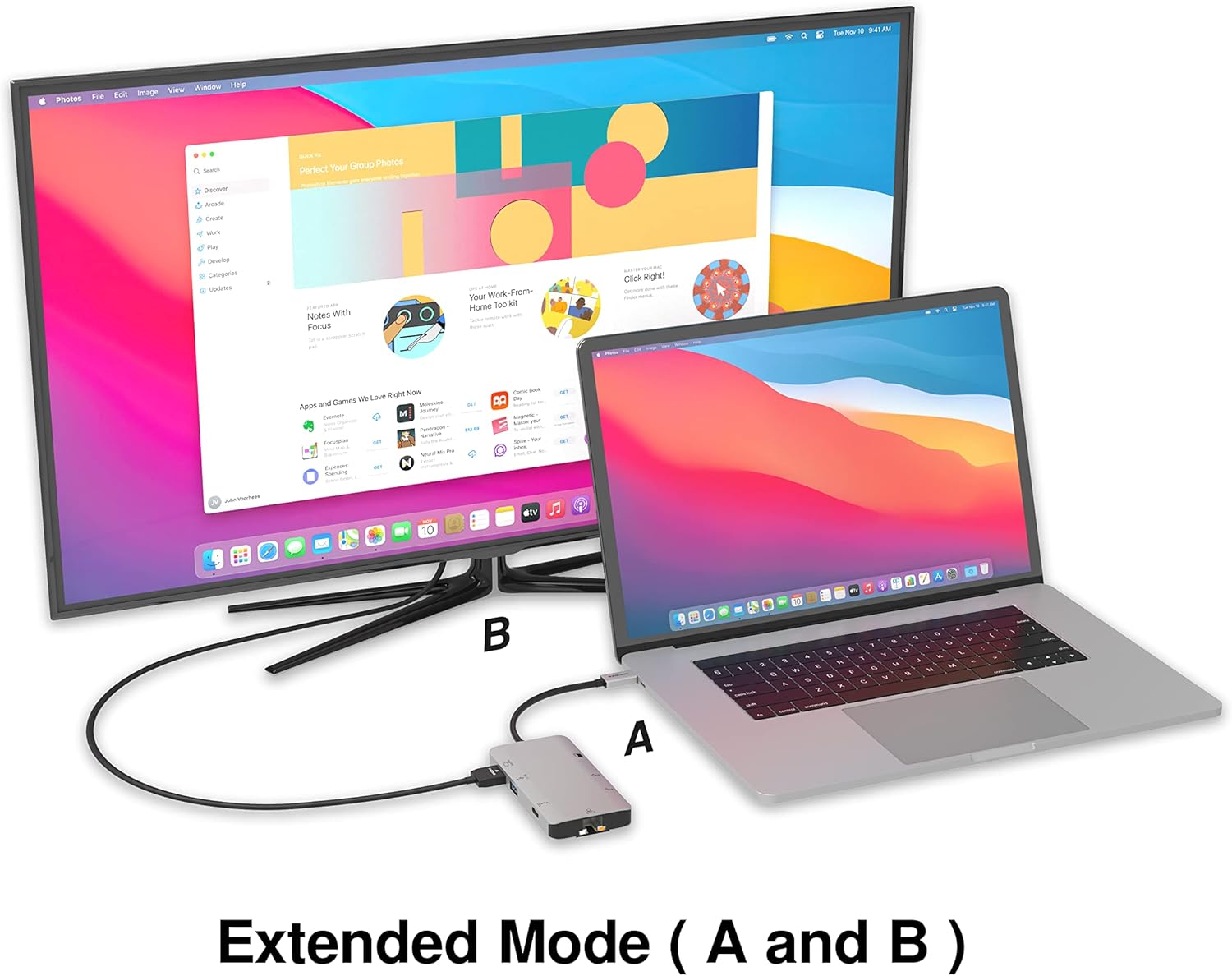
Image: A laptop connected to an external monitor via the hub, demonstrating extended display mode.
Data Transfer (USB-A & SD/Micro SD)
The three USB-A 3.0 ports offer data transfer speeds up to 5Gbps. The SD and Micro SD card slots allow for simultaneous read and write operations, facilitating quick file přenosy z paměťových karet.

Image: Various devices like USB drives, SD cards, and an Ethernet cable connected to the EZQuest hub.
Network Connection (Gigabit Ethernet)
The Gigabit Ethernet port provides a stable and high-speed wired internet connection, ideal for large downloads, uploads, or streaming where Wi-Fi might be unreliable. An LED indicator confirms network activity.
Distribuce energie
The USB-A ports distribute power efficiently. One USB-A port with BC1.2 outputs 5V/1.5A (7.5W), while the other two USB-A ports deliver 5V/0.9A (4.5W) each. The total shared power when all ports are in use is 10 watts.

Image: A diagram detailing the power output and data transfer speeds of the USB-A ports on the hub.
Funkce a porty
| Typ portu | Množství | Funkčnost |
|---|---|---|
| HDMI | 1 | 4K @ 30Hz Video Output (Extended/Mirror Mode) |
| USB-C Power Delivery/Data | 1 | Up to 100W Power Input (85W Pass-Through), 5Gbps Data Transfer |
| USB-A 3.0 | 3 | 5Gbps Data Transfer (One port BC1.2 5V/1.5A, two ports 5V/0.9A) |
| Gigabit Ethernet | 1 | 10/100/1000 Mbps Wired Network Connection with LED Indicator |
| Čtečka SD karet | 1 | SDHC/SDXC Read/Write |
| Čtečka karet Micro SD | 1 | Micro SDHC/SDXC Read/Write |
Kompatibilita
This USB C Hub is compatible with a wide range of devices:
- Computers featuring USB-C, USB 4, Thunderbolt 4, or Thunderbolt 3 ports.
- USB-C smartphones and tablets equipped with OTG (On-The-Go) support.
Unsupported Device:
- The USB-A ports on this docking station do not support Apple SuperDrive. For connecting an Apple SuperDrive, an alternative adapter (e.g., EZQuest X40100 USB-C to USB-A Female Mini Adapter) directly to your Mac is recommended.
Odstraňování problémů
- Žádný výstup na displej:
- Ujistěte se, že port USB-C vašeho hostitelského zařízení podporuje video výstup (alternativní režim DisplayPort).
- Zkontrolujte všechna kabelová připojení (USB-C z rozbočovače k zařízení, HDMI z rozbočovače k monitoru).
- Verify your monitor input source is set correctly to HDMI.
- Zkuste jiný kabel HDMI nebo monitor, pokud je k dispozici.
- Problémy s nabíjením:
- Ensure your USB-C power adapter is connected to the hub's USB-C PD port.
- Ověřte, zda váš napájecí adaptér poskytuje dostatečný výkontage (up to 100W recommended for laptops).
- Check if the host device's USB-C port supports Power Delivery.
- Pomalý přenos dat:
- Pro optimální rychlost se ujistěte, že používáte zařízení a kabely kompatibilní s USB 3.0.
- The total shared power for USB-A ports is 10W; excessive power draw from multiple devices may affect performance.
- Ethernet nefunguje:
- Zkontrolujte připojení ethernetového kabelu k rozbočovači i k routeru/modemu.
- Ověřte síťová nastavení na hostitelském zařízení.
- Ensure the LED indicator on the Ethernet port is active.
- SD/Micro SD Card Not Recognized:
- Ujistěte se, že je karta zcela zasunuta do správného slotu.
- Try reinserting the card or using a different card.
- Check if the card is damaged or corrupted.
Specifikace
| Funkce | Detail |
|---|---|
| Číslo modelu | X40030 |
| Rozměry produktu | 0.81 x 1.63 x 0.2 palce |
| Hmotnost položky | 1.6 unce |
| Hardwarové rozhraní | USB typ C |
| HDMI výstup | 4K @ 30Hz |
| Vstup USB-C PD | Až 100W |
| USB-C PD výstup | Až 85W |
| USB-A 3.0 Data Speed | 5 Gbps |
| Rychlost Ethernetu | 1 Gigabit (10/100/1000 Mbps) |
| Podpora čteček karet | SDHC, SDXC, Micro SDHC, Micro SDXC |
| Materiál | Anodized Aluminum Housing |
Údržba
- Čištění: K čištění náboje používejte měkký, suchý hadřík. Nepoužívejte tekuté čisticí prostředky ani aerosoly.
- Skladování: Skladujte rozbočovač na chladném a suchém místě mimo dosah přímého slunečního záření a extrémních teplot.
- Zacházení: Zabraňte pádu zařízení nebo jeho vystavování silným nárazům. Nepokoušejte se rozebírat rozbočovač.
Záruka a podpora
The EZQuest USB C Hub Docking Station 8-in-1 comes with a 1letá záruka bez starostí. This warranty covers manufacturing defects and ensures peace of mind regarding your investment.
For technical support, warranty claims, or any product-related inquiries, please visit the official EZQuest website or contact their customer service team through the contact information provided with your product packaging.


